The best adjustable monitor arms make it easier to position your screen at a comfortable height, viewing angle, and distance while freeing valuable desk space. This roundup compares 10 single-, dual-, and stacked-monitor mounts for home offices, gaming setups, and everyday productivity.
Before buying, check your monitor’s size, weight, VESA pattern, and your desk’s mounting requirements. The right arm should also provide enough range of motion for your preferred sitting position and workflow.
Best 10 Adjustable Monitor Arms Picks for 2026
Best Ultrawide-Friendly Pick

- Supports screens up to 38 inches
- 16 inches of height adjustment
- C-clamp and grommet bases included
Best For: Ultrawide monitor owners needing flexible positioning
Best Stacked Dual-Display Option

- Holds two monitors vertically
- Raises screens up to 25.19 inches
- Supports clamp and grommet installation
Best For: Stacked dual-monitor workstations
Best Heavy-Capacity Single Arm

- Supports flat screens up to 26.4 pounds
- Extends 19.3 inches from the desk
- Includes a 10-year warranty
Best For: Single-monitor setups needing extra reach
Best Mechanical-Spring Design

- Mechanical spring construction
- Fits monitors up to 32 inches
- Includes clamp and grommet mounts
Best For: Compact home-office and gaming setups
Best Dual-Arm Stability
HUANUO HNDS6 White Dual Monitor Stand

- Fits 13- to 32-inch monitors weighing 4.4 to 19.8 pounds each
- Supports tilt, swivel, rotation, and height adjustment
- Includes C-clamp and grommet mounting options
Best For: Dual-monitor workspaces needing flexible installation
Best Mechanical Adjustability
VIVO STAND-V002O Dual Monitor Stand
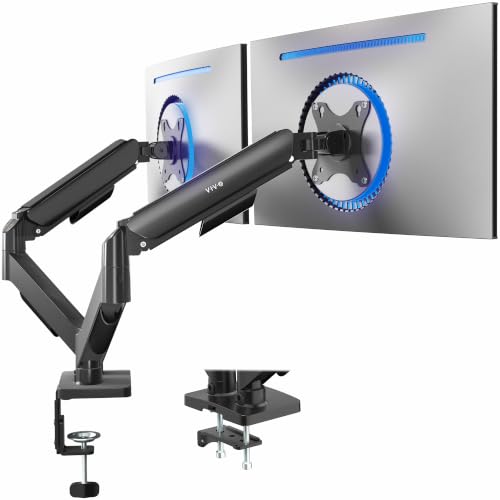
- Fits 17- to 32-inch flat or curved monitors
- Offers wide tilt, swivel, and rotation adjustment
- Includes C-clamp and optional grommet mounting
Best For: Office and gaming desks needing broad screen positioning
Best Single-Monitor Ergonomics
HUANUO FlowLift Single Monitor Arm

- Supports compatible screens weighing 4.4 to 19.8 pounds
- Provides tilt, swivel, rotation, and height adjustment
- Includes C-clamp and grommet mounting options
Best For: Single-monitor desks prioritizing easy ergonomic positioning
Best Dual-Monitor Flexibility

- Fits most 13–32-inch monitors with common VESA patterns
- Independent adjustment with extensive tilt, swivel, and rotation
- Tool-free VESA mounting plus cable management
Best For: Two-screen workstations needing flexible positioning
Best Value Single-Monitor Mount

- Fits most 13–30-inch monitors up to 22 pounds
- Rotates 360 degrees for landscape or portrait use
- Includes height, tilt, cable-management, and detachable VESA features
Best For: Single-monitor office setups on a budget
Best Precision Adjustment
HUANUO FlowLift Pro Monitor Arm

- Supports compatible 13–32-inch monitors with common VESA patterns
- Visible tension window helps calibrate support accurately
- Tool-free snap-in VESA plate and LockSteady positioning system
Best For: Frequently repositioned single-monitor workstations
Best Ultrawide-Friendly Pick – VIVO Single Monitor Arm
For shoppers comparing adjustable monitor arms, the VIVO STAND-V001 is a versatile single-monitor option for regular screens up to 32 inches and ultrawide displays up to 38 inches. Its broad positioning range, cable clips, and included C-clamp and grommet bases make it practical for flexible desk setups.
Best For: Users who want one arm with ultrawide compatibility and portrait-orientation flexibility.
Pros:
- Supports monitors up to 22 pounds, including ultrawides up to 38 inches.
- Offers tilt, swivel, rotation, and up to 16 inches of height adjustment.
- Includes C-clamp and grommet mounting options plus cable management.
Cons:
- Requires a compatible 75x75mm or 100x100mm VESA pattern.
- Its 22-pound capacity may not suit heavier displays.
The VIVO stands out when screen size flexibility matters, especially for ultrawide owners. Verify the monitor’s VESA pattern, weight, and desk thickness before buying.
Best Stacked Dual-Display Option – HUANUO Dual Monitor Stand
Among adjustable monitor arms, the HUANUO stacked mount is designed for two screens arranged vertically. Its added extension raises monitors up to 25.19 inches, while tilt, swivel, and rotation controls help accommodate work, gaming, and multitasking setups.
Best For: Users who want a space-saving stacked arrangement for two compatible monitors.
Pros:
- Supports two monitors up to 32 inches each and 19.8 pounds each.
- Provides up to 25.19 inches of monitor height with the 17-inch extension.
- Includes cable management, C-clamp mounting, and grommet mounting.
Cons:
- Only supports monitors weighing between 4.4 and 19.8 pounds.
- Not designed for glass desks.
- Each monitor must use a 75x75mm or 100x100mm VESA pattern.
This HUANUO mount is a focused choice for vertical dual-screen users who have compatible displays and a sturdy wood or metal desk. Check both monitor weights and the available desk space before installation.
Best Heavy-Capacity Single Arm – WALI Adjustable Monitor Arm
The WALI GSMP001N is one of the more capable single-screen adjustable monitor arms for users who need substantial reach and positioning control. It supports flat screens up to 26.4 pounds and curved screens up to 19.8 pounds, with a long extension and full-motion adjustment.
Best For: Users who want a long-reach single arm for a flat or curved monitor.
Pros:
- Supports flat screens up to 34 inches and 26.4 pounds.
- Extends up to 19.3 inches and raises up to 17.3 inches.
- Features 360-degree rotation, tilt, swivel, and built-in cable management.
Cons:
- Curved monitors have a lower 19.8-pound capacity.
- Recommended for wooden desks, preferably without an underside crossbeam.
- Requires a 75x75mm or 100x100mm VESA pattern.
With its generous reach and 10-year warranty, WALI is a strong fit for a flexible single-monitor workstation. Confirm the display type, weight, VESA pattern, and desk construction before purchasing.
Best Mechanical-Spring Design – NB SmooVex Monitor Arm
The NB SmooVex is an adjustable monitor arm for screens up to 32 inches that uses a mechanical spring rather than a traditional gas spring. It combines a slimmer profile with clamp and grommet installation, making it a practical option for home offices, study areas, and gaming desks.
Best For: Users who prefer a mechanical-spring arm with straightforward installation and stable positioning.
Pros:
- Supports most flat and curved monitors up to 32 inches.
- Mechanical spring design avoids gas leakage concerns noted for gas-spring arms.
- Offers 230mm of height travel, tilt, swivel, and 90-degree rotation.
Cons:
- Does not specify a maximum monitor weight in the supplied details.
- Limited to monitors with 75x75mm or 100x100mm VESA mounting holes.
- Its two-year warranty is shorter than some competing options listed here.
The SmooVex is appealing if long-term mechanical-spring use and a compact arm design are priorities. Confirm the monitor’s weight and VESA compatibility before choosing it.
Best Dual-Arm Stability – HUANUO HNDS6 White Dual Monitor Stand
For shoppers comparing adjustable monitor arms, the HUANUO HNDS6 is a dual-screen option with a choice of C-clamp or grommet installation. Its pneumatic spring arms support smooth positioning for compatible 13- to 32-inch monitors while helping clear desk space.
Best For: Dual-monitor workspaces that prioritize flexible mounting and smooth adjustment.
Pros:
- Supports two monitors from 13 to 32 inches and 4.4 to 19.8 pounds per arm.
- Offers tilt, swivel, rotation, and height adjustment.
- Includes both C-clamp and grommet mounting options.
- Built-in cable management helps reduce desktop clutter.
Cons:
- Each monitor must use a 75x75mm or 100x100mm VESA pattern.
- Monitors must weigh at least 4.4 pounds per arm.
This is a practical choice when you want two adjustable monitor arms in one setup and need mounting flexibility. Check your monitor dimensions, weight, and VESA pattern before purchasing.
Best Mechanical Adjustability – VIVO STAND-V002O Dual Monitor Stand
The VIVO STAND-V002O is one of the adjustable monitor arms to consider for a traditional office or gaming desk. Its mechanical spring arms support two compatible 17- to 32-inch screens and provide broad tilt, swivel, and rotation ranges.
Best For: Office and gaming setups that want broad viewing-angle adjustment and straightforward assembly.
Pros:
- Supports two flat or curved monitors from 17 to 32 inches.
- Holds screens weighing 4.4 to 19.8 pounds each.
- Provides +90° to -90° tilt, 180° swivel, and 360° rotation.
- Includes a heavy-duty C-clamp and optional bolt-through grommet mount.
Cons:
- The arms extend past the edge of the desk.
- Requires VESA 75x75mm or 100x100mm mounting holes.
Choose this VIVO mount if you value extensive articulation and a mechanical spring adjustment system. Measure your desk and account for the arm extension before installation.
Best Single-Monitor Ergonomics – HUANUO FlowLift Single Monitor Arm
The HUANUO FlowLift is a single-screen option among adjustable monitor arms, designed for users who want one monitor raised and repositioned without repeated screw adjustments. It fits compatible screens and includes both clamp and grommet mounting hardware.
Best For: Single-monitor workstations seeking one-handed adjustment and flexible positioning.
Pros:
- Supports compatible monitors weighing 4.4 to 19.8 pounds.
- Offers -50° to +85° tilt, ±90° swivel, and 360° rotation.
- Can lift the screen up to 39.6 cm from the desktop.
- Uses a one-piece design with C-clamp or grommet mounting options.
Cons:
- It is designed for one monitor rather than a dual-screen setup.
- VESA 75x75mm or 100x100mm mounting holes are required.
- The supplied details list compatibility information inconsistently, so verify screen size before buying.
The FlowLift is a strong fit for a compact, ergonomic workstation where easy adjustment matters. Confirm your monitor’s VESA pattern, weight, size, and desk thickness before installation.
Best Dual-Monitor Flexibility – ErGear Dual Monitor Arm
For shoppers comparing adjustable monitor arms for a two-screen workspace, the ErGear dual monitor arm combines broad positioning range with tool-free VESA mounting. It supports most 13–32-inch flat or curved monitors up to 19.8 pounds total per stated specifications, using 75x75mm or 100x100mm VESA patterns.
Best For: Dual-monitor workstations that need independent positioning and desk-space savings.
Pros:
- Supports two monitors from 13 to 32 inches with 75x75mm or 100x100mm VESA compatibility.
- Offers height adjustment up to 17.5 inches, extension up to 18.1 inches, tilt, swivel, and 360-degree rotation.
- Includes tool-free VESA mounting, C-clamp and grommet mounting options, and accessible cable clips.
- Backed by a 5-year warranty and tested for more than 20,000 movement cycles.
Cons:
- Installation is recommended only on suitable wooden desks, preferably without an underside crossbeam.
- Requires checking each monitor’s size, weight, and VESA pattern before purchase.
The ErGear is a strong choice when you want two independently adjustable screens and a wide range of motion. Confirm your desk construction and monitor specifications first, especially for curved displays or unusual desk layouts.
Best Value Single-Monitor Mount – Amazon Basics Adjustable Arm
This Amazon Basics model is a straightforward option for shoppers seeking adjustable monitor arms for one screen. Its steel desk mount fits most 13–30-inch monitors up to 22 pounds and provides height adjustment, landscape-to-portrait rotation, tilt, and built-in cable management.
Best For: Single-monitor home offices and workstations that need practical adjustment at a value-focused price.
Pros:
- Supports most 13–30-inch screens weighing up to 22 pounds.
- Provides 360-degree rotation for landscape or portrait orientation.
- Includes height adjustment from 7.9 to 14.2 inches and tilt from -15 to +85 degrees.
- Comes with a detachable VESA plate, cable management, tools, and hardware.
Cons:
- Supports only one monitor.
- VESA compatibility is limited to 75x75mm and 100x100mm patterns.
- Backed by a 1-year limited warranty.
Choose this mount if you want essential ergonomic adjustment without the added complexity of a dual-arm setup. Its broad tilt range and portrait rotation are useful for general office work, provided your monitor and desk fall within the stated limits.
Best Precision Adjustment – HUANUO FlowLift Pro Monitor Arm
The HUANUO FlowLift Pro is designed for shoppers who want adjustable monitor arms with smooth, repeatable positioning. Its MechaSpring arm supports compatible 13–32-inch displays, while the LockSteady system, visible tension indicator, and tool-free VESA plate are intended to simplify setup and everyday adjustments.
Best For: Users who frequently reposition a single monitor for coding, design, gaming, or meetings.
Pros:
- Supports compatible 13–32-inch monitors with 75x75mm or 100x100mm VESA patterns.
- Uses a MechaSpring design with a stated service-life advantage over conventional gas-based designs.
- Features visible tension feedback, a LockSteady system, and tool-free snap-in VESA mounting.
- Offers C-clamp and grommet base options and is TÜV Rheinland certified according to the supplied notes.
Cons:
- Monitor weight must be 4.4–19.8 pounds for flat screens or 4.4–15.4 pounds for curved screens.
- Recommended only for wood desks within the stated 0.59–3.54-inch thickness range.
- Irregular desk edges may make the mount less suitable.
The FlowLift Pro stands out for its visual tension adjustment and quick-release VESA installation. It is especially appealing for users who change viewing positions often, but compatibility checks are essential because the curved-monitor weight range is narrower.
How We Picked the Best Adjustable Monitor Arms
We selected these Adjustable Monitor Arms based on compatibility, weight capacity, adjustment range, mounting flexibility, and the needs of different desk setups. The lineup includes single and dual mounts, stacked configurations, clamp and grommet installation, and models designed for standard monitors or larger ultrawide screens.
We also considered practical features such as VESA compatibility, tilt and swivel control, height adjustment, cable management, spring-assisted movement, and installation convenience. Because desk construction and monitor weight vary, always verify the manufacturer’s specifications before ordering.
Quick Comparison
| Best For | Recommended Type | What to Prioritize |
|---|---|---|
| One standard monitor | Single arm | Easy height adjustment and stable positioning |
| Two side-by-side screens | Dual arm | Independent adjustment and sufficient weight capacity |
| Limited desk width | Stacked dual arm | Vertical range and a strong desk attachment |
| Ultrawide display | Wide-compatible single arm | Screen size, weight rating, and clearance |
| Frequent repositioning | Mechanical or gas-spring arm | Smooth movement and secure tension adjustment |
Key Buying Factors for Adjustable Monitor Arms
Monitor Size, Weight, and VESA Pattern
Confirm that the arm supports your monitor’s diagonal size and weight without the stand. Weight capacity matters especially for ultrawide displays and dual-monitor configurations. Most compatible monitors use VESA 75x75mm or 100x100mm mounting patterns, but you should confirm the pattern on the rear of the display.
Desk Mounting and Stability
A C-clamp is convenient when the rear edge of the desk is accessible. A grommet mount can provide a more centered, secure installation but requires an existing cable hole or a drilled opening. Check your desktop thickness and avoid mounting to fragile, hollow, or unstable surfaces unless the manufacturer specifically allows it.
Range of Motion
Look for independent height, tilt, swivel, and rotation controls if you regularly switch between sitting, standing, portrait orientation, or collaborative viewing. Dual arms should offer enough adjustment to align screens at the same depth and height.
Spring Mechanism and Cable Management
Gas-spring and mechanical-spring designs can make repositioning easier, but correct tension adjustment is essential. Integrated cable channels or clips help keep power and display cables organized, particularly on articulated arms that move frequently.
Who Should Buy Which Adjustable Monitor Arms?
Choose a single-arm model for a clean, space-saving setup with one monitor. If you use two screens for productivity, research, or gaming, a dual mount is usually more practical than two separate stands. A stacked mount suits narrow desks or users who want one display above another, while an ultrawide-compatible arm is the safer choice for large, heavy screens.
For occasional adjustments, prioritize stability and simple controls. For sit-stand desks or workflows that require frequent repositioning, choose an arm with smooth spring assistance, broad articulation, and easy tension adjustment. Whichever style you choose, match the mount to your monitor and desk specifications before installation.