A well-chosen wall mount can free up desk space, improve viewing comfort, and position a monitor at a more useful height. The best option depends on your screen size, VESA pattern, weight, and the amount of movement you need.
We compare 10 tilting monitor wall mounts ranging from compact fixed-position brackets to full-motion arms for ultrawide and larger displays. Use the guide below to narrow the list quickly and avoid compatibility surprises.
Best 10 Tilting Monitor Wall Mounts Picks for 2026
Best Ultrawide Pick
VIVO Single Ultrawide Wall Mount

- Fits ultrawide screens up to 49 inches
- Supports up to 44 pounds
- Tilt, swivel, leveling, and cable management
Best For: Large ultrawide monitor setups needing full-motion adjustment
Most Versatile Full-Motion Mount
Pipishell TV and Monitor Wall Mount

- Fits 13- to 43-inch displays
- Supports VESA 75x75mm to 200x200mm
- Tilts, swivels, extends, and rotates 360°
Best For: Flexible monitor or small-TV installations with varied viewing positions
Best for Compact Workstations
VIVO 17-32 in Monitor Wall Mount

- Fits 17- to 32-inch monitors
- Includes height, tilt, swivel, and rotation adjustment
- Low-profile 5.1cm wall distance
Best For: Compact home-office and standing-workstation setups
Best Full-Motion Pick
MOUNT PRO Single Monitor Wall Mount

- Wide range of tilt, swivel, rotation, and extension
- Fits 13- to 32-inch monitors up to 19.8 pounds
- Supports portrait and landscape positioning
Best For: Flexible home offices, gaming stations, and creative workspaces
Best Low-Profile Pick
Mount-It! Tilting TV Wall Mount

- Sits only 1.4 inches from the wall
- Supports screens up to 44 pounds
- Includes tilt adjustment and a built-in bubble level
Best For: Space-constrained rooms and simple glare reduction
Best Budget-Friendly Versatility
VideoSecu Tilt Rotation Wall Mount
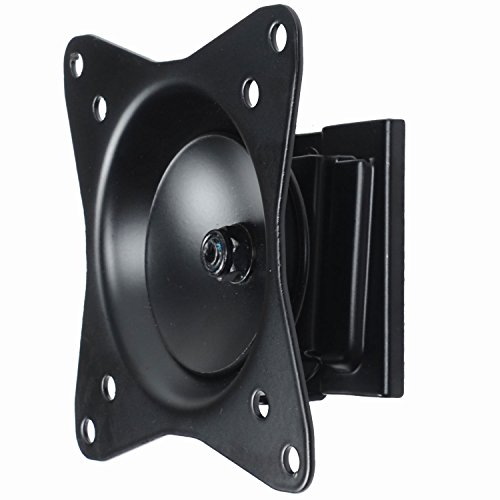
- Supports common 75x75mm and 100x100mm VESA patterns
- Rotates for portrait or landscape orientation
- Handles up to 40 pounds with a 2-inch profile
Best For: Small-screen monitor or TV setups needing occasional rotation
Compact Articulating Pick
XINLEI 13–32-Inch Full-Motion Monitor Mount

- Supports 13–32-inch displays up to 33 pounds
- ±15° tilt with swivel and rotation
- Retracts to 1.96 inches from the wall
Best For: Small monitors and TVs needing flexible positioning
Low-Profile Tilting Pick
QAQMILI 14–42-Inch Tilt Monitor Mount
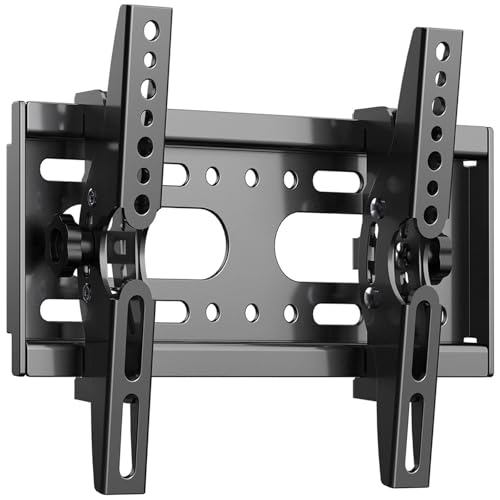
- Supports 14–42-inch displays up to 55 pounds
- Fits VESA 50x50mm to 200x200mm
- Places the display about 2 inches from the wall
Best For: Simple, close-to-wall tilt installations
Heavy-Duty Flexibility Pick
monTEK 17–57-Inch Gas-Spring Arm
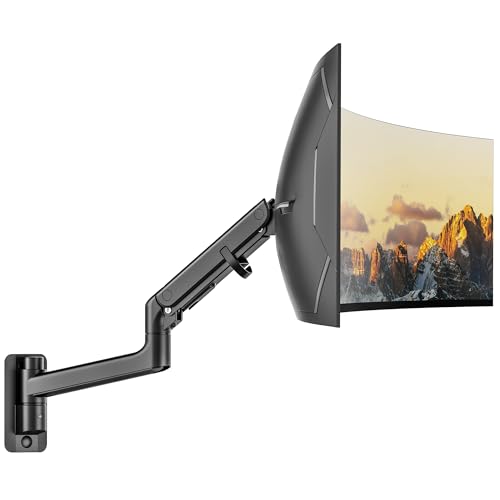
- Supports monitors up to 59.4 pounds
- Wide tilt, swivel, rotation, and height adjustment
- Extends 27.4 inches and folds to 5.2 inches
Best For: Large ultrawide or heavy monitors needing flexible adjustment
Best Ultrawide Pick – VIVO Single Ultrawide Wall Mount
For shoppers comparing tilting monitor wall mounts for a large ultrawide display, the VIVO MOUNT-VW01M combines broad screen support with full-motion adjustment. It fits most ultrawide monitors up to 49 inches, supports up to 44 pounds, and extends up to 10.5 inches from the wall.
Best For: Ultrawide monitor setups that need strong weight capacity, tilt and swivel adjustment, and integrated cable routing.
Pros:
- Supports most ultrawide screens up to 49 inches and up to 44 pounds.
- Offers +5° to -12° tilt, ±45° swivel, and screen leveling.
- Collapses close to the wall and extends up to 10.5 inches.
- Includes integrated cable management and a steel construction.
Cons:
- Limited to VESA 75x75mm and 100x100mm patterns.
- The larger articulating design may be more mount than smaller screens require.
This is a practical choice when an ultrawide monitor needs more positioning flexibility than a fixed bracket can provide. Confirm the monitor’s VESA pattern and wall compatibility before installation.
Most Versatile Full-Motion Mount – Pipishell TV and Monitor Wall Mount
The Pipishell is a flexible option among tilting monitor wall mounts, supporting 13- to 43-inch flat or curved monitors and TVs with VESA patterns from 75x75mm to 200x200mm. Its articulating arm adds tilt, swivel, rotation, and extension for varied seating or working positions.
Best For: Monitor or small-TV installations that need broad VESA compatibility, portrait or landscape rotation, and single-stud mounting.
Pros:
- Supports 13- to 43-inch displays weighing up to 44 pounds.
- Works with VESA patterns from 75x75mm through 200x200mm.
- Tilts, swivels up to 90° per side depending on screen size, and rotates 360°.
- Extends 14.59 inches and retracts to 2.7 inches from the wall.
Cons:
- Maximum swivel range varies with the display size.
- Its broad TV-and-monitor compatibility may be unnecessary for a small fixed workstation display.
With its wide mounting range and rotating arm, this mount suits rooms where viewing direction or screen orientation changes. Check both the display dimensions and VESA spacing before ordering.
Best for Compact Workstations – VIVO 17-32 in Monitor Wall Mount
For a standard-size monitor, the VIVO MOUNT-VW01A keeps the setup close to the wall while adding useful ergonomic movement. This tilting monitor wall mount fits 17- to 32-inch screens up to 17.6 pounds and includes height adjustment, tilt, swivel, and rotation.
Best For: Home offices and standing workstations using a 17- to 32-inch monitor with a 75x75mm or 100x100mm VESA pattern.
Pros:
- Fits 17- to 32-inch monitors weighing up to 17.6 pounds.
- Provides +10° to -10° tilt, 20° swivel, and 360° rotation.
- Offers 16cm of height adjustment for a more adaptable workstation.
- Sits just 5.1cm from the wall and carries a three-year warranty.
Cons:
- Supports only VESA 75x75mm and 100x100mm patterns.
- Hardware for curved or recessed monitor backs is not included.
This mount is a good fit when height adjustment matters as much as tilt and the monitor is within its modest size and weight range. Verify the back-panel design and mounting pattern before installation.
Best Low-Profile Small-Screen Mount – Mount-It! MI-2829 Small TV Wall Mount
The Mount-It! MI-2829 is a straightforward choice among tilting monitor wall mounts for smaller displays. It fits 19- to 32-inch monitors and TVs up to 44 pounds, sits 2.6 inches from the wall, and adds downward tilt plus side-to-side swivel.
Best For: Small monitors or TVs in bedrooms, kitchens, offices, dorms, and RVs where a close-to-wall installation is preferred.
Pros:
- Fits 19- to 32-inch displays with VESA 75x75mm or 100x100mm patterns.
- Supports up to 44 pounds despite its small-screen focus.
- Tilts up to 12° down and swivels up to 30° left or right.
- Measures 2.6 inches from the wall and includes a lifetime manufacturer warranty.
Cons:
- Swivel range may be reduced with larger or wider displays in its size class.
- It is not intended for drywall alone without anchoring into a stud or masonry.
This model makes sense when a compact display needs glare-reducing tilt and moderate swivel without the depth of a pull-out arm. Measure the screen’s VESA holes and identify a suitable stud or masonry mounting surface first.
Best Full-Motion Pick – MOUNT PRO Single Monitor Wall Mount
For shoppers comparing tilting monitor wall mounts, the MOUNT PRO stands out when you want more than basic angle adjustment. Its articulated arm supports tilt, swivel, rotation, extension, and height adjustment for a flexible workstation setup.
Best For: Remote workers, gamers, creators, developers, and anyone who needs portrait or landscape monitor positioning.
Pros:
- Offers +90° to -45° tilt, 180° swivel, 360° rotation, and extension up to 21.6 inches.
- Fits 13- to 32-inch monitors with 75x75mm or 100x100mm VESA patterns.
- Supports monitors from 4.4 to 19.8 pounds and includes integrated cable management.
- Installs on wood studs or solid concrete and includes labeled parts and instructions.
Cons:
- It is not compatible with 1000R, 1500R, or 1800R curved screens.
- The arm requires weight adjustment before use for proper movement and stability.
- Drywall-only installation is not supported; wood-stud or solid-concrete installation is specified.
This is the most versatile option of the three for users who regularly change viewing position or orientation. Confirm your monitor’s VESA pattern, weight, and wall structure before installation.
Best Low-Profile Pick – Mount-It! Tilting TV Wall Mount
This Mount-It! model is a straightforward choice among tilting monitor wall mounts when a close-to-the-wall installation matters most. It places the screen just 1.4 inches from the wall and adds vertical tilt for glare control without a protruding arm.
Best For: Compact rooms, RVs, boats, and setups where a slim, fixed-position mount is preferred.
Pros:
- Supports screens from 19 to 32 inches and up to 44 pounds with 75x75mm or 100x100mm VESA patterns.
- Tilts up to 15 degrees down or 10 degrees up to help reduce glare.
- Its 1.4-inch profile creates a clean, space-saving installation.
- Includes a bubble level, hardware, tools, and a lifetime manufacturer warranty.
Cons:
- It tilts only and does not swivel side to side.
- Installation must use a suitable wood or metal stud, concrete, brick, or block surface rather than unsupported drywall alone.
- Confirm the VESA spacing and screen weight before ordering.
Choose this mount if you want a simple, sturdy, low-profile installation rather than frequent repositioning. The quick-release bracket also makes cleaning or cable changes easier without removing the wall plate.
Best Budget-Friendly Versatility – VideoSecu Tilt Rotation Wall Mount
The VideoSecu ML32B is a practical option for shoppers seeking tilting monitor wall mounts with added rotation flexibility. It supports common small-screen VESA patterns and can accommodate portrait or landscape orientation while maintaining a relatively compact 2-inch wall profile.
Best For: Small monitors and TVs from 19 to 32 inches, including setups that occasionally switch between screen orientations.
Pros:
- Supports 75x75mm and 100x100mm VESA mounting patterns.
- Holds up to 40 pounds and fits many 19- to 32-inch screens, with some models up to 39 inches.
- Rotation adjustment allows portrait or landscape orientation.
- Steel construction, powder-coated finish, and included mounting hardware simplify installation.
Cons:
- The supplied notes do not specify the exact tilt-angle range.
- Its 2-inch profile is not as close to the wall as the Mount-It! option.
- Compatibility with screens above 32 inches depends on the VESA pattern and weight, so those details require checking.
This mount offers a useful middle ground between basic tilt-only brackets and fully articulated arms. Verify your display’s size, weight, and VESA pattern, especially if considering a screen larger than 32 inches.
Compact Articulating Pick – XINLEI 13–32-Inch Full-Motion Monitor Mount
For smaller displays, the XINLEI is a versatile choice among tilting monitor wall mounts. Its articulating arm combines tilt, swivel, and rotation while supporting monitors or TVs up to 33 pounds.
Best For: Small monitors and TVs on compatible wood-stud, brick, or concrete walls.
Pros:
- Supports most 13–32-inch displays up to 33 pounds.
- Offers ±15° tilt, 180° swivel, and 360° rotation.
- Retracts to 1.96 inches and extends up to 14.25 inches from the wall.
- Includes a removable plate and installation hardware.
Cons:
- Not designed for drywall-only installation.
- Limited to VESA 75x75mm and 100x100mm patterns.
- The 100x100mm plate may create potential cable blockage.
This mount makes sense when you want broad positioning control in a compact package. Confirm the display’s VESA pattern, weight, and wall type before buying.
Low-Profile Tilting Pick – QAQMILI 14–42-Inch Tilt Monitor Mount
The QAQMILI is a straightforward option among tilting monitor wall mounts for displays that need a close-to-wall installation and modest angle adjustment. It supports a broad VESA range and up to 55 pounds.
Best For: Small to medium monitors or TVs where a low-profile, tilt-only mount is preferred.
Pros:
- Fits most 14–42-inch displays up to 55 pounds.
- Supports VESA patterns from 50x50mm through 200x200mm.
- Positions the display about 2 inches from the wall.
- Provides up to 15° of upward tilt to help adjust viewing angle and glare.
Cons:
- Offers tilt adjustment only, without swivel or rotation.
- Requires careful installation according to the included manual.
- The supplied notes specify compatibility with 8-inch wood studs, which may limit placement.
Choose this model if simplicity and a tidy wall profile matter more than movement in multiple directions. Its wider VESA compatibility also makes it easier to match with varied displays.
Heavy-Duty Flexibility Pick – monTEK 17–57-Inch Gas-Spring Arm
For large, heavy, or ultrawide displays, the monTEK stands out among tilting monitor wall mounts with its gas-spring arm and extensive adjustment range. It supports monitors up to 59.4 pounds and can extend well beyond a typical low-profile bracket.
Best For: Ultrawide, curved, gaming, and professional monitors requiring substantial positioning flexibility.
Pros:
- Supports 17–57-inch monitors up to 59.4 pounds.
- Provides +75° to -75° tilt, ±90° swivel, and 180° screen rotation.
- Offers 11 inches of height adjustment and extends up to 27.4 inches.
- Includes cable management and a quick-release VESA plate.
Cons:
- Limited to VESA 75x75mm and 100x100mm patterns.
- Not suitable for drywall-only mounting.
- Its larger arm may be more than needed for small, lightweight monitors.
This is the strongest fit when a standard tilt bracket cannot provide enough load capacity or reach. Verify the monitor’s VESA holes and use an appropriate wood-stud, brick, or concrete mounting surface.
How We Picked These Tilting Monitor Wall Mounts
We focused on mounts that support common monitor and small-TV sizes, with attention to tilt range, VESA compatibility, stated weight capacity, installation profile, and adjustability. The selection includes basic tilting brackets, swivel-capable mounts, height-adjustable arms, and heavy-duty options for larger or ultrawide screens.
Because wall construction and hardware requirements vary, treat the listed capacity as a starting point rather than a guarantee. The mount, wall material, fasteners, and display must all be suitable for the finished installation.
Quick Comparison
| Best for | What to prioritize | Typical option in this roundup |
|---|---|---|
| Compact monitors | Small size range, simple tilt, low-profile design | 13–32-inch brackets |
| Flexible positioning | Swivel, height adjustment, and cable clearance | Full-motion monitor arms |
| Ultrawide displays | Wide mounting pattern and high weight capacity | Single-arm ultrawide mounts |
| Small TVs or mixed displays | Broad VESA support and secure locking hardware | Universal TV/monitor brackets |
Key Buying Factors for Tilting Monitor Wall Mounts
Screen Size and Weight
Check both diagonal size and actual display weight, including any stand or accessories that remain attached. A mount rated for a 32-inch screen may not safely support a heavier monitor, while an ultrawide needs enough horizontal reach and structural support.
VESA Pattern and Hardware
Confirm the monitor’s VESA mounting dimensions, such as 75x75mm or 100x100mm, before ordering. Larger displays may use 200x200mm or wider patterns. Also verify that the included screws match the display and that the wall anchors are appropriate for drywall, wood studs, or masonry.
Movement and Viewing Angle
Tilt is useful for reducing glare and setting a comfortable viewing angle, but it is not the same as full motion. Choose swivel or an articulated arm if you regularly reposition the screen. For a display that rarely moves, a simpler tilting bracket is usually less expensive and less bulky.
Wall Clearance and Installation
Low-profile mounts keep the screen close to the wall, while arms provide more adjustment but require additional clearance. Locate studs when possible, measure cable length, and check that ports remain accessible after mounting. A built-in bubble level can make alignment easier.
Who Should Buy Which Tilting Monitor Wall Mounts?
Choose a compact tilt bracket if you want an affordable, space-saving setup for a smaller monitor or TV. Pick a full-motion model if you need to turn the screen, adjust its position during the day, or share it with another seating area. Ultrawide owners should select a mount explicitly rated for the display’s width and weight rather than relying on screen size alone.
For a desk workstation, prioritize height adjustment, smooth arm movement, and cable management. For a permanent viewing position, prioritize wall compatibility, locking security, low profile, and straightforward tilt adjustment. If you are unsure, compare the monitor’s VESA pattern and weight against the mount specifications first; those two checks eliminate most unsuitable choices.