A reliable laptop lock can help deter opportunistic theft in offices, classrooms, libraries, and other shared spaces. The right cable depends on your laptop’s security-slot type, preferred locking method, and how permanently you plan to install the anchor.
Our roundup includes keyed, combination, universal, and multi-device laptop locking cables, plus options designed for newer Nano and Wedge-style slots. Use the guide below to narrow the choices by compatibility, convenience, and everyday security needs.
Best 10 Laptop Locking Cables Picks for 2026
Best Combination Lock
Kensington T-Bar Standard Cable Lock

- Resettable four-digit combination
- Six-foot carbon steel cable
- Push-button, one-handed engagement
Best For: Keyless security for devices with a standard Kensington slot
Best Desktop Security Kit
Kensington Desktop & Peripherals Locking Kit 2.0
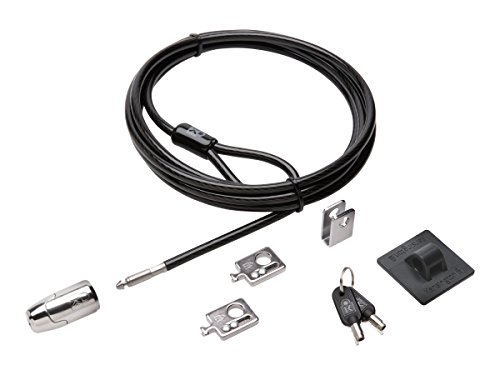
- Eight-foot carbon steel cable
- Includes adapters and cable trap
- Anchor plate supports non-slot devices
Best For: Desktop workstations with multiple peripherals
Best Keyed Laptop Lock
Kensington T-Bar Standard Keyed Lock

- Six-foot carbon steel cable
- Compact pivoting 10 mm lock head
- Hidden Pin anti-pick technology
Best For: Keyed security for compatible standard Kensington slots
Best Simple Budget Lock
Sendt Black Notebook/Laptop Cable Lock

- Six-foot cut-resistant cable
- Two keys included
- Simple installation
Best For: Basic keyed deterrence in schools, libraries, and offices
Best Nano-Slot Pick
Kensington Combination Laptop Lock

- Slim head supports thin laptops with nano slots
- 5-foot carbon steel cable with protective sleeve
- Resettable four-digit combination
Best For: Thin laptops with nano-sized security slots
Best Adhesive Anchor Kit

- Two adhesive anchor plate sets included
- Six-foot galvanized steel cable
- Works with laptops, tablets, and smartphones
Best For: Multi-device setups without built-in security slots
Best Universal Fit
Kensington 3-in-1 Combination Laptop Lock

- Fits standard, nano, and wedge-shaped slots
- Six-foot carbon steel cable
- Resettable combination with 10,000 codes
Best For: Mixed-device offices and households
Best Keyed-Alike Multipack
Retractable 5-Pack Cable Locks

- Five locks with matching keys
- 6-foot retractable steel cables
- Includes adhesive anchor plates
Best For: Securing multiple compatible devices with one shared key
Best for Dell and Alienware

- Fits compatible wedge lock slots
- Resettable four-wheel combination
- 6-foot carbon steel cable
Best For: Dell and Alienware laptops with wedge-type security slots
Best Simple Pick

- Supports K-Slot, Nano, and wedge slots
- Resettable four-digit combination
- 360-degree rotating lock head
Best For: Mixed-brand laptops with compatible security slots
Best Combination Lock – Kensington T-Bar Standard Cable Lock
For shoppers comparing laptop locking cables, this Kensington model offers a resettable four-digit combination lock and a six-foot carbon steel cable. Its push-button design makes everyday attachment straightforward, provided your device has a standard Kensington security slot.
Best For: Users who want keyless security for compatible laptops and other electronics in offices, homes, or public spaces.
Pros:
- Resettable four-wheel combination provides 10,000 possible codes.
- Six-foot cut-resistant carbon steel cable anchors to fixed structures.
- Push-button design supports one-handed engagement.
- Works with compatible laptops, desktops, monitors, TVs, projectors, and docking stations.
Cons:
- Not compatible with Dell and Alienware devices using Noble or wedge-style slots.
- Requires a standard Kensington security slot on the device.
This is a practical choice when convenience matters and you prefer not to carry keys. Check your laptop’s slot type before buying, especially for newer Dell models.
Best Desktop Security Kit – Kensington Desktop & Peripherals Locking Kit 2.0
Among laptop locking cables and broader equipment-security options, this Kensington kit is designed for desktop PCs and peripherals. It combines an eight-foot carbon steel cable with adapters, a cable trap, and an anchor plate for devices that lack a built-in Kensington slot.
Best For: Desktop workstations and setups with multiple peripherals that need to be secured together.
Pros:
- Eight-foot cut-resistant cable provides flexible anchoring.
- Includes two K-Slot adapters and a cable trap for peripheral accessories.
- Anchor plate helps secure devices without a Kensington security slot.
- Patented Hidden Pin Technology supports the keyed lock’s anti-pick design.
Cons:
- Keyed lock requires carrying and managing keys.
- Its desktop-oriented design may be more than needed for a single laptop.
This kit stands out for complete workstation coverage rather than simple laptop portability. It is a useful fit for offices, labs, libraries, and other shared environments with several devices to protect.
Best Keyed Laptop Lock – Kensington T-Bar Standard Keyed Lock
This Kensington option is one of the more traditional laptop locking cables, pairing a keyed T-Bar lock with a six-foot carbon steel cable. Its compact pivoting lock head is intended for compatible thin devices with a standard Kensington security slot.
Best For: Users who prefer a keyed lock and need a cable for compatible laptops, monitors, desktops, or other fixed equipment.
Pros:
- Six-foot carbon steel cable with a plastic sheath resists cutting attempts.
- Smaller 10 mm pivoting lock head suits many thin devices.
- Patented Hidden Pin Technology supports the anti-pick tubular lock.
- Pivoting hinge helps reduce awkward locking and unlocking angles.
Cons:
- Does not fit newer Dell devices using wedge lock slots.
- Some HP devices use a Nano security slot and require a different Kensington lock.
- Keys are required for operation.
The compact head and pivoting hinge make this a solid keyed choice for compatible equipment. Confirm the laptop’s security-slot specification before ordering, particularly with newer Dell and select HP models.
Best Simple Budget Lock – Sendt Black Notebook/Laptop Cable Lock
For a straightforward laptop-locking-cable setup, this Sendt model provides a six-foot cut-resistant cable, a keyed lock, and two included keys. It is intended for laptops and notebooks with a Kensington security slot, making slot compatibility the main consideration.
Best For: Students, libraries, schools, and offices seeking a basic keyed theft deterrent for compatible notebooks.
Pros:
- Six-foot cable allows anchoring to a desk or other fixed structure.
- Cut-resistant cable provides a practical physical deterrent.
- Includes two keys.
- Simple installation and black finish suit everyday use.
Cons:
- Does not fit Dell, Kensington Nano, or Noble wedge security slots.
- Limited one-year warranty.
- Keyed design is less convenient than a combination lock for some users.
This is a no-frills option for shared spaces where a basic visible deterrent is sufficient. Verify that your laptop has a compatible Kensington T-Bar security slot before purchase.
Best Nano-Slot Pick – Kensington Combination Laptop Lock
If you need laptop locking cables for a thin computer, this Kensington model pairs a slim lock head with a 5-foot carbon steel cable. Its resettable four-digit combination and rotating design make it practical for shared workspaces, cafes, and travel.
Best For: Thin laptops equipped with nano-sized security slots.
Pros:
- Slim head is designed to support thin laptops while allowing them to lie flat.
- Five-foot carbon steel cable offers useful reach for desks, tables, and other anchor points.
- Resettable four-wheel combination provides 10,000 possible codes.
- Pivoting head and rotating anchor help preserve access to nearby ports.
Cons:
- Designed specifically for nano-sized slots, so slot compatibility should be checked before purchase.
- Uses a combination rather than a key, which may not suit every preference.
This is a focused choice for thin laptops with the matching nano security slot. Confirm the slot dimensions and style before buying, especially if you use a different laptop generation.
Best Adhesive Anchor Kit – AboveTEK Laptop Lock
Among laptop locking cables, the AboveTEK kit stands out for devices without a built-in security slot. It includes adhesive anchor plates and a six-foot galvanized steel cable for securing laptops, tablets, phones, and other equipment in public or commercial settings.
Best For: Mixed-device setups that need adhesive anchors for laptops, tablets, or smartphones.
Pros:
- Includes two adhesive sticker and anchor plate sets for multiple devices.
- Industrial-grade 3M adhesive is designed for most flat surfaces.
- Six-foot galvanized steel cable allows movement while the device remains secured.
- Key-operated design is intended for quick installation and use.
Cons:
- Adhesive anchors require a suitable flat surface and proper installation.
- Key operation means you must keep track of the included keys.
- May be less suitable for users who prefer a built-in laptop-slot lock.
This kit is a versatile option for retail counters, libraries, cafes, and display areas where devices may lack compatible security slots. Its adhesive-based approach makes surface suitability an important consideration.
Best Universal Fit – Kensington 3-in-1 Combination Laptop Lock
For shoppers comparing laptop locking cables across different computers, this Kensington universal lock is designed to fit standard, nano, and wedge-shaped security slots. Its interchangeable lock tips, six-foot carbon steel cable, and resettable combination make it a flexible choice for mixed-device households or offices.
Best For: Users who need one lock for laptops with different security-slot shapes.
Pros:
- Three included adapters support standard, nano, and wedge-shaped slots.
- Six-foot carbon steel cable provides added reach around desks and other anchor points.
- Resettable four-number dial offers 10,000 possible combinations.
- Unused lock tips remain attached by a tether for convenient storage.
Cons:
- The interchangeable-adapter design may be more involved than a single-slot lock.
- It is heavier than the smaller nano-slot Kensington model listed here.
This is the strongest fit-focused option in the group because it accommodates three common security-slot styles. It is particularly practical when one lock needs to serve multiple laptops or when future device compatibility matters.
Best Keyed-Alike Multipack – Retractable 5-Pack Cable Locks
If you need laptop locking cables for several workstations, this keyed-alike five-pack offers a convenient shared-key setup. Each retractable cable extends to 6 feet and includes an adhesive anchor plate for compatible devices without a built-in security slot.
Best For: Offices, classrooms, or households securing multiple laptops and other electronics with the same key.
Pros:
- Includes five locks, five anchor plates, and five matching keys.
- 6-foot steel cable retracts to a compact 4-inch size.
- Works with compatible 3 x 7 mm security slots or included adhesive plates.
Cons:
- Compatibility varies, and some devices require the anchor plate.
- The supplied notes state that newer Apple MacBooks are not compatible.
- Adhesive plates require careful surface preparation and up to 48 hours for maximum hold.
This is a practical bulk option when multiple devices need a shared-key solution. Confirm your laptop’s slot type before relying on the direct-fit installation.
Best for Dell and Alienware – N17 Combination Lock
Kensington N17 Dell Laptop Computer Lock, Combination Security Locking Cable (K68008WW) Black
Check Price On AmazonFor Dell and Alienware systems with a wedge-type lock slot, this combination option keeps laptop locking cables simple by replacing keys with a resettable four-wheel code. Its 6-foot carbon steel cable anchors to a desk, table, or other fixed structure.
Best For: Dell and Alienware laptops with compatible wedge-shaped security slots in offices, homes, or schools.
Pros:
- Designed specifically for Dell and Alienware wedge lock slots.
- Resettable four-wheel combination provides 10,000 possible codes.
- Push-button engagement supports one-handed attachment.
- Includes a 6-foot cut-resistant carbon steel cable and a five-year warranty.
Cons:
- It is not presented as a universal lock for all laptop slot types.
- Requires a compatible wedge security slot.
This is a focused choice rather than an all-purpose cable lock. If your Dell or Alienware laptop has the specified wedge slot, the keyless design and long cable make it well suited to routine desk security.
Best Simple Pick – 3-in-1 Combination Cable Lock
This universal option is designed for laptop locking cables shoppers who need broader slot compatibility. Its 3-in-1 lock head supports K-Slot, Nano, and wedge slots, while the resettable four-digit combination avoids the need to carry a key.
Best For: People securing laptops from different brands in offices, on campuses, or while traveling.
Pros:
- Compatible with K-Slot, Nano, and wedge security slots.
- Resettable four-digit code offers 10,000 possible combinations.
- 360-degree rotating head helps with positioning and access.
- Includes six secure spacers and a 12-month warranty.
Cons:
- You should verify your laptop’s slot type before purchase.
- Only one lock and cable are included.
- The combination must be programmed and remembered; it does not use a key.
The AboveTEK stands out when device compatibility is the main concern. Its multiple slot interfaces and rotating head add flexibility, provided your laptop matches one of the listed security systems.
How We Picked These Laptop Locking Cables
We selected products based on security-slot compatibility, cable construction, locking mechanism, installation flexibility, portability, and likely use case. The list includes established Kensington models alongside adaptable alternatives from AboveTEK, Sendt, and other manufacturers. We also considered whether each lock is suited to a single laptop, multiple devices, or mixed equipment such as monitors and tablets.
Because a cable lock is a deterrent rather than an impenetrable barrier, fit and correct installation matter as much as the cable itself. Always confirm your laptop’s slot before buying.
Quick Comparison
| Type | Best For | Main Advantage | Watch For |
|---|---|---|---|
| Combination | Shared offices and classrooms | No key to carry | Choose and protect a memorable code |
| Keyed | Personal workstations | Fast, familiar operation | Keep the key accessible and secure |
| Universal | Mixed laptop fleets | Supports multiple slot formats | Verify the included heads or adapters |
| Multi-device kit | Monitors, laptops, and peripherals | Secures more than one device | Check anchor placement and cable reach |
Key Buying Factors for Laptop Locking Cables
Security-Slot Compatibility
Standard K-Slot, Nano, and Wedge slots are not interchangeable. Check the laptop manufacturer’s specifications or inspect the slot carefully. A universal lock can be useful for mixed equipment, but it still must include the correct fitting and be installed properly.
Keyed Versus Combination Locking
Combination locks eliminate lost-key concerns and work well for shared desks or classrooms. Keyed models are often quicker for a dedicated workstation, particularly when several devices use an alike-key system. Pick the method that fits your daily routine rather than relying on a lock you may leave unused.
Cable Length and Construction
A six-foot cable is common and provides flexibility around desks, poles, and other fixed objects. Look for a sturdy steel cable and a locking head that fits securely without excessive movement. Longer cables add reach but can be harder to manage neatly.
Anchors and Installation
Some kits include adhesive anchors for devices without a built-in slot. These can expand compatibility, but surface preparation and curing time are important. Place the anchor on a clean, smooth, structurally sound surface and follow the manufacturer’s instructions.
Who Should Buy Which Laptop Locking Cables?
Choose a standard Kensington combination lock for a straightforward office or school setup. A keyed model is a good fit for a personal desk where quick access matters. Select a Nano- or Wedge-compatible option for newer laptops with nonstandard slots, and choose a universal 3-in-1 design if you manage several laptop models. For offices securing monitors and peripherals as well as computers, a locking kit or multi-pack offers broader coverage and simpler fleet management.