The EMEET C60E 4K Webcam review starts with one clear point: this is not a basic plug-and-play webcam for casual calls only.
It is built for people who want more framing flexibility, stronger close-up detail, and easier live control.
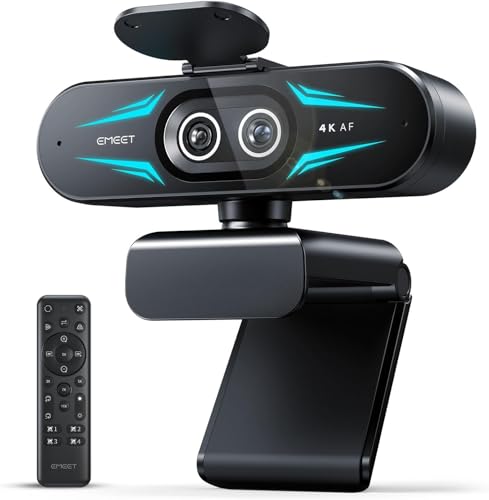
EMEET C60E Review Summary
If you want a webcam that can handle streaming, tutorials, live presentations, and everyday meetings without forcing you to constantly reposition your setup, the EMEET C60E 4K Webcam makes a strong case.
Its dual-camera design, 4K capture, 11X hybrid zoom, and included remote give it a clear edge over simple fixed webcams, especially for creators who often switch between a face shot, a desk demo, and a wider scene.
What makes the EMEET C60E 4K Webcam appealing is its practical balance of convenience and creator-focused features.
You get a wide-angle lens for broader scenes, a telephoto view for closer detail, PDAF autofocus for stability during movement, and software controls for tuning brightness and RGB lighting.
That combination is especially useful for buyers who want one webcam to do more than one job.
It is not perfect, though.
Zoom support depends on the mode you choose, Chrome OS compatibility can be inconsistent, and the lack of image stabilization means your mount matters.
Still, for the right buyer, the EMEET C60E 4K Webcam worth it question leans toward yes because the feature set is unusually flexible for the category.
Scorecard
| Category | Score | Why it matters |
|---|---|---|
| Video quality | 9.0 | Dual-camera 4K setup with a 1/2.8-inch CMOS sensor is built for sharp streams and clearer detail. |
| Zoom and framing | 9.0 | 1X to 11X hybrid zoom and remote/app control make live reframing far easier. |
| Autofocus | 8.0 | PDAF helps keep subjects clear during movement and zoom changes. |
| Audio capture | 8.0 | Two omnidirectional microphones are practical for calls and casual streaming. |
| Compatibility and setup | 8.0 | USB plug-and-play on Windows and macOS keeps setup simple. |
| Control and customization | 9.0 | Remote control and EMEET STUDIO offer better adjustment than a basic webcam. |
| Mounting and versatility | 8.0 | Tripod support and portrait/landscape use add flexibility for desk or creator setups. |
Bottom line: the EMEET C60E 4K Webcam is best for buyers who care about framing control, close-up clarity, and multi-use content creation.
If you just need a simple meeting camera, it may be more than you need.
If you stream, teach, demo products, or present on camera often, it is a smart pick.
Key Features and Specifications of EMEET C60E
The EMEET C60E 4K Webcam is a compact USB webcam built around a dual-camera concept.
That design choice is important because it gives the camera more versatility than a standard single-lens model.
Here are the core specs and features buyers should pay attention to:
- Brand: EMEET
- Model: C60E
- Video resolution: 4K
- Sensor: CMOS
- Sensor size: 1/2.8-inch
- Connectivity: USB 2.0 Type-A
- Focus type: PDAF autofocus
- Viewing angle: 73 degrees
- Zoom: 1X to 11X hybrid zoom
- Microphones: 2 omnidirectional mics
- Mic pickup range: about 9.8 feet
- Mounting: 1/4-inch tripod support
- Software: EMEET STUDIO
- Controls: 22-key remote control
- OS support: Windows 10/11 (64-bit), macOS 10.14+
- Platforms: OBS, Twitch, YouTube, Facebook
- Video formats: YUY2 / MJPEG
- Audio formats: AAC / PCM
- Color: Black
- Form factor: Compact
A few of those details matter a lot in real use.
The 1/2.8-inch CMOS sensor is a strong sign that the camera is built for better image capture than the cheapest webcams.
The 73-degree viewing angle is wide enough for a desk setup without turning every frame into a distorted fisheye look, while the telephoto side helps keep faces and objects more readable when you want to zoom in.
The USB plug-and-play design also keeps setup straightforward.
That matters for buyers who do not want to spend time troubleshooting drivers just to get a meeting started.
Pros and Cons of EMEET C60E
Here is the clearest breakdown of the EMEET C60E 4K Webcam pros and cons from a buyer’s point of view.
Pros
- Excellent flexibility thanks to the dual-camera system and hybrid zoom.
- Sharp 4K detail for streaming, demos, and professional meetings.
- PDAF autofocus helps maintain clarity when you move or shift framing.
- Remote control adds convenience for live changes without touching the camera.
- EMEET STUDIO customization gives you more control over brightness, focus, and RGB effects.
- Built-in dual mics are good enough for many home office and creator setups.
- Tripod support expands placement options beyond a monitor clip.
Cons
- Zoom limitations apply in some higher-resolution or high-frame-rate modes.
- No image stabilization, so shaky mounting can hurt the result.
- Chrome OS compatibility may vary depending on the device.
- Not compatible with Windows Hello, which matters for some login workflows.
- Built-in audio is useful, but not premium; serious creators may still want an external mic.
For most shoppers, the biggest tradeoff is simple: the EMEET C60E 4K Webcam gives you more creative control, but it expects a slightly more thoughtful setup than a bare-bones webcam.
That is a fair exchange if you need its features.
Who Should Buy EMEET C60E?
The EMEET C60E 4K Webcam is a good match for buyers who need a webcam that can do more than sit on top of a monitor and stream a face shot all day.
It is especially well suited to:
- Streamers who need quick framing changes without resetting the entire shot.
- Teachers and presenters who alternate between face cam, whiteboard, and product or document demos.
- Remote workers who want better-than-basic video quality for recurring meetings.
- Content creators who need wide and close views from the same compact device.
- Desk-based demo users who want the telephoto side for closer detail on products or objects.
Who should skip it?
If you only need a webcam for occasional video calls, the EMEET C60E 4K Webcam may be overbuilt.
Also, if you rely on Windows Hello, use Chrome OS, or need the absolute simplest setup possible, a more basic model may fit better.
Dual-Camera Design and How It Helps
The standout design choice here is the dual-camera system.
This is the feature that separates the EMEET C60E 4K Webcam from many single-lens competitors.
Instead of giving you one static framing style, it offers a wide-angle camera for broader scenes and a telephoto camera for more focused close-ups.
In practice, that means you can keep a stream or presentation visually interesting without moving the whole camera every time the subject changes.
For a creator, that is a real workflow advantage.
You can show your face, then zoom toward a product, then widen out again, all while staying on the same device.
The design is also supported by a compact black body that should fit cleanly into a home office or streaming desk.
It does not try to look flashy; it tries to be useful.
That is a good design philosophy for buyers who value function over gimmicks.
Zoom Range and Autofocus Performance
Zoom is one of the main reasons to buy the EMEET C60E 4K Webcam.
The advertised 1X to 11X hybrid zoom is unusually broad for a webcam, and it becomes more useful when paired with remote control and software tuning.
You can adjust framing in real time instead of physically moving the camera or changing your entire setup.
That said, buyers should understand the limitation: not every mode supports every zoom function.
If you expect to use high-resolution or high-frame-rate capture while also zooming, check the mode details carefully.
That is an important decision-making factor for creators who need consistency in production workflows.
PDAF autofocus is another practical advantage.
It helps the camera maintain subject clarity when you lean in, move slightly, or switch scenes.
It will not replace professional camera tracking, but for a webcam it is a meaningful upgrade over slower or less reliable focus systems.
Mic Quality for Calls and Streaming
Webcam audio is often an afterthought, but the EMEET C60E 4K Webcam includes two omnidirectional microphones with a stated pickup range of about 9.8 feet.
That is enough for a desk setup, meeting room-style use at short distance, or casual streaming where convenience matters more than broadcast-grade sound.
For buyers, the practical takeaway is this: the built-in mics are good for a streamlined setup, but they are not the main reason to buy this webcam.
If you are a serious streamer, podcast host, or voice-forward creator, an external microphone will still deliver cleaner, more controlled audio.
If you just want one device that handles video and voice well enough, the onboard microphones are a welcome bonus.
RGB Lighting and Remote Control Features
The RGB lighting accents and 22-key remote control are smaller features, but they contribute to the overall user experience.
RGB lighting in red, green, and blue adds a bit of visual flair to the camera itself, which may appeal to streamers building a more polished desk aesthetic.
The remote control matters more from a practical standpoint.
During a live session, being able to adjust settings without reaching for the webcam is a real convenience.
Combined with EMEET STUDIO, which allows tuning for brightness, focus, and lighting, the camera gives you more control than the average plug-and-play model.
This is where the EMEET C60E 4K Webcam starts to feel like a creator tool rather than just a meeting accessory.
Compatibility, Mounting, and Setup Tips
Setup is simple in the ways that matter most.
The webcam uses USB 2.0 Type-A and supports Windows 10/11 64-bit plus macOS 10.14+.
It also works with popular platforms like OBS, Twitch, YouTube, and Facebook, which makes it a realistic choice for both work and content production.
Mounting options are another plus.
The 1/4-inch tripod support gives you more placement flexibility than a fixed monitor clip alone.
That is especially helpful because the camera has no image stabilization.
A stable tripod or monitor mount will improve results more than most buyers expect.
There are a few caution points.
It is not water resistant, it does not include onboard flash memory, and Chrome OS support may vary.
None of that is surprising for this category, but it should be part of your decision.
Alternatives to Consider
If you are comparing the EMEET C60E 4K Webcam against other Amazon-friendly options, these are the most sensible alternatives:
- Logitech Brio 4K — a well-known 4K webcam option if you want a mainstream brand and broad compatibility.
- Elgato Facecam Pro — better suited to creators who want a more premium streaming-focused camera experience.
- Razer Kiyo Pro Ultra — a strong choice for users who prioritize image quality and creator branding.
- AnkerWork C310 — worth considering if you want a modern webcam from another creator-tech brand.
- EMEET 1080P webcam — a simpler budget-friendly option if 4K and advanced zoom are not necessary.
Compared with those options, the EMEET C60E 4K Webcam stands out most on dual-camera flexibility and zoom control, not raw brand prestige.
That makes it particularly attractive for practical buyers who want more function per device.
Is EMEET C60E Worth It?
So, is EMEET C60E 4K Webcam worth it?
For the right buyer, yes.
The camera earns its place by offering a real productivity and creator advantage: dual-camera framing, strong zoom capability, autofocus support, and simple controls that make live use easier.
If your main need is a webcam for occasional casual meetings, you probably do not need this much hardware.
But if you want a webcam for streaming, content creation, product demos, teaching, or frequent professional calls, the EMEET C60E 4K Webcam is a compelling buy.
Final verdict: choose the EMEET C60E 4K Webcam if you value flexibility, close-up detail, and hands-on control.
Skip it only if you want a basic webcam with the fewest possible features or if your platform needs fall outside its supported ecosystem.
Buying advice: pair it with a stable mount, use EMEET STUDIO for fine tuning, and consider an external mic if audio quality is a top priority.
That is the best way to get the most out of this capable creator-focused webcam.