Reliable video capture is the foundation of a polished business livestream. The right card can turn a DSLR, camcorder, presentation system, or production switcher into a dependable camera source for your streaming software.
These 10 picks cover plug-and-play USB devices, internal cards, SDI and HDMI workflows, 4K passthrough, and multi-input production needs. Use the guide below to match features, connectivity, and performance to your organization’s setup.
Best 10 Capture Cards for Business Livestreaming Picks for 2026
Camera-to-Webcam Pick

- 1080p60 and 4K capture support
- Ultra-low-latency HDMI-to-USB connection
- Works with cameras, OBS, Zoom, PC, Mac, and iPad
Best For: Businesses upgrading camera quality for livestreams
Plug-and-Play Business Pick
Roland UVC-01 USB Video Capture

- Uncompressed 1080p at 60 fps
- Plug-and-play operation for Mac and Windows
- Dedicated analog audio line input
Best For: Simple HDMI streaming for offices, schools, and venues
High-Performance PC Pick
Elgato 4K Pro Internal Capture Card

- 4K60 HDR10 capture with HDMI 2.1
- 8K60 passthrough and up to 1080p240 recording
- VRR and ultra-low-latency support
Best For: Windows studios and dual-PC livestreaming setups
Flexible SDI/HDMI Pick

- SDI and HDMI inputs with automatic detection
- Uncompressed 1080p60 YUY2 capture
- Works with Windows, macOS, Linux, OBS, Zoom, and Teams
Best For: Organizations using mixed SDI and HDMI production sources
Premium HDMI 2.1 Pick

- 4K144 capture and HDMI 2.1 passthrough
- VRR support and ultra-low latency
- Works with OBS, Zoom, Teams, and more
Best For: High-end business broadcasts using modern HDMI 2.1 equipment
Reliable 1080p Workhorse

- SDI and HDMI inputs with uncompressed capture
- 1080p60 output over USB 3.0
- Driver-free support for OBS, Zoom, Teams, and more
Best For: Church, education, conference, and office livestreams
Dual-Source Production Choice

- Two 4K60 HDMI inputs with 1080p60 output
- Built-in microphone and audio I/O
- PIP/PBP layouts and source switching
Best For: Multi-camera, presentation, and interactive business livestreams
Portable USB-C Capture

- 1080p at 60fps output
- USB-C and USB connectivity
- Plug-and-play, portable design
Best For: Mobile business streams, meetings, and online teaching
Zero-Latency Pass-Through
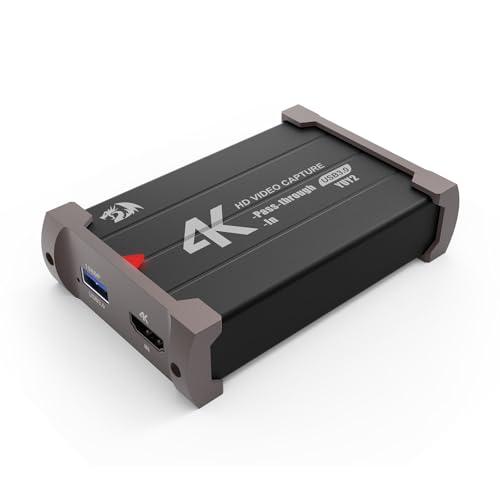
- 1080p at 60fps capture
- 4K HDMI pass-through
- Simultaneous audio and video capture
Best For: Real-time business presentations and HDMI-based streams
Commentary-Ready Capture

- 1080p at 60fps capture
- HDMI loop-out monitoring
- 3.5mm microphone input
Best For: Training, presentations, and streams needing external commentary
Camera-to-Webcam Pick – Elgato Cam Link 4K
For businesses using a DSLR, mirrorless camera, camcorder, action cam, or compatible iPhone, the Elgato Cam Link 4K is a compact choice among capture cards for business livestreaming. It connects an HDMI camera to a computer over USB 3.0 and supports 1080p60 or 4K capture, depending on the setup.
Best For: Businesses upgrading camera quality for webinars, presentations, and live events.
Pros:
- Supports 1080p60 and 4K60 capture with compatible equipment.
- Ultra-low latency helps keep video and audio synchronized.
- Works with OBS, Zoom, Discord, PC, Mac, and iPad.
Cons:
- Requires a compatible HDMI camera and computer setup.
- 4K capabilities depend on the specific Cam Link model and connected devices.
Its camera flexibility and low-latency USB 3.0 connection make it a practical fit for professional-looking business broadcasts, especially when a dedicated camera is preferred over a standard webcam.
Plug-and-Play Business Pick – Roland UVC-01 USB Video Capture
The Roland UVC-01 keeps capture cards for business livestreaming simple: connect an HDMI camera, camcorder, or Roland V-series switcher, then plug the encoder into a computer’s USB 3.0 port. Its uncompressed 1080p HD video at 60 fps is designed for straightforward streaming on Mac and Windows.
Best For: Businesses, schools, musicians, and houses of worship needing simple HDMI livestream connectivity.
Pros:
- Plug-and-play USB webcam operation for Mac and Windows.
- Captures uncompressed 1080p video at 60 fps.
- Includes a dedicated analog audio line input for live music applications.
- Powered through USB.
Cons:
- Capture resolution is limited to 1080p HD at 60 fps.
- Its HDMI-focused design may be less suitable for sources without HDMI output.
With no driver-focused setup described and a dedicated audio input, the UVC-01 is a sensible option for organizations that want dependable HD streaming without a complicated workflow.
High-Performance PC Pick – Elgato 4K Pro Internal Capture Card
For demanding production teams and gaming-focused businesses, the Elgato 4K Pro is an internal PCIe option among capture cards for business livestreaming. HDMI 2.1 input and output support 4K60 HDR10 capture, 8K60 passthrough, and high-frame-rate workflows on a compatible Windows 10 desktop.
Best For: Windows-based studios, dual-PC setups, and broadcasts requiring high-resolution or high-frame-rate video.
Pros:
- Captures 4K60 HDR10 and supports up to 1080p240 recording.
- Offers 8K60 passthrough through HDMI 2.1.
- Supports VRR passthrough and ultra-low latency.
- Works with OBS, Streamlabs, Zoom, Teams, Twitch, YouTube, and other platforms.
Cons:
- Requires a Windows 10 computer with an available PCIe slot.
- Its internal-card design is less portable than USB capture hardware.
The 4K Pro is best suited to a properly equipped desktop production system. Its HDMI 2.1 connectivity and VRR support give businesses room for demanding live video and gaming-related broadcasts.
Flexible SDI/HDMI Pick – AVMATRIX UC2018 Video Capture
The AVMATRIX UC2018 is a versatile choice among capture cards for business livestreaming when a production setup may use SDI, HDMI, or separate line-level audio. It captures uncompressed YUY2 video up to 1080p60 through USB 3.0 and supports major conferencing and streaming software on Windows, macOS, and Linux.
Best For: Businesses, educators, churches, telemedicine teams, and conference setups using SDI or HDMI sources.
Pros:
- Accepts both SDI and HDMI inputs with automatic signal detection.
- Captures uncompressed video and audio up to 1080p60.
- Includes USB 3.0 Type-C output and a dedicated audio line input.
- Driver-free compatibility includes OBS, Zoom, Teams, YouTube Live, and other platforms.
Cons:
- Maximum capture resolution is 1080p60.
- At 205 g, it is heavier than some compact USB capture options.
- Its broader SDI and audio feature set may be more than basic webcam users need.
With SDI and HDMI support, cross-platform compatibility, and a three-year warranty, the UC2018 is well suited to organizations that need a flexible capture interface for recurring broadcasts and video communications.
Premium HDMI 2.1 Pick – Elgato 4K X
For businesses that want high-end capture cards for business livestreaming, the Elgato 4K X combines HDMI 2.1 connectivity, high-resolution capture, and broad software compatibility. It is especially suited to polished broadcasts using modern gaming hardware, cameras, or presentation sources.
Best For: Professional-looking livestreams where high frame rates, VRR passthrough, and ultra-low latency matter.
Pros:
- Captures up to 4K at 144 fps and supports up to 1080p240 capture.
- HDMI 2.1 input and output support high-bandwidth workflows.
- VRR passthrough and USB 3.2 Gen 2 help keep gameplay and broadcasts responsive.
- Works with OBS, Streamlabs, Zoom, Teams, Twitch Studio, and other major apps.
Cons:
- Requires a USB 3.2 Gen 2 port for its highest stated performance.
- Its advanced features may be more than a basic business presentation setup needs.
- Compatibility requires a relatively capable computer and supported operating system.
The 4K X is the strongest choice here for demanding, high-quality productions. Businesses should verify their computer, USB port, and source devices before buying to take full advantage of its HDMI 2.1 capabilities.
Reliable 1080p Workhorse – AVMATRIX UC2018-K
The AVMATRIX UC2018-K is a practical option among capture cards for business livestreaming when dependable 1080p60 video and wide software support are the priority. Its SDI and HDMI inputs make it useful for conferences, education, church broadcasts, and other fixed-source productions.
Best For: Churches, schools, offices, and presenters needing straightforward 1080p60 capture with SDI or HDMI sources.
Pros:
- Supports uncompressed YUY2 capture up to 1080p60.
- Accepts both SDI and HDMI video, plus line-in audio.
- Plug-and-play, driver-free operation works with OBS, Zoom, Teams, YouTube Live, Wirecast, and more.
- Compact design and USB 3.0 Type-C output make it portable for mobile setups.
Cons:
- Limited to 1080p capture rather than 4K.
- Its highest stated performance requires a USB 3.0 port.
- The supplied system requirements list older Windows, macOS, and Linux versions, so newer system compatibility should be confirmed.
This AVMATRIX model favors stable, uncomplicated operation over premium resolution. It is a sensible business choice when existing SDI or HDMI equipment needs to feed common conferencing and streaming applications.
Dual-Source Production Choice – Osee GoStream M2
For teams managing multiple sources, the Osee GoStream M2 adds two 4K HDMI inputs, built-in audio connections, and picture-in-picture tools to the capture-card workflow. It is a flexible fit for business livestreaming that combines cameras, gaming devices, presentations, or live conference feeds.
Best For: Two-source streams, live conferences, demonstrations, and productions that need switching or PIP/PBP layouts.
Pros:
- Connects two 4K60 HDMI sources while providing 1080p60 output.
- Built-in 3.5mm microphone and audio input/output ports simplify commentary and voice capture.
- Supports PIP and PBP, with multiple layouts and screen switching.
- Plug-and-play operation works with Windows, macOS, Linux, Android, OBS, Zoom, and major platforms.
Cons:
- Although inputs support 4K, the stated capture output is 1080p60.
- Its 4.72-by-3.03-inch body and 0.41 kg weight are less compact than a basic single-input dongle.
- The listed minimum system requirement is Windows 7 or later, so buyers should verify their specific setup.
The GoStream M2 stands out when a business needs more than one HDMI source without adding a separate hardware switcher. Its audio ports and PIP/PBP functions make it particularly useful for interactive, multi-presenter, or demonstration-based streams.
Portable USB-C Capture – 4K HDMI to USB 3.0
For businesses that need flexible capture cards for business livestreaming, this compact HDMI-to-USB device offers 1080p at 60fps output, USB-C and USB connectivity, and broad software compatibility. It is suited to meetings, presentations, online teaching, and mobile streaming setups.
Best For: Portable business livestreaming, online meetings, training sessions, and camera-based content.
Pros:
- Captures up to 1080p at 60fps, with input support up to 4K at 30Hz.
- Works with Windows, macOS, Linux, Android, OBS Studio, Zoom, VLC, and major streaming platforms.
- Plug-and-play design requires no external power or additional drivers.
- Compact aluminum construction is convenient for mobile or backup kits.
Cons:
- It is designed for HDMI-to-USB capture and is not a direct HDMI screen-casting device.
- USB 3.0 is recommended for the best bandwidth and resolution.
- Audio setup in OBS may require restarting the software.
This is a practical choice when portability and broad compatibility matter more than advanced routing. Its 1080p60 output is well suited to professional livestreams, while the included USB-C adapter adds connection flexibility.
Zero-Latency Pass-Through – Redragon VC321 4K Capture
The Redragon VC321 is one of the more gaming-oriented capture cards for business livestreaming, combining 1080p60 capture with 4K HDMI pass-through. Its zero-latency pass-through can help presenters, trainers, and creators monitor source video in real time while sending content to a computer.
Best For: Businesses streaming from cameras, consoles, or other HDMI sources where real-time pass-through is important.
Pros:
- Supports 4K at 30fps input and 1080p at 60fps capture.
- 4K HDMI pass-through is designed for zero-latency monitoring.
- Captures video and audio simultaneously.
- Plug-and-play operation requires no additional drivers or power source.
Cons:
- Operating-system support is listed for Windows 7 and newer and macOS 10.15 and newer.
- Its feature set is focused on HDMI capture rather than broader connection types.
- Capture output is limited to 1080p according to the supplied specifications.
Choose the VC321 when smooth source monitoring is a priority. The combination of 4K input, 1080p60 capture, dual audio/video capture, and pass-through makes it a strong fit for live demonstrations and camera-based productions.
Commentary-Ready Capture – 1080p60 HDMI Capture Device
This VIXLW capture card adds useful audio flexibility to capture cards for business livestreaming, with a microphone input for external commentary and HDMI loop-out for delayed-free gameplay or source monitoring. It supports 1080p capture and works with common streaming software on Windows and Mac.
Best For: Presenters, trainers, and streamers who need external microphone commentary and HDMI pass-through.
Pros:
- Captures up to 1080p at 60fps and accepts 4K input at supported refresh rates.
- HDMI loop-out supports monitoring without gameplay delay.
- Includes a microphone input for external commentary.
- Recognized automatically as a webcam without drivers or external power.
Cons:
- The microphone input accepts only a 3.5mm TRS standard microphone headset.
- It does not support 4K at 120Hz or 144Hz.
- The listed warranty period is 60 days.
This model is especially useful for live instruction, commentary, and interactive presentations where a separate microphone connection is valuable. Confirm your computer has USB 3.0 and that your source uses a supported video format before purchasing.
How We Picked the Best Capture Cards for Business Livestreaming
We focused on the requirements that matter in business environments: dependable signal handling, broad compatibility, low-latency monitoring, useful resolution and frame-rate support, and straightforward integration with common streaming and video-conferencing software. We also considered whether each design suits a portable presenter kit, a fixed production workstation, or a more advanced multi-camera workflow.
Specifications still require careful checking before purchase. Confirm the card’s supported input type, maximum capture resolution, passthrough limits, audio connections, operating-system compatibility, and USB or PCIe requirements against your equipment.
Quick Comparison
| Best For | Recommended Type | What to Prioritize |
|---|---|---|
| Portable presentations | External USB HDMI capture | Plug-and-play setup, USB-C or USB 3.0, compact design |
| Professional cameras | HDMI capture card | Clean HDMI output, stable 1080p60 or 4K support |
| Broadcast and installed systems | SDI/HDMI capture | Long-cable reliability, audio options, signal compatibility |
| High-end production PCs | Internal PCIe capture | Bandwidth, passthrough performance, workstation compatibility |
| Multiple video sources | Dual-input capture device | Input switching or mixing workflow, USB bandwidth, software support |
Key Buying Factors for Capture Cards for Business Livestreaming
Input and Output Connections
HDMI is common for cameras, laptops, and presentation systems, while SDI is better suited to professional cameras and longer cable runs. If presenters need to view the source locally, choose a model with passthrough rather than routing everything through the streaming computer.
Resolution, Frame Rate, and Latency
1080p at 60 frames per second is sufficient for many webinars, training sessions, and corporate events. 4K capture or passthrough is more useful when you need sharper source video, high-resolution presentations, or future-proofing. Low latency matters for live monitoring, demonstrations, and interactive broadcasts.
Audio and Software Compatibility
Check whether audio travels through HDMI, requires a line-in connection, or is handled separately by your mixer. UVC-compliant devices are generally easy to use with popular streaming and conferencing applications, but verify driver requirements for internal or specialized hardware.
Connection and Installation
External cards are easier to move between offices and presenters. Internal PCIe cards can offer higher performance and cleaner permanent installations, but they require an available slot, adequate system bandwidth, and a compatible desktop chassis.
Who Should Buy Which Capture Cards for Business Livestreaming?
Choose a compact external HDMI model for a small business, traveling presenter, or single-camera webinar setup. A 1080p60 device is typically the most practical balance of cost, quality, and computer load.
Choose an SDI/HDMI model when your venue uses broadcast cameras, installed cabling, or a production switcher. Select a dual-input unit when events routinely combine two sources, but confirm how its software handles switching and audio.
For a dedicated studio or events workstation, an internal capture card can provide a tidy, high-performance setup. Advanced 4K HDMI 2.1 hardware makes the most sense when your cameras, displays, computer, and production software can all use its higher bandwidth; otherwise, a reliable 1080p workflow may deliver equal business value with less complexity.