A dependable router is essential for video calls, cloud apps, VPN connections, and connected devices in a home office. The right choice depends on your internet plan, floor plan, device count, and need for newer wireless standards.
We compared 10 home networking options, from affordable WiFi 6 models and whole-home mesh systems to high-performance WiFi 7 routers, to help you choose with confidence.
Best 10 Wifi Routers for Home Offices Picks for 2026
Best Value Wi-Fi 6 Pick

- Wi-Fi 6 with up to 1.8 Gbps combined bandwidth
- Four antennas and beamforming support coverage
- VPN server support and WPA3 security
Best For: Budget-conscious home offices with several connected devices
Best for Busy Networks
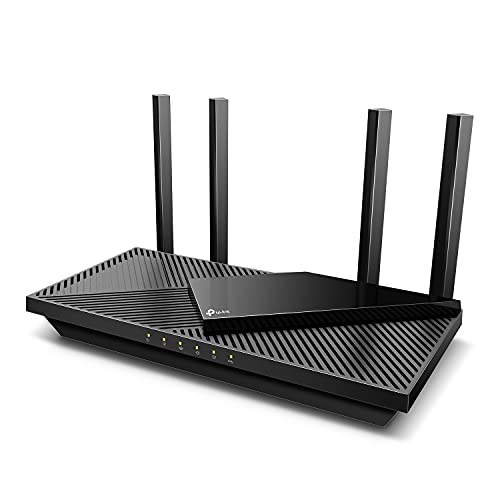
- Up to 2,976 Mbps combined Wi-Fi 6 throughput
- OFDMA helps reduce latency and jitter
- HomeShield, VPN, and Alexa support included
Best For: Home offices with simultaneous calls, streaming, and downloads
Best Wi-Fi 7 Upgrade

- Tri-band Wi-Fi 7 adds a dedicated 6 GHz band
- Up to 9.3 Gbps total throughput
- Two 2.5Gbps and two gigabit Ethernet ports
Best For: Fast, modern home offices with Wi-Fi 7 devices
Best for Large Homes

- Mesh coverage reaches up to 6,500 square feet
- Supports up to 150 connected devices
- Three gigabit ports per unit with Ethernet backhaul
Best For: Large or multistory homes with office dead zones
Best for Easy Setup

- Wi-Fi 7 features for higher capacity
- Two 2.5Gbps ports
- Coverage up to 2,000 sq. ft.
Best For: Multi-gig home offices and Wi-Fi 7 devices
Best Simple Mesh Start
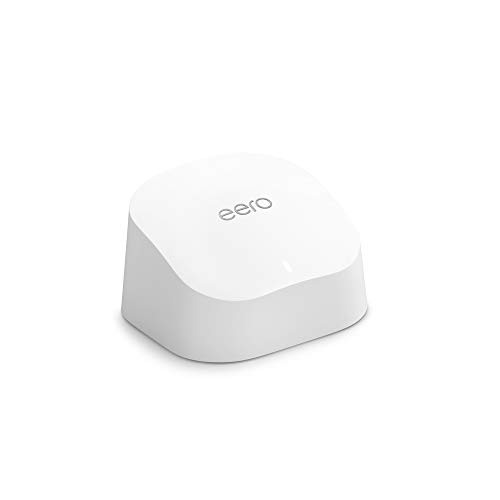
- Covers up to 1,500 sq. ft.
- Supports 75+ devices
- Easy app-guided setup
Best For: Small homes and low-maintenance networks
Best 6GHz Performance

- Tri-band Wi-Fi 6E
- Up to 5,400 Mbps combined Wi-Fi
- VPN and EasyMesh support
Best For: Wi-Fi 6E home offices with many active devices
Best Wi-Fi 7 Value
TP-Link BE6500 Dual-Band Router

- Wi-Fi 7 features including MLO, Multi-RUs, and 4K-QAM
- Up to 2,400 sq. ft. coverage and 90 connected devices
- 2.5 Gbps WAN/LAN and LAN connectivity
Best For: Home offices adopting Wi-Fi 7 without needing tri-band service
Best Tri-Band Upgrade
TP-Link Archer BE550 Wi-Fi 7 Router

- Tri-band Wi-Fi 7 with a dedicated 6 GHz band
- One 2.5G WAN and four 2.5G LAN ports
- EasyMesh, IoT network, HomeShield, and VPN support
Best For: Demanding home offices with newer devices and multi-gig networking
Best Budget Office Router

- Dual-band Wi-Fi 5 with up to 1,900 Mbps combined speed
- Coverage up to 1,200 sq. ft. with beamforming
- Four Gigabit LAN ports and simple Tether App setup
Best For: Smaller home offices with moderate wireless and wired needs
Best Value Wi-Fi 6 Pick – Archer AX21 V5
If you need dependable performance for everyday work, video calls, streaming, and browsing, the TP-Link Archer AX21 is a practical choice among wifi routers for home offices. Its dual-band Wi-Fi 6 design supports up to 1.8 Gbps combined bandwidth, while OFDMA helps the router communicate with multiple devices more efficiently. A separate modem is required.
Best For: Home offices seeking affordable Wi-Fi 6 performance, broad coverage, and straightforward app or voice control.
Pros:
- Wi-Fi 6 and OFDMA help handle multiple connected devices.
- Four high-gain antennas, beamforming, and an advanced FEM support reliable coverage.
- Includes WPA3 security and OpenVPN and PPTP VPN server support.
- Works with major internet providers and supports Alexa control.
Cons:
- Dual-band design does not include the 6 GHz band.
- Actual speeds depend on your internet plan, distance, obstacles, and network conditions.
- A separate modem is required for internet access.
The Archer AX21 is a sensible entry point for a typical home office. It offers modern Wi-Fi 6 features and gigabit wired ports without moving into the higher cost or complexity of tri-band and mesh systems.
Best for Busy Networks – Archer AX55 AX3000
The TP-Link Archer AX55 is a stronger fit for busy home offices where work calls, streaming, downloads, and other devices compete for bandwidth. This dual-band Wi-Fi 6 router reaches up to 2,976 Mbps combined throughput, and OFDMA is designed to reduce latency and jitter across simultaneous connections. A modem is required for most internet providers.
Best For: Busy households and home offices that need higher Wi-Fi 6 capacity, coverage, and basic network-management tools.
Pros:
- Offers up to 2,402 Mbps on 5 GHz and 574 Mbps on 2.4 GHz.
- OFDMA supports smoother simultaneous gaming, streaming, and live feeds.
- Four high-gain antennas and beamforming help extend coverage.
- Includes HomeShield features, VPN server and client support, and Alexa compatibility.
Cons:
- It is dual-band, so it lacks a dedicated 6 GHz band.
- Some HomeShield security and control features are limited to the basic offering described.
- Performance varies with the internet plan, placement, obstacles, and connected devices.
Compared with the AX21, the Archer AX55 gives a home office more headroom for demanding concurrent use. Its cooling design and network tools also make it a compelling choice for users who want sustained performance and easier device management.
Best Wi-Fi 7 Upgrade – NETGEAR BE9300 Wi-Fi 7 Router
The NETGEAR Nighthawk BE9300 is a forward-looking option among wifi routers for home offices, pairing Wi-Fi 7 with a third 6 GHz band. It provides up to 9.3 Gbps across three bands, giving compatible devices an additional high-speed lane for video calls, demanding transfers, streaming, and other heavy network use. It connects to an existing modem or gateway through Ethernet.
Best For: Performance-focused home offices with newer Wi-Fi 7 devices, fast internet service, and up to 2,500 square feet to cover.
Pros:
- Tri-band Wi-Fi 7 includes the 2.4 GHz, 5 GHz, and 6 GHz bands.
- Up to 9.3 Gbps total throughput supports demanding connected homes.
- Two 2.5Gbps ports and two gigabit ports support fast wired connections.
- Nighthawk app provides guided setup, speed tests, device controls, and guest networks.
Cons:
- Wi-Fi 7 benefits depend on compatible client devices and internet speeds.
- Coverage is rated up to 2,500 square feet and can be reduced by walls, floors, and interference.
- Larger or multistory homes may need a mesh system instead.
The BE9300 is the most capable single-router option in this group, especially when a home office has newer devices and a fast connection. Its higher-end features may be unnecessary for basic broadband plans, but the 6 GHz band and 2.5Gbps ports provide useful room to grow.
Best for Large Homes – Deco X55 Three-Pack
The TP-Link Deco X55 three-pack is designed for home offices where a single router may leave dead zones. Its Wi-Fi 6 mesh system covers up to 6,500 square feet, supports up to 150 devices, and uses multiple units to provide seamless coverage throughout the home. A modem is required for most internet providers.
Best For: Large or multistory homes that need consistent Wi-Fi coverage for a home office, smart devices, and household users.
Pros:
- Three mesh units provide up to 6,500 square feet of stated coverage.
- Supports up to 150 connected devices with Wi-Fi 6.
- Each unit has three gigabit Ethernet ports and supports wired Ethernet backhaul.
- Deco app setup, AI-driven mesh management, and basic HomeShield features simplify administration.
Cons:
- Dual-band Wi-Fi 6 does not include the 6 GHz band.
- A three-unit system may be more equipment than a smaller home needs.
- Coverage and speeds vary with home layout, placement, obstacles, and network conditions.
For a home office separated from the main router by floors or thick walls, the Deco X55 offers a more practical coverage strategy than a traditional single-router setup. Its wired backhaul support is especially useful when you can connect units by Ethernet for more consistent performance.
Best for Easy Setup – TP-Link Archer BE230
For home offices that need a modern, high-capacity connection, the TP-Link Archer BE230 is one of the more forward-looking wifi routers for home offices. Its dual-band Wi-Fi 7 design, 2.5Gbps ports, and coverage for up to 2,000 square feet make it a practical fit for fast internet plans and busy households.
Best For: Home offices with Gigabit-plus service, multiple wired devices, and newer Wi-Fi 7 clients.
Pros:
- Wi-Fi 7 features include Multi-Link Operation, Multi-RUs, and 4K-QAM.
- Includes two 2.5Gbps ports plus three 1Gbps LAN ports.
- Rated to cover up to 2,000 square feet and support up to 60 devices.
- Supports EasyMesh expansion and app-based setup through TP-Link Tether.
Cons:
- It is dual-band and does not include a 6GHz band.
- Actual performance depends on your internet plan, distance, walls, and other conditions.
- A separate modem is required for most internet providers.
The Archer BE230 stands out when wired multi-gig connectivity and Wi-Fi 7 features matter more than having a 6GHz channel. It is also a sensible choice for households that may expand coverage with EasyMesh later.
Best Simple Mesh Start – Amazon eero 6
The Amazon eero 6 is a straightforward option for home workers who want easy setup and dependable coverage without managing complicated router settings. As one of the more user-friendly wifi routers for home offices, it covers up to 1,500 square feet, supports 75-plus devices, and can be expanded with compatible eero hardware.
Best For: Small to medium homes needing simple Wi-Fi 6 coverage and easy network management.
Pros:
- Wi-Fi 6 supports speeds up to 900 Mbps and more than 75 connected devices.
- TrueMesh technology is designed to reduce drop-offs and buffering.
- The eero app guides setup and allows remote network management.
- Built-in Zigbee smart home hub supports compatible Alexa-connected devices.
Cons:
- The single unit covers up to 1,500 square feet, so larger homes may need additional eero hardware.
- Its supported internet speed is up to 900 Mbps, making it less suited to faster multi-gig plans.
- Some smart-home features depend on compatible devices and Alexa integration.
The eero 6 is a good fit when ease of use is the priority. Its app, automatic updates, and expandable design make it especially practical for remote workers who want to spend less time troubleshooting their network.
Best 6GHz Performance – TP-Link Archer AXE75
The TP-Link Archer AXE75 is a strong choice for home offices with newer Wi-Fi 6E devices, especially when low-latency video calls, large downloads, and several active connections are common. Its tri-band design adds a 6GHz band and up to 5,400 Mbps of combined Wi-Fi capacity.
Best For: Busy home offices using Wi-Fi 6E devices and needing extra wireless capacity.
Pros:
- Tri-band Wi-Fi 6E includes a 6GHz band with 160MHz channels.
- Up to 5,400 Mbps combined Wi-Fi capacity supports browsing, streaming, and downloading at the same time.
- OFDMA and tri-band operation help accommodate more connected devices.
- Includes VPN server and client support, EasyMesh compatibility, and basic HomeShield features.
Cons:
- The supplied specifications list 1Gbps LAN bandwidth, limiting wired multi-gig potential.
- The benefits of 6GHz depend on compatible Wi-Fi 6E devices and suitable range.
- A modem is required for most internet providers.
The Archer AXE75 is a well-rounded pick for offices that need more wireless lanes rather than the fastest wired ports. Its 6GHz band can help compatible devices avoid congestion, while EasyMesh leaves room to extend coverage.
Best Wi-Fi 7 Value – TP-Link BE6500 Dual-Band Router
For home offices that need modern wireless performance without moving to a tri-band setup, the TP-Link Archer BE400 is a capable Wi-Fi 7 option. It supports Multi-Link Operation, Multi-RUs, and 4K-QAM, with up to 5,764 Mbps on 5 GHz and 688 Mbps on 2.4 GHz. Its multi-gig ports also make it a practical match for faster internet service and wired office equipment.
Best For: Home offices using newer Wi-Fi 7 devices and needing strong coverage, multi-gig connectivity, and support for many connected devices.
Pros:
- Wi-Fi 7 features can improve throughput, latency, and connection reliability on compatible devices.
- Provides coverage of up to 2,400 square feet for as many as 90 devices under stated conditions.
- Includes one 2.5 Gbps WAN/LAN port, one 2.5 Gbps LAN port, and three 1 Gbps LAN ports.
- Offers HomeShield security features, parental controls, IoT protection, and VPN client/server support.
Cons:
- It is dual-band and does not provide a dedicated 6 GHz band.
- Wi-Fi 7 benefits depend on compatible devices and real-world conditions.
- A separate modem is required, and EasyMesh compatibility does not extend to Deco systems.
The Archer BE400 is a sensible choice for a home office that wants Wi-Fi 7 features, broad stated coverage, and a mix of wired port speeds. It is especially appealing when you have compatible devices but do not specifically need tri-band operation.
Best Tri-Band Upgrade – TP-Link Archer BE550 Wi-Fi 7 Router
The TP-Link Archer BE550 is built for demanding home offices with heavy streaming, large downloads, and multiple connected devices. Its tri-band Wi-Fi 7 design combines 6 GHz, 5 GHz, and 2.4 GHz bands, while five 2.5 Gbps ports give both wireless and wired equipment room to benefit from faster networking.
Best For: Busy home offices that want tri-band Wi-Fi 7, extensive 2.5 Gbps wired connectivity, and an upgrade path for whole-home coverage.
Pros:
- Tri-band Wi-Fi 7 supports up to 5,760 Mbps on 6 GHz, 2,880 Mbps on 5 GHz, and 574 Mbps on 2.4 GHz.
- Includes one 2.5G WAN port and four 2.5G LAN ports for future-ready wired networking.
- EasyMesh support can help expand coverage and reduce dead zones with compatible equipment.
- Provides HomeShield protection, a separate IoT network, WPA3 support, and VPN client/server features.
Cons:
- The fastest results require compatible Wi-Fi 7 devices and suitable internet service.
- A separate modem is required for most internet providers.
- Its advanced features may be more than a small, lightly connected office needs.
With a dedicated 6 GHz band and four 2.5G LAN ports, the Archer BE550 is the strongest fit here for a performance-focused home office. It also offers useful expansion and security features for households that expect their network to grow.
Best Budget Office Router – TP-Link Archer A8 AC1900
The TP-Link Archer A8 is a straightforward choice for smaller home offices seeking dependable Wi-Fi without paying for newer Wi-Fi 7 hardware. This dual-band Wi-Fi 5 router delivers up to 1,300 Mbps on 5 GHz and 600 Mbps on 2.4 GHz, with four Gigabit LAN ports for wired computers, displays, or other office equipment.
Best For: Small to medium home offices with moderate internet needs, a limited number of devices, and a preference for simple setup.
Pros:
- Offers up to 1,900 Mbps combined dual-band throughput, with MU-MIMO and three simultaneous data streams.
- Covers up to 1,200 square feet under stated conditions and uses beamforming for more focused connections.
- Four Gigabit LAN ports support reliable wired connections for PCs, smart TVs, and consoles.
- Includes OneMesh compatibility, parental controls, guest Wi-Fi, and easy Tether App management.
Cons:
- It uses Wi-Fi 5 and does not support the 6 GHz band.
- Security is listed as basic, with WPA2-PSK rather than newer Wi-Fi 7-era features.
- There is no USB port.
The Archer A8 remains a practical option when your home office mainly needs stable dual-band wireless and Gigabit Ethernet. It is less suitable for users planning a high-density, multi-gig, or Wi-Fi 7 setup, but its simple management and modest coverage make it easy to deploy.
How We Picked the Best Wifi Routers for Home Offices
We focused on the features that matter most for productive home networking: wireless standard, real-world capacity, coverage approach, wired connectivity, ease of setup, and value. The lineup includes traditional single-router designs, mesh systems for larger or irregular homes, and newer WiFi 6E and WiFi 7 models for buyers who want additional spectrum and longer-term performance.
We also considered practical use cases such as simultaneous video meetings, large file transfers, streaming, smart-home devices, and multiple household users. Advertised speeds and coverage are theoretical; walls, interference, device compatibility, and internet service limits affect actual results.
Quick Comparison
| Best For | Recommended Type | Why It Makes Sense |
|---|---|---|
| Basic home office | WiFi 6 dual-band router | Good value for video calls, browsing, and everyday work |
| Large or multi-level homes | Mesh system | More consistent coverage across rooms |
| Many devices | High-capacity WiFi 6E or WiFi 7 router | Better traffic handling and newer wireless features |
| Fast internet plans | Multi-gig WiFi 7 router | More headroom for compatible devices and wired connections |
Key Buying Factors for Wifi Routers for Home Offices
Internet Speed and Wireless Standard
Match the router to your service plan. A budget WiFi 6 router is sufficient for many plans, while WiFi 6E and WiFi 7 are more compelling for gigabit-plus service, newer laptops, and heavy simultaneous use. A faster router cannot increase the speed supplied by your internet provider.
Coverage and Placement
Single routers work best when placed centrally and in the open. If your office is far from the router, separated by thick walls, or located on another floor, a mesh system can provide more reliable coverage. Ethernet backhaul is preferable when available because it reduces wireless relay losses.
Ports and Wired Connections
Check whether you need gigabit or multi-gig Ethernet for a desktop, NAS, gaming system, or wired access point. Wired connections generally offer lower latency and greater consistency than WiFi, which can be valuable for video conferencing and large uploads.
Capacity, Security, and Management
Count laptops, phones, cameras, printers, smart-home devices, and streaming hardware—not just office computers. Look for current security updates, automatic firmware support, guest networking, parental controls if needed, and an app or web interface you will actually use.
Who Should Buy Which Wifi Routers for Home Offices?
Choose an affordable dual-band WiFi 6 or AC1900 router if you have a small home, a modest plan, and a limited number of active devices. Choose a mesh system if coverage dead zones are your main problem rather than raw speed. A WiFi 6E model is a sensible middle ground for compatible 6-GHz devices and busy networks, provided your home layout does not require mesh coverage.
Choose WiFi 7 when you have a fast internet plan, several newer compatible devices, or want a router with more performance headroom for the coming years. Regardless of category, place the router centrally, update its firmware, use WPA2 or WPA3 security, and connect stationary work equipment by Ethernet whenever practical.