Finding the right robotics kit can turn coding from a screen-only subject into a hands-on STEM challenge. The best options help students build, test, troubleshoot, and improve while learning real programming concepts.
This roundup focuses on age-appropriate, classroom-friendly picks for beginners through more advanced learners, with a mix of Scratch, Arduino, and Python support.
Best 10 Programmable Robot Kits for Students Picks for 2026
Entry-Level Coding Robot

- Scratch-to-Arduino learning path
- Builds in about 15 minutes
- Includes lessons and free apps
Best For: Students ages 8+ starting with guided robotics and coding
Mechanical Coding Challenge
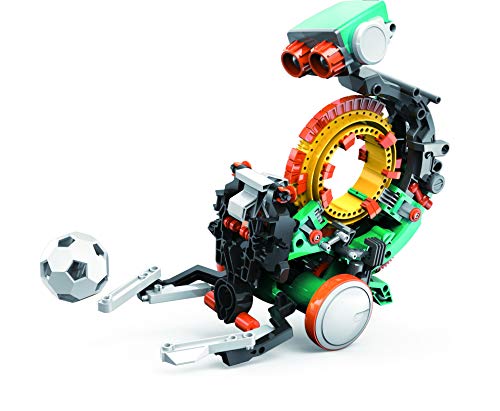
- Mechanical coding wheel system
- Makes multiple actions and motions
- In-depth STEM build for ages 10+
Best For: Older students who prefer hands-on mechanical coding and building
App-Controlled Builder
468-Piece Programmable Robot Kit
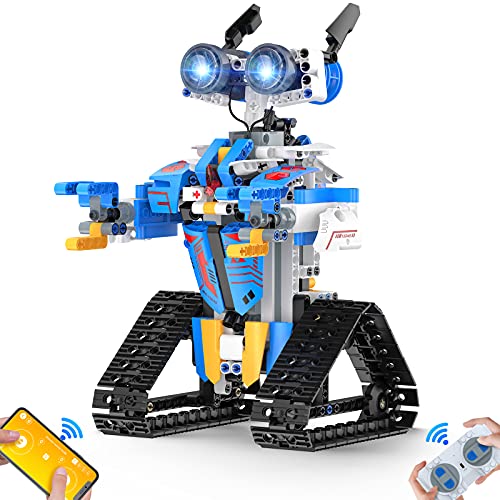
- 468-piece build with stickers
- APP, remote, voice, and sensor modes
- 360-degree movement and stunt play
Best For: Kids ages 8+ who want a versatile build-and-control robot
Robotic Arm Starter Kit
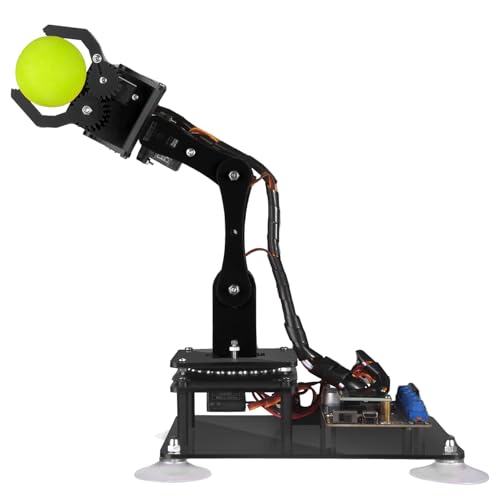
- Arduino IDE compatible
- Includes digital tutorials and code routines
- Manual and PC software control
Best For: Older students and hobbyists learning robotics with Arduino
Mobile Coding Robot Kit
ACEBOTT Robotics Kit for Kids Ages 8-16

- Scratch, Arduino, and Python support
- Codes on phones, tablets, and computers
- Includes 16 guided tutorials
Best For: Students who want a flexible starter kit that can scale up
Project-Based Coding Robot

- Scratch to Python learning path
- Built-in WiFi, Bluetooth, and sensors
- Includes 37 guided lessons
Best For: Classrooms and students who want project-based coding depth
Feature-Rich Robot Car Kit
ELEGOO UNO R3 Smart Robot Car V4

- 24 module parts for robotics learning
- Line tracking, obstacle avoidance, and FPV video
- App, tablet, and IR remote control
Best For: Students ready for a feature-packed robot car project
3-in-1 Advanced Builder
Makeblock mBot Ranger Coding Kit

- Three robot builds: tank, bird, and racing car.
- Supports Scratch and Arduino programming.
- Includes multiple sensors and tracked wheels.
Best For: Students who want a more advanced STEM kit with multiple robot builds.
Modular Arm and Tank Build

- Builds as a car, tank, or robotic arm combo.
- Includes a 5DOF programmable arm and ESP32.
- Supports Arduino, Scratch, app, and remote control.
Best For: Older students who want a modular robotics kit with a programmable arm.
Interactive Coding Starter

- Supports Scratch and Python programming.
- Includes guided project cards and 24+ learning cases.
- Offers voice control, Wi-Fi, Bluetooth, and sensors.
Best For: Students who want an easy-to-build coding robot with guided learning support.
Entry-Level Coding Robot – mBot STEM Coding Robot Kit
For shoppers comparing programmable robot kits for students, the Makeblock mBot is a straightforward starting point for learning electronics, robotics, and coding. It pairs Scratch with Arduino-style progression, so students can begin with simple software-based control and move toward more advanced programming as they grow.
Best For: Students ages 8+ who want an easy-to-build starter robot with guided coding lessons and room to expand.
Pros:
- Designed for entry-level coding with step-by-step learning from Scratch to Arduino
- Simple build process with instructions that can take about 15 minutes
- Includes coding cards, lessons, and free Makeblock apps plus mBlock software
- Supports fun functions like remote control, line-following, and obstacle avoidance
Cons:
- Remote controller battery is not included
- The robot kit needs 4 AA batteries, which are not included
- Best suited to younger or beginner students rather than advanced builders
The mBot is a practical pick if you want a student-friendly coding robot that teaches more than one skill at once. Its mix of guided tutorials, simple assembly, and open-ended compatibility makes it a strong classroom or home learning option.
Mechanical Coding Challenge – Teach Tech Mech-5 Robot
If you want programmable robot kits for students that focus on hands-on engineering, the Teach Tech Mech-5 stands out for its mechanical coding system. Instead of software-based coding, students snap coding buttons onto a coding wheel to make the robot throw, lift, kick, draw, and more.
Best For: Students ages 10+ who want a deeper build project centered on mechanical coding basics.
Pros:
- Unique mechanical coding wheel teaches coding concepts without a screen
- Builds multiple actions like throwing, lifting, kicking, and drawing
- Designed as a mission-based STEM project for future engineers
- Includes detailed step-by-step assembly instructions
Cons:
- Requires multiple hours of build time
- Not a pre-assembled toy, so it demands patience and attention
- Less focused on digital programming than app- or software-based kits
Mech-5 is a strong choice for students who like building first and coding second. Its mechanical approach makes it especially useful for learning how engineered systems translate instructions into movement.
App-Controlled Builder – 468-Piece Programmable Robot Kit
Among programmable robot kits for students, this 468-piece building robot aims to blend construction play with multiple control options. It can move in several directions, rotate 360 degrees, and switch between APP Bluetooth control, remote control, voice control, gravity sensor mode, and STEM programming mode.
Best For: Kids ages 8+ who want a feature-rich buildable robot with app and remote control options.
Pros:
- Includes 468+ pieces for a substantial building experience
- Offers several control modes, including app, remote, voice, gravity sensor, and programming
- Moves in all directions and performs 360-degree rotating stunts
- Comes with a step-by-step assembly manual and organized packaging
Cons:
- Uses many parts, so assembly will take more time than simpler kits
- More play-focused than a pure coding curriculum kit
- Designed for ages 8+, so it may not satisfy older students seeking advanced programming depth
This kit is a good fit if you want a robot that keeps students engaged with lots of movement and control choices. It works best as a hybrid of building toy and introductory programmable robot rather than a technical coding platform.
Robotic Arm Starter Kit – Adeept 5DOF Arduino Robot Arm
For students exploring programmable robot kits for students in a more advanced format, the Adeept 5DOF robotic arm focuses on Arduino-compatible learning and hands-on robotics practice. It includes detailed PDF manuals, code routines, and control methods that let users experiment with manual control and PC-based graphical control.
Best For: Older students and hobbyists who want an Arduino-compatible robotic arm with tutorials and support.
Pros:
- Compatible with Arduino IDE for programming practice
- Includes detailed PDF tutorials and example code routines
- Offers manual control and PC software-based remote control
- Supports learning tasks like self-learning, drawing, and imitating
Cons:
- Listed for adult use, so it is not a typical beginner kids’ kit
- Paper tutorials are not included, since the guides are digital
- Assembly may be better suited to experienced builders
This robotic arm is best for learners ready for a more technical project than a basic classroom robot. It rewards students who want to study coding, movement, and mechanical control in one build.
Mobile Coding Robot Kit – ACEBOTT Robotics Kit for Kids Ages 8-16
If you’re comparing programmable robot kits for students, this ACEBOTT build is a strong pick for hands-on learning that connects coding, electronics, and robotics in one project. It supports Scratch, Arduino, and Python, and the mobile-friendly coding setup makes it practical for classrooms, home learning, or STEM programs that want flexibility.
Best For: Students who need a beginner-friendly robot kit that can grow into more advanced coding.
Pros:
- Supports Scratch, Arduino, and Python for multiple skill levels.
- Works on computers, tablets, and smartphones for flexible coding.
- Includes 16 story-based tutorials plus HD videos and illustrated instructions.
- App and IR remote control help students see code effects quickly.
Cons:
- Batteries are not included.
- More advanced modes may be better suited to older or more experienced learners.
Overall, this is a versatile learning kit for students who want a guided start with room to advance. Its mix of mobile coding, build-first assembly, and multiple programming languages makes it especially appealing for long-term STEM use.
Project-Based Coding Robot – Makeblock CyberPi STEM Kit
For shoppers focused on programmable robot kits for students, this Makeblock CyberPi kit stands out for project-based learning and a clear path from Scratch to Python. It combines a built-in WiFi module, Bluetooth, sensors, and a display into a compact robot platform designed for classroom lessons and creative STEM projects.
Best For: Students and classrooms that want an all-in-one coding platform with project depth.
Pros:
- Supports both Scratch and Python for beginner-to-advanced learning.
- Built-in WiFi, Bluetooth, sensors, LED display, microphone, speaker, and motion sensors.
- Includes up to 37 step-by-step lessons for teachers and learners.
- Compatible with Windows, Mac, Linux, Chromebook, and mobile devices.
Cons:
- More focused on coding projects than traditional car-style robot play.
- May feel more advanced than simple entry-level kits for absolute beginners.
This is a strong option if you want a robot kit that goes beyond assembly and into experimentation with IoT, data, and interactive programming. The lesson structure and broad device compatibility make it especially useful for school settings.
Feature-Rich Robot Car Kit – ELEGOO UNO R3 Smart Robot Car V4
If you want programmable robot kits for students that feel closer to a full robotics lab, the ELEGOO UNO R3 Smart Robot Car Kit V4 offers a lot of built-in functionality. It includes obstacle avoidance, line tracking, FPV video, app control, and IR remote control, making it a practical choice for learners who want to build and then test real robot behaviors.
Best For: Students who want a hands-on robot car with multiple sensing and control features.
Pros:
- Includes 24 module parts for a broad robotics build.
- Supports line tracking, ultrasonic obstacle avoidance, and FPV video.
- Can be controlled by app, tablet, or IR remote.
- HD instructions and included code help simplify assembly.
Cons:
- Requires basic electronic knowledge for best results.
- May be better with guidance if the student is brand new to robotics.
This kit is a good fit for learners who want more than a simple beginner toy and are ready to explore robotics concepts in depth. Its combination of modules and control methods makes it a strong classroom or home STEM project.
3-in-1 Advanced Builder – Makeblock mBot Ranger Coding Kit
If you want programmable robot kits for students that go beyond a basic build, the Makeblock mBot Ranger offers three different robot forms in one set: a tank, a self-balancing bird, and a racing car. It supports Scratch and Arduino programming, and the included sensors and modules give students plenty of room to experiment with movement, detection, and control.
Best For: Students who want a more advanced STEM kit with multiple robot builds and Scratch/Arduino learning.
Pros:
- 3-in-1 design includes a tank, self-balancing robot, and racing car.
- Supports Scratch and Arduino through the mBlock5 programming app.
- Includes multiple modules such as ultrasonic, line-tracking, gyroscope, LED, and temperature sensors.
- Sturdy metal parts and tracked wheels are built for indoor and outdoor play.
Cons:
- Requires 6 AA batteries or lithium batteries, which are not included.
- More advanced than entry-level kits, so younger students may need help.
This is a strong pick for students who want a hands-on robotics kit with real variety and room to grow. The multiple build modes and broader module set make it especially useful for learning by doing rather than just following one simple path.
Modular Arm and Tank Build – ACEBOTT 4-in-1 Robot Kit
For programmable robot kits for students who like both construction and coding, this ACEBOTT set stands out with a modular design that can become a robot car, tank, robotic arm car, or robotic arm tank. It uses an ESP32 controller, works with Arduino and Scratch, and includes guided tutorials plus assembly videos to help kids and teens build step by step.
Best For: Older students who want a modular robotics kit with a programmable arm and all-terrain tank builds.
Pros:
- 4-in-1 modular design with multiple robot and tank combinations.
- Includes a 5DOF programmable robotic arm powered by an ESP32 controller.
- Compatible with Arduino and Scratch, with 16 guided tutorials and HD assembly videos.
- IR remote and smartphone app control add flexibility for play and testing.
Cons:
- Designed for ages 12+, so it may be too advanced for younger students.
- Best suited to learners who are comfortable spending time on assembly and coding.
This kit is a good fit if you want one product that mixes robotics, mechanics, and hands-on programming. Its modular structure and arm functionality give students more ways to explore movement, control, and problem-solving.
Interactive Coding Starter – Makeblock mBot2 Robot Kit
Among programmable robot kits for students, the Makeblock mBot2 is a solid choice for kids who want interactive features and a clear learning path. It supports Scratch and Python, includes guided project cards, and adds features like voice control, music, Wi-Fi, Bluetooth, and USB control for a more engaging coding experience.
Best For: Students who want an easy-to-build coding robot with Scratch and Python learning support.
Pros:
- Supports both Scratch and Python programming.
- Includes 24+ cases and 8+ courses with project cards for guided learning.
- Offers 8+ play modes, including drive, draw, music, voice control, and Wi-Fi.
- Comes with 10+ advanced sensors and is expandable with 30+ modules.
Cons:
- Focused on guided learning, so advanced builders may want more open-ended hardware.
- Uses AAA and lithium-ion battery support, which may require planning for power management.
This kit works well for students who want a friendly entry into robotics without giving up depth. The combination of interactive modes, structured lessons, and sensor expansion makes it useful for both home learning and classroom projects.
Choosing among Programmable Robot Kits for Students comes down to age fit, coding depth, build complexity, and how much classroom or home support the kit needs. A good kit should feel challenging without becoming frustrating, and it should reward experimentation with clear feedback.
How We Picked the Best Programmable Robot Kits for Students
We prioritized kits with strong educational value, clear programming pathways, and hands-on assembly that teaches both hardware and software basics. We also looked for options that suit different skill levels, from entry-level visual coding to more advanced projects with Arduino or Python compatibility.
Quick Comparison
For beginners, visual programming platforms like Scratch are usually the easiest starting point. Students ready for more control may prefer kits with Arduino support, while older learners can benefit from Python-capable models and multi-function kits that grow with their skills. Build style also matters: cars and simple robots are often easier for first-time users, while robot arms and multi-mode kits offer broader engineering practice.
Key Buying Factors for Programmable Robot Kits for Students
Age and Skill Level
Match the kit to the student’s reading level, patience for assembly, and prior coding experience. Younger students generally do best with guided builds and block-based coding, while teens can handle more open-ended programming and troubleshooting.
Coding Platform
Scratch-style coding is ideal for beginners because it reduces syntax errors and builds confidence. Arduino is better for students who want to learn text-based logic and electronics. Python support adds another step up for learners preparing for more advanced STEM coursework.
Build Time and Complexity
A kit with a manageable assembly process is more likely to be used repeatedly. If the goal is a classroom project or first robotics experience, look for clear instructions and durable parts. If the goal is deeper engineering practice, choose a kit with more components and expandable projects.
Learning Scope
The strongest kits teach more than movement. Look for sensors, remote control, app integration, mechanical functions, and project-based lessons that reinforce problem-solving, sequencing, and debugging.
Who Should Buy Which Programmable Robot Kits for Students?
Buy simple coding cars or Scratch-based kits for younger students and first-time learners. Choose multi-function robot kits or Arduino-compatible models for middle and high school students who want more challenge. If the student is especially interested in mechanics, robot arms and 3-in-1 designs can offer more variety and longer-term value.
For families, homeschoolers, and teachers, the best choice is usually the kit that balances fun with repeatable learning. The most useful robotics kits are the ones students will keep rebuilding, reprogramming, and improving after the first project is done.