The best coding toys for 5 year olds turn big STEM ideas into simple, hands-on play. At this age, the right toy should teach sequencing, problem-solving, and cause-and-effect without feeling like a lesson.
In this roundup, we focused on beginner-friendly picks that are age-appropriate, durable, and fun enough to keep kids engaged beyond the first play session.
Best 10 Coding Toys for 5 Year Olds Picks for 2026
Screen-Free Starter
Code & Go Robot Mouse Activity Set
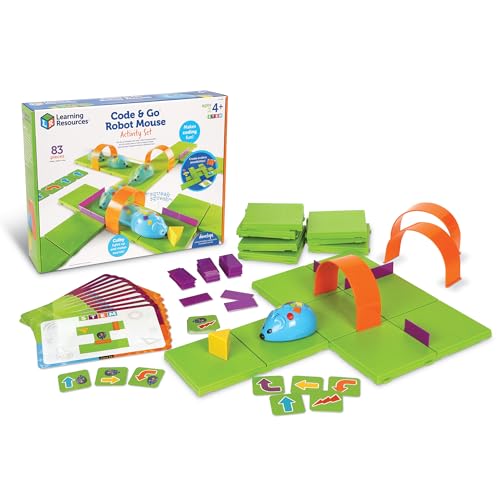
- Screen-free robot mouse coding
- Ages 4+ beginner-friendly design
- Maze grids, walls, and activity cards
Best For: Beginners who enjoy maze-based learning
Story-Based Learning

- No app or device needed
- Teaches sequences, loops, and more
- Includes 64-page experiment manual
Best For: Kids who like guided STEM stories
Creative STEM Play

- 4 STEM challenge types with 3 levels
- Over 50 patterns to build
- Supports fine motor skills and logic
Best For: Creative kids who like patterns and design
Fantasy Coding Play
Coding Critters MagiCoders Blazer

- Screen-free coding with a magic wand
- Fantasy story challenges and accessories
- Builds sequencing and problem solving
Best For: Beginner coders who love pretend-play themes
Hands-On iPad Coding
Coding Starter Kit for Ages 5-10+
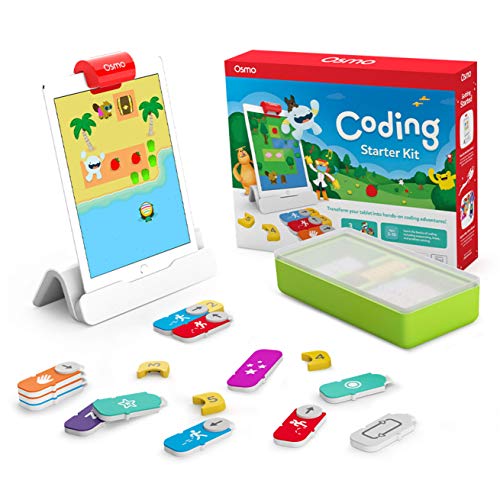
- 3 app-based coding games included
- Physical blocks teach sequencing and logic
- Requires a compatible iPad, not included
Best For: Kids who learn best with hands-on, iPad-based coding games
Screen-Free Robot Starter
Screen-Free Beginner Robot Coding

- Push-button coding is easy for beginners
- 3-in-1 robot supports rescue mission play
- Made for ages 4+ and classroom use
Best For: Younger kids who want simple, screen-free robot coding
Grow-With-Me Coding Robot
Screen-Free to App Coding Robot
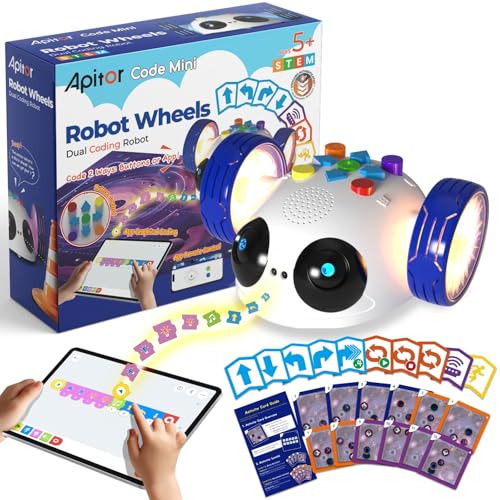
- Begins with coding cards and physical buttons
- App adds drag-and-drop programming
- Designed for ages 5-8 and classroom use
Best For: Kids who should start with tactile coding and later try app programming
Best with Extra Features
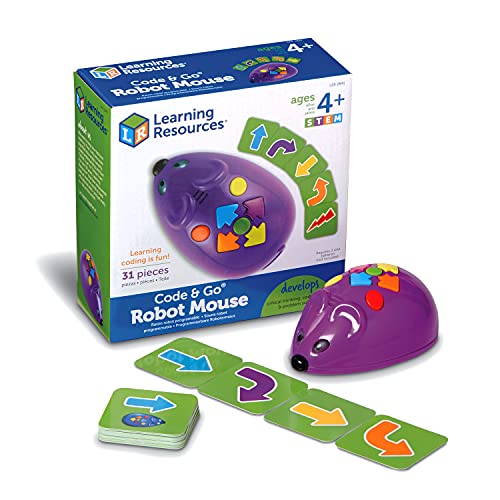
- Screen-free button coding for early learners
- Includes 30 double-sided coding cards
- Ages 4+ with lights, sounds, and 2 speeds
Best For: Beginners learning sequencing and early programming
Expandable Coding Set

- 78-piece screen-free coding set with robot and remote
- Builds sequencing with cards, boards, and obstacles
- Adds multi-step routes, turns, and sensor reactions
Best For: Kids ready for bigger coding challenges and maze play
Classic Screen-Free Pick

- Screen-free coding fundamentals with remote programming
- Supports up to 80-step programming and loops
- Includes coding cards, tiles, and detachable arms
Best For: Kids who want a grow-with-me coding robot
Screen-Free Starter – Code & Go Robot Mouse Activity Set
If you’re shopping for coding toys for 5 year olds, this screen-free robot mouse is a very approachable place to start. Kids use simple buttons and matching coding cards to practice sequencing, problem-solving, and early programming as they guide Colby through mazes and obstacle setups.
Best For: Hands-on beginners who learn best through maze play and simple robot commands.
Pros:
- Screen-free coding with buttons and coding cards
- Designed for ages 4+ and early learners
- Includes maze grids, walls, tunnels, and activity cards for repeat play
- Supports sequencing, logic, and directional understanding
Cons:
- Requires 3 AAA batteries, which are not included
- Best suited to guided maze activities rather than open-ended play
This set works well if you want a straightforward introduction to coding concepts without apps or screens. It has enough pieces to keep practice varied, and the repeatable maze format makes it especially useful for home learning or classroom centers.
Story-Based Learning – Kids First Coding & Robotics
For parents comparing coding toys for 5 year olds, this kit stands out because it teaches coding without any app or smart device. Kids build models, follow story-based challenges, and learn core ideas like sequences, loops, functions, conditions, events, algorithms, and variables through a full-color manual.
Best For: Kids who like structured lessons and story-driven STEM activities.
Pros:
- No software, apps, or smart devices required
- Introduces a wide range of coding concepts for early STEM learning
- Includes a 64-page full-color experiment manual
- Six storylines add variety, from maze challenges to soccer-themed play
Cons:
- More guided and instructional than freeform play
- Assembly and lesson-following may take more adult involvement
This is a strong pick if you want a more complete introductory coding experience with clear explanations. The story format can help younger kids stay engaged while still building real sequencing and robotics foundations.
Creative STEM Play – Pixel Art Kit for Kids
If you’re looking at coding toys for 5 year olds that also feel like arts and crafts, this pixel art kit is a creative option. It focuses on STEM challenges, pattern building, and problem-solving while kids create colorful designs with the included blocks and platform.
Best For: Kids who enjoy art-based STEM activities and pattern play.
Pros:
- Includes 4 types of STEM challenges with 3 difficulty levels
- Offers over 50 patterns for repeated use
- Helps build fine motor skills, logic, and creativity
- Uses safe, durable, non-toxic materials
Cons:
- More of a pattern and design kit than a true programmable robot toy
- Small size may limit large-group play
This kit makes sense if you want a hands-on activity that bridges creativity and early STEM thinking. It is a good fit for children who like building patterns, solving visual challenges, and making finished artwork they can be proud of.
Fantasy Coding Play – Coding Critters MagiCoders Blazer
Among coding toys for 5 year olds, this fantasy-themed set is especially appealing if your child likes pretend play. Kids use a magic wand and spell book to send Blazer through sequencing challenges, making it a playful way to introduce early robotics and coding basics without a screen.
Best For: Kids who want coding practice wrapped in a fantasy adventure.
Pros:
- Screen-free coding with wand controls and guided play
- Fantasy story adventures keep the activity engaging
- Helps build logic, sequencing, and problem solving
- Includes Blazer, a wand, a spell book, and themed accessories
Cons:
- Battery powered, so it needs batteries for play
- Best suited for simple beginner challenges rather than advanced coding
This is a solid pick for younger kids who need a playful hook to stay interested. The themed missions and hands-on controls make it a friendly first step into robotics-style thinking at home or in the classroom.
Hands-On iPad Coding – Coding Starter Kit for Ages 5-10+
If you want coding toys for 5 year olds that feel interactive instead of screen-only, the Osmo Coding Kit is built around hands-on puzzle play with an iPad. Kids use physical coding blocks to guide characters, build sequences, and work through beginner-to-advanced activities with audio and visual feedback, which makes it a practical pick for early coding practice.
Best For: Families who want a guided, screen-assisted coding toy with multiple game modes and room to grow from beginner to more advanced play.
Pros:
- Includes 3 game apps: Coding Awbie, Coding Jam, and Coding Duo.
- Uses tangible coding blocks for sequencing, loops, subroutines, and problem-solving.
- No WiFi is needed for gameplay, and the kit includes an Osmo Base and reflector.
- Designed for ages 5-10+ with beginner-to-expert levels.
Cons:
- An iPad is required but not included.
- Best fit only if your device is on the supported iPad list.
- Gameplay depends on app-based setup rather than fully standalone play.
Overall, this is a strong choice if you want a more educational, puzzle-driven option that combines physical manipulation with coding logic. It offers more depth than a basic toy robot, especially for kids who like structured challenges and creative play.
Screen-Free Robot Starter – Screen-Free Beginner Robot Coding
For coding toys for 5 year olds that keep things simple and screen-free, the Learning Resources Switcheroo Coding Crew uses push-button coding to introduce sequencing and beginner programming. It adds playful rescue missions, vehicle transformations, and a puzzle-town map, making it a good fit for kids who learn through imaginative, repeatable activities.
Best For: Younger beginners who want a screen-free coding robot with lots of hands-on mission play.
Pros:
- Screen-free push-button coding makes it easy for beginners to start.
- Includes a 3-in-1 robot with vehicle shells and coding cards.
- Supports sequencing, logic, and problem-solving through rescue missions.
- Designed for ages 4+ and works for home or classroom use.
Cons:
- Requires 3 AAA batteries, which are not included.
- Limited to one-player use.
- Less open-ended than app-based coding systems.
This is a straightforward starter robot for early learners who are not ready for tablets or more complex programming. Its strength is the combination of simple coding controls and imaginative play, which can help keep practice engaging.
Grow-With-Me Coding Robot – Screen-Free to App Coding Robot
If you’re comparing coding toys for 5 year olds, Robot Wheels stands out for starting with screen-free coding cards and then moving into app-based programming. Kids can practice logic, direction, and sequencing with physical pieces first, then expand into drag-and-drop programming and remote driving in the app as their skills develop.
Best For: Early elementary kids who need a step-by-step coding toy that can grow from hands-on practice into app programming.
Pros:
- Starts with 48 coding cards and physical buttons before moving to app control.
- Includes guided activity cards, a space map, and a user guide for structured play.
- Teaches sequencing, pattern recognition, color recognition, and problem-solving.
- Built for ages 5-8 and designed to be durable for home or classroom use.
Cons:
- Requires 3 AA batteries, not included.
- App features are an add-on rather than the only way to play.
- Best suited to guided learning, not fully open-ended robotics.
Robot Wheels is a practical middle-ground option: simple enough for beginners, but flexible enough to grow with a child. The combination of physical coding and app expansion makes it a solid pick for families who want more than a basic robot toy.
Best with Extra Features – Code & Go Robot Mouse
If you want coding toys for 5 year olds that start with the basics, this screen-free robot mouse is a simple way to teach sequencing, problem-solving, and early programming. Kids use button commands and coding cards to plan paths, test them, and debug mistakes as they play.
Best For: Kids who are just starting to learn coding fundamentals through hands-on, screen-free play.
Pros:
- Screen-free coding with simple button commands
- 30 double-sided coding cards for step-by-step planning
- Built for ages 4+ with logic and directional skill practice
- Mouse lights up, makes sounds, and has 2 speeds
Cons:
- Requires 3 AAA batteries, which are not included
- Best suited to basic coding rather than advanced challenges
This is a strong starter option if you want an approachable coding toy that keeps the learning tactile and easy to follow. It works well on its own or as an add-on to a larger Code & Go setup.
Expandable Coding Set – Botley 2.0 Activity Set
For coding toys for 5 year olds that offer more room to grow, this Botley 2.0 activity set blends remote-control play with early coding practice. Kids can use coding cards, boards, and obstacle pieces to build routes, try multi-step commands, and explore problem-solving in a screen-free format.
Best For: Kids who like building mazes and moving from simple commands to more complex coding paths.
Pros:
- 78-piece set with robot, remote programmer, cards, boards, and obstacles
- Screen-free learning with hands-on coding sequences
- Includes multi-step paths, 45° turns, and object-sensing reactions
- Lights, sounds, and music add engaging multisensory play
Cons:
- Requires 5 AAA batteries, which are not included
- More pieces may take extra setup time before play starts
This is a good pick if you want a toy that can keep challenging a child after the basics click. The larger set gives plenty of room for custom obstacle courses and repeat play.
Classic Screen-Free Pick – Botley Coding Robot
This Botley version is a practical choice if you want coding toys for 5 year olds that teach programming fundamentals without screens. It uses a remote programmer, coding cards, and accessory pieces to help kids build obstacle courses, follow sequences, and try more advanced ideas as they improve.
Best For: Families looking for a screen-free coding robot with enough features to grow with a child.
Pros:
- Screen-free introduction to programming fundamentals
- 80-step programming, loops, and obstacle detection
- Includes detachable robot arms, coding cards, and tiles
- Ready to use right out of the box aside from batteries
Cons:
- Requires 5 AAA batteries, which are not included
- Set is more compact than the larger Botley 2.0 activity kit
It’s a solid middle-ground option for kids who want more than a basic starter toy but do not need a full activity set. The added programming depth makes it useful as skills develop.
How We Picked These Coding Toys for 5 Year Olds
We looked for toys that match early learners’ attention spans and motor skills, with a strong balance of play value and skill-building. The best options for Coding Toys for 5 Year Olds should introduce core ideas like sequencing, debugging, loops, and directional thinking in a clear, age-appropriate way.
We also prioritized screen-free options, easy setup, reusable activities, and clear progression from simple challenges to more advanced play. For families who want a tablet-based option, we included one that still keeps the coding logic front and center.
Quick Comparison
For the most hands-on, screen-free experience, robot mouse and Botley-style sets are usually the easiest place to start. If you want more open-ended STEM play, robotics kits and buildable coding toys offer more room to grow. For kids who enjoy puzzles, art, or visual patterns, hybrid toys that combine coding with creativity can be especially appealing.
Key Buying Factors for Coding Toys for 5 Year Olds
Age Fit and Skill Level
Look for toys designed for ages 4 to 6, with simple commands and short challenge cycles. A toy that is too advanced can frustrate a five-year-old, while one that is too basic may lose interest quickly.
Screen-Free Vs. App-Based
Screen-free coding toys are often the best first choice because they make abstract concepts tangible. App-based sets can still be excellent if your child already enjoys tablets and you want a more interactive learning path.
Durability and Replay Value
Choose sturdy pieces, clear instructions, and multiple ways to play. The best Coding Toys for 5 Year Olds should support repeated use, not just a one-time activity.
Skills Taught
Good starter coding toys teach direction, planning, sequencing, and basic logic. Some also introduce loops, problem-solving, and early engineering concepts, which can help kids progress naturally as they grow.
Who Should Buy Which Coding Toys for 5 Year Olds?
If you want the simplest introduction, choose a screen-free robot or mouse-style coding toy. If your child likes building, pick a robotics kit with moving parts and challenge cards. If they enjoy creative play, a coding-based art or pattern kit may be a better fit. And if you want a more guided digital experience, an app-connected option can bridge playtime and structured learning.
For most families, the best choice is the toy that feels like fun first and learning second. That keeps young kids engaged long enough to actually build confidence with coding concepts.