Finding coding toys for 7 year olds should be about more than fun features. The best picks help kids practice sequencing, logic, and simple problem-solving without feeling like homework.
In this roundup, we focus on beginner-friendly STEM toys that are age-appropriate, engaging, and easy for families to use at home or in the classroom.
Best 10 Coding Toys for 7 Year Olds Picks for 2026
Screen-Free Starter Pick
Botley The Coding Robot Activity Set
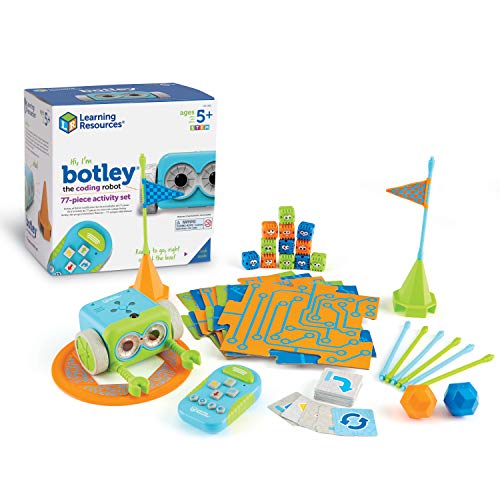
- Screen-free coding with remote programmer
- 77-piece set with challenges and obstacle parts
- Teaches STEM, logic, and problem solving
Best For: Kids who want a hands-on first coding robot
Electronics Builder Pick
Snap Circuits Jr. SC-100 Electronics Exploration Kit

- 100+ snap-together electronics projects
- No soldering or tools required
- Builds circuitry and STEM foundations
Best For: Kids who like hands-on electronics projects
Dual-Mode Robot Pick
Thames & Kosmos Robotics Smart Machines Junior STEM Kit

- Screen-free buttons plus block-based app coding
- Programs up to 200 actions
- Builds movement, lights, and sound skills
Best For: Beginners who want a robot they can build and code
Computer Science Activity Pick

- Hands-on coding and computer science activities
- 30+ parts with picture-based instructions
- Covers binary, encryption, sorting, and mazes
Best For: Kids who prefer guided STEM activities over robots
Best for Easy Setup
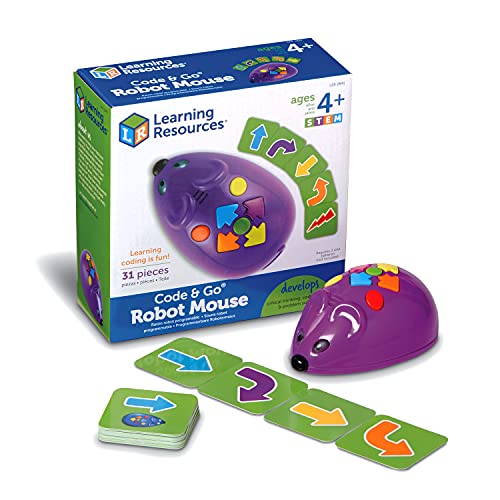
- Screen-free button coding and cards
- Teaches sequencing and debugging
- Includes 30 coding cards and guide
Best For: Early coding practice with simple, screen-free challenges
Build-and-Code Combo

- Combines building with card-based coding
- Includes 12 guided models and storybooks
- Adds lights, sounds, motion, and remote control
Best For: Young builders who want a guided robotics starter kit
Expandable Coding Set

- 78-piece screen-free robotics kit
- Supports multi-step routes and turns
- Includes lights, sounds, and music
Best For: Kids who want bigger maze-building and coding challenges
Screen-Free Starter Robot

- No-screen coding for early learners
- Ready to use with simple remote commands
- Builds logic, STEM, and problem solving
Best For: Beginners who want a hands-on intro to coding
Maze Coding Activity Set
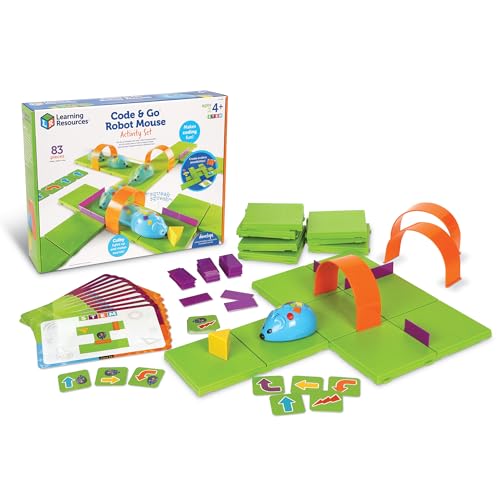
- Screen-free coding with maze play
- Includes grids, walls, tunnels, and cards
- Great for sequencing and direction skills
Best For: Kids who learn best through maze-based activities
Advanced Screen-Free Robot

- Screen-free coding with 80-step programming
- Adds loops and obstacle detection
- Includes cards, tiles, and accessories
Best For: Kids ready for more challenging coding play
Screen-Free Starter Pick – Botley The Coding Robot Activity Set
If you’re looking for coding toys for 7 year olds, Botley is a strong screen-free option that teaches early coding through active play. It’s ready to use right out of the box and includes obstacles, coding cards, and a remote programmer for hands-on learning.
Best For: Kids who want an interactive, screen-free introduction to coding and problem solving.
Pros:
- Screen-free coding with no phone or tablet required
- Includes 77 pieces for obstacle courses, coding cards, and guided play
- Teaches early STEM skills, critical thinking, and logical thinking
- Detects objects, follows looping commands, and can follow black-line paths
Cons:
- Requires AAA batteries, which are not included
- Some features may need a bit of setup with the included guide
Botley stands out if you want a beginner-friendly coding robot that keeps kids moving instead of staring at a screen. The mix of hands-on challenges and simple programming makes it a practical pick for early learners.
Electronics Builder Pick – Snap Circuits Jr. SC-100 Electronics Exploration Kit
Snap Circuits Jr. is a practical choice for coding toys for 7 year olds who are ready to explore how circuits work through safe, no-tools projects. It doesn’t teach programming directly, but it does build STEM confidence with 100+ hands-on electronic builds and a full-color manual.
Best For: Kids who enjoy building and want an easy introduction to electronics and circuitry.
Pros:
- Includes 100+ projects to keep kids busy and learning
- No soldering or tools required; pieces snap together easily
- Color-coded parts and full-color project manual make it approachable
- Supports practical STEM learning and electrical engineering basics
Cons:
- Designed for ages 8+, so it may be better for older 7-year-olds
- Requires batteries
This kit is best if you want a build-focused STEM toy rather than a true coding robot. It offers lots of variety, and the snap-together design makes it easy for kids to start experimenting quickly.
Dual-Mode Robot Pick – Thames & Kosmos Robotics Smart Machines Junior STEM Kit
For coding toys for 7 year olds who are nearing age 8 or want a more advanced challenge, this Thames & Kosmos kit offers a robot-building and coding experience with two ways to play. Kids can use the built-in buttons for screen-free control or switch to the free block-based app to program up to 200 actions.
Best For: Kids who want a beginner robot kit with both screen-free and app-based coding options.
Pros:
- Two play modes: built-in buttons or block-based coding app
- App can program up to 200 different actions
- Builds a 9-inch robotic pal with lights, sounds, and movement
- Supports problem solving, critical thinking, and data-driven decision making
Cons:
- Recommended for ages 8+, so it may be slightly advanced for many 7-year-olds
- Needs a smart device for app-based coding
This is a strong step-up option if your child is ready for more than simple button presses. The flexibility of screen-free play and app programming makes it useful for beginners who may grow into the kit.
Computer Science Activity Pick – Playz Coding Learning Kit
If you want coding toys for 7 year olds that focus on computer science concepts, this Playz kit offers a lot of guided hands-on activities. Kids work through projects like binary necklaces, encryption devices, sorting races, mazes, and pixelated pictures using the included lab guide and parts.
Best For: Kids who enjoy activity-based learning and want an intro to coding and computer science ideas.
Pros:
- Includes 30+ tools, ingredients, and parts
- Covers coding-related activities like binary, encryption, sorting, and mazes
- Colorful guide uses pictures and simple instructions
- Designed for kids ages 6-12+ with a wide learning range
Cons:
- Focuses more on coding concepts than on a programmable robot
- Requires following a guide, so it may be less open-ended than some toys
This kit is a good fit if you want an educational set that mixes science activities with early coding ideas. It’s less about robotics and more about learning how computer science works through projects.
Best for Easy Setup – Code & Go Robot Mouse
If you want coding toys for 7 year olds that teach sequencing without a screen, the Code & Go Robot Mouse is a simple, hands-on option. Kids use button commands and coding cards to plan routes, then test and debug their ideas as they guide Jack the mouse through obstacles.
Best For: Kids who are just starting to learn basic coding, sequencing, and problem-solving through screen-free play.
Pros:
- Screen-free coding with simple button commands and coding cards.
- Supports trial-and-error learning as kids test, debug, and retry paths.
- Includes 30 double-sided coding cards and an activity guide.
- Mouse lights up, makes sounds, and offers 2 speeds for added engagement.
Cons:
- Batteries are not included.
- Designed for early learners, so advanced coders may outgrow it quickly.
- Best for simple routing challenges rather than complex building.
This is a strong beginner pick if you want a low-pressure coding toy focused on logic, direction-following, and basic programming concepts.
Build-and-Code Combo – WhalesBot C3 Pro Kit
For families looking for coding toys for 7 year olds that also include building, the WhalesBot C3 Pro mixes guided robotics with card-based programming. Kids build models, follow story tasks, and use the coding panel and cards to explore logic, cause and effect, and remote-controlled play.
Best For: Kids who enjoy building projects and want an interactive first coding kit with guided activities.
Pros:
- Combines building, coding cards, remote control, lights, sounds, and motion.
- Includes 12 guided models plus open-ended building options.
- Comes with 4 storybooks, an activity map, a quick-start guide, and 38 coding cards.
- Designed with smooth edges and no sharp parts for younger users.
Cons:
- Uses a manual-and-programmable format, so setup is more involved than a simple push-button toy.
- Includes many pieces, which may be more than some beginners want to manage.
- Geared more toward guided play than freeform coding complexity.
This kit stands out if you want a fuller STEM experience that blends construction, programming, and interactive feedback in one set.
Expandable Coding Set – Botley 2.0 Activity Set
If you’re comparing coding toys for 7 year olds and want something with more room to grow, the Botley 2.0 Activity Set offers a larger, more expandable play system. Kids use the remote programmer, coding cards, boards, and obstacle pieces to create routes, solve challenges, and practice multi-step thinking.
Best For: Kids who want a screen-free coding robot with more challenge options and open-ended maze play.
Pros:
- 78-piece set includes the robot, remote programmer, coding cards, boards, and obstacle pieces.
- Supports multi-step coding paths, 45° turns, and object-sensing reactions.
- Lights, sounds, and music add variety to play.
- Open-ended layout makes it easy to build custom mazes and new challenges.
Cons:
- Requires 5 AAA batteries.
- Best suited to kids who can handle slightly more complex challenge play.
- Indoor use only.
Botley 2.0 is a strong choice if you want a screen-free robot that can scale with a child’s confidence and keep offering new problem-solving tasks.
Screen-Free Starter Robot – Botley 2.0 The Coding Robot
If you want coding toys for 7 year olds that feel more like play than a lesson, Botley 2.0 is a solid screen-free pick. It introduces early STEM skills through simple remote coding, with ready-to-go setup and activities that encourage critical thinking and problem solving.
Best For: Kids who are just starting with coding and do best with hands-on, screen-free play.
Pros:
- Screen-free coding with no phone or tablet required
- Ready out of the box once AAA batteries and a screwdriver are on hand
- Supports STEM learning, logic, and problem solving
- Remote programmer makes early coding easy to understand
Cons:
- Batteries are required and not included
- Designed for younger beginners, so advanced coders may outgrow it
Botley 2.0 is a practical choice if you want a beginner-friendly coding toy that keeps the learning tactile and approachable. It fits well for early elementary kids who enjoy experimenting, making mistakes, and trying again.
Maze Coding Activity Set – Code & Go Robot Mouse
For coding toys for 7 year olds that teach sequencing in a very concrete way, the Code & Go Robot Mouse Activity Set is easy to understand and easy to set up. Kids program Colby to move through mazes using buttons and coding cards, making it a useful screen-free introduction to early programming.
Best For: Young kids who like maze challenges and need a very hands-on way to learn coding basics.
Pros:
- Screen-free coding with buttons and matching coding cards
- Includes a full maze setup with grids, walls, tunnels, and activity cards
- Builds sequencing, directional understanding, and problem solving
- Works well for classroom STEM centers and small-group activities
Cons:
- Requires 3 AAA batteries, which are not included
- Best suited to basic coding concepts rather than advanced programming
This set is especially useful if you want a coding toy that feels structured and repeatable. The maze format makes it easy for kids to practice trial-and-error while reinforcing early logic skills.
Advanced Screen-Free Robot – Botley Coding Robot
If you’re comparing coding toys for 7 year olds and want one that can grow with a child, this Botley set adds more challenge than a basic starter robot. It keeps coding screen-free while adding 80-step programming, loops, obstacle detection, and extra accessories for more complex play.
Best For: Kids who already understand the basics and want more room to experiment with coding challenges.
Pros:
- Screen-free coding with remote programming
- 80-step programming and loops add more challenge
- Includes coding cards, tiles, detachable arms, and accessories
- Supports critical thinking, problem solving, and sequential reasoning
Cons:
- Requires 5 AAA batteries, which are not included
- May be more toy-like than a kid who wants app-based coding
This version of Botley is a stronger fit for families who want a toy that can scale with a child’s skills. It offers more ways to play and more room for coding practice without adding a screen.
How We Picked These Coding Toys for 7 Year Olds
We looked for toys that match early elementary attention spans and skill levels, with clear step-by-step play, strong replay value, and beginner coding concepts such as sequences, loops, and debugging. We also favored options that are easy to set up, durable enough for repeated use, and suitable for independent play or guided learning.
Quick Comparison
For the broadest beginner appeal, screen-free robot toys are usually the easiest starting point. If your child enjoys building and experimenting, electronics and robotics kits offer more challenge and hands-on learning. For kids who like structured missions, activity sets with cards, mats, or challenge books tend to keep interest high longer.
Key Buying Factors for Coding Toys for 7 Year Olds
Skill Level and Age Fit
Look for toys that teach one concept at a time. Seven-year-olds often do best with simple commands, visual prompts, and short challenges rather than open-ended programming too early.
Screen-Free Vs. App-Based
Screen-free options are often ideal for beginners because they reduce setup friction and keep the focus on hands-on thinking. App-based toys can still be a good choice if your child is ready for more features and you want room to grow.
Learning Depth
The best Coding Toys for 7 Year Olds introduce core coding ideas in playful ways: order of operations, problem-solving, cause and effect, and trial-and-error. Toys that add movement, lights, sounds, or building pieces can make these lessons feel more interactive.
Durability and Replay Value
Choose toys with multiple activities, challenge cards, or expandable parts so the set stays useful after the first few sessions. That matters more than flashy features for long-term value.
Who Should Buy Which Coding Toys for 7 Year Olds?
If you want an easy first coding toy, choose a screen-free robot with simple directional commands. If your child likes building and tinkering, a robotics or electronics kit is a better fit. If they prefer guided play, go with an activity set that includes missions, puzzles, or themed challenges. For mixed-age homes, look for the most flexible option so younger kids can start simple and older siblings can stretch the toy further.
Overall, the best Coding Toys for 7 Year Olds are the ones that make learning feel like play while steadily building confidence, logic, and early STEM skills.