Looking for a smarter way to turn screen time into skill-building play? The best coding board games for kids make programming concepts feel like puzzles, challenges, and family fun.
From beginner-friendly logic games to more advanced STEM picks, this roundup focuses on options that help kids practice sequencing, critical thinking, and problem-solving in an engaging format.
Best 10 Coding Board Games for Kids Picks for 2026
Code Logic Challenge
ThinkFun Code Master Programming Logic Game

- Builds programming logic through progressive puzzles.
- Includes 60 levels and multiple challenge components.
- Best for solo play ages 8+.
Best For: Kids who want a solo coding-style logic game with clear progression.
Visual Scratch Guide

- Step-by-step visual Scratch projects for beginners.
- Includes 18 creative activities and illustrated guidance.
- Best for kids who prefer guided, screen-based learning.
Best For: Kids ages 9 to 12 who learn best from illustrated Scratch projects.
Color Code Deduction
Code Breakers Family Board Game

- Simple code-breaking gameplay with clue-based guessing.
- Helps develop logic and strategic thinking.
- Built-in storage tray makes it easy to store.
Best For: Families and kids 8+ who enjoy quick deduction games.
Screen-Free Coding Workbook
The Big Coding and Logic Workbook for Kids

- Packed with 222+ screen-free coding and logic activities.
- Covers loops, conditionals, debugging, and patterns.
- Portable workbook format for home, school, or travel.
Best For: Ages 8 to 12 who want lots of screen-free coding practice.
AI Coding Board Game

- Teaches loops, functions, conditionals, and algorithms
- Introduces AI topics like training, inference, and image recognition
- Works for home, school, clubs, and STEM activities
Best For: Kids starting with coding and early AI ideas
Screen-Free Coding Activity Book
Coding Skills Logic Activity Book

- 40 screen-free puzzles across 10 units
- Covers algorithms, loops, conditionals, and debugging
- Includes answers and solutions in the back
Best For: Ages 8-12 who prefer puzzles over board games
Mars AI Coding Board Game
CoderMarz Mars Coding Adventure
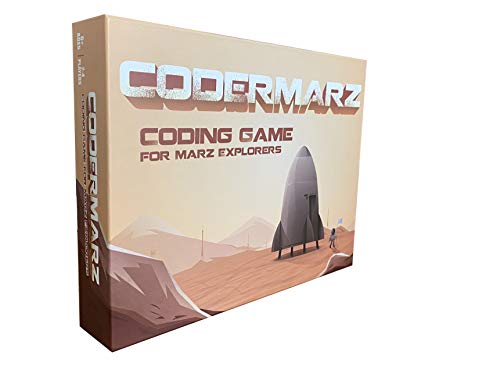
- Teaches coding plus Mars and AI concepts
- Made for 2-4 players with printed rules
- Includes area control, cooperative, and deck-building play
Best For: Space-loving kids who want coding and AI learning
Two-Player Code Challenge

- 2-player color code guessing game
- Builds logical thinking and reasoning
- Compact board with built-in storage tray
Best For: Families wanting a portable logic game for ages 8+
Full Programming Lesson Game

- Covers loops, branches, functions, and more
- Includes 13 levels and free curriculum support
- Built for schools, clubs, and home learning
Best For: Kids and groups wanting a deep STEM coding introduction
Solo Cybersecurity Challenge

- 120 challenges for long-lasting solo play
- Teaches programming principles through puzzles
- Clear instructions and challenge booklet included
Best For: Kids 10+ who prefer independent logic games
Code Logic Challenge – ThinkFun Code Master Programming Logic Game
If you’re comparing coding board games for kids, ThinkFun Code Master is a strong pick for building programming logic through hands-on play. It uses progressively harder challenges to help kids practice sequential reasoning, problem-solving, and conditional thinking in a format that feels more like a puzzle game than a lesson.
Best For: Kids ages 8 and up who want a solo coding-style logic game with clear skill progression.
Pros:
- Teaches programming logic, sequential reasoning, and problem-solving.
- Includes 10 maps, 60 levels, and multiple action and conditional tokens.
- Designed for ages 8+ and works well for beginners and experienced players.
- Award-winning educational game with a STEM focus.
Cons:
- Single-player format only.
- May feel more like structured logic practice than freeform play.
Overall, this is a practical choice if you want a compact, well-scaffolded game that steadily ramps up the challenge. It stands out for kids who enjoy puzzles and want a clear introduction to coding-style thinking.
Visual Scratch Guide – Coding Projects in Scratch
For families shopping for coding board games for kids, this book is a useful companion when you want screen-based projects with a very visual, step-by-step approach. It walks kids through Scratch activities like animations, games, sound effects, and other creative builds, making it easy to follow even for first-time coders.
Best For: Kids ages 9 to 12 who learn best from illustrated instructions and guided Scratch projects.
Pros:
- Step-by-step visual lessons make coding basics easy to approach.
- Includes 18 projects, from games to animations and sound effects.
- Fully illustrated with fun pixel art and simple instructions.
- Supports creativity, collaboration, and systematic thinking.
Cons:
- Requires a desktop or laptop and internet access for Scratch.
- More of a coding book than a board game.
This is a solid pick if you want a guided introduction to real coding concepts without a steep learning curve. It works especially well for kids who like visuals and want to build their own projects one step at a time.
Color Code Deduction – Code Breakers Family Board Game
If you want coding board games for kids that emphasize deduction and logic, this code-breaking game is a straightforward family option. Players set a secret color code, take turns guessing, and use clues to narrow down the answer, making it a simple way to practice strategic thinking in a competitive format.
Best For: Families and kids ages 8+ who enjoy quick code-breaking puzzles and turn-based play.
Pros:
- Easy to learn and suitable for a wide age range.
- Encourages logical thinking, strategy, and problem-solving.
- Uses five colors for more options than a standard four-color version.
- Built-in storage tray helps keep pieces organized.
Cons:
- Gameplay centers on deduction rather than hands-on coding concepts.
- May feel repetitive once players learn the pattern.
This is a good pick if you want a family-friendly brain game that’s easy to set up and repeat. It’s especially appealing for kids who like guessing games and quick logic challenges.
Screen-Free Coding Workbook – The Big Coding and Logic Workbook for Kids
Among coding board games for kids, this workbook stands out if you want a screen-free way to build coding skills through puzzles and hands-on activities. It covers algorithms, debugging, loops, conditionals, and pattern recognition in short, clear exercises that are easy to start and keep moving.
Best For: Ages 8 to 12 who want lots of screen-free coding and logic practice at home, school, or on the go.
Pros:
- Includes 222+ activities for extended practice.
- Builds logic, sequencing, critical thinking, and coding fundamentals.
- Short instructions make it easy for kids to jump in.
- Portable format works well for travel and quiet time.
Cons:
- Book format is not an actual board game.
- Requires a workbook-style approach rather than group play.
This is a strong choice for families who want a lot of coding practice without screens or setup. It’s best for steady skill-building and works well when you want independent, puzzle-based learning.
AI Coding Board Game – Coder Mindz AI Adventure Game
If you’re comparing coding board games for kids, this one stands out for blending beginner programming with early AI ideas in a hands-on board game format. Coder Mindz uses robots, code cards, and adventure-style play to introduce concepts like loops, functions, conditionals, algorithms, training, and inference in a way that feels game-like rather than like a lesson.
Best For: Kids who want an early introduction to both coding basics and AI concepts through guided board game play.
Pros:
- Teaches coding fundamentals such as loops, functions, conditionals, and algorithm writing.
- Introduces AI ideas including image recognition, training, inference, and adaptive learning.
- Designed for use at home, in schools, coding clubs, Montessori settings, and STEM programs.
- Includes a free curriculum download mentioned by the maker.
Cons:
- Contains small parts, so it needs supervision for younger children.
- Gameplay and theme are focused on coding and AI rather than broad family trivia or party play.
For families or educators who want a STEM game with a strong coding-and-AI angle, this is a focused option with a clear learning purpose. Its biggest strength is how it makes advanced ideas feel approachable for kids.
Screen-Free Coding Activity Book – Coding Skills Logic Activity Book
For parents looking at coding board games for kids but wanting a screen-free format, this logic activity book is a practical alternative. It uses puzzles, pattern work, counting, drawing, and colour-matching challenges to build coding-style thinking while reinforcing ideas like algorithms, sequencing, loops, conditionals, and debugging.
Best For: Kids ages 8-12 who like puzzle-based, screen-free practice with coding logic.
Pros:
- Includes 40 activities across 10 units for structured practice.
- Teaches core coding concepts such as sequencing, loops, conditionals, and debugging.
- Answers and solutions are included at the back of the book.
- Bright, colourful pages are designed to keep kids engaged.
Cons:
- It is a workbook, not a true board game.
- Best suited to children who enjoy independent pencil-and-paper activities.
This book makes sense if you want coding practice without screens or setup. It is less interactive than a game, but it offers a straightforward way to build logical thinking and early programming skills.
Mars AI Coding Board Game – CoderMarz Mars Coding Adventure
If you want coding board games for kids with a science-fiction theme, this Mars-focused game combines space facts with coding and AI concepts. CoderMarz is built around exploring and settling Planet Mars while teaching children about Mars landscapes, rovers, training, prediction, adaptive learning, back propagation, and programming ideas like loops, functions, conditionals, and algorithm writing.
Best For: Kids who enjoy space themes and want a coding game that also introduces AI and Mars facts.
Pros:
- Blends Mars facts with coding and artificial intelligence concepts.
- Supports 2-4 players and comes with a printed rulebook.
- Uses area control, cooperative, and deck-building mechanics.
- Can be used in schools, STEM clubs, tutoring, and after-school settings.
Cons:
- Like many STEM board games, it includes small parts and needs care with younger children.
- Its learning focus is specific to Mars and AI rather than broad casual gameplay.
This is a strong pick if your child is excited by space and wants a themed STEM game with more than just basic coding practice. The Mars setting gives it extra appeal while keeping the learning goals front and center.
Two-Player Code Challenge – Hi-Q Code Breaker Board Game
If you’re comparing coding board games for kids, Hi-Q Code Breaker is a simple 2-player option that turns logic into a color-based guessing challenge. Kids set a secret code and the other player gets up to 30 guesses, making it a straightforward way to practice strategy, reasoning, and pattern thinking.
Best For: Families and kids 8+ who want a quick, easy-to-store coding-style logic game for two players.
Pros:
- Uses a code-breaking mechanism that supports logical thinking and reasoning.
- Over 2,000 possible codes keeps replayability high.
- 2-player format works well for parent-child play or head-to-head challenges.
- Built-in storage tray and compact board make it easy to carry and store.
Cons:
- Only supports 2 players, so it is less flexible for larger groups.
- Focuses on color-code guessing rather than broader programming concepts.
This is a good fit if you want a light, portable brain game that introduces coding-style thinking without a complex setup. It is more about deduction and reasoning than full coding instruction, which can be ideal for younger players or casual family game nights.
Full Programming Lesson Game – CoderBunnyz Coding Board Game
For shoppers looking at coding board games for kids with a stronger programming focus, CoderBunnyz stands out with a wide range of concepts built into play. Players use code cards to guide the Bunnyz through a maze while learning loops, branches, functions, conditionals, and more through a large challenge-based rulebook.
Best For: Kids, classrooms, and clubs that want a broad, hands-on introduction to computer programming concepts.
Pros:
- Teaches both simple and advanced programming concepts, including loops and inheritance.
- Includes 13 levels of play plus a printed rulebook and free curriculum support.
- Designed for use in schools, libraries, STEM clubs, tutoring, and home play.
- Includes many game components for structured, repeatable learning.
Cons:
- Has many pieces and a larger setup than simpler family coding games.
- Best suited to players who want an educational, lesson-style experience.
This is the most curriculum-like option in the group, so it makes sense if you want a game that goes beyond basic logic and into programming vocabulary. Its breadth is a strength for teaching, but it also means it is better for structured learning than quick casual play.
Solo Cybersecurity Challenge – Think Fun Hacker Coding Game
Think Fun Hacker Cybersecurity Coding Game and STEM Toy for Boys and Girls Age 10 and Up, Multicolor
Check Price On AmazonIf you want coding board games for kids that lean toward puzzle solving, Think Fun Hacker offers a cybersecurity theme with 120 challenges. Players work through programming principles using a game grid, movement tiles, and other components, making it a solid choice for kids who enjoy solitary logic games.
Best For: Kids 10+ who like challenge books, solo play, and a cybersecurity-themed coding puzzle.
Pros:
- Includes 120 challenges for extended play and gradual skill building.
- Single-player format is useful for independent practice.
- Clear instructions make it easy to start right away.
- Teaches reasoning, planning, and core programming principles.
Cons:
- Only supports 1 player, so it is not a group game.
- More puzzle-focused than open-ended coding or team play.
This is a smart pick for kids who like logic challenges and want a coding game they can work through on their own. The cybersecurity theme adds interest, while the challenge booklet format keeps the experience focused and structured.
How We Picked These Coding Board Games for Kids
We focused on games and learning tools that make coding concepts accessible without requiring a computer. The strongest picks support core skills like sequencing, pattern recognition, debugging, logic, and planning, while still being fun for kids and families. We also looked for age fit, replay value, clarity of instructions, and whether the activity feels genuinely hands-on rather than overly academic.
Quick Comparison
Some options are true board games with competitive or cooperative play, while others lean more toward workbook-style or project-based learning. If you want shared family play, prioritize board-game formats. If your goal is quiet practice or independent skill building, coding workbooks and logic activity books may be the better fit. For kids who already enjoy STEM or puzzles, advanced strategy and cybersecurity-themed choices can add a stronger challenge.
Key Buying Factors for Coding Board Games for Kids
Age and Skill Level
Match the game to your child’s reading level and attention span. Younger kids usually do best with simple directions, visual cues, and short rounds. Older kids can handle layered logic, multi-step planning, and more abstract programming ideas.
Learning Goal
Choose based on what you want your child to practice. Some games emphasize basic sequencing and logic, while others introduce computer science themes such as algorithms, AI, cybersecurity, or debugging. For a broader educational value, look for titles that encourage reasoning over memorization.
Replayability and Engagement
The best Coding Board Games for Kids stay interesting after the first few plays. Variable challenges, different difficulty levels, and flexible puzzle formats help extend use and keep the game from feeling repetitive.
Solo Vs. Family Use
If you want bonding time, a family board game may be ideal. If your child needs independent practice, a workbook or challenge-based format can work better. Many families prefer a mix of both so learning can continue in different ways.
Who Should Buy Which Coding Board Games for Kids?
Buy a beginner-friendly logic game for younger kids or first-time learners who need a simple introduction to coding thinking. Choose a more advanced STEM board game if your child already enjoys puzzles and wants a bigger challenge. Pick a workbook or activity book if you want screen-free practice and easier solo use. For families interested in modern tech topics, AI- or cybersecurity-themed games can be a strong fit.
Overall, the best choice depends on whether you want a playful entry point, a deeper STEM challenge, or a flexible screen-free learning tool. Any of these can make coding concepts feel approachable when the format matches your child’s interests and stage of development.