Finding coding toys for 9 year olds means striking the right balance between fun, challenge, and real learning. The best options keep kids engaged while teaching sequencing, problem-solving, and early programming concepts.
Below, you’ll find a focused roundup of 10 STEM-friendly picks that work for different skill levels, interests, and play styles.
Best 10 Coding Toys for 9 Year Olds Picks for 2026
Entry-Level Coding Robot
Makeblock mBot STEM Coding Toy

- Builds in about 15 minutes with instructions
- Teaches Scratch and Arduino step by step
- Adds remote-control play and robot functions
Best For: Kids who want a buildable robot with room to grow
Mechanical Coding Challenge
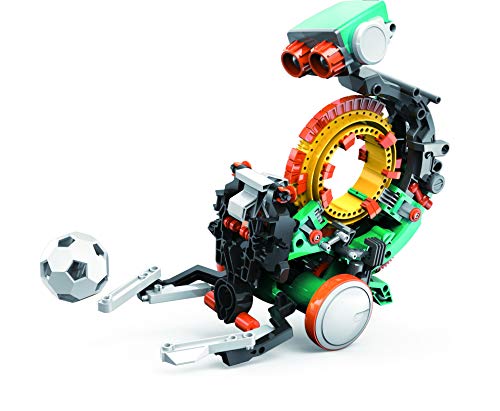
- Coding wheel controls robot actions physically
- Combines mechanical engineering and coding basics
- Expect a detailed multi-hour build
Best For: Kids ready for a tougher STEM project with moving robot actions
Computer Science Activity Kit

- Uses hands-on coding and logic activities
- Includes 30+ tools and parts
- Great for home or classroom learning
Best For: Kids who like activities and puzzles more than robots
Screen-Free Build-and-Code Kit
Thames & Kosmos Junior Smart Robot

- Built-in buttons or free coding app
- Programs up to 200 actions
- Includes motors, LEDs, and speaker
Best For: Beginners who want screen-free play plus app coding
Tiny app-based coding robot
Sphero Mini Green Coding Robot Ball
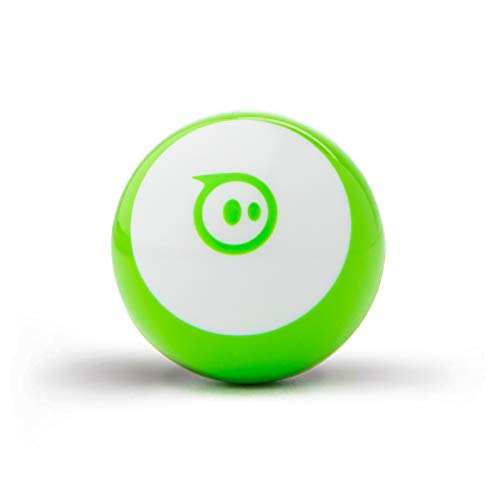
- Codes with drawing, blocks, or JavaScript
- Tabletop-friendly with obstacle-course accessories
- Also works as a game controller in the app
Best For: Beginners who want coding plus game-style play
Flexible screen-free and app coding

- Screen-free Color Codes plus Ozobot Blockly
- Five skill levels for growing learners
- Includes 700+ free STEAM lessons
Best For: Kids or classrooms wanting adaptable coding practice
Screen-free starter robot
Learning Resources Botley the Coding Robot

- No tablet or smartphone required
- 80-step coding with loops and obstacle detection
- Includes cards, tiles, and robot accessories
Best For: Beginners who prefer screen-free coding play
Unplugged Coding Pet
My Robotic Pet: Coding Chameleon

- Screen-free coding with physical color cards
- Three play modes: Coding, Wild, and Pet
- Includes a 48-page STEM guide and 133 pieces
Best For: Hands-on kids who want a buildable robot pet
Draw-and-Code Bot
Artie 3000 Coding & Drawing Robot

- Code patterns and watch Artie draw on paper
- Built-in tutorials for beginner and advanced coders
- Works with Blockly, Snap!, JavaScript, and Python
Best For: Creative kids who like coding plus drawing
Build-and-Control Car Kit

- Build a robot car with 24 module parts
- Features line tracking and obstacle avoidance
- Can be controlled by app or infrared remote
Best For: Older kids ready for a more advanced robotics kit
Entry-Level Coding Robot – Makeblock mBot STEM Coding Toy
If you want coding toys for 9 year olds that blend hands-on building with real programming practice, the Makeblock mBot is a strong pick. It starts with simple Scratch-style coding and grows into Arduino-based learning, so kids can build confidence step by step while exploring robotics, electronics, and problem solving.
Best For: Kids who want a buildable robot that introduces coding, robotics, and remote-control play in one kit.
Pros:
- Easy to build in about 15 minutes with clear instructions.
- Supports learning from Scratch to Arduino with apps, software, and coding lessons.
- Includes fun robot functions like line-following and obstacle avoidance.
- Compatible with add-on packs, Makeblock modules, and LEGO parts.
Cons:
- Remote controller battery is not included.
- Robot batteries are not included.
- More advanced add-ons may appeal most after the basics are mastered.
Overall, mBot is a well-rounded starter robot for kids who learn best by building first and coding second. It offers enough room to grow without feeling overwhelming at the beginning.
Mechanical Coding Challenge – Teach Tech Mech-5 Robot
For coding toys for 9 year olds who like building challenges, the Teach Tech Mech-5 offers a more mechanical, hands-on approach. Kids snap coding buttons onto a wheel to make the robot throw, lift, kick, draw, and more, which keeps the coding concept tactile and easy to understand.
Best For: Older or advanced kids who enjoy a multi-hour STEM build and learning coding through mechanical action.
Pros:
- Unique coding wheel system makes actions easy to program physically.
- Teaches mechanical engineering principles and coding basics together.
- Supports multiple robot motions like throwing, lifting, kicking, and drawing.
- Designed as an in-depth, hands-on STEM build.
Cons:
- Recommended for ages 10+, so it may be a bit advanced for some 9 year olds.
- Build time is multiple hours, not a quick activity.
- Best suited to kids who enjoy detailed assembly projects.
Mech-5 is a strong choice if you want a coding toy that feels more like an engineering project than a quick robot toy. It rewards patience and curiosity with genuinely interactive results.
Computer Science Activity Kit – Playz Coding Learning Kit
If you’re shopping for coding toys for 9 year olds that focus on logic and computer science concepts, the Playz Coding Learning Kit is a practical, activity-based option. Rather than building a robot, kids work through hands-on projects like binary necklaces, encryption devices, sorting races, and mazes to explore coding ideas in a playful way.
Best For: Kids who prefer brainy STEM activities and coding concepts over robot assembly.
Pros:
- Includes 30+ tools, ingredients, and parts for varied activities.
- Covers computer science ideas through projects like binary and encryption.
- Colorful illustrated guide makes the activities easy to follow.
- Works well for home learning or classroom use.
Cons:
- It is more of an activity kit than a programmable robot.
- Some kids may prefer a more mechanical or interactive build.
- Best for guided learning rather than freeform play.
This kit is a good fit for families who want coding concepts presented through experiments and puzzles. It keeps the focus on foundational thinking skills instead of motors or screens.
Screen-Free Build-and-Code Kit – Thames & Kosmos Junior Smart Robot
For coding toys for 9 year olds that balance screen-free control with app-based coding, the Thames & Kosmos Robotics Smart Machines Junior kit is a flexible choice. Kids can use the built-in buttons right away, then move into block-based app coding to program movements, speed, lights, and sounds.
Best For: Beginners who want an approachable robot kit with both screen-free and app-based coding options.
Pros:
- Offers two ways to play: built-in buttons or a free coding app.
- Block-based app can program up to 200 different actions.
- Designed for beginners ages 8+ with no complex coding required.
- Includes motors, LEDs, and a speaker for light, movement, and sound effects.
Cons:
- Requires a smart device for app-based coding.
- Best for guided beginner learning rather than advanced programming.
- Focused on one robotic build rather than multiple project types.
This kit stands out if you want a beginner-friendly robotics set that doesn’t force screen time from the start. It gives kids a simple path from hands-on play to structured coding.
Tiny app-based coding robot – Sphero Mini Green Coding Robot Ball
Sphero Mini is a compact pick for coding toys for 9 year olds who like hands-on play and want to learn programming in a fun, low-pressure way. It works with the free Sphero Edu app, so kids can start by driving, then move into coding with drawing, drag-and-drop blocks, or JavaScript.
Best For: Kids who want a tiny robot that blends coding practice with game-style play.
Pros:
- Supports multiple ways to code, including drawing, blocks, and JavaScript
- Drive mode and included cones/pins make obstacle-course play easy to start
- Works as a game controller in the Sphero Play app for extra variety
- Small tabletop-friendly design is easy to use in limited space
Cons:
- Best suited to indoor/tabletop play rather than larger-scale robotics
- Requires a mobile app for most coding features
Overall, Sphero Mini offers a flexible introduction to coding with enough game options to keep practice feeling playful. Its small size and multiple learning modes make it a practical choice for beginners who are ready to move beyond simple button-based robots.
Flexible screen-free and app coding – Ozobot Evo Coding Robot Kit
Ozobot Evo is a strong option among coding toys for 9 year olds because it combines screen-free color code play with online coding in Ozobot Blockly. The kit is designed to grow with a child, starting with beginner activities and moving through five skill levels as their coding confidence improves.
Best For: Kids and classrooms that want both screen-free coding and app-based lessons in one kit.
Pros:
- Offers both Color Code marker play and Ozobot Blockly coding
- Five skill levels help the kit stay useful as abilities grow
- Includes access to over 700 free lessons across STEAM and core subjects
- Durable design and zip case make it practical for classroom use
Cons:
- Marker-based coding may appeal more to some kids than others
- Less hands-on building than some robot kits
Ozobot Evo stands out for flexibility and long-term use, especially if you want a coding toy that can start simple and scale up. The mix of screen-free and online learning makes it easy to fit different preferences and settings.
Screen-free starter robot – Learning Resources Botley the Coding Robot
Botley is a practical choice for coding toys for 9 year olds who benefit from screen-free learning and simple hands-on challenges. It introduces programming fundamentals through remote coding, obstacle courses, and included cards and tiles, so kids can practice sequencing without needing a tablet or smartphone.
Best For: Kids who want an easy-to-start coding toy with no screen required.
Pros:
- Screen-free design keeps coding off tablets and smartphones
- 80-step programming, loops, and obstacle detection add depth
- Ready to use out of the box with remote coding controls
- Includes coding cards, tiles, and accessories for varied play
Cons:
- Requires 5 AAA batteries, which are not included
- Less app-based coding variety than connected robot kits
Botley is a straightforward way to build early coding skills without screens, and the included pieces help keep play moving from one challenge to the next. It is especially appealing if you want a robot that teaches sequencing and problem-solving in a very accessible format.
Unplugged Coding Pet – My Robotic Pet: Coding Chameleon
If you want coding toys for 9 year olds that feel more like play than a lesson, this robotic chameleon is a strong pick. Kids build a 15-inch reptile robot, then use color action cards to program movements with no screen, app, or software required.
Best For: Kids who like hands-on STEM toys, animal robots, and screen-free coding practice.
Pros:
- Uses physical color cards for unplugged coding.
- Offers three play modes: Coding, Wild, and Pet.
- Includes a 48-page guide that explains assembly and robotics concepts.
- Features sensors, RGB LEDs, and realistic articulated joints.
Cons:
- Assembly is recommended with adult help for younger kids.
- Requires 4 AAA batteries, which are not included.
This is a good choice if you want a coding kit that blends construction, cause-and-effect play, and a nature-inspired robot. It should hold up well for kids who enjoy building something they can program and then interact with in different ways.
Draw-and-Code Bot – Artie 3000 Coding & Drawing Robot
For coding toys for 9 year olds that add an art twist, Artie 3000 turns code into drawings on paper. Kids can follow built-in tutorials and code patterns and sequences while the robot draws with washable markers.
Best For: Kids who want a beginner-friendly coding robot that also encourages drawing and creative play.
Pros:
- Teaches coding through drawing and pattern-making.
- Supports Blockly, Snap!, JavaScript, and Python.
- No app or internet connection is required.
- Comes with 4 washable markers, a quick start guide, and activity cards.
Cons:
- Requires 4 AA batteries, which are not included.
- Needs a Wi-Fi-enabled tablet or computer to connect.
Artie 3000 stands out if you want a coding toy that feels creative instead of purely technical. It is especially appealing for kids who enjoy seeing their code produce a visible result on paper.
Build-and-Control Car Kit – UNO R3 Smart Robot Car Kit V4
If you are comparing coding toys for 9 year olds who are ready for a more technical challenge, this robot car kit offers real hands-on STEM learning. It combines assembly, programming, electronics, and control features like line tracing, obstacle avoidance, app control, and an infrared remote.
Best For: Kids and beginners who want a more advanced robotics kit with building and coding practice.
Pros:
- Includes 24 module parts for a fuller robotics build.
- Supports line tracking, ultrasonic obstacle avoidance, and remote control.
- Can be controlled by Android and iOS devices.
- Comes with HD instructions and included code files.
Cons:
- Requires some basic electronic knowledge.
- May need adult guidance for first-time users.
This kit is better suited to kids who want to build something functional and learn how the parts work together. It is a solid pick for families who want a more involved robotics project rather than a simple toy.
How We Picked the Best Coding Toys for 9 Year Olds
We looked for Coding Toys for 9 Year Olds that are age-appropriate, engaging, and built to teach genuine STEM skills. Priority went to toys that support beginner-friendly coding concepts, offer room to grow, and encourage hands-on experimentation rather than passive screen time.
We also considered build quality, clarity of setup, learning value, and whether a toy feels fun enough to hold a child’s attention beyond the first day.
Quick Comparison
Think of this roundup in a few simple buckets: robot kits for kids who like building, screen-based or app-supported options for kids who enjoy guided coding, and creative coding toys for children who prefer drawing, games, or imaginative play. Some models are best as first coding toys, while others are better for kids who already understand basic sequencing and want a bigger challenge.
Key Buying Factors for Coding Toys for 9 Year Olds
Skill Level
At age 9, many kids are ready for simple logic, loops, and cause-and-effect coding. Choose a toy that teaches those ideas without requiring constant adult help. If your child is brand new to coding, start with something visual and hands-on.
Play Style
Match the toy to the child. Builders may prefer robotics kits, artistic kids may like drawing-based coding toys, and curious tinkerers may enjoy sensor or movement-based robots. The best choice is usually the one that feels like play first and learning second.
Setup and Independence
Check how much assembly, app setup, or device pairing is required. A toy that is too complex can lose a child’s interest quickly. For many families, the sweet spot is a toy that works independently but still leaves room for guided exploration.
Room to Grow
Good Coding Toys for 9 Year Olds should stay useful after the basics are mastered. Look for multiple challenge levels, extra activities, or features like coding cards, sensors, or expandable builds.
Who Should Buy Which Coding Toys for 9 Year Olds?
If you want a first coding toy for easy introduction, choose a simple robot with visual commands or basic movement games. If your child likes building and engineering, a robotics kit is usually the better fit. For creative kids, drawing or motion-based coding toys can make programming feel more expressive. And if you want the strongest long-term learning value, pick a kit that combines building, coding, and experimentation in one package.
Overall, the best choice depends less on price alone and more on how naturally the toy matches your child’s interests. The right pick should feel exciting to use, easy to revisit, and challenging enough to keep growing with your child.