The right memory card reader can make a noticeable difference when transferring large photo libraries, 4K video, or files between cameras, phones, tablets, and computers. The best models combine fast interfaces with broad card compatibility and dependable everyday handling.
We compared 10 high-speed memory card readers across connection standards, supported formats, slot layouts, portability, and practical workflow needs. Use the guide below to narrow the list based on your devices and the cards you use most.
Best 10 High Speed Memory Card Readers Picks for 2026
Best Compact USB-C Pick
Lexar Dual-Slot SD/microSD Reader
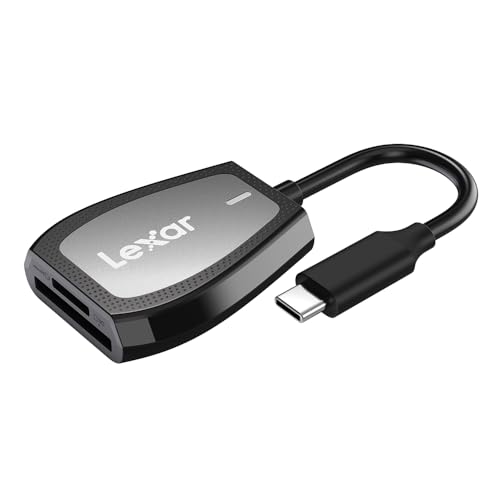
- Up to 312MB/s advertised read speed
- Dual SD and microSD slots
- LED activity light and two-year warranty
Best For: USB-C computers and everyday SD or microSD transfers
Best Pro Workflow Reader
ProGrade CFexpress Type B & SD Reader
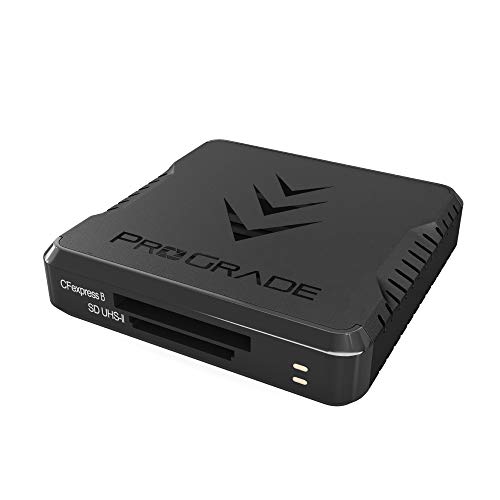
- Up to 10Gb/s USB 3.2 Gen 2 transfers
- Reads CFexpress Type B and SD cards
- Magnetic mounting system and two-year warranty
Best For: Professional photo and video workflows with large CFexpress files
Best UHS-II Value
UGREEN USB-C SD 4.0 Card Reader

- Up to 312MB/s advertised transfer speed
- Dual UHS-II SD and microSD slots
- Reads and writes two cards simultaneously
Best For: USB-C users transferring media from UHS-II cards
Best 3-in-1 Utility

- SD, microSD, and USB 3.0 ports
- Up to 5Gbps transfer rate
- Aluminum body with plug-and-play setup
Best For: USB-C devices needing card access and an extra USB-A port
Best All-Around Choice
SmartQ C368 4-in-1 USB 3.0 Card Reader

- Four slots support SD, microSD, MS, and CF cards
- Up to 5 Gbps USB 3.0 transfer speeds
- Plug-and-play support for Windows, Mac OS, and Linux
Best For: Multi-format card access across common computer systems
Fastest Professional Pick
ProGrade Digital SD UHS-II Dual-Slot Reader

- Up to 10 Gbps USB 3.2 Gen 2 performance
- Simultaneous transfers from two SD UHS-II cards
- Magnetic mounting plate and two-year warranty
Best For: Professional photo and video workflows using UHS-II SD cards
Best USB-C Value
uni Dual-Slot USB-C and USB 3.0 Card Reader

- USB-C and USB-A connectivity at up to 5 Gbps
- Simultaneous SD and microSD card access
- Plug-and-play support for Android, Mac OS, and Windows
Best For: USB-C phones and laptops using SD or microSD cards
Most Versatile
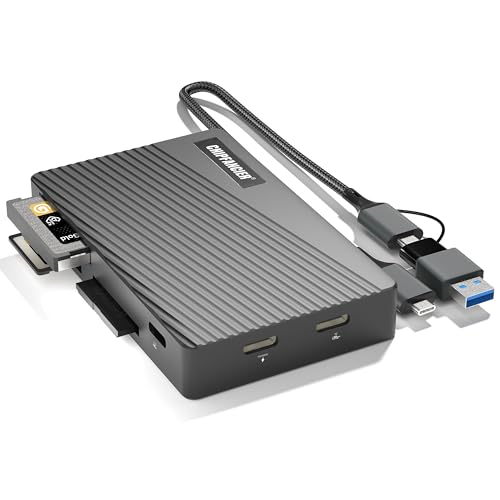
- Reads SD, microSD, MS, and CF cards
- USB-C and USB-A connectivity
- UHS-I speeds up to 104MB/sec
Best For: Photographers using multiple card formats
Best Compact Dual-Slot Pick

- Simultaneous SD and microSD reading
- USB 3.0 speeds up to 5Gbps
- Slim 15-gram travel-friendly design
Best For: SD and microSD users on the go
Best for USB-C Photography Workflows

- Dual SD and microSD slots
- Extra USB 3.0 port for peripherals
- Up to 90MB/sec listed transfer speed
Best For: USB-C photographers and mobile creators
Best Compact USB-C Pick – Lexar Dual-Slot SD/microSD Reader
If you need high speed memory card readers for a USB-C computer, the Lexar Dual-Slot reader offers a compact two-slot design with advertised read speeds of up to 312MB/s. It supports SD and microSD media, while remaining compatible with USB 2.0 ports.
Best For: USB-C laptop and desktop users who want a compact reader for SD and microSD cards.
Pros:
- Advertised read speeds up to 312MB/s
- Dual SD and microSD slots
- LED activity light shows working status
- Includes a two-year limited warranty
Cons:
- UHS-I cards are limited to speeds up to 170MB/s
- Uses USB-C connectivity, so an adapter may be needed for some USB-A devices
The Lexar is a straightforward choice for everyday photo and file transfers, especially when you value a small footprint and dual-card convenience over extra ports.
Best Pro Workflow Reader – ProGrade CFexpress Type B & SD Reader
For demanding photo, video, audio, and imaging workflows, this ProGrade reader is one of the high speed memory card readers designed for professional media. Its USB 3.2 Gen 2 interface supports transfers up to 10Gb/s, with simultaneous CFexpress Type B and SD card operation.
Best For: Photographers and video creators moving large files from CFexpress Type B and SD cards.
Pros:
- Transfers data at up to 1.25GB/s or 10Gb/s, according to the supplied notes
- Supports CFexpress Type B and SD cards in two slots
- Magnetic mounting system helps create a mobile workstation
- Includes a two-year warranty
Cons:
- Designed for USB 3.0 Type-A host ports, which may require an adapter with newer USB-C devices
- At 200g, it is less lightweight than compact travel readers
The ProGrade stands out when fast post-production transfers and CFexpress compatibility matter more than minimal size. Its mounting plate is also useful for organized mobile workflows.
Best UHS-II Value – UGREEN USB-C SD 4.0 Card Reader
The UGREEN USB-C reader is a practical option among high speed memory card readers for users with UHS-II SD and microSD cards. It supports advertised speeds up to 312MB/s, offers two card slots, and can read and write both cards simultaneously.
Best For: Creators and mobile users transferring 4K video, photos, or vlogs from UHS-II SD and microSD cards.
Pros:
- Supports SD 4.0 UHS-II speeds up to 312MB/s
- Dual SD and TF slots can operate simultaneously
- USB-C plug-and-play design works across many listed operating systems
- Aluminum shell and braided cable improve durability
Cons:
- USB interface is listed at 5Gb/s, below the reader’s advertised 312MB/s card speed ceiling
- Android devices need OTG support
With UHS-II support and simultaneous card access, UGREEN is a strong fit for streamlined transfers. Its compact 10g design also suits laptop bags and mobile kits.
Best 3-in-1 Utility – Acer USB-C SD Card Reader
The Acer 3-in-1 reader combines SD and microSD access with an extra USB 3.0 port, making it a useful choice among high speed memory card readers for laptops, tablets, and compatible smartphones. Its USB 3.0 connection supports transfers up to 5Gbps.
Best For: USB-C users who want card-reading capability plus a spare USB-A port for peripherals.
Pros:
- Three-port design supports SD, microSD, and USB devices
- Up to 5Gbps USB 3.0 transfer rate
- Aluminum shell supports heat dissipation
- Plug-and-play operation across Windows, macOS, Chrome OS, Linux, and Android
Cons:
- Does not support UHS-II, CF, XQD, SDUC, or several other listed card formats
- Thick device cases may prevent full connector insertion
- The USB-A port is not compatible with Lightning or USB-A host devices as described in the notes
Acer’s reader prioritizes versatility rather than advanced card-format support. It is a convenient travel accessory for UHS-I card users who also need to connect a USB-A peripheral.
Best All-Around Choice – SmartQ C368 4-in-1 USB 3.0 Card Reader
The SmartQ C368 is a practical option for shoppers comparing high speed memory card readers with broad format support. Its four slots handle SD, microSD, Memory Stick, and CompactFlash cards, while USB 3.0 connectivity provides transfer speeds up to 5 Gbps. Plug-and-play support across Windows, Mac OS, and Linux makes it suitable for travel and everyday file transfers.
Best For: Users who need one compact reader for several card formats and multiple computer operating systems.
Pros:
- Four-in-one design supports SD, microSD, MS, and CF cards.
- USB 3.0 transfers data at up to 5 Gbps and remains compatible with USB 2.0.
- No driver is required on Windows, Mac OS, or Linux.
- Blue LED indicator shows when the reader is powered.
Cons:
- Uses a USB Type-A connection rather than USB-C.
- Memory cards are not included.
Choose the SmartQ C368 if flexibility matters more than specialized UHS-II performance. It is a versatile, travel-friendly reader for cameras, laptops, desktops, and other USB Type-A devices.
Fastest Professional Pick – ProGrade Digital SD UHS-II Dual-Slot Reader
The ProGrade Digital PG08 is designed for demanding workflows where fast transfers matter. This high speed memory card reader uses USB 3.2 Gen 2 and supports up to 1.25 GB/s, or 10 Gbps, from both SD UHS-II cards simultaneously. Its dual-slot design and included magnetic mounting plate are useful for photographers and creators working on the road.
Best For: Photographers, videographers, and other creators transferring files from two SD UHS-II cards.
Pros:
- USB 3.2 Gen 2 supports transfer speeds up to 10 Gbps.
- Reads from two SD UHS-II cards simultaneously.
- Included adhesive metal plate enables magnetic laptop mounting.
- Includes Refresh Pro support and a two-year warranty.
Cons:
- Supports SD, SDXC, and UHS-II media, but not the broader range of formats offered by multi-card readers.
- Its high-speed benefits require compatible UHS-II cards and a suitable host connection.
The PG08 is the strongest fit for professional post-production and large media transfers. It costs more in exchange for dual-slot UHS-II support, fast USB 3.2 performance, and workflow-focused features.
Best USB-C Value – uni Dual-Slot USB-C and USB 3.0 Card Reader
The uni card reader is a flexible choice for shoppers seeking high speed memory card readers that work with both USB-C and USB-A devices. Its dual slots support SD and microSD formats, and both interfaces provide transfer speeds up to 5 Gbps. The reader can access two cards at once, making it useful for downloading photos, moving video, or transferring files from cameras and surveillance devices.
Best For: USB-C users who want dual-card access and compatibility with phones, tablets, laptops, and cameras.
Pros:
- USB-C and USB 3.0 interfaces support up to 5 Gbps transfers.
- Supports simultaneous SD and microSD card reading and writing.
- Works with many Windows, Mac OS, and Android devices without drivers.
- Protective covers and a tethered cord help with travel and storage.
Cons:
- Does not support CF Express, XQD, MS, or Memory Stick cards.
- Not compatible with Lightning-port devices.
- Cards are not included.
The uni reader is a convenient middle ground for modern devices, especially laptops and phones equipped with USB-C. Its main advantage is connectivity flexibility, while its format support is focused on SD and microSD media.
Most Versatile – 10Gbps All-in-One Card Reader
For shoppers comparing high speed memory card readers, this all-in-one model stands out for its broad format support and USB-C/USB-A connectivity. It accepts SD, microSD/TF, MS, and CF cards, with USB 3.2 connectivity and UHS-I transfer rates listed up to 104MB/sec.
Best For: Photographers and computer users who need one reader for several card formats, including CompactFlash.
Pros:
- Supports SD, microSD/TF, MS, and CF cards.
- Dual USB-C and USB-A connectivity works with newer and older devices.
- USB 3.2 interface and UHS-I speeds up to 104MB/sec.
- Broad compatibility across Windows, macOS, Linux, Chrome OS, and Android.
Cons:
- Its larger format support may be unnecessary for users who only read SD or microSD cards.
- The listed UHS-I speed is dependent on the card, port, and device.
This is the strongest choice when flexibility matters most. Its durable braided and aluminum construction plus dual-connector design make it useful as a general-purpose reader for cameras, computers, and mobile devices.
Best Compact Dual-Slot Pick – Acer USB-C SD Card Reader
This Acer reader is a practical option among high speed memory card readers for users who mainly work with SD and microSD media. Its USB 3.0 interface reaches up to 5Gbps, and the dual slots support simultaneous reading and writing for more efficient file management.
Best For: Photographers, video editors, and travelers who need a slim SD/microSD reader with both USB-C and USB-A connectors.
Pros:
- Supports simultaneous reading and writing from SD and microSD cards.
- USB 3.0 transfer speeds up to 5Gbps.
- Compact 15-gram design with protective port covers and an attached cord.
- Plug-and-play support for Windows, macOS, Android, Chrome OS, and Linux.
Cons:
- Does not support CFexpress, XQD, MS, or Memory Stick cards.
- Thick device cases may interfere with full insertion.
- Not compatible with Lightning-port devices.
Choose this model for a streamlined workflow centered on SD and microSD cards. Its small size, dual-card operation, and dual-header design make it especially convenient for laptops, phones, tablets, and travel kits.
Best for USB-C Photography Workflows – SD/TF Reader with USB Port
For USB-C devices, this model combines SD and microSD access with an additional USB 3.0 port. As one of the high speed memory card readers designed for mobile and desktop use, it supports simultaneous card reading and writing and lists transfer speeds up to 90MB/sec.
Best For: USB-C photographers and iPhone, iPad, MacBook, Android, or laptop users who also need to connect a USB accessory.
Pros:
- Dual SD and microSD slots support simultaneous reading and writing.
- Includes a USB 3.0 port for devices such as flash drives, cameras, keyboards, and mice.
- Designed for USB-C devices, including newer iPhone Pro models, iPads, MacBooks, and Android phones.
- Plug-and-play operation requires no driver installation or external power.
Cons:
- Uses USB-C connectivity only, so USB-A systems need an adapter.
- The listed 90MB/sec performance depends on the card and host device.
- Its support is focused on SD and microSD rather than specialty formats such as CF or MS.
This reader is a good fit for creators who move photos and videos directly to USB-C hardware. The added USB port makes it more flexible than a basic two-slot adapter, especially in a compact mobile workflow.
How We Picked the Best High Speed Memory Card Readers
We focused on readers that offer a useful combination of transfer speed, card compatibility, connection reliability, and value. The selection includes compact USB-C adapters, dual-slot SD and microSD models, multi-format readers, and faster options for UHS-II or CFexpress workflows.
Advertised speed is only one part of performance. Actual results depend on the memory card, computer or mobile device, USB standard, file sizes, and whether multiple cards are being accessed at once. We therefore considered each reader’s complete feature set rather than ranking products by a single headline specification.
Quick Comparison
| Best For | Look For |
|---|---|
| Everyday SD and microSD transfers | USB 3.0 or faster and a compact USB-C design |
| Professional photography and video | UHS-II support, CFexpress compatibility, or USB 3.2 |
| Multiple card formats | Dedicated SD, microSD, CF, or Memory Stick slots |
| Phone and tablet use | USB-C compatibility, short cables, and appropriate device support |
| Simultaneous transfers | Independent slots and a controller that explicitly supports concurrent reading |
Key Buying Factors for High-Speed Memory Card Readers
Interface and Real-World Speed
USB 3.0 is adequate for many standard UHS-I cards, while USB 3.2 offers more headroom for faster media. A reader cannot exceed the slowest component in the chain, so pair a high-speed reader with a compatible card and host port. USB-C describes the connector, not necessarily the transfer standard.
Card Format Support
Check whether you need SD, microSD, CompactFlash, Memory Stick, UHS-II, or CFexpress support. A dual-slot reader may be ideal for camera and drone users, but a multi-format model is more practical if your equipment uses several card types.
Slot Layout and Workflow
Separate slots make cards easier to insert and remove. If you plan to copy from two cards at once, verify that simultaneous reading is supported; some readers share bandwidth or allow only one active card at a time.
Build, Portability, and Device Compatibility
Compact readers are convenient for travel, but a sturdier enclosure or attached cable may be better for frequent desktop use. Confirm compatibility with your computer, phone, tablet, operating system, and any required USB-C adapter before buying.
Who Should Buy Which High Speed Memory Card Readers?
Choose a compact USB-C SD or microSD reader for everyday transfers, phone use, drones, and action cameras. Photographers using fast UHS-II cards should prioritize a UHS-II-compatible reader with USB 3.2. Professionals working with CFexpress Type B should select a dedicated CFexpress model rather than relying on a general-purpose reader. If you regularly handle older or less common formats, a multi-format reader with SD, microSD, CF, and Memory Stick support offers the most flexibility.
For occasional backups, prioritize price, simplicity, and portability. For daily editing or large video projects, spend more on the fastest interface and card standards your workflow can actually use.