A laptop stand with cable management can do more than raise your screen. The right model helps create a cleaner workstation, improves viewing comfort, and may add useful features such as drawers, ventilation, rotation, or USB-C connectivity.
We selected 10 stands and risers spanning simple mesh designs, adjustable ergonomic options, portable models, and stands with integrated docking stations. Use the guide below to narrow your choice by desk setup, laptop size, and workflow.
Best 10 Laptop Stand with Cable Management Picks for 2026
Best Adjustable Organizer

- Four height settings up to 6 1/2 inches
- Built-in cable management, drawer, and phone holder
- Supports up to 25 pounds
Best For: Organized adjustable desk setups
Best Premium Aluminum Design
Rain Design mStand Laptop Stand
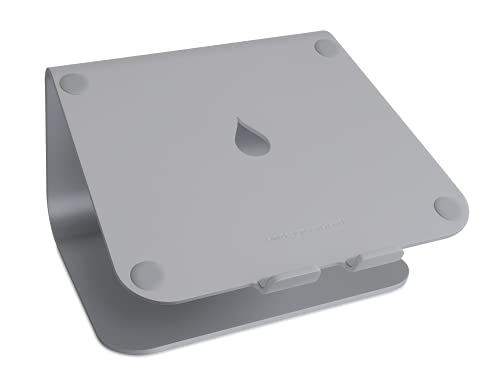
- Raises notebooks 5.9 inches
- Single-piece aluminum construction
- Rear cable-routing hole and keyboard storage
Best For: Stable, minimalist desktop setups
Best Traditional Adjustable Riser

- Adjusts from 4 to 6 inches in half-inch steps
- Cooling slots support ventilation
- Includes side shelves and cable management
Best For: Docking-station office workspaces
Best Mesh Cooling Stand
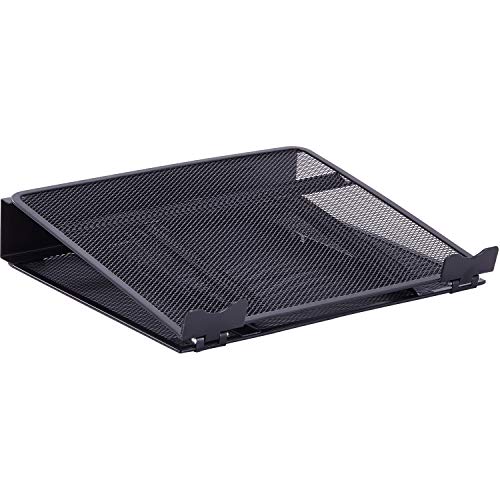
- Adjusts from 2 1/2 to 7 inches
- Breathable mesh supports airflow
- Rear slots organize cables
Best For: Adjustable cooling and cord organization
Compact Cable Organizer
3M Vertical Notebook Computer Riser

- 3 inches of vertical height adjustment
- Built-in cable management and non-skid base
- Compatible with most docking stations
Best For: Compact desks needing organized laptop cables
Docking Station Stand
BENFEI USB-C 6-in-1 Laptop Stand

- Adjusts from 68mm to 178mm
- Adds HDMI, Ethernet, USB, and charging ports
- Aluminum build with anti-skid silicone
Best For: Desk setups needing height adjustment and port expansion
Portable Adjustable Stand
Amazon Basics Ergonomic Laptop Riser

- Up to 7 inches of height adjustment
- Ventilated, open design supports airflow
- Folds flat and supports laptops up to 15.6 inches
Best For: Portable everyday laptop elevation and improved airflow
Simple Cable Control

- Integrated cable management
- Metal and alloy steel construction
- Designed for tabletop use
Best For: Fixed home or office workstations needing a simple cable-managed stand
Flexible Ergonomics
LOXP 360° Rotating Laptop Stand

- 360-degree rotating base
- Adjustable height and angle
- Folds for portable use
Best For: Users prioritizing ergonomic adjustment and flexible laptop positioning
Connected Workspace
Umaniy 8-in-1 USB-C Laptop Stand

- Built-in 8-in-1 USB-C hub
- 4K HDMI and up to 85W laptop charging
- Foldable, adjustable design with travel bag
Best For: Users needing laptop elevation and integrated peripheral connectivity
Best Adjustable Organizer – Bostitch Konnect Laptop Stand
The Bostitch Konnect is a practical laptop stand with cable management for users who want adjustable height and built-in desk storage. Its four height settings, drawer, phone holder, and non-slip feet make it especially useful for an organized workstation.
Best For: Users who want adjustable laptop positioning plus convenient storage for small desk accessories.
Pros:
- Four height options from 2 1/8 to 6 1/2 inches
- Built-in cable management helps keep cords organized
- Includes a drawer and dedicated cell phone holder
- Supports up to 25 pounds and has non-slip rubber feet
Cons:
- Its plastic construction may feel less premium than an aluminum stand
- The fixed rectangular design is not intended for portable use
Choose this model if workstation organization matters as much as screen height. It is a versatile desktop riser for a laptop or a single monitor up to 30 inches.
Best Premium Aluminum Design – Rain Design mStand Laptop Stand
The Rain Design mStand is a sturdy laptop stand with cable management designed to raise a notebook 5.9 inches for a more ergonomic viewing position. Its single-piece aluminum construction, rear cable-routing hole, and keyboard storage make it a polished choice for a permanent desk setup.
Best For: MacBook and laptop users seeking a stable, minimalist stand with integrated cord routing.
Pros:
- Raises the laptop screen 5.9 inches toward eye level
- Single-piece aluminum design provides solid stability
- Two-inch rear cable management opening routes wires neatly
- Keyboard can be stored underneath when not in use
Cons:
- Height is not adjustable
- Designed for laptops less than 10.4 inches deep, limiting compatibility
- Not a folding stand for easy transport
The mStand is a strong fit for a clean, dedicated workstation. Its aluminum build and cable organizer prioritize stability and appearance over adjustability or portability.
Best Traditional Adjustable Riser – 3M Adjustable Notebook Riser
The 3M Adjustable Notebook Riser is a laptop stand with cable management for users who need straightforward height adjustment and practical desk accessories. It adjusts from 4 to 6 inches in half-inch increments and includes cooling slots, side shelves, and an adapter for a compatible document holder.
Best For: Office users who want precise height adjustment and compatibility with docking stations.
Pros:
- Adjusts from 4 to 6 inches in 0.5-inch increments
- Cooling slots help ventilate the notebook
- Supports up to 20 pounds
- Includes side shelves and a cable-management design
Cons:
- Its larger 13-by-13-inch platform may use substantial desk space
- Document holder adapter is for an accessory sold separately
- Shorter 30-day warranty than some alternatives
This riser is best when incremental height control and office functionality take priority. It is less streamlined than minimalist stands but offers useful support for a docking-station workspace.
Best Mesh Cooling Stand – Lorell Mesh Laptop Stand
The Lorell Mesh Laptop Stand combines adjustable elevation with a breathable steel mesh platform and rear organizer slots. As a laptop stand with cable management, it suits users who want improved viewing comfort while keeping cords routed behind the stand.
Best For: Users who want adjustable height, airflow, and simple cord organization in a compact desktop stand.
Pros:
- Height adjusts from 2 1/2 to 7 inches
- Angled design supports more comfortable laptop viewing
- Breathable mesh helps cool the laptop
- Rear organizer slots manage cables
Cons:
- Does not include a drawer, phone holder, or keyboard storage
- The 3.5-inch width may provide less under-stand storage
The Lorell is a focused option for ergonomic viewing and ventilation. Its broad height range and five-year limited warranty add flexibility, while the mesh construction keeps the design functional and understated.
Compact Cable Organizer – 3M Vertical Notebook Computer Riser
If you want a laptop stand with cable management that saves desk space, the 3M LX550 is a compact vertical riser designed to improve viewing height while keeping cords organized. Its adjustable height and docking-station compatibility make it a practical choice for a streamlined workstation.
Best For: Users who need a compact riser with basic height adjustment and built-in cord organization.
Pros:
- Provides 3 inches of vertical height adjustment.
- Built-in cable management helps keep cords organized.
- Non-skid base and holding ledge help secure the laptop.
- Compatible with most docking stations.
Cons:
- Supports up to 20 pounds but offers less adjustment range than larger ergonomic stands.
- Plastic construction may feel less premium than aluminum alternatives.
The LX550 focuses on efficient vertical elevation rather than extensive features. Choose it when a small footprint, cable organization, and docking-station compatibility matter most.
Docking Station Stand – BENFEI USB-C 6-in-1 Laptop Stand
The BENFEI combines a laptop stand with cable management-friendly desktop connectivity through an integrated USB-C docking station. Its adjustable aluminum design adds height while providing HDMI, Ethernet, charging, and high-speed USB ports for a cleaner workstation setup.
Best For: Users who want an adjustable laptop stand that also consolidates common desktop connections.
Pros:
- Height adjusts from 68mm to 178mm for a more flexible viewing position.
- Includes HDMI 4K@60Hz, Gigabit Ethernet, USB-C, and two USB-A ports.
- Supports up to 100W power delivery, with up to 85W USB-C pass-through charging.
- Aluminum construction and anti-skid silicone support stability.
Cons:
- Its 1.21 kg weight makes it less portable than simpler folding stands.
- Device and video-output compatibility should be checked before purchase.
This is the most feature-rich option of the three, replacing multiple adapters while elevating the laptop. It is a strong fit for a permanent or semi-permanent desk setup where fewer loose cables are valuable.
Portable Adjustable Stand – Amazon Basics Ergonomic Laptop Riser
The Amazon Basics ergonomic riser is a straightforward option for elevating a laptop while leaving room beneath it for a tidier desk. Although it does not include dedicated cable-management hardware, its foldable design and open structure can help support a laptop stand with cable management setup.
Best For: Everyday users who prioritize adjustable height, ventilation, and portability.
Pros:
- Provides up to 7 inches of height adjustment.
- Open hollow design promotes airflow and heat dissipation.
- Folds flat for storage and travel, weighing 1.7 pounds.
- Supports laptops and tablets from 10 to 15.6 inches, up to 11 pounds.
Cons:
- Does not include built-in cable-management features.
- Larger or heavier devices may affect balance and stability.
- Requires a flat, solid surface for best stability.
This stand is best suited to flexible everyday use rather than integrated connectivity or dedicated cord routing. Its adjustable, ventilated, foldable design makes it convenient for work, travel, and shared spaces.
Simple Cable Control – Lorell Mesh Laptop Stand
If you need a straightforward laptop stand with cable management, the Lorell Mesh Laptop Stand offers a stable desktop setup with a modern black metal design. Its tabletop form factor is sized for laptops and weighs 2.9 pounds.
Best For: Home or office users who want a simple desktop laptop riser with integrated cable management.
Pros:
- Includes cable management for a tidier desk.
- Metal and alloy steel enclosure provides a durable construction.
- Designed for tabletop use with a modern black finish.
Cons:
- No height, angle, or rotation adjustment is listed.
- Its 2.9-pound weight may be less convenient for frequent travel.
The Lorell is a practical choice when cable organization matters more than portability or extensive adjustability. It suits a fixed workstation where a sturdy, uncomplicated stand is the priority.
Flexible Ergonomics – LOXP 360° Rotating Laptop Stand
The LOXP adjustable stand is a flexible option to consider alongside a laptop stand with cable management, especially if you prioritize positioning and portability. It folds for travel, rotates 360 degrees, and supports laptops from 10 to 16 inches.
Best For: Users who want adjustable height and angle positioning, full rotation, and a foldable design for home, office, or travel use.
Pros:
- 360-degree rotating base allows flexible viewing angles.
- Height and angle adjustment supports a more ergonomic setup.
- Foldable design is suitable for travel and portable workstations.
- Non-slip silicone helps protect the laptop from sliding.
Cons:
- Supports laptops only up to 16 inches.
- Cable management is not listed as a feature.
- Its 1.53-kilogram weight is relatively substantial for a travel stand.
The LOXP stands out for adjustability rather than desk-cable organization. Choose it if rotating access and ergonomic positioning are more important to you than built-in cable management.
Connected Workspace – Umaniy 8-in-1 USB-C Laptop Stand
For shoppers seeking a laptop stand with cable management, the Umaniy dock stand adds a different kind of organization by combining laptop support with an 8-in-1 USB-C hub. It offers HDMI, USB, SD/TF card connectivity, adjustable height, and a foldable travel-friendly design.
Best For: Professionals, creators, students, and mobile workers who need a laptop riser with built-in peripheral connectivity.
Pros:
- Eight-in-one hub includes 4K HDMI, USB-A, USB-C, and SD/TF card connectivity.
- Provides up to 85W of laptop charging power from its 100W power-delivery design.
- Fits 10- to 17-inch USB-C laptops.
- Folds compactly and includes a portable storage bag.
Cons:
- HDMI functionality requires a compatible USB-C DisplayPort Alt Mode connection.
- It is not described as having dedicated cable-management channels.
- High-power device use is limited, including a maximum of one hard drive.
The Umaniy is best viewed as a connectivity-focused desk organizer rather than a traditional cable-management stand. Its integrated ports can reduce the need for separate adapters, while the adjustable stand helps elevate the laptop.
How We Picked the Best Laptop Stand with Cable Management
We compared the selected stands by the features that matter most in everyday use: height adjustment, stability, cable routing, laptop support, ventilation, portability, and extra workspace functionality. We also considered whether each design suits a fixed desk, shared workspace, travel setup, or monitor-and-keyboard arrangement.
Not every model offers the same type of cable organization. Some include a dedicated pass-through or rear channel, while others keep cables tidy through an open riser design. Docking-station models add ports but require closer attention to USB-C compatibility, power delivery, and display support.
Quick Comparison
- Best for an organized desk: Choose a riser with a drawer, phone holder, or clearly defined cable path.
- Best for adjustability: Look for multiple height levels or a rotating base.
- Best for cooling: Favor ventilated or open mesh platforms that allow airflow beneath the laptop.
- Best for connectivity: A USB-C docking stand can consolidate displays, storage, networking, and accessories.
- Best for travel: Foldable, lightweight stands are easier to carry and store, though they may provide less stability.
Key Buying Factors for a Laptop Stand with Cable Management
Height, Angle, and Ergonomics
Raising the display toward eye level can reduce neck strain, but the ideal height depends on your chair, desk, and whether you use an external keyboard. Adjustable models provide more flexibility; fixed stands are often simpler and sturdier. A rotating base is useful when you regularly share your screen.
Stability and Laptop Fit
Check the platform dimensions, weight capacity, and the location of any front lip or retaining edge. The stand should support your laptop securely without blocking ports or making the device feel top-heavy. Heavy metal stands usually suit permanent desks, while lighter foldable designs prioritize portability.
Cable Routing and Airflow
Look for rear openings, channels, or enough clearance to guide charging and display cables without sharp bends. Open or mesh construction can also improve airflow, especially for laptops that run hot under sustained workloads. Cable management is most useful when it keeps connectors accessible rather than trapping them behind the stand.
Built-In Hubs and Power Requirements
Docking stands can reduce desktop clutter, but verify the host laptop’s USB-C capabilities before buying. HDMI resolution and refresh-rate support, Ethernet speed, USB data rates, and pass-through charging vary by model. A listed 100W power-delivery rating does not guarantee that every laptop will receive 100W; the computer, charger, and cable must all support it.
Who Should Buy Which Laptop Stand with Cable Management?
Choose a simple riser if you mainly want a higher screen and cleaner cable routing with minimal setup. Choose an adjustable model if multiple people use the desk or you frequently change posture. Choose a mesh stand for an affordable, ventilated workstation solution. Choose a docking stand if you connect several peripherals or an external display and want fewer loose adapters. Choose a foldable stand if portability matters more than maximum weight and rigidity.