Old family photos deserve more than a shoebox. The right scanner can help you preserve prints, slides, and negatives with better detail, less frustration, and a cleaner digital archive.
In this roundup of the best photo scanners for family archives, we focus on speed, image quality, ease of use, and the features that matter most when you are digitizing years of memories.
Best 10 Photo Scanners for Family Archives Picks for 2026
Speed-First Family Archiving
Epson FastFoto FF-680W High-Speed Duplex Photo and Document Scanner

- Scans up to 1 photo per second at 300 dpi
- Batch-scans up to 36 photos at once
- Duplex scanning captures notes on the back
Best For: Large family photo collections that need fast scanning and easy sharing
Easy Feed-Through Scanning
Plustek ePhoto Z300 Photo Scanner

- Scans a 4 x 6 photo in about 2 seconds
- Supports 3 x 5 through 8 x 10 prints
- Works with Mac and PC
Best For: Users who want simple, fast one-by-one photo scanning
Archival Detail Champion
Epson Perfection V850 Pro Photo Scanner

- 6400 dpi resolution for high-detail scans
- Dual lens system improves scan results
- Digital ICE and 4.0 Dmax support archival work
Best For: Careful archiving of important family originals with maximum detail
Portable Family Digitizing Kit
Plustek Photo Scanner Z300 + Carrying Bag
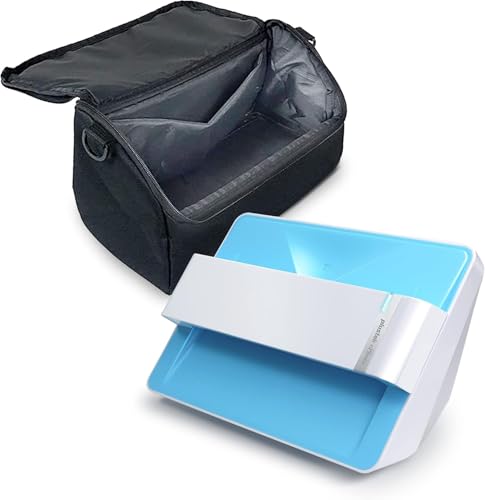
- Scans a 4 x 6 photo in about 2 seconds
- Supports common print sizes up to 8 x 10
- Includes a carrying bag for portability
Best For: Families who want a movable scanner for standard photo prints
Flatbed Detail Pick
Epson Perfection V39 for Photos & Documents

- 4800 dpi optical resolution
- Easy Photo Fix restores faded photos
- USB-powered with cloud scan support
Best For: Households archiving photos, albums, and documents with a compact flatbed scanner
Standalone Film Pick
Photo, Slide & Negative Scanner with 5" Screen

- Scans photos, slides, and negatives
- 5-inch LCD for on-device preview
- Standalone, no-computer workflow
Best For: Digitizing mixed family archives with slides, negatives, and printed photos
Compact Archive Pick
Epson Perfection V19 II for Family Photos

- 4800 dpi optical resolution
- Easy Photo Fix for faded prints
- Lightweight USB-powered flatbed
Best For: Small-space households scanning family photos and albums with a portable flatbed
Portable Sheetfed Option
HP Small USB Document & Photo Scanner

- Ultra-compact 3 oz design
- USB-powered for PC and Mac
- Includes WorkScan editing tools
Best For: Families wanting a portable scanner for mixed photo and document jobs
Flatbed Photo Restorer

- High 4800 dpi optical resolution
- Easy Photo Fix restores faded prints
- Flatbed scans photos, books, and docs
Best For: Families archiving old prints and wanting simple restoration tools
Archival Photo Bundle

- 300/600 DPI archival scanning
- Includes cleaning kit and carrier sheet
- Software supports albums and tags
Best For: Families with large photo collections needing scanning and organization
Speed-First Family Archiving – Epson FastFoto FF-680W High-Speed Duplex Photo and Document Scanner
If you’re looking for photo scanners for family archives that can move a big box of prints into digital form fast, the Epson FastFoto FF-680W is built for that job. It scans up to 1 photo per second at 300 dpi and can batch-scan up to 36 photos at a time, while also handling photos up to 8 x 10 inches, Polaroids, panoramas, and postcards.
Best For: Families with large photo piles who want speed, wireless sharing, and back-of-photo capture.
Pros:
- Scans thousands of photos quickly, with batch scanning up to 36 photos at once.
- Duplex capture preserves handwritten notes on the back in a single scan.
- Auto enhancement, color restoration, red-eye reduction, de-skew, crop, and rotate help clean up old photos.
- Wireless and USB connectivity, plus easy backup to Dropbox and Google Drive.
Cons:
- Best results depend on the supported photo sizes and batch workflow.
- Windows 7 minimum system requirement may be limiting for some setups.
This is the strongest pick when speed matters more than ultra-fine archival detail. It combines fast photo throughput with useful restoration and sharing tools for a practical family archiving workflow.
Easy Feed-Through Scanning – Plustek ePhoto Z300 Photo Scanner
The Plustek ePhoto Z300 is a practical option for photo scanners for family archives when you want simple, one-by-one scanning without the bulk of a flatbed. It scans 4 x 6 photos in about 2 seconds and supports 3 x 5, 4 x 6, 5 x 7, and 8 x 10 prints, plus letter and A4 paper.
Best For: Home users who want an easy, fast way to digitize stacks of prints on Mac or PC.
Pros:
- Very fast for individual photos, especially 4 x 6 prints.
- Supports multiple print sizes and also letter/A4 paper.
- Image enhancement features help restore old faded photos.
- Works with both Mac and PC.
Cons:
- Feeds one photo at a time, so it is less automated than batch scanners.
- Not as resolution-focused as a high-end archival scanner.
For family archives that are mostly standard prints, this model offers a straightforward balance of speed and simplicity. It is a strong everyday choice if you want to move through a photo pile efficiently on either platform.
Archival Detail Champion – Epson Perfection V850 Pro Photo Scanner
If your goal is preserving family originals with maximum detail, the Epson Perfection V850 Pro is a serious archival tool among photo scanners for family archives. Its 6400 dpi resolution, dual lens system, and Digital ICE support make it aimed at high-quality scans rather than quick bulk feeding.
Best For: Users who care most about scan quality, tonal range, and preserving photo detail.
Pros:
- 6400 dpi resolution is built for high-detail photo capture.
- Dual lens system selects the best lens for the task.
- 4.0 Dmax helps deliver smooth gradations and fine shadow detail.
- Digital ICE is included for improved handling of defects.
Cons:
- It is a flatbed-style photo scanner, so it is not designed for rapid bulk stacks.
- Much heavier and larger than feed-through models.
This is the most quality-focused choice in the group, making it a better fit for carefully preserving irreplaceable family photos than racing through a shoebox. If detail and tonal depth matter most, it stands out clearly.
Portable Family Digitizing Kit – Plustek Photo Scanner Z300 + Carrying Bag
The Plustek Photo Scanner Z300 with carrying bag is a convenient pick for photo scanners for family archives if you want the same fast feed-through approach with easier transport. It supports 3 x 5, 4 x 6, 5 x 7, and 8 x 10 photos, scans a 4 x 6 print in about 2 seconds, and includes image enhancement for faded pictures.
Best For: Families who want a portable, easy-to-move scanner for digitizing print collections.
Pros:
- Fast 4 x 6 scanning helps process stacks efficiently.
- Supports common print sizes plus letter and A4 paper.
- Includes enhancement tools for restoring old faded images.
- Carrying bag makes the bundle easier to move and store.
Cons:
- Still scans one photo at a time rather than batching multiple prints.
- Best suited to standard prints instead of specialty archival workflows.
This bundle is a practical choice when portability matters as much as scan speed. It keeps the Z300’s straightforward workflow while adding a carrying bag for easier storage or shared use.
Flatbed Detail Pick – Epson Perfection V39 for Photos & Documents
If you want photo scanners for family archives that can also handle everyday paperwork, the Epson Perfection V39 is a practical flatbed choice. Its 4800 dpi optical resolution gives you strong detail for old prints, while the built-in software helps restore faded photos and scan directly to cloud services.
Best For: Families who want a compact USB-powered scanner for photos, albums, books, and document archiving.
Pros:
- 4800 dpi optical resolution for clear photo and document scans
- Easy Photo Fix helps restore color to faded family photos
- High-rise removable lid makes it easier to scan books and photo albums
- USB-powered design means no AC adapter is required
Cons:
- Single-sheet flatbed design is slower than feed-based batch scanning
- Best suited to photos and flat originals rather than stacks of loose pages
The V39 fits well if your archive work is mostly careful, high-quality scanning rather than high-volume conversion. It is a simple, space-saving scanner that balances image quality with everyday convenience.
Standalone Film Pick – Photo, Slide & Negative Scanner with 5" Screen
For photo scanners for family archives that include slides and negatives, this standalone converter is built for fast, simple digitizing. It works without a computer, saves directly to the included SD card, and gives you a large 5-inch screen so you can preview and review scans on the device itself.
Best For: Families who need an all-in-one scanner for printed photos, 35mm slides, and 110/135 negatives without using a computer.
Pros:
- Scans printed photos, slides, and negatives in one device
- 5-inch LCD screen makes previewing and editing easier
- Standalone operation means no software, apps, or drivers are needed
- Includes SD card, holders, cleaning brush, adapter, and USB cable
Cons:
- 1080P resolution is lower than the 4800 dpi flatbed options here
- Designed mainly for film and photo conversion, not document scanning
This is a strong pick if your archive includes older film formats and you want the simplest path from storage box to digital file. The tradeoff is less scanning flexibility than a traditional flatbed, but the workflow is very convenient.
Compact Archive Pick – Epson Perfection V19 II for Family Photos
The Epson Perfection V19 II is a compact option for photo scanners for family archives when you want strong image quality in a small footprint. With 4800 dpi optical resolution, one-touch controls, and software for restoring faded photos, it covers the basics well for home scanning projects.
Best For: Families who want a lightweight flatbed scanner for photos, albums, and occasional document scanning.
Pros:
- 4800 dpi optical resolution for detailed scans and enlargements
- Easy Photo Fix helps bring life back to faded prints
- High-rise removable lid is useful for books and photo albums
- USB-powered and lightweight for easy placement and portability
Cons:
- Single-sheet flatbed design is not intended for bulk batch scanning
- Fewer convenience extras than the V39, such as scan-to-cloud support
If you want a dependable scanner for carefully preserving family prints, this model offers the resolution and simplicity to do the job. It is especially appealing when desk space is limited and portability matters.
Portable Sheetfed Option – HP Small USB Document & Photo Scanner
If you need photo scanners for family archives that can also handle everyday paperwork, this compact HP sheetfed model is built for quick, portable scanning. It works with PC and Mac, runs over USB, and includes HP WorkScan software for simple auto-scan, editing, and saving. It is a practical choice when you want to digitize smaller batches of photos, receipts, and family documents without a bulky setup.
Best For: Families who want a lightweight, travel-friendly scanner for mixed photo and document digitizing.
Pros:
- Very compact and lightweight at just 3 ounces
- USB-powered with PC and Mac compatibility
- 15 ppm simplex scanning for faster small-batch jobs
- Includes software tools for preview, crop, and cleanup
Cons:
- Simplex scanning only, so it scans one side at a time
- Lower 300 dpi resolution than dedicated photo flatbeds
- Best suited to small- to medium-batch scanning
Overall, this HP scanner makes sense if portability and convenience matter more than maximum photo detail. It is a flexible, budget-friendly way to start digitizing family archives alongside other household scanning tasks.
Flatbed Photo Restorer – Epson Perfection V39 II
For photo scanners for family archives, the Epson Perfection V39 II is a strong pick when scan quality and restoration matter most. Its 4800 dpi optical resolution is aimed at detailed photo work, and the flatbed design handles photos, artwork, books, and documents with ease. The included ScanSmart software and Easy Photo Fix tools make it especially useful for bringing faded family prints back to life.
Best For: Households that want detailed flatbed scanning and simple photo restoration.
Pros:
- 4800 dpi optical resolution for detailed scans
- Easy Photo Fix helps restore faded photos with one click
- Scans photos, artwork, books, and documents
- USB-powered and compact enough for home use
Cons:
- Single-sheet flatbed design is slower than batch sheetfed scanning
- Heavier than ultra-portable scanners at 3.1 pounds
- Specified media handling is limited to one item at a time
If your family archive includes old prints, scrapbooks, or mixed keepsakes, this Epson is built for careful scanning rather than speed. It offers a good balance of detail, convenience, and restoration features for home archiving projects.
Archival Photo Bundle – AMBIR Photo Scanner Kit
If you are shopping for photo scanners for family archives and want a kit made for organizing as well as scanning, this AMBIR bundle is worth a look. It scans printed photos in seconds, offers 300 or 600 DPI options, and includes a photo cleaning kit plus a protective carrier sheet for handling delicate prints. The included software also helps you restore, tag, and organize a growing family collection in one place.
Best For: Families with large photo collections that need scanning, cleanup, and organization tools.
Pros:
- 300/600 DPI options for archival-quality scanning
- Includes cleaning kit and protective carrier sheet
- Handles multiple photo sizes, including panoramics up to 12″
- Software supports albums, tags, favorites, and basic restoration
Cons:
- Photo-focused design may be less versatile for documents
- At 8.62 ounces, it is less lightweight than the smallest portable options
- Best results may require extra time for cleaning and organizing
For families with boxes of prints, this bundle stands out because it combines scanning hardware with cleanup and cataloging features. It is a practical all-in-one approach when preserving family memories is the main goal.
How We Picked the Best Photo Scanners for Family Archives
We focused on Photo Scanners for Family Archives that balance scan quality, workflow speed, and day-to-day usability. Priority went to models with reliable color reproduction, practical resolution, easy software or cloud handoff, and features that reduce manual cleanup such as auto-crop, deskew, and dust correction.
We also considered whether a scanner makes sense for one-time archive projects or ongoing use, since families often need something that can handle both stacks of prints and occasional documents.
Quick Comparison: Which Type Fits Your Archive?
Fast sheetfed and dedicated photo scanners are best when you have hundreds of loose prints to digitize quickly. Flatbed scanners are slower, but they usually deliver more control for fragile photos, albums, and items that need careful alignment. High-end photo and film scanners are the better choice if your archive includes slides or negatives.
Speed Vs. Quality
If your priority is finishing a large backlog, choose speed and automation. If you want the best possible archival output from heirloom prints or film, choose a higher-resolution flatbed or film-capable model.
Key Buying Factors for Photo Scanners for Family Archives
Resolution: For printed photos, 4800 dpi-class scanners offer plenty of flexibility for restoration and reprints. For slides and negatives, higher-end optical performance matters more than marketing claims alone.
Photo handling: Look for auto-crop, deskew, and dust reduction to cut manual editing time. These features are especially helpful when scanning large family collections.
Media support: Make sure the scanner matches your archive. Some models are best for loose prints, while others can handle film, contact sheets, or mixed document piles.
Workflow: USB simplicity, wireless sharing, scan-to-cloud options, and bundled software can all save time if multiple family members will help with the project.
Physical size and setup: A compact scanner may be easier to keep on a desk for long sessions, while a larger flatbed or pro unit can be worth it if you are digitizing an entire lifetime of albums.
Who Should Buy Which Photo Scanners for Family Archives?
Choose a fast dedicated photo scanner if you have hundreds of standard prints and want the quickest path to a usable digital archive. Choose a flatbed if your photos are delicate, mounted, curled, or mixed with documents that need careful scanning. Choose a film scanner if your family history lives in slides and negatives. For most households, the best fit is the scanner that matches the majority of your collection, not the most feature-packed model on the list.
For Photo Scanners for Family Archives, the smartest purchase is the one that makes it easy to keep going. If the process feels simple, you are far more likely to finish the project and preserve the memories that matter.