Programmable coding robots for kids can turn coding from an abstract idea into hands-on play, helping children build logic, sequencing, and problem-solving skills.
With options for toddlers through teens, the right robot depends on age, skill level, and whether you want screen-free simplicity, app-based control, or real programming practice.
Best 10 Programmable Coding Robots for Kids Picks for 2026
Instant-Start STEM Friend

- No assembly required for quick setup
- Teaches sequencing, loops, algorithms, and variables
- Works with five learning apps on major platforms
Best For: Kids 6–11, classrooms, and families starting STEM play
Build-It Coding Project
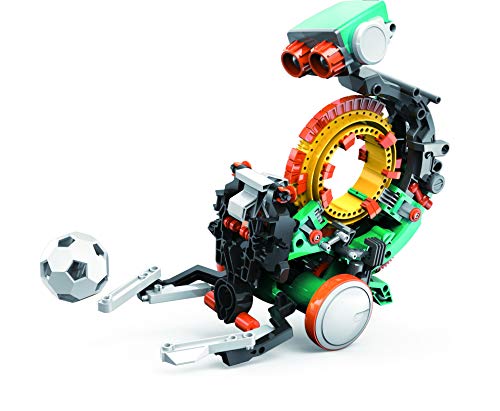
- Mechanical coding wheel controls robot actions
- Requires step-by-step assembly and build time
- Designed to teach coding and engineering basics
Best For: Kids 10+ who like hands-on STEM building
Screen-Free Beginner Bot

- Push-button coding with no screen required
- Transforms into 3 vehicle shells for rescue play
- Includes coding and math challenge cards
Best For: Ages 4+ beginners learning sequencing and logic
Pocket-Sized Coding Play
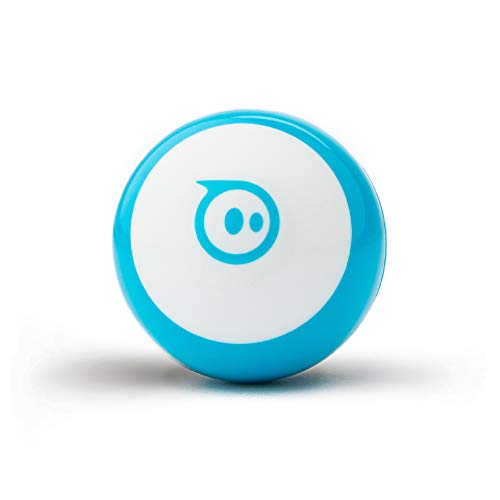
- Tiny robot with app-based coding and driving
- Supports blocks coding plus JavaScript
- Includes cones and bowling pins for play
Best For: Ages 8+ who want portable coding and gaming
Expandable STEM starter
Makeblock mBot Coding Toy for Ages 8-12

- Builds in about 15 minutes.
- Teaches Scratch and Arduino step by step.
- Works as a line-following and obstacle-avoidance robot.
Best For: Kids ages 8-12 who want a buildable coding robot with upgrade potential.
Screen-free coding practice
Learning Resources Robot Mouse Activity Set
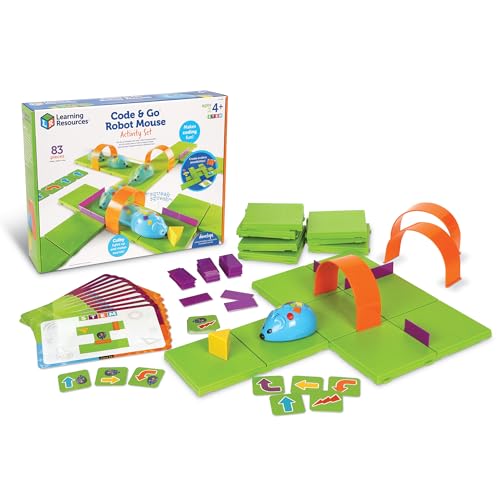
- Teaches sequencing and early programming without a screen.
- Includes maze pieces, coding cards, and activity cards.
- Ideal for ages 4+ and classroom use.
Best For: Young beginners who need a hands-on, screen-free introduction to coding.
Two-language coding upgrade
Educational Insights PYXEL Coding Robot for Kids

- Programs in Blockly and Python.
- Includes built-in tutorials and interactive effects.
- No internet connection or app required.
Best For: Kids 8+ who want a more advanced coding robot with Python support.
Screen-Free Coding Pet
Thames & Kosmos Coding Chameleon

- Unplugged coding with physical action cards
- Three play modes: Coding, Wild, and Pet
- Builds a 15-inch robotic reptile with sensors
Best For: Hands-on STEM learners who want a screen-free robot pet
Creative Coding Robot

- Codes turn into drawings on paper
- Teaches Blockly, Snap!, JavaScript, and Python
- No app or internet connection required
Best For: Creative kids who want coding and drawing in one robot
Advanced Scratch & Python Kit

- Supports Scratch and Python with guided projects
- Has 8+ play modes and 10+ sensors
- Expandable with 30+ modules
Best For: Older kids ready for a more advanced robotics and coding kit
Instant-Start STEM Friend – Dash Robot for Ages 6+
If you want programmable coding robots for kids that feel approachable right away, Dash is built for that first hands-on coding experience. It arrives ready to play with no assembly required, and the companion apps on iOS, Android, and Fire OS make it easy to move from simple challenges into coding concepts like sequencing, loops, algorithms, and variables.
Best For: Kids ages 6–11, classrooms, and families who want a ready-to-use coding robot with app-based learning.
Pros:
- No assembly required, so kids can unbox and start learning immediately
- Can sing, dance, navigate obstacles, and respond to voice commands
- Works with five apps, including Blockly, Wonder, and Path
- Used in 40,000+ schools globally for STEM learning
Cons:
- Does not include a camera
- Requires a compatible app device for full learning use
- Designed more for guided coding play than advanced robotics projects
Dash stands out as a friendly, classroom-tested option that keeps the focus on early coding skills rather than complex setup. Its mix of voice interaction, active play, and app-supported lessons makes it an easy pick for younger learners.
Build-It Coding Project – Mech-5 Mechanical Robot
Among programmable coding robots for kids, Mech-5 is the kind of kit that leans heavily into hands-on building. Instead of a pre-assembled toy, it is a step-by-step STEM project where kids snap coding buttons onto a coding wheel to make the robot throw, lift, kick, draw, and more while learning mechanical engineering principles and coding basics.
Best For: Kids ages 10+ who want a build-focused coding robot and a longer STEM project.
Pros:
- Teaches coding basics through a mechanical coding wheel
- Can throw, lift, kick, draw, and perform more actions
- Strong fit for learning mechanical engineering principles
- Includes detailed step-by-step assembly instructions
Cons:
- Not a pre-assembled toy
- Expect multiple hours of build time
- Best for older kids rather than beginners under 10
Mech-5 is a good match for kids who like building as much as coding. The tradeoff is more setup time, but that also makes it a deeper STEM experience for motivated learners.
Screen-Free Beginner Bot – Switcheroo Coding Crew
If you’re shopping for programmable coding robots for kids that work well for early learners, Switcheroo Coding Crew keeps things simple and screen-free. Kids use push-button coding to program the robot, then switch vehicle shells and complete rescue missions across the puzzle town map, making it a practical starter option for logic and sequencing practice.
Best For: Ages 4+ beginners who need a screen-free, playful introduction to coding.
Pros:
- Simple push-button coding supports beginner programming
- Screen-free play is easy for home, classroom, or homeschool use
- Includes a 3-in-1 robot with vehicle shells and activity pieces
- Rescue mission play adds repeatable, imaginative challenges
Cons:
- Uses a manual operation mode rather than app-based coding
- Requires 3 AAA batteries
- Built for beginners, so it may feel limited for older kids
This is a strong choice for introducing coding concepts without screens or complicated setup. Its mix of role-play, challenge cards, and beginner-friendly controls makes it especially approachable for younger children.
Pocket-Sized Coding Play – Sphero Mini Blue
For families comparing programmable coding robots for kids, Sphero Mini is a compact option that blends coding, driving, and game play. The ping-pong-ball-sized robot works with the free Sphero Edu app for drag-and-drop coding or JavaScript, while the Sphero Play app adds driving modes and STEM-style games for quick, flexible use.
Best For: Ages 8+ who want a tiny coding robot that also doubles as a game controller.
Pros:
- Supports drag-and-drop blocks and JavaScript in Sphero Edu
- Drive mode offers joystick, slingshot, and tilt controls
- Includes cones and bowling pins for obstacle-course play
- Very small, portable design for limited space or travel
Cons:
- About 1 hour of play time
- Best experience depends on using a mobile device and apps
- Smaller size may feel less like a traditional robot toy
Sphero Mini is a smart pick if portability and app variety matter most. It is less about big physical buildouts and more about quick coding, driving, and game-based experimentation.
Expandable STEM starter – Makeblock mBot Coding Toy for Ages 8-12
If you want programmable coding robots for kids that balance hands-on building with real coding practice, the Makeblock mBot is a strong entry point. It introduces electronics, robotics, and programming step by step, and it can also double as a remote-control robot with line-follow and obstacle-avoidance functions.
Best For: Kids ages 8-12 who are ready for a build-it-and-code-it robot kit with room to grow.
Pros:
- Easy to build in about 15 minutes with clear instructions.
- Supports Scratch and Arduino learning with free apps, mBlock software, coding cards, and lessons.
- Includes fun robot functions like remote control, line-following, and obstacle avoidance.
- Compatible with add-on packs, 100+ electronic modules, 500+ parts, and LEGO parts.
Cons:
- Remote controller battery is not included.
- Robot kit requires 4 AA batteries, which are not included.
- Best suited for kids who are comfortable with a more involved STEM kit.
This is a flexible coding robot that starts simple and leaves plenty of room for expansion, making it a practical pick for families who want an educational robot toy that can keep pace with growing skills.
Screen-free coding practice – Learning Resources Robot Mouse Activity Set
For families seeking programmable coding robots for kids without a screen, the Code & Go Robot Mouse Activity Set is a very approachable choice. It teaches sequencing, problem-solving, and basic programming through buttons, coding cards, and maze play, making it easy for young children to start learning robotics concepts.
Best For: Preschool and early elementary kids ages 4+ who learn best through screen-free hands-on play.
Pros:
- Screen-free coding with simple buttons and matching coding cards.
- Designed for ages 4+ to build confidence through trial and error.
- Includes maze grids, walls, tunnels, coding cards, activity cards, and a guide for repeatable play.
- Well suited for classroom STEM centers and small-group activities.
Cons:
- Requires 3 AAA batteries, which are not included.
- Focuses on early programming basics rather than advanced coding.
- More of a guided learning set than a programmable robot with app-based features.
This set is a smart fit if you want an introduction to coding that feels like a game rather than a tech lesson. It is especially useful for younger kids who need a simple, tactile way to practice logic and direction.
Two-language coding upgrade – Educational Insights PYXEL Coding Robot for Kids
If you’re comparing programmable coding robots for kids and want something with more depth, PYXEL stands out for its two-language coding support. Kids can program it with Blockly or Python, and the built-in tutorials, lights, sounds, and colors make it feel engaging while still teaching real coding skills.
Best For: Kids ages 8+ who are ready to move from beginner coding into Blockly and Python.
Pros:
- Supports both Blockly and Python for beginner and advanced learners.
- Built-in tutorials help kids self-teach through hands-on play.
- No internet connection or app required, and it uses password-protected Wi-Fi.
- Includes a rechargeable battery and USB-C cord.
Cons:
- Requires a Wi-Fi-enabled tablet or computer to program.
- May be more challenging than entry-level coding robots for younger kids.
- Best for kids ready for more structured coding practice.
PYXEL is a good step-up option when a child has outgrown simple coding toys and wants a robot that can grow with them. The mix of guided lessons and Python support makes it especially appealing for families looking for a longer-term STEM learning tool.
Screen-Free Coding Pet – Thames & Kosmos Coding Chameleon
If you want programmable coding robots for kids without adding another screen, this coding chameleon is a strong pick. Kids build a 15-inch robotic reptile, then use color cards, sensors, and play modes to program how it moves and reacts.
Best For: Kids who like hands-on STEM activities, screen-free coding, and animal-themed robot builds.
Pros:
- Uses physical colored action cards for unplugged coding lessons.
- Includes three play modes: Coding, Wild, and Pet.
- Features a color sensor, infrared sensor, and RGB LEDs for interactive behavior.
- Comes with a 48-page manual that supports assembly and exploration.
Cons:
- Assembly is recommended with adult help for younger kids.
- Requires 4 AAA batteries, which are not included.
This one stands out if you want a robot that blends building, coding, and pretend play in a single kit. It leans more toward guided STEM learning than fast-paced gameplay, but that makes it a better fit for thoughtful, hands-on exploration.
Creative Coding Robot – Artie 3000 Drawing Bot
For families shopping programmable coding robots for kids who also love art, Artie 3000 adds a creative twist. Kids code patterns and sequences, then watch the robot draw colorful designs on paper with included markers.
Best For: Kids ages 7+ who want a coding toy that turns programming into drawing and creative play.
Pros:
- Combines coding practice with hands-on drawing output.
- Built-in tutorials support beginners and advanced coders.
- Works with Blockly, Snap!, JavaScript, and Python.
- No app or internet connection is required.
Cons:
- Requires 4 AA batteries, which are not included.
- Needs a Wi-Fi-enabled tablet or computer to connect.
Artie 3000 is a practical choice if you want a robot that teaches coding through immediate visual results. The drawing feature makes it especially appealing for kids who stay engaged longer when they can see their code turn into something tangible.
Advanced Scratch & Python Kit – Makeblock mBot2 Coding Robot
If you’re comparing programmable coding robots for kids with more room to grow, mBot2 is built for longer-term STEM learning. Kids can assemble the robot, explore interactive features like voice control and music, and move into Scratch and Python with guided projects.
Best For: Kids ages 8-14 who want a buildable coding robot with more advanced programming and sensor-based projects.
Pros:
- Supports Scratch and Python learning with project cards and courses.
- Includes 8+ modes such as Drive, Draw, Musician, and Voice Control.
- Has 10+ sensors and can expand with 30+ modules.
- Offers Bluetooth, USB, and Wi-Fi control options.
Cons:
- More advanced than basic entry-level coding toys.
- Requires assembly before use.
mBot2 makes sense if you want a robotics kit that can start simple and keep expanding. Its combination of guided coding, sensors, and modular upgrades gives it a longer learning runway than many beginner robots.
How We Picked the Best Programmable Coding Robots for Kids
We focused on Programmable Coding Robots for Kids that balance ease of use, educational value, and long-term playability. Selection criteria included age range, coding method, build quality, supported learning levels, and whether the robot offers room to grow from beginner commands to more advanced programming concepts.
We also looked for a mix of formats so families can choose between screen-free sets, drawing or movement-based robots, modular STEM kits, and platforms that introduce block coding or text-based languages.
Quick Comparison
The best choice depends on the child’s starting point. Younger kids usually do best with simple, tactile robots that teach sequencing without requiring reading. Elementary-age learners often benefit from app-connected robots or kit-based models that make coding feel like a game. Older kids and confident beginners may prefer systems that support Scratch, Blockly, or Python for a smoother path into real programming.
Key Buying Factors for Programmable Coding Robots for Kids
Age and Skill Level
Match the robot to the child’s current ability, not just their age. A toy that is too simple may lose interest quickly, while one that is too advanced can feel frustrating.
Coding Style
Some Programmable Coding Robots for Kids use buttons or coding cards, while others rely on apps, drag-and-drop blocks, or text-based coding. Screen-free options are ideal for early learners; app-based and Scratch-compatible models suit kids who are ready for more challenge.
Learning Progression
Look for a robot that teaches sequencing first, then loops, conditionals, and problem-solving. The best models grow with the child so you do not outgrow them too quickly.
Build and Interaction
Movement, lights, sounds, sensors, and hands-on building all add engagement. If the goal is sustained use, choose a robot that feels interactive rather than purely instructional.
Who Should Buy Which Programmable Coding Robots for Kids?
For preschoolers and early elementary kids, choose a simple, screen-free robot with guided activities. For ages 7 to 10, a versatile coding robot with app control or beginner block coding is often the sweet spot. For tweens and older kids, pick a robot kit that supports Scratch, Python, or expandable STEM projects.
If you want the easiest entry point, prioritize simplicity and replay value. If you want the strongest educational return, choose a platform that can advance alongside your child’s coding skills.