Wireless label printers make it easier to print shipping labels without cables, ink cartridges, or trips to a shared office printer. The 10 models in this roundup focus on popular 4×6 thermal printing for online sellers, home offices, and small businesses.
We compare Bluetooth and Wi-Fi connectivity, device compatibility, setup requirements, portability, and everyday shipping convenience so you can choose a printer that fits your workflow.
Best 10 Wireless Label Printers Picks for 2026
Budget-Friendly Bluetooth Pick
JADENS Wireless 4x6 Label Printer

- 203 DPI thermal printing without ink or toner
- Bluetooth and USB connectivity
- Works with roll and fanfold labels
Best For: Small online businesses needing flexible shipping-label printing
Wi-Fi Powerhouse
Rollo Wireless 4x6 Thermal Label Printer

- Wi-Fi and AirPrint support across many devices
- Prints one 4x6 label per second
- Compatible with major marketplaces and carriers
Best For: High-volume sellers who prefer Wi-Fi printing
Template-Rich Portable Pick
KNAON Bluetooth 4x6 Label Printer
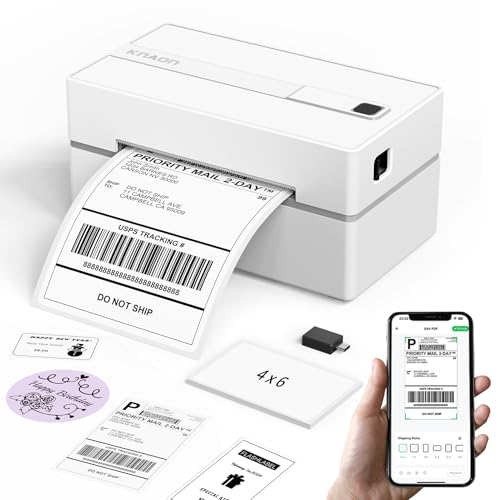
- App includes thousands of templates and design assets
- Prints up to 180 mm/s
- Supports Bluetooth, USB, and multiple operating systems
Best For: Users creating customized shipping and small-format labels
Fast App-Based Workhorse
Nelko Bluetooth 4x6 Label Printer

- Prints up to 72 4x6 labels per minute
- No ink or toner required
- Supports mobile app and USB workflows
Best For: Fast shipping and general-purpose label printing
Best Budget Pick
Mvgges Bluetooth 4x6 Label Printer

- Bluetooth printing for Android and iOS
- USB support for Windows and Mac
- 203 DPI output at up to 160 mm/s
Best For: Small businesses and home shipping stations
Best for Flexible Label Sizes
Labeer Bluetooth Thermal Label Printer

- App-based PDF cropping and rotation
- Supports multiple widths and custom sizes
- Bluetooth and USB device compatibility
Best For: Sellers and teams printing varied label formats
Best Feature-Rich Option
Arrvel A42BT Label Printer with Stand

- AI cropping and extensive design templates
- Bluetooth and USB connectivity
- Includes a label stand and 203 DPI printing
Best For: Businesses wanting shipping and custom-label tools
Best Compact Option
Rongta RP425 Wireless Label Printer

- Bluetooth printing through the RONGTA app
- USB support for Windows and macOS
- Inkless 203 dpi printing for 4 x 6 labels
Best For: Home sellers and small businesses needing a compact dual-connection printer
Best Fast Bluetooth Pick
N40 4 x 6 Thermal Label Printer

- Bluetooth support for iOS, Android, and tablets
- USB compatibility with Windows, macOS, and Linux
- Up to 150 mm/s printing with automatic calibration
Best For: Sellers needing fast mobile printing and broad platform support
Best App Features
NULLTONEX Shipping Label Printer

- FlashLabel Pro offers 1,800+ templates and 300+ fonts
- Bluetooth and USB connectivity
- Supports 4 x 6 and 1.57–4.3-inch-wide labels
Best For: Small businesses wanting customizable labels and flexible media support
Budget-Friendly Bluetooth Pick – JADENS Wireless 4×6 Label Printer
The JADENS Bluetooth Thermal Shipping Label Printer is a practical option for shoppers comparing wireless label printers for a small business or home shipping setup. Its 203 DPI thermal print head requires no ink or toner, supports both roll and fanfold labels, and works with labels from 1.57 to 4.1 inches wide.
Best For: Online sellers who want Bluetooth printing, USB connectivity, and broad shipping-platform compatibility.
Pros:
- Supports Bluetooth printing on compatible Windows and Mac computers, with app-based printing for iOS and Android.
- USB connectivity works with Windows 7 or newer and Mac OS 10.9 or newer.
- Compatible with platforms including Amazon, eBay, Shopify, ShipStation, Shippo, and Shipping Easy.
- Includes setup resources and a one-year warranty with customer support.
Cons:
- Mobile printing requires the Jadens printer app rather than direct Bluetooth printing.
- You need to recalibrate the label size when changing media.
Choose this model if flexible connections and straightforward shipping-label compatibility matter more than advanced app features. Its compact thermal design can help reduce ongoing supply costs for regular package labeling.
Wi-Fi Powerhouse – Rollo Wireless 4×6 Thermal Label Printer
The Rollo Wireless Shipping Label Printer stands out among wireless label printers for its Wi-Fi-first approach. It can print through AirPrint from Apple devices or over Wi-Fi from Android, Windows, Chromebook, and Linux systems, while also offering USB connectivity and fast 150 mm/s output.
Best For: Busy sellers who want broad device support, fast 4×6 printing, and Wi-Fi convenience.
Pros:
- Prints wirelessly through AirPrint or Wi-Fi without Bluetooth or separate drivers.
- Prints up to one 4×6 label per second at 203 DPI.
- Works with major shipping services and marketplaces, including USPS, UPS, Amazon, Shopify, Etsy, and eBay.
- Rollo states that the print head is designed for about 650,000 shipping labels.
Cons:
- The printer’s wireless functions depend on connecting it to a Wi-Fi network.
- The Rollo Ship Manager app is an added part of the workflow for its shipping features.
Rollo is a strong fit for higher-volume shipping stations that value speed and cross-platform wireless access. Its custom-label support also lets you create barcodes, product labels, stickers, and other labels through the app.
Template-Rich Portable Pick – KNAON Bluetooth 4×6 Label Printer
The KNAON Bluetooth Thermal Shipping Label Printer is a compact choice among wireless label printers, with app-based Bluetooth printing and USB support for several computer operating systems. Its FlashLabel Pro app adds more than 3,000 templates, 5,000 icons, and 100 fonts for customized shipping and personal labels.
Best For: Small businesses and home users who want portable hardware plus extensive DIY label-design options.
Pros:
- Supports app-based wireless printing from iPhone, Android, Windows, and macOS devices.
- USB connectivity supports macOS, Windows, ChromeOS, and Linux.
- Offers more than 3,000 templates, 5,000 icons, and 100 fonts in the app.
- Prints at up to 180 mm/s and supports media from 1.5 to 4.2 inches wide.
Cons:
- Bluetooth printing requires the FlashLabel Pro app rather than direct device pairing.
- Marketplace labels must be saved as PDFs and imported into the app for printing.
- ChromeOS users need to install the FlashLabel extension.
This KNAON model makes the most sense if label customization is a priority. It can handle shipping labels, barcodes, tags, and stickers while taking up relatively little storage space and including sample labels to get started.
Fast App-Based Workhorse – Nelko Bluetooth 4×6 Label Printer
The Nelko PL70E-BT is a compact thermal option for shoppers comparing wireless label printers for shipping and home labeling. It uses the NELKO app for mobile Bluetooth printing, supports USB connections for desktop systems, and produces up to 72 4×6 labels per minute at 203 DPI.
Best For: Sellers who need fast app-based printing for shipping, mailing, barcode, price, and name labels.
Pros:
- Prints wirelessly through the NELKO app on iOS and Android, with Bluetooth support for Windows computers.
- USB connectivity supports Windows, Mac OS, and Chrome OS.
- Thermal printing requires no ink or toner and supports roll or fanfold labels from 1.54 to 4.1 inches wide.
- Compatible with major platforms including Amazon, eBay, Shopify, USPS, UPS, Etsy, PayPal, and Poshmark.
Cons:
- Mac users are limited to USB printing, according to the supplied notes.
- Mobile and supported Bluetooth workflows require the NELKO app.
- Marketplace labels need to be saved as PDFs and uploaded to the app.
Nelko is a sensible choice when speed and a small footprint are important. Its automatic detection and self-test features are designed to simplify setup, while the included 50 4×6 labels let you begin printing immediately.
Best Budget Pick – Mvgges Bluetooth 4×6 Label Printer
If you need wireless label printers for a small online shop or home office, the Mvgges offers straightforward Bluetooth printing from Android and iOS devices, plus USB connectivity for Windows and Mac. Its 203 DPI direct thermal output avoids ink and toner, while speeds up to 160 mm/s suit routine 4×6 shipping-label work.
Best For: Small businesses and home users who want an affordable Bluetooth-and-USB printer for standard shipping labels.
Pros:
- Prints wirelessly from Android and iOS through a Bluetooth printing app.
- Supports USB printing on Windows and Mac with the required driver.
- Inkless 203 DPI printing and speeds up to 160 mm/s help reduce ongoing costs and waiting time.
- Includes 30 test labels, a power adapter, USB-C cable, and one-year warranty.
Cons:
- Bluetooth is not supported over Wi-Fi and requires the app on iOS and Android.
- Windows and Mac users must print through USB and install the driver.
- Its maximum media size is 4 x 6 inches.
The Mvgges is a practical entry-level choice if your main priority is easy 4×6 shipping-label printing. Just account for the separate app and driver requirements when choosing it for a mixed-device setup.
Best for Flexible Label Sizes – Labeer Bluetooth Thermal Label Printer
The Labeer is one of the more flexible wireless label printers for sellers and inventory teams. Its FlashLabel Pro app can crop and rotate PDF labels from iPhone or Android devices, while the printer supports standard 4×6 labels along with several narrower formats and custom sizes.
Best For: Online sellers, warehouses, and retail users who print shipping, barcode, product, and inventory labels in different sizes.
Pros:
- Prints shipping labels directly from iPhone and Android through the FlashLabel Pro app.
- Supports label widths from 1.57 to 4.41 inches, including 4×6, 4×4, 4×2, and 2×1 formats.
- Automatic gap detection and calibration help align repeated print jobs.
- Works with Windows via USB or Bluetooth and with macOS, ChromeOS, and Linux via USB.
Cons:
- Mobile Bluetooth printing depends on the FlashLabel Pro app.
- The supplied specifications list a 203 DPI resolution, which may be less suited to very fine graphics.
Choose the Labeer when label-format flexibility matters as much as wireless access. Its app tools and alignment features are especially useful for sellers who regularly switch between shipping and inventory tasks.
Best Feature-Rich Option – Arrvel A42BT Label Printer with Stand
For shoppers comparing wireless label printers with added workflow tools, the Arrvel A42BT combines Bluetooth and USB connectivity with a desktop label stand. Its FlashLabel Pro app offers AI-assisted PDF cropping, templates, icons, and fonts, making it useful for both shipping labels and custom business stickers.
Best For: Small businesses and home offices that want wireless shipping-label printing plus built-in design and customization options.
Pros:
- Supports Bluetooth printing from iOS, Android, Windows, and macOS through the appropriate app or driver.
- USB compatibility extends to Windows, macOS, ChromeOS, and Linux.
- Prints at up to 150 mm/s with 203 DPI resolution and supports 1.57- to 4.3-inch-wide labels.
- Includes a label stand, AI Smart Cropping, more than 3,000 templates, and lifetime technical support.
Cons:
- Mobile devices and macOS must use the FlashLabel Pro app rather than system Bluetooth settings.
- The app and driver setup varies by operating system.
- The package includes only 20 test labels.
The Arrvel stands out for users who want more than basic 4×6 printing. Its stand and design tools add convenience, while broad label-size support makes it a capable option for shipping, barcodes, price tags, and custom labels.
Best Compact Option – Rongta RP425 Wireless Label Printer
The Rongta RP425 is a compact choice for shoppers comparing wireless label printers for shipping and small-business tasks. It uses inkless direct thermal printing at 203 dpi and connects to phones through Bluetooth or to computers through USB.
Best For: Home sellers and small businesses that need a compact 4 x 6 shipping-label printer with both mobile and computer connectivity.
Pros:
- Supports Bluetooth printing through the RONGTA app on Android and iOS devices.
- USB connectivity supports Windows and macOS computers.
- Inkless thermal printing produces monochrome labels without ink cartridges.
- Supports 4 x 6-inch media and multiple label sizes.
Cons:
- Prints in black and white only.
- Requires the RONGTA app for phone printing and a driver for computer printing.
- Its listed 203 dpi resolution is intended for standard label text and barcodes rather than high-detail graphics.
The RP425 keeps the setup straightforward with dual Bluetooth and USB connectivity. Its small, lightweight design and one-year manufacturer warranty make it a practical option when desk space and basic shipping functionality matter most.
Best Fast Bluetooth Pick – N40 4 x 6 Thermal Label Printer
The N40 is a Bluetooth-focused option among wireless label printers, pairing with iOS, Android, and tablets through the Nada Print app. It also offers USB support for Windows, macOS, and Linux, plus automatic calibration and smart paper ejection for easier label handling.
Best For: Sellers who want fast mobile printing, broad platform compatibility, and support for both roll and fanfold labels.
Pros:
- Supports Bluetooth printing from iOS, Android, and tablets.
- USB connectivity works with Windows 7 and newer, macOS, and Linux.
- Prints at speeds up to 150 mm/s with 203 dpi resolution.
- Works with shipping and marketplace platforms including Amazon, eBay, Etsy, Shopify, USPS, UPS, FedEx, and DHL.
Cons:
- Label size should be recalibrated when changing media.
- Prints monochrome labels only.
- Bluetooth printing requires downloading the Nada Print app.
With included 4 x 6 labels, automatic calibration, and a two-year warranty, the N40 offers a convenient starting package. Its wide operating-system and platform support makes it a flexible fit for home or commercial shipping workflows.
Best App Features – NULLTONEX Shipping Label Printer
The NULLTONEX thermal shipping printer combines Bluetooth and USB connections with the FlashLabel Pro app. For shoppers evaluating wireless label printers, it stands out for its extensive template library, offline design storage, support for varied label widths, and claimed speeds up to 150 mm/s.
Best For: Small businesses and home organizers that want customizable templates alongside standard 4 x 6 shipping-label printing.
Pros:
- Bluetooth and USB connectivity support phones, laptops, and PCs.
- FlashLabel Pro includes more than 1,800 templates, 300 fonts, and editing tools.
- Supports 4 x 6 labels and other media from 1.57 to 4.3 inches wide.
- Direct thermal printing requires no ink, toner, or cartridge.
Cons:
- Prints in black and white only.
- Bluetooth printing depends on the FlashLabel Pro app.
- The included starter supply is limited to 25 sheets of 4 x 6 labels.
The NULLTONEX is a versatile choice if label customization matters as much as shipping output. Its compact design, printhead overheat protection, offline template storage, and compatibility with major shipping platforms support a busy small-business workflow.
How We Picked These Wireless Label Printers
We selected these Wireless Label Printers based on the features that matter most for shipping and small-business use: wireless connection type, 4×6 label support, compatibility with common operating systems, setup simplicity, print speed, portability, and ongoing operating costs. Because thermal printers use heat-sensitive labels instead of ink or toner, we also considered whether each model is practical for frequent label printing.
Bluetooth models can be convenient for phones and tablets, while Wi-Fi printers may be a better fit for multiple users or a shared workspace. Compatibility details are especially important because mobile apps, desktop drivers, and shipping-platform support can vary by model.
Quick Comparison
| Best For | Recommended Connection | Typical Strength |
|---|---|---|
| Occasional home shipping | Bluetooth | Simple mobile setup |
| Small online stores | Bluetooth or Wi-Fi | Faster recurring label workflows |
| Shared offices | Wi-Fi | Multi-device access |
| Markets and remote work | Bluetooth | Portability |
Key Buying Factors for Wireless Label Printers
Bluetooth Versus Wi-Fi
Bluetooth is usually easiest for a single user printing from a nearby phone, tablet, or computer. Wi-Fi offers greater flexibility when several devices need access or the printer will stay in a central location. Check whether the printer supports your preferred operating system and whether mobile printing requires a dedicated app.
Label Size and Compatibility
Most shipping labels use the standard 4×6 format, but not every printer accepts the same label rolls or fanfold stock. Confirm the supported media type, maximum label width, roll-holder design, and whether labels are included. Some printers may also support smaller product, barcode, or organization labels.
Speed, Resolution, and Reliability
For occasional orders, basic thermal output may be enough. Higher-volume sellers should prioritize consistent feed alignment, quick print cycles, clear barcodes, and a design that is easy to reload. Thermal labels can fade or become difficult to scan when exposed to heat, sunlight, or moisture, so store them appropriately.
Operating Costs and Workspace
Thermal printing eliminates ink purchases, but labels remain an ongoing expense. Compare compatible-label pricing and availability before buying. Also measure your desk or packing station, especially if you need room for a roll holder, stand, or paper tray.
Who Should Buy Which Wireless Label Printers?
Choose a Bluetooth model if you primarily print from one phone, tablet, or nearby laptop and want a straightforward setup. A Wi-Fi model is better for a small team, shared office, or workflow that moves between several devices. Frequent marketplace sellers should favor dependable feeding, broad platform compatibility, and easy label replacement over the lowest upfront price. If you take orders to craft fairs, markets, or another location, prioritize a compact Bluetooth printer and verify that your mobile device is supported.