The Vixtan 14-inch Triple Portable Monitor review starts with one clear takeaway: this is a serious productivity upgrade for laptop users who need more screen space on the move.
It is built for people who value portable multi-monitor convenience more than desk-bound simplicity.
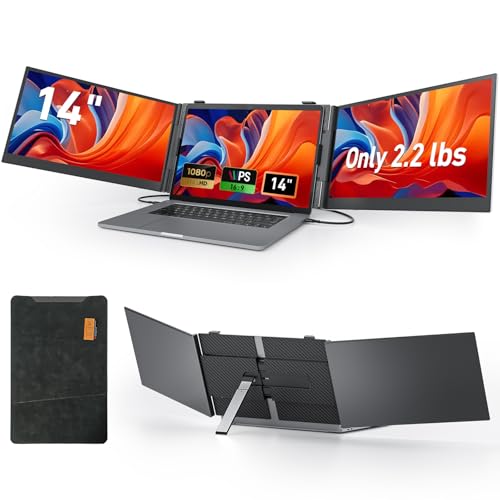
Vixtan Triple Monitor Review Summary
If you are trying to turn a single laptop into a true mobile workstation, the Vixtan 14-inch Triple Portable Monitor makes a strong case.
It is especially appealing for remote workers, business travelers, traders, coders, and creators who want three screens in one compact travel-friendly package without lugging around a full-size monitor and stand.
Quick Scorecard
| Category | Score | Takeaway |
|---|---|---|
| Portability | 9.0 | Extremely thin and lightweight, with a carry case for easy travel. |
| Display Quality | 8.0 | Sharp 14-inch IPS 1080p panels with 100% sRGB and 300-nit brightness. |
| Multi-Screen Productivity | 9.0 | Excellent for multitasking, extended desktop use, mirrored mode, and portrait layouts. |
| Compatibility | 8.0 | Broad OS support, with some Mac-specific setup considerations. |
| Setup and Connectivity | 8.0 | Plug-and-play for supported systems, but power and cable matching matter. |
| Stand Stability and Adjustability | 8.0 | Good height adjustment and rotation with a low-wobble aluminum design. |
| Build and Durability | 8.0 | Aluminum frame and protective leather case give it a travel-ready feel. |
The biggest reason to buy it is simple: it solves the “I need more monitor space, but I travel” problem.
For the right user, that is a bigger deal than raw screen size.
If you already work in spreadsheets, browser-heavy workflows, stock charts, coding environments, customer support dashboards, or content planning tools, this triple-screen extender can pay off immediately in workflow speed and reduced tab switching.
That said, the Vixtan 14-inch Triple Portable Monitor is not for everyone.
Buyers who only want a casual second screen may find it more complex than they need, and Mac users should pay close attention to the cable and power guidance before ordering.
Still, as a portable triple-monitor solution, it looks well thought out.
Key Features and Specifications of Vixtan Triple Monitor
The hardware list is one of the main reasons the Vixtan 14-inch Triple Portable Monitor stands out in the portable display category.
It combines a slim chassis, IPS panels, and multiple connection paths in a way that makes sense for mobile professionals.
| Specification | Details |
|---|---|
| Screen size | 14 inches per display |
| Display type | LCD with IPS technology |
| Resolution | 1920 x 1080 Full HD |
| Aspect ratio | 16:9 |
| Brightness | 300 nits |
| Color gamut | 100% sRGB |
| Viewing angle | 178 degrees |
| Refresh rate | 60 Hz |
| Contrast ratio | 1000:1 |
| Response time | 2 ms |
| Thickness | 0.18 inches |
| Weight | 2.2 lbs |
| Body material | Aerospace-grade aluminum |
| Stand | Widened aluminum stand with multi-level height adjustment and 180-degree rotation |
| Compatibility | Windows, Mac, Chrome OS, Android, laptops from 13 to 17 inches |
| Connectivity | USB-C, USB-C to USB-A, HDMI, H5-T cable |
| Power | No internal battery; powered through laptop USB or external adapter |
| Included accessories | Carry bag, protective leather case, cables, power support notes |
From a buyer’s perspective, those numbers are important because they point to a monitor extender that is built for productivity, not entertainment first.
The 1080p resolution is a smart match for a 14-inch panel size, keeping text crisp without making scaling a headache.
The 100% sRGB coverage is also useful if your work involves photo editing, design mockups, or content review where color consistency matters more than on basic office displays.
The 300-nit brightness claim and anti-glare treatment suggest decent visibility indoors and in bright rooms, though the glossy finish means it still may not feel like a true outdoor monitor.
The 178-degree viewing angle is ideal for a dual- or triple-panel setup because the side screens stay usable without severe color shift.
Another practical design choice is the aluminum body and widened stand.
Portable monitors often wobble when attached to a laptop, especially if you type aggressively or move the lid often.
Vixtan appears to have addressed that with a more rigid support design and 180-degree rotation for flexible positioning.
Pros and Cons of Vixtan Triple Monitor
Here is the short version of the Vixtan 14-inch Triple Portable Monitor pros and cons from a buyer’s standpoint.
- Very portable for a triple-screen setup, especially with the included carrying accessories.
- Excellent multitasking potential for work that benefits from multiple visible windows.
- Sharp 14-inch IPS Full HD panels with wide viewing angles and solid color coverage.
- Useful stand adjustment and 180-degree rotation improve day-to-day ergonomics.
- Broad compatibility with major platforms, including Windows, Mac, Chrome OS, and Android.
- Includes cables and case accessories, which helps reduce the need for extra purchases.
- No built-in battery, so stable power is essential.
- Some Mac setups and newer Apple chip models may need the included H5-T cable and driver step.
- The triple-screen format can be more than some users need if they only want a simple second display.
- Glossy finish may be less comfortable in very bright environments despite anti-glare treatment.
The strongest upside is productivity.
The biggest drawback is complexity.
That tradeoff makes sense: this is not a casual add-on display, it is a workflow extender.
Buyers should expect to think a little about compatibility and power, but that is normal for a triple portable monitor.
Who Should Buy Vixtan Triple Monitor?
The Vixtan 14-inch Triple Portable Monitor is best for people who need serious screen expansion in a travel-friendly form factor.
If you fit one of the user profiles below, it makes a lot of sense.
- Remote workers who want a compact desk setup that can move from home to office to hotel room.
- Business travelers and digital nomads who need portable productivity without a full monitor cart.
- Traders and analysts who watch multiple windows, charts, and dashboards at once.
- Developers and technical users who want code, logs, documentation, and browser previews visible simultaneously.
- Designers and content creators who value extra workspace for editing, references, and communication apps.
Who should skip it?
If you only use a laptop for email, streaming, or light browsing, this probably adds more hardware than value.
The same goes for anyone who wants a simple plug-in screen with minimal setup, because the triple-screen format has more moving parts than a standard portable monitor.
If your workflow depends on constant app switching, though, this is exactly the type of device that can save time every day.
How the triple-screen layout changes laptop workflows
This is where the Vixtan 14-inch Triple Portable Monitor becomes more than just an accessory.
A single laptop display limits how much can stay visible at once, and that slows down people who live inside multitasking software.
With the triple-screen layout, you can keep a primary task in the center and use the side screens for reference material, chat apps, email, dashboards, or tools.
That means fewer alt-tabs, less window resizing, and a workflow that feels much closer to a proper desktop setup.
The product supports extended, mirrored, and portrait display modes, which increases flexibility.
Extended mode is the obvious productivity winner.
Mirrored mode is useful for presentations or client conversations.
Portrait mode can be a nice fit for coding, long documents, social feeds, and monitoring tools.
In practical terms, this is the kind of monitor extender that helps you stay in context.
That can matter just as much as image quality, especially for jobs where speed and organization beat raw screen size.
Connection options and setup tips
Connection flexibility is one of the most important buying factors for any portable monitor, and Vixtan gives you several ways to hook it up.
The package includes Type-C cables, a USB-C to USB-A cable, an HDMI cable, and an H5-T cable.
That mix should cover many modern laptops and some older ones too.
The ideal setup is usually a full-featured USB-C port that can handle video and power through a single connection.
If your laptop supports that, you are likely to get the cleanest experience.
If not, the USB-C plus HDMI route may be the better path.
There are a few setup cautions worth knowing before you buy:
- Some systems need extra power if the screen shows a “No Signal” message.
- A 5V/2A or higher adapter can help keep the displays stable.
- Users should confirm their laptop ports before purchase, especially if they expect one-cable operation.
- Mac users may need the included H5-T cable and driver step depending on the chipset.
For most shoppers, this is still a plug-and-play style product, but not a completely hands-off one.
In the portable display category, that is normal.
The trick is to match the monitor’s input expectations with your laptop’s output capabilities before you rely on it for work travel.
Check current availability on Amazon
Mac compatibility and power requirements
Mac support is a key decision point for the Vixtan 14-inch Triple Portable Monitor review.
The product does support Mac, but buyers with newer Apple chips should read the setup notes carefully.
The included H5-T cable and a driver requirement are specifically mentioned for M1, M2, and M3 compatibility scenarios.
That does not make the monitor a bad choice for Mac users.
It just means Mac owners should be more deliberate than Windows laptop owners about checking the exact connection path.
If you are used to simple dock-and-go peripherals, this is worth attention.
Power is the other major consideration.
Because there is no integrated battery, the unit must draw power from your laptop’s USB output or an external adapter.
That keeps the device lighter and more travel-friendly, but it also means the extender is only as stable as the power source feeding it.
In buyer terms, this is a sensible tradeoff.
A built-in battery would add weight and bulk, which would weaken the whole portability angle.
For this category, Vixtan made the right design choice, but it still means you should travel with the right cables and a backup power plan.
Display quality for work, media, and outdoor use
For a mobile productivity device, the display spec sheet is strong.
The 14-inch IPS panels, 1920 x 1080 resolution, and 100% sRGB color coverage are all signs that the Vixtan Triple Monitor aims above basic budget monitors.
Text should look crisp, and color should be more than good enough for everyday office work, browsing, presentations, and light creative tasks.
The 60 Hz refresh rate is standard for this category, and the 2 ms response time is more than adequate for fast pointer movement and window transitions.
The 1000:1 contrast ratio is also respectable for general productivity use.
What about media?
It should handle streaming and casual video well, but that is not its main selling point.
The real advantage is how efficiently it extends your workspace.
If you are buying this for movies first, you are likely overpaying for features you will not use.
If you are buying it for work, the value proposition is much better.
Outdoor visibility is more mixed.
The 300-nit brightness level is useful, and the anti-glare treatment helps, but the glossy finish means reflections can still become distracting in harsh light.
In other words, it is good for bright rooms, less ideal for direct outdoor use.
Alternatives to consider before buying
Before committing to the Vixtan 14-inch Triple Portable Monitor, it is smart to compare it with a few related Amazon-friendly options:
- ASUS portable monitor – A better fit if you only need one external screen and want simpler setup.
- LG portable monitor – Worth considering for users who want a trusted display brand with broad laptop compatibility.
- dual portable monitor extender – A middle ground if triple screens feel like overkill.
- 15.6-inch portable monitor – Better if you prefer one larger side display instead of multiple panels.
- laptop docking station with monitor support – A more desk-centric option if portability is less important than cable management.
The comparison that matters most is not just screen size, but workflow style.
If you move around a lot and need all three screens attached to your laptop, the Vixtan wins on convenience.
If you mostly work at one desk, a dock and one or two larger monitors may be the smarter long-term setup.
Who Should Buy Vixtan Triple Monitor?
Buy the Vixtan 14-inch Triple Portable Monitor if you want a highly portable way to create a true multi-screen workstation from a laptop.
It is a strong fit for people who value flexibility, frequent travel, and multitasking efficiency.
Skip it if you want the simplest possible monitor add-on, if your laptop ports are limited, or if you do not actually need three visible workspaces.
This is a focused productivity tool, not a general-purpose display for everyone.
My bottom-line advice: if you have a compatible laptop and a real need for more screen space, the Vixtan 14-inch Triple Portable Monitor is a compelling buy.
It is thoughtfully designed, genuinely travel-ready, and especially strong for mobile professionals who want desktop-like productivity without desktop-like bulk.
Is Vixtan Triple Monitor Worth It?
So, is Vixtan 14-inch Triple Portable Monitor worth it?
For the right buyer, yes.
It delivers one of the most practical productivity upgrades you can carry in a bag, and it does so with a slim, lightweight build that makes sense for travel.
The Vixtan 14-inch Triple Portable Monitor pros and cons are fairly clear.
You get excellent portability, useful display quality, broad compatibility, and a genuine multitasking boost.
In exchange, you need to accept external power requirements, pay attention to Mac setup details, and decide whether triple screens are actually useful for your workflow.
Final verdict: buy it if you need portable triple-screen efficiency. If your laptop is your main work machine and you often work away from a full desk, this is a smart and capable upgrade.
If you only need a basic second screen, look at a simpler portable monitor instead.