The ZUMWALT Laptop Screen Extender review starts with one clear idea: this is built for people who want a bigger workspace without carrying a full monitor setup.
It is especially appealing if you work remotely, study, code, or travel often.
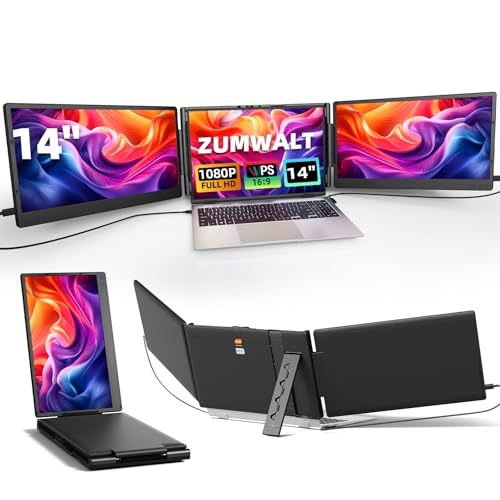
ZUMWALT Extender Review Summary
If you want a laptop accessory that can instantly turn a small screen into a serious multi-display workstation, the ZUMWALT Laptop Screen Extender is easy to understand.
It is best for buyers who need more room for spreadsheets, chat windows, browser tabs, meetings, stock charts, coding tools, or research without giving up portability.
In practical use, the ZUMWALT Laptop Screen Extender delivers its biggest value through the triple-screen layout.
That design makes it far more compelling than a basic portable monitor because you gain two extra displays at once, which can dramatically reduce app switching during the day.
Bottom line: if your laptop is compatible and you genuinely work in multitasking-heavy workflows, this is a strong productivity buy.
If you mainly want a light travel accessory or you use an unsupported MacBook chip, you should look elsewhere.
Scorecard
| Category | Score | Why it matters |
|---|---|---|
| Display quality | 8.0 | 14-inch IPS panel, 1080p resolution, 300 nits brightness, 80% color gamut, 178-degree viewing angle, and eye-care coating support clear multitasking. |
| Productivity boost | 9.0 | Triple-screen design helps with spreadsheets, coding, research, meetings, and other multitasking workflows. |
| Compatibility | 6.0 | Works with several systems, but port requirements matter and it is not compatible with MacBook M1/M2/M3 models. |
| Setup and convenience | 8.0 | Plug-and-play design with no driver requirement and multiple included cables reduces setup friction. |
| Portability | 7.0 | At about 4.5 pounds with a travel pouch, it is portable for a workstation-style accessory, though not ultralight. |
| Build and adjustability | 7.0 | 180-degree rotatable stand, stable base, magnetic protector, and built-in speakers add flexibility. |
| Value for multi-tasking users | 8.0 | Strong fit for users who want a compact mobile workstation without carrying separate monitors. |
Overall verdict: the ZUMWALT Laptop Screen Extender is best for productivity-first buyers who care more about screen space than minimal weight.
It is not the universal answer for every laptop owner, but for the right user it is highly practical and genuinely useful.
Key Features and Specifications of ZUMWALT Extender
The ZUMWALT Extender is a 14-inch triple portable monitor designed to expand a laptop into a three-screen setup.
That alone tells you the target audience: people who need a compact mobile workstation, not a simple second screen.
- Screen size: 14 inches
- Resolution: 1920 x 1080 Full HD
- Panel type: IPS LCD
- Aspect ratio: 16:9
- Brightness: 300 nits
- Refresh rate: 60Hz
- Viewing angle: 178 degrees
- Contrast ratio: 2000:1
- Response time: 2ms
- Color gamut: 80%
- Finish: Glossy
- Additional features: Built-in speakers, Eye Care enhancement
- Stand: 180-degree rotatable with stable base
- Accessories: Magnetic dual-screen protector, travel pouch, included cables
- Weight: About 4.5 lb
- Warranty: 12-month warranty
Those numbers matter because they show the ZUMWALT Laptop Screen Extender is optimized for productive clarity rather than premium color work.
The 1080p resolution is enough for documents, code, browser work, and meetings.
The 300 nits brightness is respectable for indoor use, while the 178-degree viewing angle makes it easier to share screens with a coworker or client without severe color shift.
The 80% color gamut and glossy finish make the panel more suited to everyday productivity than to color-critical photo grading.
That is not a flaw if you are buying it for multitasking, but it is a factor to consider if you are a visual professional.
Pros and Cons of ZUMWALT Extender
Here is the quick ZUMWALT Laptop Screen Extender pros and cons breakdown from a buyer’s perspective.
Pros
- Adds two extra screens for a major multitasking advantage.
- IPS panel offers good clarity and wide viewing angles.
- Plug-and-play setup keeps installation simple.
- Included cables reduce accessory hunting.
- Portable enough for travel, remote work, and flexible desks.
- Rotating stand and flat-lay presentation mode improve usability.
- Built-in speakers add convenience for calls and videos.
Cons
- Not compatible with MacBook M1/M2/M3 models, which is a major limitation.
- Compatibility depends on having the right port layout and connection path.
- Triple-screen design is bulkier than a single portable monitor.
- Glossy screen can reflect light in bright rooms.
The biggest strength here is obvious: this product is made to increase output per hour.
The biggest weakness is equally obvious: if your laptop setup is not compatible, the whole concept loses value quickly.
Who Should Buy ZUMWALT Extender?
The ZUMWALT Extender is a smart fit for buyers who regularly juggle multiple tasks on one laptop and feel constrained by limited screen space.
If your day includes spreadsheets, messaging apps, dashboards, coding, trading, or research tabs, this kind of setup can save a surprising amount of time.
- Remote workers who want a compact home-office alternative.
- Students who need notes, lecture material, and assignments open at once.
- Programmers and developers who benefit from code, preview, and terminal windows.
- Analysts and traders who need charts and data visible side by side.
- Frequent travelers who want a portable workstation in one carrying case.
- Presenters and meeting-heavy users who need quick screen sharing and layout flexibility.
Who should skip it?
Anyone using an unsupported MacBook chip, buyers who only need a light travel monitor, and users who prefer a single large external display at a desk.
If you already work from one dedicated location, a conventional monitor may be simpler and cheaper to live with.
How the Triple Display Modes Work
One of the most important decision factors in any triple screen extender is how the display modes behave in real use.
The ZUMWALT Laptop Screen Extender supports both extended and duplicate modes, which covers the two core workflows most buyers want.
Extended mode is the real productivity feature.
It lets you spread out your workflow across multiple panels so you can keep email open on one side, a document in the center, and a browser or chat app on the other.
This is where the product earns its keep.
Duplicate mode is useful for meetings, demos, classroom settings, and client presentations.
Instead of turning your laptop toward someone else, you can simply mirror the same information across screens for easier viewing.
The 180-degree rotatable stand adds flexibility here, because you can lay the display flat for collaborative work or position it in a more traditional stacked or expanded arrangement.
That gives the ZUMWALT Laptop Screen Extender a little more versatility than cheaper one-position add-ons.
Laptop Compatibility and Port Requirements
This is the section that should determine whether you buy or move on.
The ZUMWALT Laptop Screen Extender supports Mac, Windows, Android, Chrome, and Switch through USB-C or HDMI, but compatibility is not universal and the details matter.
The most important warning: it is explicitly not compatible with MacBook M1/M2/M3 models.
That means many modern Mac buyers can stop here.
If you use a Mac, verify chip generation before anything else.
Because the unit uses USB-C and HDMI-based connections, the laptop must have the right ports and enough support for the display path.
That makes it a better fit for buyers who are comfortable checking their system specs.
If you want a fully carefree accessory that works with absolutely everything, this is not that product.
Included cables help reduce setup friction: two USB-C to USB-C cables, one HDMI to Type-C cable, and two USB-A to USB-C cables.
That is helpful, but it does not remove the need to confirm the proper port configuration on your laptop.
Buying advice: before ordering, check your laptop model, chip type, and available video-out ports.
This is the difference between a great purchase and an expensive compatibility headache.
Travel Use, Weight, and Desk Setup
For a triple-screen accessory, the ZUMWALT Extender is reasonably portable.
At about 4.5 pounds, it is not featherlight, but it is light enough to be carried for business trips, campus use, or hybrid work if screen space matters to you.
The included travel pouch and magnetic protector improve practicality.
Those accessories make it easier to pack the extender without feeling like you are transporting a fragile desktop monitor setup.
The item dimensions, 13.85 inches deep by 8.5 inches wide by 1.44 inches high, also suggest a relatively compact footprint for a three-panel product.
That said, the form factor still has trade-offs.
A single portable monitor is easier to pack and set up.
A standard external monitor is better if you stay at one desk.
The ZUMWALT Laptop Screen Extender sits between those options: more capable than a single screen, but bulkier than the simplest portable setups.
Best use case: a user who wants a “bring-your-workstation-with-you” solution rather than the lightest possible travel accessory.
Built-in Speakers and Presentation Use
Built-in speakers are not usually the headline feature on a screen extender, but they do improve convenience.
For video calls, quick demonstrations, classroom use, or casual media, having audio integrated into the device can reduce cable clutter and setup time.
Still, buyers should keep expectations realistic.
Built-in speakers on accessories like this are usually about convenience, not high-end sound.
They are useful when you are mobile, but a headset or external speakers will still be better for serious audio work.
Where the speakers matter most is during presentation mode.
If you are laying the extender flat or using it in a shared space, the all-in-one design keeps the setup cleaner and faster.
ZUMWALT Laptop Screen Extender Review: Design and Everyday Usability
From a design standpoint, the ZUMWALT Laptop Screen Extender is clearly optimized for function.
The stable base is important because a triple-panel attachment can feel awkward if the structure flexes too much.
The rotatable stand helps make the most of small desks, hotel rooms, and meeting spaces.
The black finish is understated and professional.
That is a good choice for an office or travel accessory because it avoids the flashy look that some portable monitors have.
The overall design feels like it was made for working people rather than hobbyists.
The usability story is mostly positive.
A plug-and-play design without drivers is exactly what most buyers want from this category.
If you move between locations often, the ability to connect quickly is more valuable than fancy software tools.
The included support for connection issues also adds confidence for less technical buyers.
The downside is that a glossy panel can reflect windows and bright office lighting.
If your desk faces a light source, that may reduce comfort.
In that case, a matte display or a different monitor arrangement could be better.
Best Alternatives to Consider
If you are comparing the ZUMWALT Laptop Screen Extender with other options, the right alternative depends on how much screen space you really need.
- portable USB-C monitor – Better if you want something lighter and simpler than a triple-screen setup.
- laptop docking station with monitor support – Useful for a desk-based setup with one or more external monitors.
- portable dual-screen monitor extender – A middle ground if two extra screens feels like too much.
- external monitor for home office – Often the easiest choice if you work from one fixed location.
If your priority is pure portability, a single portable monitor may be the better buy.
If your priority is maximum screen real estate in a mobile form factor, the ZUMWALT Laptop Screen Extender has the stronger pitch.
Is ZUMWALT Extender Worth It?
So, is ZUMWALT Laptop Screen Extender worth it?
For the right buyer, yes.
It is worth it if you need a mobile multi-monitor setup, have a compatible laptop, and will actually use the extra screens every day.
The value proposition is strongest for remote workers, students, analysts, traders, and developers who feel limited by one laptop display.
The ZUMWALT Laptop Screen Extender review also makes it clear that this is not a casual accessory; it is a productivity tool with real workflow impact.
Buy it if: you want triple-screen productivity, can confirm compatibility, and prefer plug-and-play convenience.
Skip it if: you use an incompatible MacBook, want the lightest travel monitor possible, or only need a screen extension occasionally.
Final verdict: the ZUMWALT Laptop Screen Extender is a smart, focused purchase for buyers who need more workspace now and value mobility.
Check your ports first, then it becomes an easy recommendation.