The right monitor stand can improve screen height, viewing comfort, and usable desk space without requiring a full monitor arm installation. The best adjustable monitor stands also make it easier to position one or two displays for work, gaming, or hybrid setups.
We compared freestanding risers and VESA-compatible stands across height adjustment, weight capacity, screen compatibility, stability, storage, and adjustability to help you choose the right fit.
Best 10 Adjustable Monitor Stands Picks for 2026
Flexible Glass-Base Pick
HT05B-001 Single Monitor Stand

- Supports one 13–32-inch screen up to 77 pounds
- Four height levels plus tilt, swivel, and rotation
- Tempered-glass base with cable management
Best For: A sturdy, highly adjustable single-monitor setup
Best Two-Pack Value
BONTEC Adjustable Monitor Stand Risers

- Two metal risers support up to 44 pounds each
- Three height positions from 3.9 to 5.5 inches
- Pen holder, cable management, and storage space
Best For: Dual-screen desks and flexible office organization
Ultrawide Freestanding Pick
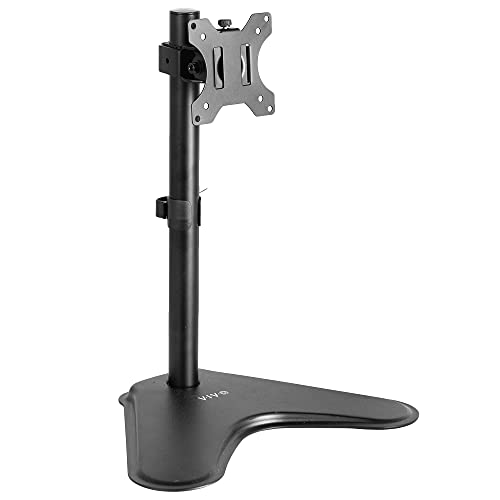
- Fits regular monitors up to 32 inches and ultrawides up to 38
- Offers tilt, swivel, rotation, and height adjustment
- Includes cable management and a three-year warranty
Best For: Compatible single monitors and lighter ultrawide screens
Simple Storage Riser

- Three height settings from 4.5 to 6.1 inches
- Supports monitors, laptops, and printers up to 44 pounds
- Ventilated platform with rubber pads and under-stand storage
Best For: Basic desk elevation and organized home-office setups
Best Metal Riser
Adjustable BoYata Monitor Stand

- Metal riser supports up to 33.06 pounds
- Twist-knob height adjustment
- Open space for keyboard and office storage
Best For: Single-monitor setups needing sturdy construction and storage
Best Dual-Monitor Arm
HUANUO FlowLift Adjustable Stand

- Full-motion support for two 13- to 32-inch monitors
- Tilt, swivel, rotation, and height adjustment
- C-clamp and grommet mounting options
Best For: Compatible dual-monitor workstations and gaming setups
Best Budget Riser
Amazon Basics 3-Level Monitor Stand

- Three preset heights from 2.87 to 4.8 inches
- Supports monitors and laptops up to 22 pounds
- Lightweight ABS design with non-skid feet
Best For: Simple home and office setups with standard-size devices
Best Dual-Monitor Pick
VIVO STAND-V002F Dual Monitor Stand

- Holds two 13- to 27-inch monitors
- Articulating tilt, swivel, rotation, and height adjustment
- Large padded base with cable clips
Best For: Flexible two-screen desk setups
Best Adjustable Riser
HUANUO Three-Height Monitor Stand

- Three height settings from 3.94 to 5.51 inches
- Supports up to 44 pounds
- Ventilated platform with storage underneath
Best For: Organized desks needing a simple height boost
Best Two-Pack Riser
Hemudu Adjustable Glass Monitor Stands

- Includes two adjustable risers
- Height range of 3.4 to 4.9 inches
- Tempered glass supports up to 88 pounds
Best For: Multi-device desks and flexible workstation layouts
Flexible Glass-Base Pick – HT05B-001 Single Monitor Stand
This adjustable monitor stand is a strong fit for users who want a freestanding mount with broad positioning control. It supports one 13- to 32-inch display up to 77 pounds and includes tilt, swivel, rotation, and four height settings.
Best For: Users who need a sturdy, highly adjustable stand for one VESA-compatible monitor.
Pros:
- Supports screens from 13 to 32 inches and up to 77 pounds.
- Offers -15° to +10° tilt, ±50° swivel, 360° rotation, and four height levels.
- Tempered-glass base, cable management, and portrait or landscape orientation support.
- Open-top VESA plate and included hardware simplify installation.
Cons:
- Limited to a single monitor.
- Requires a compatible 50×50, 75×75, or 100x100mm VESA pattern.
The high weight capacity and wide range of adjustments make this one of the more versatile adjustable monitor stands for a single-screen workstation, while the glass pedestal base adds a substantial footprint.
Best Two-Pack Value – BONTEC Adjustable Monitor Stand Risers
This two-pack of adjustable monitor stands is designed for flexible desk organization. Each metal riser supports up to 44 pounds and offers three height positions, making the set useful for dual-screen desks, a monitor-and-laptop arrangement, or separate work areas.
Best For: Home offices, study spaces, and users who want two risers with built-in organization features.
Pros:
- Includes two stands for dual monitors, two desks, or a monitor-and-laptop setup.
- Three height settings range from 3.9 to 5.5 inches.
- Each powder-coated steel riser supports up to 44 pounds.
- Built-in pen holder, cable management, and under-stand storage help organize the desk.
Cons:
- The supplied details describe height adjustment but not tilt or swivel.
- The compact 14.5 x 9.1-inch platform may not suit larger equipment footprints.
Choose this set when quantity and desk organization matter more than articulated monitor movement. Its tool-free setup and strong per-stand capacity make it practical for everyday office devices.
Ultrawide Freestanding Pick – VIVO STAND-V001H
The VIVO STAND-V001H is one of the adjustable monitor stands in this roundup aimed at users who need a freestanding mount for a regular or ultrawide display. It supports screens up to 38 inches, provided they weigh no more than 22 pounds and use a 75×75 or 100x100mm VESA pattern.
Best For: Owners of compatible single monitors or ultrawide screens who want articulated positioning without a desk clamp.
Pros:
- Supports most 13- to 32-inch monitors and ultrawide displays up to 38 inches.
- Provides ±15° tilt, 90° swivel, 360° rotation, and height adjustment.
- Supports portrait and landscape orientations with integrated cable management.
- Includes assembly hardware and a three-year warranty.
Cons:
- Maximum supported weight is 22 pounds.
- Limited to 75x75mm or 100x100mm VESA mounting patterns.
This stand is especially appealing for a compatible ultrawide display, combining a freestanding base with useful articulation. Confirm both the monitor’s weight and VESA pattern before buying.
Simple Storage Riser – WALI Adjustable Monitor Stand
This WALI adjustable monitor stand is a straightforward riser for monitors, laptops, and printers. Its ventilated 14.6 x 9.3-inch platform supports up to 44 pounds and raises equipment to one of three set heights while leaving storage space underneath.
Best For: Users seeking a lightweight, tool-free riser with ventilation and under-stand storage.
Pros:
- Three height settings raise devices 4.5, 5.3, or 6.1 inches.
- Supports monitors, laptops, and printers up to 44 pounds.
- Vented platform helps keep supported devices cool.
- Rubber pads, tool-free assembly, and under-stand storage add everyday convenience.
Cons:
- The plastic construction may offer less rigidity than a metal stand.
- The supplied details do not list tilt, swivel, or rotation adjustments.
This is a practical choice when you want basic height adjustment rather than an articulated mount. The ventilated shelf and open storage area make it useful for compact home-office setups.
Best Metal Riser – Adjustable BoYata Monitor Stand
For shoppers comparing adjustable monitor stands, the BoYata Monitor Stand offers a sturdy metal platform with twist-knob height adjustment. It raises a monitor while leaving open space underneath for a keyboard, notebook, or other office items.
Best For: Users who want a durable single-monitor riser with flexible height and under-stand storage.
Pros:
- Twist knob provides adjustable height for a more comfortable viewing position.
- Metal construction supports up to 33.06 pounds.
- Open storage area helps reduce desktop clutter.
- Includes a screwdriver for assembly, plus skidproof pads for added stability.
Cons:
- Designed as a single-platform riser rather than a full-motion monitor arm.
- Height adjustment is manual and uses a screw mechanism.
Choose this BoYata model when stability, weight capacity, and accessible storage matter more than advanced screen positioning or multi-monitor support.
Best Dual-Monitor Arm – HUANUO FlowLift Adjustable Stand
Among adjustable monitor stands, the HUANUO FlowLift is suited to dual-screen workstations that need broad positioning control. Its full-motion arms support compatible 13- to 32-inch monitors and attach with either a C-clamp or grommet mount.
Best For: Dual-monitor work, gaming, coding, and users who frequently change screen height, angle, or orientation.
Pros:
- Supports two compatible monitors weighing 4.4 to 19.8 pounds each.
- Offers tilt, swivel, rotation, and height adjustment, including portrait orientation.
- Includes C-clamp and grommet mounting options for suitable wooden desks.
- Built-in cable management helps keep the workstation organized.
Cons:
- Requires monitors with 75×75 or 100×100 VESA mounting holes.
- Desk compatibility is limited to suitable wooden desks 0.59 to 3.54 inches thick.
- Installation may be blocked by cross beams or panels beneath the desk.
This is the most flexible option here, but compatibility checks are essential before purchase. Confirm your monitor weight, VESA pattern, and desk construction first.
Best Budget Riser – Amazon Basics 3-Level Monitor Stand
The Amazon Basics Monitor Stand is a straightforward choice among adjustable monitor stands, using detachable legs to provide three height options. Its lightweight ABS construction suits everyday monitor, laptop, and small-office-equipment setups.
Best For: Home and office users seeking simple height adjustment, portability, and modest under-stand organization.
Pros:
- Three height settings measure approximately 2.87, 4.2, and 4.8 inches.
- Supports up to 22 pounds for standard monitors and laptops.
- Non-skid feet help keep the riser stable on flat surfaces.
- Lightweight ABS plastic is easy to move between work areas.
Cons:
- Not intended for oversized or heavy-duty equipment.
- Height changes require detaching or repositioning the legs rather than using a continuous adjustment.
- The tapered top surface has specified dimensions that should be checked against your device.
This riser makes sense for straightforward setups where three preset heights are sufficient. Measure your monitor or laptop footprint and stay within the 22-pound support limit.
Best Dual-Monitor Pick – VIVO STAND-V002F Dual Monitor Stand
For a flexible dual-screen setup, the VIVO STAND-V002F is one of the more adjustable monitor stands available. Its freestanding design supports two 13- to 27-inch monitors, while articulated arms allow you to fine-tune tilt, swivel, rotation, and height.
Best For: Users who want a freestanding stand for two monitors with extensive positioning options.
Pros:
- Supports two monitors up to 27 inches and 22 pounds each.
- Offers tilt, swivel, rotation, and center-pole height adjustment.
- Large padded base and detachable cable clips help with stability and organization.
- Detachable VESA plates simplify monitor installation.
Cons:
- The 13-by-10.5-inch base requires a reasonable amount of desk space.
- Pulling the monitors too far forward or backward can create stability issues unless the stand is bolted down.
This is a strong choice when adjustability and dual-monitor support matter most, provided your desk can accommodate the large base and your monitors use compatible VESA mounting holes.
Best Adjustable Riser – HUANUO Three-Height Monitor Stand
The HUANUO monitor riser is a straightforward option for raising a monitor, laptop, printer, or similar device. Among adjustable monitor stands, it stands out for its three push-button height settings, ventilated steel platform, and useful storage space beneath the riser.
Best For: Anyone seeking a simple height-adjustable riser with under-platform organization.
Pros:
- Adjusts to 3.94, 4.72, or 5.51 inches high.
- Supports up to 44 pounds.
- Ventilation openings help improve airflow around a laptop.
- Provides 12.40-by-7.09-inch storage space underneath.
Cons:
- It provides fixed height levels rather than continuous adjustment.
- The listed laptop compatibility is limited to models up to 15.6 inches with a width under 9.25 inches.
Choose this riser if you want basic ergonomic height changes without a monitor arm. Its sturdy platform and open storage area make it particularly practical for organized home or office desks.
Best Two-Pack Riser – Hemudu Adjustable Glass Monitor Stands
The Hemudu 2-pack combines adjustable stainless-steel legs with tempered-glass platforms, giving you two risers for monitors, laptops, printers, or other desktop equipment. These adjustable monitor stands offer height changes from 3.4 to 4.9 inches, plus a tilt range of up to 15 degrees.
Best For: Users who need two risers for multiple devices or want a flexible workstation arrangement.
Pros:
- Includes two monitor risers for multi-device setups.
- Leg height adjusts from 3.4 to 4.9 inches.
- Platforms can tilt forward from 0 to 15 degrees.
- Tempered glass supports up to 88 pounds.
Cons:
- The clear glass surface may show fingerprints more readily than an opaque platform.
- The height adjustment is provided through the legs rather than a quick-adjust mechanism.
This two-pack is useful when you need matching risers for more than one device. The glass-and-steel construction also makes it suitable as a printer stand, laptop riser, desk shelf, or Xbox One stand.
How We Picked the Best Adjustable Monitor Stands
We focused on stands that offer practical improvements over placing a monitor directly on a desk. The selection includes single- and dual-monitor models, simple risers, storage-equipped platforms, and VESA mounts with swivel, tilt, rotation, or height adjustment. We considered the listed screen-size range, supported weight, mounting standard, base design, adjustment method, and likely desk footprint.
Because monitor setups vary widely, no single stand is ideal for everyone. A lightweight riser may be best for a laptop or compact display, while a VESA stand can provide more precise positioning. Always confirm your monitor’s weight, dimensions, and mounting-hole pattern before buying.
Quick Comparison
- Best for simple height improvement: A freestanding riser with fixed or tiered height settings.
- Best for flexible positioning: A VESA stand with swivel, tilt, rotation, and vertical adjustment.
- Best for dual screens: A dual-monitor stand designed for two compatible displays.
- Best for storage: A riser with drawers, shelves, or an organizer underneath.
- Best for larger or ultrawide screens: A heavy-duty stand with a broad base and appropriate weight rating.
Key Buying Factors for Adjustable Monitor Stands
Monitor Compatibility
Check the supported screen size and maximum load, but do not rely on screen size alone. A large monitor may be light, while an older display can be surprisingly heavy. For VESA models, verify whether your monitor uses a 75x75mm or 100x100mm mounting pattern and whether the required screws are included.
Height and Viewing Angle
Choose a stand that places the top portion of the screen near eye level when you sit upright. Tiered risers offer simple height changes, whereas adjustable arms provide finer positioning. Swivel, tilt, and rotation are useful when sharing a screen, switching between portrait and landscape orientation, or reducing glare.
Stability and Desk Space
A broad, heavy base is important for larger displays and frequent adjustments. Measure the available desk depth and width, and check whether the stand leaves enough room for a keyboard, laptop, speakers, or other accessories. Ventilated platforms may also help airflow around laptops and compact devices.
Storage and Cable Management
Drawers and open compartments can hold peripherals, notebooks, or controllers, but storage can increase the stand’s footprint. If you prefer a clean setup, prioritize a minimal base or a model with cable-routing features.
Who Should Buy Which Adjustable Monitor Stands?
Choose a basic riser if you want an affordable way to raise a monitor or laptop with minimal installation. Choose a storage riser if desk organization matters as much as screen height. Choose a single VESA stand if you want stronger control over viewing position or use a heavier display. Choose a dual-monitor stand if you need two screens aligned on one base and both monitors meet the mount’s size, weight, and VESA requirements.