Finding the right tablet for a 5-year-old means balancing fun, safety, and real learning value. The best options make it easy for kids to build early reading, math, and problem-solving skills without overwhelming them.
In this roundup, we focus on kid-friendly tablets and screen-free learning devices that are simple for preschoolers to use, easy for parents to manage, and built to support age-appropriate development.
Best 10 Educational Tablets for 5 Year Olds Picks for 2026
Starter Learning Tablet
Amazon Fire 7 Kids tablet for ages 3-7

- Amazon Kids+ included for books, games, videos, and apps
- Parent Dashboard supports educational goals and time limits
- Kid-proof case plus 2-year worry-free guarantee
Best For: Families wanting a simple, durable tablet for younger kids
Preschool Learning Toy

- Flips between keyboard and touch tablet modes
- Five modes cover ABCs, numbers, games, music, and messages
- Focuses on early learning and role-play activities
Best For: Preschoolers who enjoy hands-on learning and pretend play
More Advanced Kids Tablet
Amazon Fire HD 8 Kids Pro tablet for ages 6-12

- Amazon Kids+ adds ad-free learning and entertainment content
- 13-hour battery and 64 GB storage support longer use
- Parental controls, safe browsing, and approved contacts
Best For: Families wanting a more capable tablet that kids can grow into
Colorful Preschool Learning Toy
LeapFrog 2-in-1 LeapTop Touch, Pink
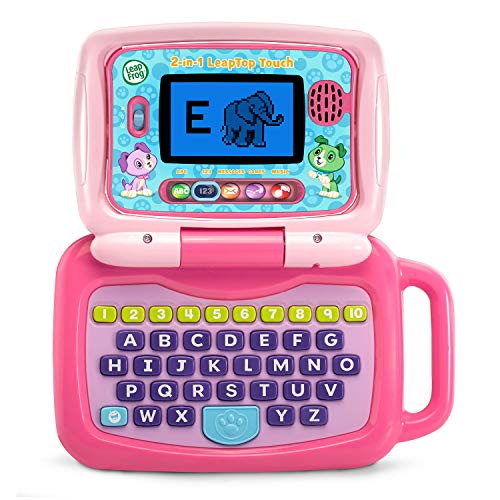
- Flips between keyboard and touch tablet styles
- Five modes cover ABCs, numbers, games, music, and messages
- Built for preschool learning and pretend play
Best For: Young children who like simple, colorful early-learning toys
Screen-Free Learning Pad
Think Academy Learning Pad with Flash Cards

- Screen-free alternative to kids’ tablets
- Three play modes with voice prompts and sound effects
- Teaches letters, numbers, phonics, logic, and daily life skills
Best For: Families wanting a screen-free preschool learning toy for ages 3 to 5
Kid-Safe Learning Tablet
LeapFrog LeapPad Academy Kids’ Learning Tablet

- Educator-approved apps for math, reading, writing, coding, and more
- Shatter-safe 7-inch screen with stylus and bumper
- Parent controls plus optional app and content expansion
Best For: Families who want a kid-safe learning tablet with app-based content
Compact No-WiFi Learning Tablet
6-in-1 Toddler Learning Tablet
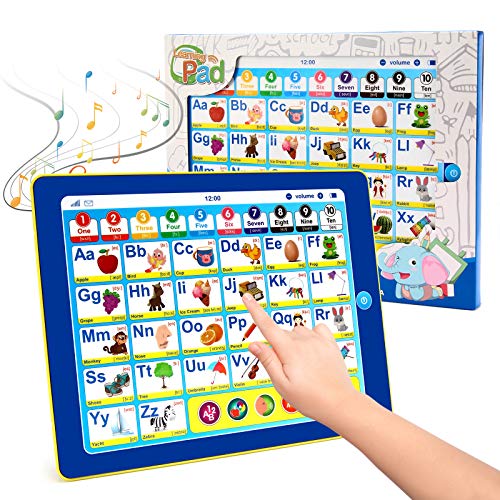
- No-WiFi design for simple, distraction-free play
- Teaches letters, words, colors, numbers, songs, and quizzes
- Three volume levels and auto shut-off
Best For: Travel-friendly early learning with simple, battery-powered play
Screen-Free Phonics Starter
JoyCat 156-Page Talking Flash Cards

- 156 pages of talking flash cards
- Screen-free audio-based learning
- 40+ themes and 100+ games
Best For: screen-free phonics and early-learning practice for ages 2-6
Bilingual Learning Pad

- English and Spanish bilingual design
- 40 learning themes with 5 modes
- 2-level volume control for flexibility
Best For: bilingual early-learning play with lots of theme variety
Reading Readiness Pick
JoyCat 156-Page Learn to Read Tablet

- 156 pages of talking flash cards
- Supports independent insert-and-tap use
- Screen-free reading and math practice
Best For: screen-free learn-to-read practice for preschoolers
Starter Learning Tablet – Amazon Fire 7 Kids tablet for ages 3-7
If you’re comparing educational tablets for 5 year olds, the Fire 7 Kids tablet is a practical full-feature option with age-filtered content, durable protection, and built-in learning subscriptions. It’s aimed at younger kids, so it works well when you want a simple tablet that can handle books, videos, games, and basic skill-building content in one place.
Best For: Families who want an affordable, kid-proof tablet with strong parental controls and a broad mix of educational content.
Pros:
- Includes 1 year of Amazon Kids+ with ad-free books, games, videos, and apps
- Parent Dashboard lets you set educational goals, time limits, and age-based filters
- Comes with a kid-proof case and a 2-year worry-free guarantee
- Up to 10-hour battery life for all-day use
Cons:
- 16 GB base storage may fill up quickly without microSD expansion
- Designed for ages 3-7, so older kids may outgrow it sooner
Overall, this is a straightforward starter tablet for younger children who need guided access to learning content rather than a more advanced device. It’s a strong fit if your priority is ease of control, durability, and bundled kids’ content.
Preschool Learning Toy – LeapFrog 2-in-1 LeapTop Touch
For educational tablets for 5 year olds, this LeapFrog option is less of a true tablet and more of a learning laptop toy with tablet mode. It’s built around preschool skill practice, making it a better choice for hands-on, pretend-play learning than for app-based screen time.
Best For: Preschoolers who learn best through letters, numbers, songs, and role-play activities.
Pros:
- Screen flips from keyboard laptop mode to touch tablet mode
- Five learning modes cover ABCs, numbers, games, music, and messages
- Supports alphabet recognition, number recognition, and communication skills
- Includes role-play features like e-mailing Scout
Cons:
- It is a toy laptop, not a full-featured tablet
- Requires 3 AA batteries
- Designed for ages 2-5, so it may be best as an early preschool learning toy
This is a good pick if you want an interactive learning toy that feels like a tablet without the complexity of a real device. It fits families looking for simple educational play around early literacy and number skills.
More Advanced Kids Tablet – Amazon Fire HD 8 Kids Pro tablet for ages 6-12
If you’re shopping educational tablets for 5 year olds and want something a child can grow into, the Fire HD 8 Kids Pro is the more advanced option here. It combines a larger HD screen, long battery life, and age-appropriate content controls, making it better suited for families who want a tablet that can handle learning, reading, and entertainment in a more capable package.
Best For: Families who want a more powerful tablet with guardrails for older kids or children who will use it for years.
Pros:
- Includes 1 year of Amazon Kids+ with ad-free books, videos, apps, and games
- Easy parental controls let you review activity and manage requests remotely
- Up to 13-hour battery life with 64 GB storage and expandable memory
- Safe web browsing and Wi-Fi voice/video calls to approved contacts
Cons:
- Designed for ages 6-12, so it may be more tablet than some 5 year olds need
- Expanded features can make it less simple than a basic starter device
In practice, this is a strong pick when you want a kid-focused tablet that feels more capable and future-proof. It’s especially appealing if you value stronger performance, more storage, and more flexible control options.
Colorful Preschool Learning Toy – LeapFrog 2-in-1 LeapTop Touch, Pink
Among educational tablets for 5 year olds, this pink LeapFrog model is a simple, screen-flipping learning toy built for preschool practice. It focuses on early academic basics and pretend-play interaction, so it makes sense if you want something lightweight and clearly educational rather than a full media tablet.
Best For: Young children who want a colorful, easy-to-use learning toy for alphabet and number practice.
Pros:
- Converts from keyboard mode to touch tablet mode
- Includes five learning modes: ABCs, numbers, games, music, and messages
- Designed for early skill development in a preschool-friendly format
- Simple battery-powered operation with included demo batteries
Cons:
- It is not a real tablet with apps or web access
- Requires 3 AA batteries for regular use
- Best suited for ages 2-5, so older kids may move past it quickly
This is a solid option if you want a toy that reinforces early learning without adding screen complexity. Its appeal is in the familiar laptop-to-tablet design and straightforward educational activities.
Screen-Free Learning Pad – Think Academy Learning Pad with Flash Cards
If you want educational tablets for 5 year olds without adding more screen time, this Think Academy learning pad is a strong fit. It uses flash cards, voice prompts, and sound effects to teach letters, numbers, early math, logic, and everyday concepts in a hands-on format that works well for preschool practice at home.
Best For: Parents who want a screen-free, battery-powered learning toy for preschoolers who like guided, interactive play.
Pros:
- Screen-free design helps reduce glare and keeps learning focused on hands-on play.
- Three modes, including Exploration, Game, and Hints, let kids learn at their own pace.
- Covers a broad range of early skills, including alphabet, numbers, phonics, shapes, logic, and daily life themes.
- Thick ABS frame and rounded edges are built for little hands.
Cons:
- Uses 3 AA batteries, which are required separately.
- It is more of a learning toy than a true digital tablet.
- Best suited to ages 3 to 5, so older kids may outgrow it quickly.
This is a practical choice if your priority is early learning without Wi-Fi, apps, or a screen. It stands out for parents who want a structured, durable preschool toy that keeps things simple.
Kid-Safe Learning Tablet – LeapFrog LeapPad Academy Kids’ Learning Tablet
The LeapFrog LeapPad Academy is one of the more recognizable educational tablets for 5 year olds because it combines a kid-focused tablet design with educator-approved apps. It supports math, reading, writing, coding, problem-solving, and creativity, while the shatter-safe screen, stylus, and parent controls make it more practical for everyday use.
Best For: Families who want a real kids’ learning tablet with apps, controls, and room to grow from preschool into early elementary.
Pros:
- More than 20 educator-approved learning apps are included to cover core early skills.
- Parent controls, app management, and kid-friendly web access add useful oversight.
- Comes with a stylus, bumper with kickstand, and a shatter-safe 7-inch screen.
- Includes a three-month trial of LeapFrog Academy for added content.
Cons:
- Additional games, videos, music, and eBooks are sold separately through the App Center.
- Some of the richest content requires a LeapFrog Academy subscription after the trial.
- It is bulkier than screen-free learning toys.
This is the best pick here if you want a tablet-like learning device rather than a screen-free toy. It offers the most traditional tablet experience in the group, with strong learning coverage and built-in parental management.
Compact No-WiFi Learning Tablet – 6-in-1 Toddler Learning Tablet
For educational tablets for 5 year olds that keep things simple, this 6-in-1 toddler learning tablet focuses on letters, words, colors, numbers, songs, and a quiz game without needing Wi-Fi. Its compact size, adjustable volume, and travel-friendly design make it a practical option for home or on-the-go learning.
Best For: Parents who want a straightforward, no-WiFi alphabet-and-numbers learning tablet for travel or quiet play.
Pros:
- Covers six learning functions, including letters, words, colors, numbers, songs, and quiz play.
- No internet required, which keeps setup simple and limits distractions.
- Three volume levels and auto shut-off help with everyday use.
- Small, lightweight design is easy for little hands to carry.
Cons:
- Uses 3 AAA batteries, which are not included.
- Learning scope is narrower than app-based tablets or larger interactive systems.
- It is designed mainly for ages 3 to 6, so older children may move on quickly.
This model makes sense if you want a compact educational toy instead of a full-featured tablet. It is especially appealing for travel or quick at-home practice where simplicity matters more than variety.
Screen-Free Phonics Starter – JoyCat 156-Page Talking Flash Cards
If you want educational tablets for 5 year olds that focus on early reading without a screen, this JoyCat tablet is built for phonics practice, vocabulary building, and simple math through audio-based flash cards and games. It’s a hands-on option that keeps learning active and easy to understand for preschool and kindergarten-aged kids.
Best For: Parents looking for a screen-free phonics and early-learning tablet for ages 2-6.
Pros:
- 156 pages of talking flash cards covering letters, short vowels, math, words, songs, and phonics rules
- Screen-free design helps reduce visual stress while supporting independent play
- Includes 40+ themes, 600+ words, and 100+ interactive games for variety
- Supports focus, fine motor skills, hand-eye coordination, and logical thinking
Cons:
- Designed for audio-led learning rather than visual lessons
- Requires card insertion and tap-based interaction, so it may be less engaging for kids who prefer bright screens
Overall, this is a practical choice if you want a simple, screenless learning tablet that reinforces phonics and early literacy through repetition and play. It stands out most for families prioritizing hands-on learning over app-based features.
Bilingual Learning Pad – Qiaojoy 40-Theme Kids Tablet
For families comparing educational tablets for 5 year olds, this Qiaojoy learning tablet offers a broad mix of themes, bilingual support, and simple modes that make early practice more varied. It’s a screen-free option aimed at letters, numbers, colors, foods, animals, weather, and more, with enough structure to support both independent and guided learning.
Best For: Families who want a bilingual, screen-free learning tablet with lots of variety.
Pros:
- Bilingual English and Spanish design adds language-learning flexibility
- 40 themes cover letters, numbers, shapes, dinosaurs, animals, and more
- 5 interactive modes include language switching, word learning, sound effects, and games
- 2-level volume control helps adapt sound for different environments
Cons:
- Requires 4 AAA batteries, which are not included
- Content is focused on early learning basics, so older kids may outgrow it quickly
In practical terms, this tablet is a good fit if you want a screen-free learning tool that can grow with a preschooler while introducing two languages. The mix of themes and game modes gives it a broader feel than a basic flash-card toy.
Reading Readiness Pick – JoyCat 156-Page Learn to Read Tablet
This JoyCat tablet is a straightforward option for educational tablets for 5 year olds when the goal is early reading practice, phonics, and independent play. Its 156 pages of talking flash cards cover alphabet skills, short vowels, simple math, word building, songs, and learning games, all in a screen-free format that keeps attention on the activity instead of a display.
Best For: Families wanting a screen-free learn-to-read tablet with simple solo use.
Pros:
- 156 talking flash-card pages with alphabet, vowels, math, songs, and word building
- Insert-and-tap design supports easy independent play
- Screen-free learning helps avoid glare and reduces screen time
- Built to support reading, counting, problem-solving, and hand-eye coordination
Cons:
- Learning is audio and card based, with no visual screen interaction
- Best suited to early learners, so its scope is narrower than a general-purpose tablet
As a practical buy, this model makes sense if you want a simple preschool learning tool that emphasizes phonics and repetition. It’s especially appealing for parents who want a low-tech option that kids can use on their own.
How We Picked These Educational Tablets for 5 Year Olds
We prioritized age-fit, learning variety, ease of use, and parent controls. For digital tablets, that means durable builds, simple navigation, and content libraries that support early literacy, numbers, and creativity. For screen-free options, we looked at hands-on learning tools that reinforce letters, phonics, and basic concepts in a more tactile format.
We also considered whether each option is practical for everyday use: battery life, screen size, content quality, portability, and whether the product can grow with your child over the next year or two.
Quick Comparison
If you want a true tablet experience, Amazon Fire Kids models and the LeapFrog tablet line are the most recognizable choices. They’re better for families who want apps, video, and a broader digital learning environment with parent controls. If you prefer less screen time, screen-free learning pads and talking flash-card systems can be a better fit for focused phonics, vocabulary, and early math practice.
In general, Educational Tablets for 5 Year Olds fall into two groups: interactive screens that feel like a real device, and non-screen learning toys that emphasize repetition and foundational skills. The right choice depends on how much screen exposure you want and whether your child learns best visually, verbally, or through hands-on play.
Key Buying Factors for Educational Tablets for 5 Year Olds
Age-Appropriate Content
Look for preschool and early elementary lessons that match a 5-year-old’s attention span. The best content should focus on letters, phonics, counting, shapes, basic spelling, and early problem-solving.
Durability and Kid-Friendly Design
At this age, drops happen. A rugged case, simple controls, and lightweight design matter more than premium materials or advanced specs.
Parental Controls
Strong parental controls help you manage app access, screen time, and content limits. This is especially important for connected tablets.
Screen Size and Battery Life
A 7- to 8-inch display is often enough for young children, while longer battery life is useful for car rides, travel, and independent play. Screen-free models avoid charging altogether, which can be a big convenience.
Learning Style
Choose a device that fits how your child learns. Some children do best with tapping and guided apps, while others benefit more from repetitive flash cards and audio prompts.
Who Should Buy Which Educational Tablets for 5 Year Olds?
If you want the most versatile option, choose a connected kids tablet with built-in parental controls and a large learning library. If you want a simpler, lower-distraction choice, a screen-free learning tablet or talking flash-card system may be better for daily practice.
For many families, the best Educational Tablets for 5 Year Olds are the ones that encourage consistent use without becoming frustrating or overstimulating. Pick the device that fits your child’s attention span, your screen-time rules, and the kinds of skills you want to reinforce most.