The KTC 15.
6-inch Portable Monitor is built for people who need a second screen without carrying a full-sized display.
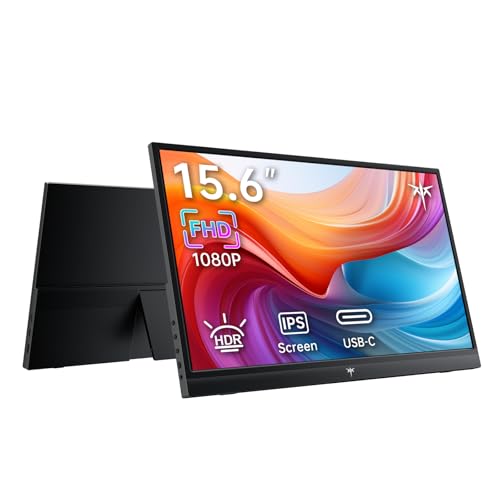
KTC Portable Monitor Review Summary
If you want a lightweight portable monitor that makes laptop work, travel productivity, and console gaming easier, the KTC 15.6-inch Portable Monitor is an easy product to like. It is especially well suited to remote workers, students, business travelers, and anyone who wants a simple second screen that connects quickly and disappears into a backpack when the day is done.
This KTC 15.6-inch Portable Monitor review finds a strong balance of practicality and value-focused design.
The 15.6-inch IPS display, 1080p resolution, matte finish, USB-C connectivity, and 1.4 lb weight make it a very usable everyday companion for spreadsheets, presentations, video calls, streaming, and casual gaming.
What stands out most is how little friction it adds.
You get two full-featured USB-C ports and a mini HDMI port, plus duplicate, extend, and second-screen modes, so it works well across modern laptops, phones, mini PCs, and consoles.
The tradeoff is that it is not built for color-critical creative work or serious desktop-style audio.
If you understand that, the KTC 15.6-inch Portable Monitor looks like a smart buy.
Scorecard
| Category | Score | Why It Matters |
|---|---|---|
| Display Quality | 8.5/10 | IPS, FHD 1080p, HDR, 300 nits, and 1000:1 contrast deliver crisp everyday image quality. |
| Portability | 9.0/10 | At 1.4 lb and 0.46-inch deep, it is easy to carry for travel and commuting. |
| Connectivity & Setup | 9.0/10 | USB-C and mini HDMI make plug-and-play use simple and flexible. |
| Compatibility | 8.5/10 | Works with laptops, phones, mini PCs, Xbox, PS4/PS5, and Switch. |
| Productivity Use | 8.5/10 | Excellent for remote work, meetings, spreadsheets, and presentations. |
| Build & Viewing Comfort | 8.0/10 | Matte finish and 178-degree viewing angle improve comfort and reduce glare. |
| Audio & Extras | 7.5/10 | Built-in speakers and included cable add convenience, but audio is best treated as backup. |
Bottom line: the KTC 15.6-inch Portable Monitor is a well-rounded portable display for buyers who value convenience, compatibility, and true travel-friendly design more than creator-grade color or premium gaming specs.
Key Features and Specifications of KTC Portable Monitor
The KTC 15.6-inch Portable Monitor is designed around a very specific buyer need: getting a usable second screen into a portable form factor without making setup complicated.
Here are the key details that matter most before buying.
| Specification | Details |
|---|---|
| Brand / Model | KTC / H15F9 |
| Screen Size | 15.6 inches |
| Resolution | 1920 x 1080 FHD |
| Panel Type | IPS LCD |
| Aspect Ratio | 16:9 |
| Brightness | 300 cd/m² |
| Contrast Ratio | 1000:1 |
| Refresh Rate | 60 Hz |
| Viewing Angle | 178 degrees |
| Finish | Matte |
| Color Support | 16.7 million colors |
| Adaptive Features | HDR, Adaptive Sync |
| Ports | 2 x full-featured USB-C, 1 x mini HDMI |
| Audio | Built-in speakers |
| Power Consumption | 12 watts |
| Weight | 1.4 lb |
| Dimensions | 0.46" D x 14.1" W x 8.7" H |
The strongest design choice here is obvious: keep the monitor slim, light, and broadly compatible.
The 15.6-inch size is the sweet spot for portability because it is large enough to be productive but small enough to travel easily.
The 1080p resolution is also a sensible match for this panel size, since it gives you a crisp desktop workspace without forcing your laptop or handheld device to work harder than necessary.
USB-C video support is a major buying advantage. Many portable monitor buyers want one cable simplicity, and this KTC model is built around that idea.
The mini HDMI option is also useful when you connect to older laptops, desktop systems, or consoles that do not supply video over USB-C.
Pros and Cons of KTC Portable Monitor
Every portable monitor has a few compromises, and the KTC 15.6-inch Portable Monitor is no exception.
The key is that its strengths align well with its intended use.
| Pros | Cons |
|---|---|
| Very easy to carry for travel and commuting | Built-in speakers are convenient, but not impressive for primary use |
| Simple plug-and-play setup with no driver install | 62 color gamut listing is not ideal for color-critical creators |
| Works with a wide range of laptops, phones, and consoles | 60 Hz refresh rate is fine for general use, not high-end gaming |
| Sharp enough 1080p image for office work and streaming | Audio and brightness can feel limited in noisy or very bright environments |
| Matte finish helps reduce glare | Requires device compatibility checks before purchase |
| Strong second-screen usefulness for productivity | Not a premium color-accuracy display |
The biggest pro is convenience. The biggest drawback is that the monitor is designed for practical everyday use, not specialized professional workloads.
That is not a flaw if you want a travel monitor, but it matters if you are shopping for editing, design, or competitive gaming.
Who Should Buy KTC Portable Monitor?
The KTC 15.6-inch Portable Monitor is a good fit for buyers who need an extra screen that travels well and connects quickly.
It is especially useful for:
- Remote workers who need a second screen for email, spreadsheets, and multitasking.
- Business travelers who want a portable display for hotel workspaces and presentations.
- Students who split time between classes, study sessions, and shared workspaces.
- Console gamers looking for a compact display for Xbox, PS4/PS5, or Switch.
- Phone and mini PC users who want a larger screen for productivity or media.
It is also a strong option for buyers who prefer simple setup over advanced calibration.
If your main goal is to extend your laptop screen, keep a portable office setup, or carry a second display in a backpack, this KTC portable monitor makes a lot of sense.
Who should skip it?
If you need professional color accuracy for photography, video grading, or design work, you should look at higher-gamut models instead.
If you want fast-paced gaming performance, a higher refresh rate portable monitor may be the better fit.
And if you need strong built-in audio, it is wiser to plan on headphones or external speakers.
Design and Portability
Design is one of the main reasons people buy a portable monitor, and the KTC 15.6-inch Portable Monitor handles this very well.
At just 1.4 lb and 0.46 inches deep, it is easy to slide into a laptop bag without turning your carry setup into a burden.
The 14.1-inch width also suggests a footprint that stays manageable for travel desks, dorm rooms, and temporary workstations.
The matte finish is a particularly useful choice.
Glossy portable displays often look impressive in controlled lighting, but they can become annoying in offices, cafes, and hotel rooms.
Here, the matte screen helps keep reflections down and makes the panel easier to live with across a wider range of environments.
The 178-degree viewing angle is another practical feature.
It means the screen remains usable even if you are not sitting directly in front of it, which is helpful when you are showing something to a coworker or using the monitor on a cramped table.
In practical terms, the design choices are focused on utility rather than flash. That is exactly what a buyer should want from a portable monitor.
Ports and Device Compatibility
One of the strongest reasons to consider the KTC 15.6-inch Portable Monitor is its connection flexibility.
The combination of two full-featured USB-C ports and one mini HDMI port gives you a lot of options for laptops, phones, tablets, mini PCs, and consoles.
For many buyers, USB-C will be the preferred route because it can simplify both power and display signal in one cable.
That makes setup faster and keeps cable clutter to a minimum.
The mini HDMI port is useful for devices that still rely on HDMI output or for users who want a more traditional connection path.
Compatibility is also broad enough to cover common real-world use cases:
- Laptops for duplicate or extended desktop use
- Mac systems and mini PCs like Mac mini and iMac
- Phones and tablets for a larger viewing surface
- Game consoles such as Xbox, PS4/PS5, and Switch
Before buying, check your device’s USB-C output support. Not every USB-C port carries display signal, so the monitor works best when your laptop or mobile device supports full-featured video output.
That one compatibility check can save a lot of frustration.
Display Quality and HDR Performance
The KTC 15.6-inch Portable Monitor uses an IPS panel with FHD 1080p resolution, which is the right baseline for a portable second screen.
At this size, 1080p is sharp enough for text, browser tabs, and video playback without making interface elements uncomfortably tiny.
The quoted 300 cd/m² brightness is solid for indoor use and travel environments, though it is not the kind of brightness that overpowers direct sunlight.
Combined with the matte finish, it should handle typical office lighting and room reflections reasonably well.
The 1000:1 contrast ratio and 16.7 million color support help it produce a clean, standard portable-monitor image.
HDR support and Adaptive Sync add useful extras, but buyers should treat these as enhancements rather than headline features.
In a product like this, HDR is most valuable for improving content compatibility and perceived dynamic range, not for delivering a dramatic home-theater-style experience.
The overall image quality looks best suited to productivity, web browsing, streaming, and casual gaming.
It should be more than adequate for spreadsheets or meeting windows, and the IPS viewing characteristics make it easy to glance at from different angles.
However, the listed 62 color gamut is the main caution.
That specification suggests the display is not aimed at professional creators who need wide-gamut, color-managed work.
Verdict on the panel: it is a smart, well-balanced portable display, but not a creator monitor.
Using It as a Second Screen
This is where the KTC 15.6-inch Portable Monitor is likely to win the most buyers.
As a second screen, it adds immediate workflow value without requiring much desk space or setup time.
For remote workers, that can mean email on one screen and documents on the other.
For students, it can mean notes on one display and lecture slides or research on the other.
For presenters, it can mean a clean way to mirror content or keep speaking notes nearby.
The monitor supports duplicate, extend, and second-screen modes, which makes it flexible for different tasks.
Extended mode is the most useful for productivity because it effectively expands your desktop.
Duplicate mode is handy for meetings and presentations.
Second-screen use is also convenient when paired with a phone or mini PC, especially if you want a more comfortable viewing experience than a smaller built-in panel can provide.
If you already know how valuable a second monitor is on a full desk, a portable version like this can feel surprisingly useful in transit.
The only real limitation is that the experience will still depend on your source device’s power delivery and video support.
For productivity-first buyers, that tradeoff is worth it.
Built-in Speakers and Media Use
The built-in speakers are convenient for casual use, but they are best seen as a backup rather than a primary listening solution.
That is normal for portable monitors in this class.
Speakers built into thin displays rarely produce full sound, especially for music, action games, or louder environments like kitchens, shared offices, or open travel areas.
That said, built-in audio still has value.
It means you can watch a quick video, join a call, or play a console game without immediately reaching for separate audio gear.
For many users, that convenience is enough.
If media use is a major priority, I would still recommend pairing the monitor with headphones, earbuds, or compact external speakers.
That approach gives you better clarity and more volume, while letting the KTC 15.6-inch Portable Monitor do what it does best: provide a flexible, travel-ready screen.
Comparable Alternatives to Consider
If you are comparing options before buying, there are a few smart alternative directions to consider:
- ASUS portable monitor – Worth a look if you want a well-known brand with a broad portable-display lineup.
- Lenovo portable monitor – A practical alternative for business users who want a recognizable office-friendly option.
- ARZOPA portable monitor – Often compared in this category for travel, plug-and-play ease, and general productivity.
- 15.6-inch portable monitor high color gamut – Better if your main need is creative work and richer color coverage.
- portable gaming monitor 120Hz – Better if you care more about gaming motion performance than general-purpose productivity.
These alternatives help clarify where the KTC model sits.
The KTC 15.6-inch Portable Monitor is not trying to win on creator specs or gaming speed.
It is trying to win on portability, ease of use, and everyday usefulness.
Is KTC Portable Monitor Worth It?
So, is KTC 15.6-inch Portable Monitor worth it? For the right buyer, yes.
It offers a genuinely useful mix of portability, simple setup, and broad compatibility that makes it easy to recommend for remote work, school, travel, and casual console use.
The strongest reasons to buy are clear: it is light, thin, easy to connect, and practical as a second screen.
The monitor’s IPS 1080p panel, matte finish, USB-C flexibility, and travel-friendly design all support the use case it was built for.
It is also appealing because it does not overcomplicate the buying decision.
You do not need to be a tech expert to understand what it does well.
The main reasons to hesitate are equally clear: the speakers are basic, the color gamut is not aimed at professionals, and the 60 Hz refresh rate is standard rather than exciting.
None of those are dealbreakers for productivity buyers, but they matter if you expect premium creative performance or fast gaming responsiveness.
Final verdict: the KTC 15.6-inch Portable Monitor is worth it if you want a dependable, travel-ready second screen more than a specialty display. If that sounds like your use case, it is a smart and easy recommendation.