The right mixer can make a streaming setup easier to control, improve microphone clarity, and help balance game audio, music, guests, and alerts without constant software adjustments.
We compare 10 audio mixers for streaming across beginner gaming rigs, podcast stations, and more advanced multi-source setups, so you can choose based on your workflow and budget.
Best 10 Audio Mixers for Streaming Picks for 2026
Best Flexible Controller

- LCD keys, touch strip, and dials
- Smart profiles and multi-actions
- Works with Wave Link, OBS, and more
Best For: Software-centered streaming and studio control
Best All-in-One Production Hub
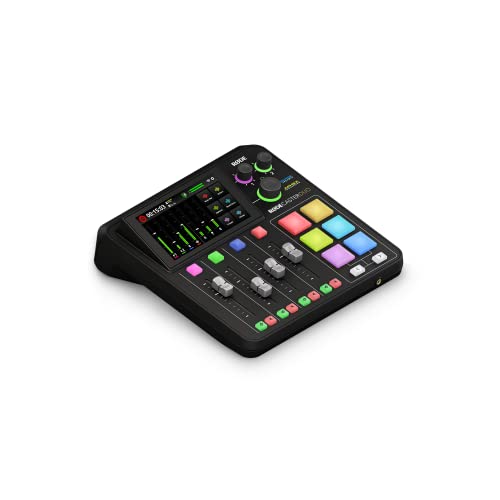
- Two combo mic and instrument inputs
- Four faders, touchscreen, and SMART pads
- APHEX processing and headset support
Best For: Podcasting, streaming, music, and content creation
Best for Multi-Source PC Streaming

- Four assignable physical faders
- Three separate listener submixes
- XLR input and dual USB-C connectivity
Best For: Windows gaming streams and multi-source audio control
Best Beginner XLR Streaming Mixer

- XLR input with 48V phantom power
- Independent channel volume controls
- Sound pads and voice effects
Best For: Beginner streamers using one XLR microphone
Best All-in-One Pick

- Two XLR inputs with up to 60dB gain
- Eight customizable sound-effect buttons
- Battery-powered operation with loopback
Best For: Podcasters and flexible multi-device streamers
Best for Gaming Audio Control

- Game/chat balance dial with virtual 7.1 surround
- 48V phantom power for compatible XLR microphones
- Optical, USB-C, and AUX connectivity
Best For: Console and PC gaming streamers
Best Compact RGB Option

- XLR input with 48V phantom power
- One-click noise reduction and loopback
- Voice effects with customizable RGB lighting
Best For: Beginner solo gamers and streamers
Best All-in-One Starter

- Complete starter package with microphone and accessories
- Supports two people and multi-platform streaming
- Includes voice effects, reverb, monitoring, and denoise
Best For: Beginners building a podcast or streaming setup
Best for Multi-Input Setups
6-Channel Bluetooth Audio Mixer

- Six channels with XLR and 1/4-inch inputs
- Adds 48V phantom power, Bluetooth, and USB playback
- Includes three-band EQ and 16 DSP effects
Best For: Streaming, karaoke, and small live setups with multiple sources
Best Compact Entry-Level Pick

- Portable design with a built-in 1200 mAh battery
- Seven knobs, two faders, and 16 sound effects
- Supports Bluetooth, USB, noise reduction, and major operating systems
Best For: Beginners streaming podcasts, gaming, or live broadcasts
Best Flexible Controller – Elgato Stream Deck +
The Elgato Stream Deck + is a compact choice among audio mixers for streaming when you want tactile controls alongside software-based routing. Its LCD keys, touch strip, and dials can manage audio, video, lighting, and other studio tasks, while smart profiles and multi-actions help adapt controls to different apps.
Best For: Streamers and creators who want customizable desktop control for audio, OBS, Wave Link, lighting, and production shortcuts.
Pros:
- LCD keys, touch strip, and dials provide visual and tactile feedback.
- Supports multi-actions and smart profiles for app-specific setups.
- Works with Wave Link, OBS, Twitch, Discord, Spotify, and other plugins.
Cons:
- It is primarily a controller and depends on compatible software for many mixing functions.
- The supplied notes do not specify a built-in XLR microphone input.
This is a strong fit if workflow customization matters more than traditional mixer hardware. Its USB-C connection, Mac and PC support, and expanding plugin ecosystem make it especially useful in software-centered streaming setups.
Best All-in-One Production Hub – RØDECaster Duo
The RØDECaster Duo is a full-featured option among audio mixers for streaming, combining microphone connectivity, physical faders, monitoring, effects, and production controls in one desktop unit. Its two Neutrik combo inputs use high-gain Revolution preamps, while the touchscreen and SMART pads support hands-on content creation.
Best For: Streamers, podcasters, musicians, and creators who need an all-in-one production studio with two microphone or instrument inputs.
Pros:
- Two combo inputs support microphones and instruments with up to 76 dB of gain.
- Four broadcast-quality faders, a touchscreen, and six SMART pads offer hands-on control.
- Includes APHEX processing and a 3.5mm TRRS headset connection.
Cons:
- At 2 kg, it is less portable than a compact controller.
- It may offer more production functionality than a simple single-mic streaming setup requires.
The RØDECaster Duo is the most comprehensive traditional mixer-style choice in this group. It makes sense for creators who want recording, streaming, podcasting, and music capabilities without assembling several separate devices.
Best for Multi-Source PC Streaming – MAONO G3 Gaming Audio Mixer
The MAONO G3 is designed for Windows-based gaming and content creation, making it a practical pick among audio mixers for streaming when you need separate control of voice, game audio, chat, music, and alerts. Four assignable faders, dual USB-C connectivity, submixes, and an XLR input support hands-on desktop routing.
Best For: Windows gamers, solo streamers, and creators balancing microphone, game, music, chat, and audience mixes.
Pros:
- Maps audio sources to four physical faders through MAONO Arena.
- Three submixes can create different mixes for the streamer, audience, and teammates.
- Includes XLR input, 48V phantom power, direct monitoring, mute keys, and customizable sound pads.
Cons:
- It is best suited to Windows workflows; Mac-first users may find it less suitable.
- The supplied notes caution that very gain-hungry dynamic microphones may not be an ideal match.
The G3 stands out for live gaming and multi-source management rather than general studio recording. Once routing is configured, its physical controls can reduce the need to switch between software windows during a broadcast.
Best Beginner XLR Streaming Mixer – FIFINE Ampligame SC3
The FIFINE Ampligame SC3 is a beginner-friendly choice among audio mixers for streaming, offering an XLR microphone input, 48V phantom power, individual channel controls, and straightforward connections for a two-PC or single-PC setup. It also adds sound effects, voice-changing modes, and RGB lighting for more interactive broadcasts.
Best For: New streamers using one XLR microphone who want separate controls for mic, line input, headphones, and line output.
Pros:
- Provides an XLR input with built-in 48V phantom power for compatible condenser microphones.
- Independent controls cover microphone, line input, headphones, and line output.
- Includes mute and monitor buttons, customizable sound pads, and voice effects.
Cons:
- It is not compatible with USB microphones through the XLR input.
- An XLR cable is not included.
- Its single-microphone design is less suited to larger production setups.
The SC3 focuses on accessible hands-on control rather than advanced routing. It is a sensible starting point for creators who want to upgrade to an XLR microphone and manage core stream audio without a more complex production console.
Best All-in-One Pick – MAONO E2 Gen2 Podcast Mixer
For creators comparing audio mixers for streaming, the MAONO E2 Gen2 is a versatile all-in-one option. It combines two XLR combo inputs, up to 60dB of gain, USB-C connectivity, loopback, customizable sound pads, and a built-in battery for flexible podcasting and live content.
Best For: Podcasters, co-hosts, and streamers who want portable operation, sound effects, and broad phone and computer connectivity.
Pros:
- Two low-noise XLR preamps with up to 60dB of gain.
- Eight customizable sound-effect buttons with adjustable volume.
- Built-in 1500mA battery provides up to 8 hours of use.
- Supports loopback, Bluetooth, USB-C, AUX, and multiple mobile connections.
Cons:
- The feature-rich layout may take time for beginners to learn.
- Battery duration depends on usage and connected equipment.
The E2 Gen2 stands out when flexibility matters more than a minimalist setup. Its dual-mic support and creator-focused controls make it especially practical for podcasts, interviews, and streams involving phones or a computer.
Best for Gaming Audio Control – FIFINE SC8 Gaming Mixer
The FIFINE SC8 is aimed at gamers who need hands-on control over microphone, game, chat, and background audio. Among audio mixers for streaming, it adds XLR microphone support, 48V phantom power, optical input, game/chat balancing, virtual 7.1 surround, and RGB lighting.
Best For: PC and console gamers who want quick audio adjustments, voice effects, and dedicated game/chat control during streams.
Pros:
- 48V phantom power and up to -50dB gain support compatible XLR microphones.
- Dedicated game/chat balance control and three EQ modes.
- Four customizable buttons for saved audio pieces or presets.
- Works with PC, PS5, Switch, mobile devices, and optical sources.
Cons:
- Does not support USB microphones.
- XLR cable is not included.
- Requires a corded power source.
The SC8 is a strong fit for streamers who prioritize gaming-oriented routing and physical controls. Its compatibility notes and missing XLR cable are worth checking before purchase, especially when building a setup from scratch.
Best Compact RGB Option – MAONO G1 Neo Gaming Mixer
The MAONO G1 Neo is a compact choice for newcomers building a gaming or streaming setup. It pairs an XLR input and 48V phantom power with one-click noise reduction, sound pads, voice changing, loopback, Bluetooth accompaniment, and customizable RGB lighting.
Best For: Beginner gamers and streamers who want an easy-to-use mixer with entertaining voice effects and broad platform compatibility.
Pros:
- Built-in preamp and 48V phantom power for XLR microphones.
- One-click noise reduction, mute, direct monitoring, and loopback.
- Voice effects include female, male, baby, and robot options.
- Compatible with phones, computers, tablets, PS4, PS5, and common streaming software.
Cons:
- It does not support USB microphones or Xbox.
- Designed around one XLR microphone input.
- Optimal results require manual adjustment of gain, volume, and headphone controls.
The G1 Neo favors accessible controls and streaming personality over complex routing. It is a practical starting point for solo creators, provided their microphone, console, and platform requirements match the stated compatibility limits.
Best All-in-One Starter – MAONO S1 Podcast Bundle
The MAONO S1 is a practical choice among audio mixers for streaming if you want a bundled setup rather than a mixer alone. It includes a condenser microphone, stand, cables, and a mixer with voice effects, reverb, monitoring, and noise reduction controls.
Best For: Beginners who want to start podcasting, live streaming, or recording with a bundled microphone and simple controls.
Pros:
- Includes microphone, tripod, windscreen, cables, and mixer.
- Supports up to two people, four devices, and four platforms for simultaneous streaming.
- Offers built-in effects, four recordable effects, voice changing, reverb, and denoise controls.
- Works with many computers, phones, tablets, iOS, Android, Windows, and Mac systems.
Cons:
- Accepts 3.5mm microphones and does not support phantom power.
- A phone without a 3.5mm jack requires a separate OTG adapter.
- A 6.35mm-to-3.5mm adapter is needed for some instruments and is not included.
This bundle is particularly convenient for first-time creators who need most of the basic hardware in one package. Check the mixer’s dimensions and connection limitations before buying, especially if you plan to use condenser microphones or instruments.
Best for Multi-Input Setups – 6-Channel Bluetooth Audio Mixer
This 6-channel console is one of the more traditional audio mixers for streaming, with multiple XLR and 1/4-inch inputs for microphones and instruments. It adds Bluetooth, USB playback, 48V phantom power, three-band EQ, and 16 DSP effects for more hands-on control.
Best For: Streamers, karaoke users, and small live setups that need several microphone or instrument connections and physical channel controls.
Pros:
- Provides six channels with four XLR inputs and 1/4-inch connections.
- Supports 48V phantom power for compatible condenser microphones.
- Includes Bluetooth streaming, USB playback, three-band EQ, and 16 DSP effects.
- Offers independent channel, master-volume, and effect adjustment controls.
Cons:
- It is a corded traditional analog mixer rather than a battery-powered portable unit.
- The listed manufacturer warranty is 90 days from purchase.
- Operation may require careful setup; incorrect operation can result in no sound.
This mixer makes sense when input flexibility and physical controls matter more than an ultra-compact streaming interface. Its phantom power and six-channel layout also make it more adaptable for microphones, guitars, karaoke, and small performance systems.
Best Compact Entry-Level Pick – Facmogu F998 Sound Card
The Facmogu F998 is a compact option among audio mixers for streaming, combining a USB audio interface, Bluetooth accompaniment, noise reduction, and sound effects in a small sound card. Its independent controls are aimed at beginners who want a portable setup for podcasts, gaming, and live broadcasts.
Best For: Entry-level podcasters, gamers, and mobile streamers who want a small mixer with battery power and simple effect controls.
Pros:
- Compact design with a built-in 1200 mAh battery for portable use.
- Provides seven independent volume controls and two fader adjustments.
- Includes 16 personalized effects, Bluetooth accompaniment, and intelligent noise reduction.
- Compatible with iOS, Android, iPad, Mac OS, and Windows.
Cons:
- The listed specifications identify it as a one-channel device, limiting larger multi-source setups.
- The package includes the sound mixer and cables but not a microphone.
- Its entry-level design is better suited to straightforward streaming than complex studio routing.
The F998 is a sensible fit when portability and accessible controls are priorities. It supports common streaming and recording platforms while keeping the hardware small, though users needing several simultaneous microphone or instrument inputs should consider a larger mixer.
How We Picked These Audio Mixers for Streaming
We focused on features that matter during live broadcasts: microphone compatibility, input and output flexibility, hands-on controls, monitoring, effects, and computer connectivity. The list includes compact gaming mixers, podcast-oriented interfaces, and larger boards for creators managing several audio sources.
We also considered setup complexity. A feature-rich mixer is not automatically the best choice if its controls are difficult to configure or its connections do not match your microphones, headphones, phone, or streaming computer.
Quick Comparison
| Best For | Look For |
|---|---|
| Beginner streamers | Simple controls, USB connection, headphone monitoring |
| Gaming setups | Independent game, chat, microphone, and music controls |
| Podcasters | Multiple microphone inputs, routing, and reliable monitoring |
| Advanced creators | Flexible routing, phantom power, effects, and expansion options |
Key Buying Factors for Audio Mixers for Streaming
Inputs and Microphone Support
Check whether the mixer supports your microphone type. XLR inputs are important for studio microphones and often provide 48V phantom power for condenser models. A 3.5mm input may be more convenient for a headset or lavalier microphone, while USB microphones may require a mixer with compatible routing or a separate interface.
Source Control and Routing
Consider how many sources you need to balance at once. Streamers may want separate control over a microphone, game audio, voice chat, music, and a second device. Independent faders or knobs are faster to use live than repeatedly opening software panels.
Monitoring and Connectivity
A headphone output with low-latency monitoring helps you catch distortion, background noise, or incorrect levels before viewers do. USB connectivity is useful for sending a mixed signal to a computer, while Bluetooth, mobile inputs, or loopback support can simplify phone calls and remote guests.
Effects and Software Features
Voice effects, reverb, sound pads, mute buttons, and programmable controls can make broadcasts more engaging, but they should not outweigh clean preamps and dependable routing. Confirm which features work without proprietary software and whether the mixer supports your operating system.
Who Should Buy Which Audio Mixers for Streaming?
Choose a compact gaming mixer if you mainly stream from one computer and want quick access to microphone, game, chat, and headphone levels. These models prioritize convenience and tactile controls.
Choose a podcast-focused interface if you record interviews, use multiple microphones, or need more deliberate routing and monitoring. Extra inputs and independent channels are worth prioritizing over a small footprint.
Choose a larger mixing console if your setup includes several analog sources, instruments, phones, or external playback devices. Make sure you have room for the board and understand how its outputs connect to your streaming software.
Before buying, map every device in your setup—from microphone and headphones to computer, console, phone, and speakers—and select a mixer with the right connectors, controls, and upgrade capacity.