The best desktop microphone preamps give microphones more usable gain, lower noise, and greater control before the signal reaches your recorder, mixer, or computer. The right choice depends on your microphone type, workflow, and need for features such as compression, EQ, USB connectivity, or multiple inputs.
We compare 10 options ranging from compact inline boosters and single-channel preamps to full channel strips and multi-channel digital units, so you can match your setup without paying for features you will not use.
Best 10 Desktop Microphone Preamps Picks for 2026
Transformer Detail

- Single-channel mic/instrument preamp
- Ultra-high-speed input stage
- Transformer-balanced output
Best For: Dedicated one-source desktop recording setups
Tube Character

- 12AX7 tube and XMAX solid-state stages
- Separate mic and instrument inputs
- Drive, pad, filter, and polarity controls
Best For: Recording sources that benefit from adjustable tube saturation
Channel-Strip Control
dbx 286s Mic Preamp & Channel Strip

- Compression, de-essing, enhancement, and gate
- Mic and 1/4-inch TRS inputs
- Rack-mountable 1U design with loop-out
Best For: Voice-focused setups needing onboard processing
USB Recording Hub
Audient iD14 MKII Audio Interface

- Two Class-A microphone preamps
- USB-C connectivity for Mac, PC, and iOS
- Dual headphone outputs and monitor controls
Best For: Computer-based recording with two mic inputs
Best Multichannel Expansion
- Eight Class-A mic preamps
- 24-bit/48 kHz digital output
- Phantom power, pads, and word clock I/O
Best For: Desktop studios recording several microphones at once
Best All-in-One Voice Processing

- Midas-designed mic preamp
- Flexible built-in compressor
- 192 kHz USB audio interface
Best For: Voice recording and computer-based setups
Best Single-Channel Control
- 12-position gold-plated gain switch
- Balanced XLR and TRS connections
- 115 dB listed signal-to-noise ratio
Best For: Recording one microphone with dedicated gain control
Best Desktop Interface

- Class A console-style microphone preamp
- USB-C connection for Mac, PC, and iOS
- Two headphone outputs and monitor controls
Best For: Home recording and portable desktop setups
Best Inline Gain Booster
- Low-noise Class A JFET amplifier
- Double single-ended amplifier topology
- Shielded enclosure with four matched JFETs
Best For: Adding inline gain to an existing microphone setup
Best Flexible Budget Preamp

- 19–66 dB variable gain with -120 dBV EIN
- Three outputs and USB-C power input
- 1 MΩ instrument input with DI-box functionality
Best For: Single-mic recording, streaming, and instrument DI use
Transformer Detail – Black Lion Audio Auteur DT
For shoppers comparing desktop microphone preamps, the Black Lion Audio Auteur DT is a focused single-channel option with an ultra-high-speed input stage and transformer-balanced output. Its one-channel design suits straightforward microphone or instrument recording setups.
Best For: Home studios and creators who want a dedicated desktop preamp for one microphone or instrument source.
Pros:
- Single-channel mic and instrument preamp
- Ultra-high-speed input stage
- Transformer-balanced output
- Desktop-oriented form factor
Cons:
- Only one channel is provided
- The supplied notes do not list additional processing features
The Auteur DT is a sensible choice when you need a dedicated, uncomplicated preamp rather than a multi-channel interface or channel strip. Its transformer-balanced output is the standout feature for integrating the unit into a desktop recording chain.
Tube Character – PreSonus TubePre v2
The PreSonus TubePre v2 is a versatile choice among desktop microphone preamps, combining a 12AX7 tube-based design with a XMAX solid-state input stage. Separate mic and instrument inputs, plus practical signal-shaping controls, make it useful for varied recording sources.
Best For: Musicians and vocalists who want tube drive control alongside flexible mic and instrument connectivity.
Pros:
- 12AX7 tube preamp with XMAX solid-state input stage
- Separate instrument and microphone inputs
- Gain and tube-drive saturation controls
- Includes phantom power, high-pass filter, pad, and polarity reverse
Cons:
- Single-channel design
- Maximum listed frequency response is 20 kHz
- Tube-based circuitry may be more features than a simple clean preamp setup requires
With its combination of tube coloration and solid-state input circuitry, the TubePre v2 offers more tonal control than a basic preamp. Its compact 3-pound enclosure and XLR/1/4-inch TRS connectivity also suit desktop and instrument-focused workflows.
Channel-Strip Control – dbx 286s Mic Preamp & Channel Strip
The dbx 286s goes beyond basic desktop microphone preamps by combining a mic and instrument preamp with compression, de-essing, enhancement, and expander/gate processing. It is a strong fit for users who want to shape a voice or instrument before it reaches the rest of the recording chain.
Best For: Vocalists, streamers, and recording setups that need built-in dynamics and tone processing.
Pros:
- Integrated compressor, de-esser, enhancer, and expander/gate
- Accepts microphone and 1/4-inch TRS line inputs
- Loop-out and insert connections support external processing
- Rack-mountable 1U chassis with status LEDs
Cons:
- More complex than a preamp-only unit
- Single-channel design
- Requires corded power
The 286s is best viewed as a complete front-end channel strip rather than merely a gain stage. Its built-in processing can help bring vocals forward, reduce sibilance, and manage dynamics before recording or broadcast, while the loop-out provides room for expansion.
USB Recording Hub – Audient iD14 MKII Audio Interface
The Audient iD14 MKII combines two Class-A microphone preamps with a USB-C audio interface, making it a practical alternative to standalone desktop microphone preamps for computer-based recording. Its metal desktop housing, dual headphone outputs, and monitor functions support a broader studio workflow.
Best For: Home-recording users who need two microphone preamps plus computer connectivity and monitoring features.
Pros:
- Two Class-A microphone preamps
- USB-C connectivity for Mac, PC, and iOS use
- Two headphone outputs
- All-metal desktop housing
Cons:
- It is an audio interface, not a standalone preamp alone
- Requires a compatible computer or iOS setup for its USB workflow
- The supplied notes do not list built-in analog processing such as compression or tube saturation
The iD14 MKII makes sense when preamps are only part of the requirement. With two Class-A inputs, USB-C, monitor mix and panning functions, and a 96 kHz maximum sample rate, it provides a more complete desktop recording center than a single-purpose preamp.
Best Multichannel Expansion – PreSonus DigiMax LT 8-Channel
For desktop microphone preamps where channel count matters, the PreSonus DigiMax LT provides eight Class-A mic preamps with balanced analog outputs. Its 24-bit/48 kHz digital output, phantom power, pad controls, and word clock I/O suit recording setups that need multiple microphone inputs and digital integration.
Best For: Desktop studios recording several microphones at once.
Pros:
- Eight Class-A microphone preamps
- 24-bit/48 kHz digital resolution
- Includes 20 dB pads, +48V phantom power, and word clock I/O
Cons:
- It is a larger 8-channel unit rather than a compact single-channel preamp
- Its listed digital resolution is limited to 48 kHz
The DigiMax LT is a practical choice when expanding a desktop recording system with several mic inputs is more important than portability or onboard voice processing.
Best All-in-One Voice Processing – Behringer UV1 USB Interface
Behringer UV1 Audiophile Mic Preamplifier, Voice Processor and 192 kHz USB Audio Interface
Check Price On AmazonThe Behringer UV1 combines a Midas-designed mic preamplifier with voice processing and a USB audio interface. Among desktop microphone preamps, it stands out for direct computer connectivity, a flexible compressor, and support for up to 192 kHz USB audio.
Best For: Voice recording, streaming, and computer-based setups needing integrated processing.
Pros:
- Works with microphone and line-level sources
- Includes a flexible compressor for level control and creative processing
- Provides a 192 kHz USB audio interface for direct computer connection
Cons:
- Its listed operating-system support is Windows
- It is a single preamplifier and does not provide the eight channels of a multichannel unit
The UV1 is a versatile pick for users who want preamplification, compression, and USB connectivity in one desktop-friendly rack-style device.
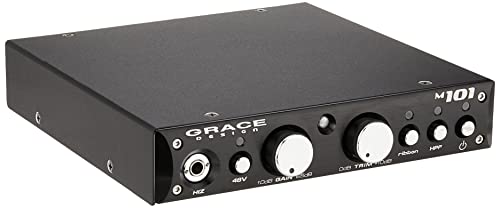
Best Single-Channel Control – Grace Design m101
The Grace Design m101 is a focused single-channel option for desktop microphone preamps. It offers a 12-position gold-plated rotary gain switch, balanced XLR and TRS connectivity, and a listed 115 dB signal-to-noise ratio for users who want straightforward control over one microphone path.
Best For: Recording one microphone with dedicated gain control.
Pros:
- 12-position gold-plated rotary gain switch
- Balanced XLR and TRS connections
- Listed 115 dB signal-to-noise ratio and 2-year warranty
Cons:
- Only one channel
- Does not list an integrated USB interface or digital output
- Uses corded electric power
The m101 makes the most sense when you value a dedicated, tactile analog preamp and do not need multiple channels or built-in computer connectivity.
Best Desktop Interface – Audient iD4 MKII
The Audient iD4 MKII is a practical choice if you want desktop microphone preamps built into a compact USB audio interface. Its Class A preamp technology, USB-C connection, two headphone outputs, and all-metal housing make it suitable for home recording and portable setups.
Best For: Home recordists and creators who want a complete, durable desktop interface with an integrated Class A microphone preamp.
Pros:
- Uses a Class A microphone preamplifier based on Audient’s ASP8024 HE console design.
- USB-C connectivity supports Mac, PC, and iOS use.
- Includes two headphone outputs plus monitor mix and monitor panning functions.
- Compact all-metal housing weighs 740 g and is designed for durability.
Cons:
- Provides two channels, so it may not suit larger multi-microphone sessions.
- Requires a computer or compatible iOS device as part of the recording setup.
For buyers seeking more than a standalone preamp, the iD4 MKII combines desktop connectivity and monitoring features with Audient’s Class A preamp design in a portable enclosure.
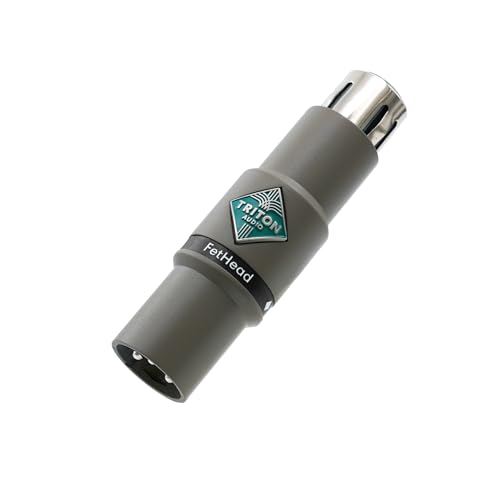
Best Inline Gain Booster – Triton Audio FetHead
The Triton Audio FetHead is a compact option for adding an inline microphone preamp stage to a compatible microphone signal path. Its low-noise Class A JFET amplifier, matched JFETs, and shielded enclosure focus on clean signal amplification in a simple form factor.
Best For: Users who need a small inline Class A gain stage rather than a full desktop audio interface.
Pros:
- Uses a low-noise Class A JFET amplifier.
- Features a double single-ended amplifier topology.
- Includes four matched JFETs for its amplification design.
- Shielded enclosure helps support a compact, focused signal path.
Cons:
- It is an inline preamp, not a complete recording interface with monitoring or computer connectivity.
- The supplied notes do not list gain range, connector details, or compatibility with specific microphones.
The FetHead makes the most sense when you already have the rest of your recording chain and want a dedicated inline Class A amplifier with a low-noise design.
Best Flexible Budget Preamp – RO03 Mic Preamp
The RO03 is a versatile pick among desktop microphone preamps for users who need variable gain, multiple outputs, and USB-C power. It offers usable gain from 19 to 66 dB, an ultra-low-noise EIN rating of -120 dBV, and a high-impedance instrument input that also allows it to function as a DI box.
Best For: Podcasters, streamers, musicians, and budget-conscious users who need flexible microphone or instrument connectivity.
Pros:
- Provides variable gain from 19 to 66 dB with -120 dBV EIN listed.
- Offers three outputs and supports +4 dBu and -10 dBV output levels.
- USB-C 5V/1A power works with phone chargers, power banks, and other USB sources.
- Approximately 1 MΩ TS input impedance supports high-impedance instruments and DI use.
Cons:
- Supports one active input at a time; simultaneous XLR and TS use is not recommended.
- It has one channel, so dual-microphone recording requires a separate dual preamp.
- The supplied notes identify a 20 kHz frequency response but do not provide a full response specification.
With its gain range, multiple outputs, portable USB-C power, and instrument-friendly input impedance, the RO03 is a flexible low-budget solution for single-source recording and live content setups.
How We Picked These Desktop Microphone Preamps
We selected products across several recording needs rather than treating every preamp as interchangeable. The lineup includes single-channel desktop units, inline gain boosters, channel strips, USB audio interfaces, and multi-channel preamps with digital outputs. We considered gain range, noise performance, connectivity, phantom-power support, tone-shaping tools, monitoring features, portability, and likely use cases such as podcasting, streaming, vocals, instruments, and small studio recording.
Because a preamp can be part of a larger interface or a complete recording system, value depends on compatibility as much as specifications. Check the connection and power requirements before buying, particularly when pairing a booster with a passive ribbon or dynamic microphone.
Quick Comparison
| Best For | Look For |
|---|---|
| Podcasting and voice work | Clean gain, compression, de-essing, and easy monitoring |
| Home recording | Low noise, phantom power, and transparent preamp performance |
| Vocals and instruments | Impedance compatibility, useful headroom, and optional coloration |
| Multi-microphone setups | Several preamp channels and appropriate analog or digital outputs |
| USB recording | Reliable drivers, headphone monitoring, and suitable computer connectivity |
| Low-output dynamic or ribbon microphones | High clean gain or an inline booster with compatible phantom power |
Key Buying Factors for Desktop Microphone Preamps
Gain and Noise
Make sure the unit provides enough clean gain for your microphone without forcing you to raise the recording level later. Low equivalent input noise is especially important with quiet sources and high-gain dynamic microphones. Extra gain is useful only when it remains quiet and controlled.
Inputs, Outputs, and Workflow
Decide whether you need a dedicated analog preamp, a USB interface, or a unit that can feed an existing interface through line-level output. Count your microphones and check whether outputs use XLR, TRS, ADAT, USB, or another format. A compact single-channel model may be ideal for one voice, while an eight-channel unit makes more sense for drums or ensemble recording.
Phantom Power and Microphone Compatibility
Condenser microphones generally need 48-volt phantom power, while many dynamics do not. Passive ribbon microphones require additional care: confirm that the preamp and cabling are appropriate before enabling phantom power. Inline boosters also need a compatible phantom-powered signal path, even though they do not pass phantom power to the microphone in the same way as a conventional preamp.
Processing and Sound Character
Compression, de-essing, gating, enhancement, and EQ can simplify voice production, but they are not essential for every setup. Choose a transparent preamp when you want to shape sound later; choose tube or transformer-style coloration when a more characterful recording chain is the priority.
Who Should Buy Which Desktop Microphone Preamps?
Choose a compact inline booster if you already own an interface and simply need more gain for a quiet dynamic or ribbon microphone. Choose a single-channel preamp for a focused vocal, instrument, or podcast setup that benefits from dedicated controls and analog connectivity.
Choose a channel strip if you want compression, de-essing, gating, or enhancement before recording. Choose a USB interface with built-in preamps if you also need computer recording, headphone monitoring, and a streamlined desktop system. Finally, choose a multi-channel preamp when you regularly record several microphones and want to expand an interface or digital mixer without adding several separate units.