Choosing the right display can make a big difference in a busy teaching space, especially when visibility, touch response, and sharing tools all need to work smoothly for a full class.
This roundup of the best interactive whiteboards for large classrooms focuses on large-format models that are built for clear viewing, fast collaboration, and everyday school use.
Best 10 Interactive Whiteboards for Large Classrooms Picks for 2026
Large-Classroom 4K Pick

- 86-inch 4K UHD display with 400+ nits brightness
- Android 14 with 8GB RAM and 128GB storage
- 20-point touch plus front-facing inputs
Best For: Large classrooms and hybrid teaching spaces
Conference-Ready Collaboration
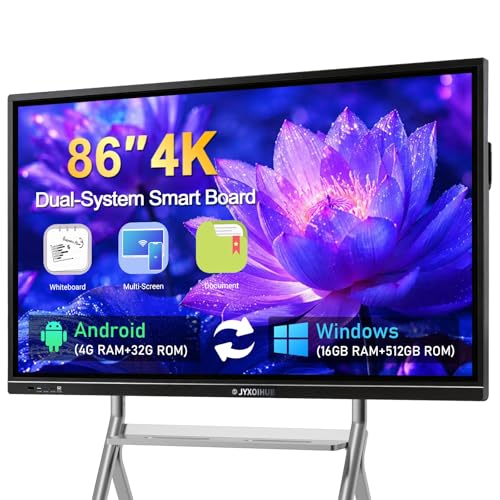
- 86-inch 4K display with 20-point multi-touch
- Open app ecosystem with cloud-drive export
- Built-in mics and speakers for meetings
Best For: Classrooms that also host hybrid meetings
Google Classroom Favorite
75'' EDLA-Certified Smart Board

- Google EDLA-certified with Play and Workspace access
- Android 14 with 8GB RAM and 64GB ROM
- 50-point touch and wireless casting for 16 devices
Best For: Google-centered classrooms and lesson sharing
Flexible Small-Room Option

- 55-inch 4K touchscreen with cloud whiteboarding
- 250+ apps on Chrome OS with enterprise security
- Wi-Fi 6, Bluetooth 5.2, 8GB RAM, 128GB storage
Best For: Smaller groups and breakout learning spaces
Classroom-Friendly 4K Touch Display
HORION 55-Inch 4K Digital Whiteboard
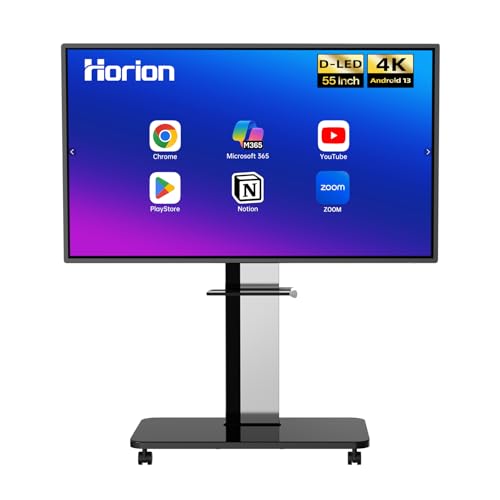
- 40-point touch with low latency
- Wireless sharing from major devices
- Android 13 with Google Play
Best For: Classrooms that need fast touch and easy casting in a smaller board size
Large-Format Hybrid Learning Hub

- 86-inch 4K anti-glare display
- 8GB RAM and 128GB storage
- Built-in camera and EDLA security
Best For: Large classrooms and hybrid spaces that need size, security, and multitasking
All-in-One Teaching and Meeting Board

- 86-inch 4K UHD screen with 20-point touch
- 13MP camera, mic array, and speakers
- Wired/wireless sharing with split-screen
Best For: Large classrooms that also need hybrid meeting and video lesson support
Large-Room Collaboration Pick
COOLHOOD 65-inch 4K Smart Board

- 65-inch 4K UHD display with 20-point touch
- Wireless sharing plus QR file distribution
- Android 13 with open app ecosystem
Best For: Large classrooms needing a fixed 65-inch board with strong sharing and annotation tools
Balanced Classroom Value
EUNIVON 55-inch 4K Smart Whiteboard

- 55-inch 4K touchscreen with wall mount included
- Cross-platform screencasting and HDMI support
- Android 14 with 8GB RAM and 128GB storage
Best For: Schools and shared spaces that want a flexible 55-inch board for teaching and presentations
Premium Hybrid Teaching Pick
JAV 65-inch Google EDLA Smart Board Pro
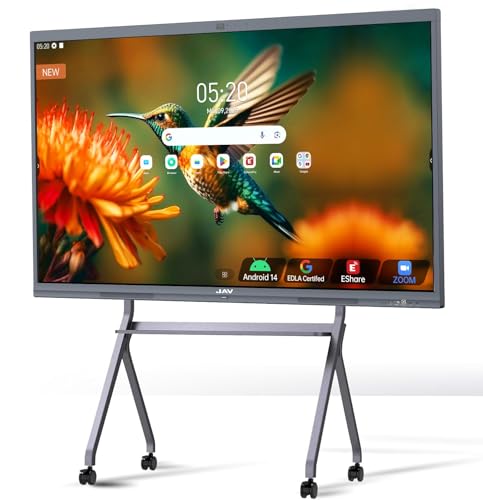
- Google EDLA-certified with Android 14
- 48MP AI camera and 100W soundbar
- 20-point touch with PDF annotation and sharing
Best For: Large classrooms that also need strong hybrid meeting and remote teaching capabilities
Large-Classroom 4K Pick – 86'' Android 14 Smart Board
If you need interactive whiteboards for large classrooms, this 86-inch model gives you the size and features to keep content visible and collaboration moving. The 4K UHD panel, 20-point touch support, and Android 14 system make it a strong fit for lessons, group work, and hybrid teaching setups.
Best For: Large classrooms, training rooms, and hybrid teaching spaces that need a big 4K touchscreen with modern Android performance.
Pros:
- 86-inch 4K UHD touchscreen with over 400 nits brightness for clear visibility.
- Android 14 with 8GB RAM and 128GB storage for smooth app use and multitasking.
- 20-point infrared touch with ±1mm precision and 6ms response time.
- Front USB, HDMI, and TOUCH inputs make classroom connections easier.
Cons:
- The large size may be more than smaller rooms need.
- Setup can be less simple than a basic display, given the number of ports and functions.
This board is a practical choice if your priority is a big interactive surface with modern performance and flexible connectivity. It is especially well matched to busy classrooms that need fast touch response, easy sharing, and all-in-one presentation tools.
Conference-Ready Collaboration – 86in Dual-System Smart Board
For interactive whiteboards for large classrooms that also need strong meeting tools, this 86-inch smart board offers a big 4K touch surface and broad conferencing support. Its open app ecosystem, cloud-drive export, and multi-touch annotation features make it useful for teaching, brainstorming, and remote collaboration.
Best For: Schools or training spaces that want a large-format board with conference-style features and flexible app support.
Pros:
- 86-inch 4K UHD touch screen with 20-point multi-touch support.
- Open app ecosystem with cloud-drive export to Google Drive, OneDrive, Dropbox, and Box.
- Built-in 8-array mics and 2 x 20W speakers for video calls and presentations.
- Supports AirPlay, Miracast, Chromecast, split screen, and QR code sharing.
Cons:
- Android 11 and 3GB RAM are less current than some newer boards.
- The listed package and mounting details may require extra planning before installation.
This is a versatile option if you want classroom collaboration plus conference-room features in one large display. It stands out more for software openness and remote-sharing flexibility than for raw hardware specs.
Google Classroom Favorite – 75'' EDLA-Certified Smart Board
This 75-inch display is a strong candidate if you want interactive whiteboards for large classrooms with Google-friendly software support. EDLA certification, Android 14, and 50-point touch make it well suited to collaborative lessons, wireless sharing, and everyday teaching workflows.
Best For: Google-based classrooms, collaborative lessons, and teachers who want easy wireless casting.
Pros:
- Google EDLA certification with access to Google Play, Workspace, and Education Suite.
- Android 14 with 8GB RAM and 64GB ROM for smooth multitasking.
- 50-point touch and support for up to 10 simultaneous writers.
- Wireless casting from up to 16 devices for classroom sharing.
Cons:
- 75-inch size is smaller than 86-inch options for very large rooms.
- Wall mount is included, but mobile flexibility depends on choosing the cart setup.
For schools already using Google tools, this board offers a very practical mix of certification, touch capacity, and wireless casting. It is especially appealing when the classroom needs easy content sharing without sacrificing display quality.
Flexible Small-Room Option – Vibe S1 55'' Chrome OS Board
Although this model is smaller than typical interactive whiteboards for large classrooms, it can still work well where you need a smart collaboration display for smaller class groups or breakout areas. The 4K UHD panel, cloud-based whiteboard, and app-rich Chrome OS environment make it useful for presenting, annotating, and saving work quickly.
Best For: Smaller classroom groups, huddle spaces, and teachers who want a portable collaboration display.
Pros:
- 4K UHD touchscreen with cloud-based whiteboarding and instant save/share.
- 250+ apps and support for Google Workspace, Microsoft 365, and more.
- 10-point infrared touch with less than 8ms response time.
- Wi-Fi 6, Bluetooth 5.2, and 8GB RAM with 128GB storage.
Cons:
- 55-inch size is not ideal for very large classrooms.
- 10-point touch is lower than some larger boards that support more users at once.
This board makes sense when collaboration matters more than sheer screen size. It is best treated as a classroom-adjacent option for smaller learning spaces rather than a full solution for big lecture rooms.
Classroom-Friendly 4K Touch Display – HORION 55-Inch 4K Digital Whiteboard
For interactive whiteboards for large classrooms, the HORION 55-inch model is a practical choice when you want multi-user writing, wireless sharing, and a simple all-in-one setup. Its 4K anti-glare panel and 40-point touch support make it easier for several students or teachers to collaborate at once without fighting reflections or lag.
Best For: Teachers and school teams who need a compact but capable classroom board with fast touch response and easy device sharing.
Pros:
- 40-point touchscreen with sub-30ms latency for smooth shared writing and drawing
- Wireless screen sharing from iPhone, Mac, Windows, and Android devices
- 4-way split-screen collaboration and touchback control for connected laptops
- Android 13 with Google Play, dual-band Wi-Fi 5, and Bluetooth 5.2
Cons:
- 55-inch size may feel small for very large lecture halls
- External camera and microphone are sold separately for conferencing
- Wall-mounted installation may require planning before setup
The HORION stands out for classrooms that want responsive touch and flexible sharing in a space-saving format. It is not the largest option here, but it covers the core teaching features well and adds a useful 18-month warranty for long-term peace of mind.
Large-Format Hybrid Learning Hub – JAV 86 Inch Smart Board
If you want interactive whiteboards for large classrooms, the JAV 86-inch smart board is built for visibility, collaboration, and hybrid teaching. The 4K anti-glare display, built-in camera, and broad device compatibility make it a strong fit when lessons need to be shared clearly across the room and online at the same time.
Best For: Large classrooms, training rooms, and hybrid learning spaces that need a big display with strong storage and security features.
Pros:
- 86-inch 4K touchscreen with anti-glare tempered glass for better visibility
- 8GB RAM and 128GB storage for heavier multitasking and app use
- Built-in camera supports remote collaboration and online classes
- Google EDLA certification plus screen lock and USB password protection
Cons:
- Large footprint may be overkill for smaller rooms
- Higher-capacity feature set may be more than casual users need
- Long feature list can make setup and administration more involved
The JAV is a strong match for larger learning environments because it combines size, performance, and security in one board. Its open app ecosystem and wireless sharing also give teachers flexibility to tailor the experience to their curriculum.
All-in-One Teaching and Meeting Board – QIXZOCV 86" Smart Board
For interactive whiteboards for large classrooms, the QIXZOCV 86-inch smart board offers a polished all-in-one setup with a big 4K screen, responsive touch, and built-in conferencing tools. It is designed to replace multiple devices, which can simplify classroom or meeting-room installs while still supporting shared writing, screen casting, and hybrid lessons.
Best For: Schools and organizations that want a feature-rich, all-in-one board for teaching, collaboration, and remote sessions.
Pros:
- 86-inch 4K UHD display with 20-point infrared touch
- Built-in 13MP camera, 8-array microphone, and dual 20W speakers
- Android 14 with access to Google Play and cloud storage options
- Supports wired and wireless sharing plus 4-source split-screen use
Cons:
- Feature-rich design may be more than basic classrooms require
- Best suited to spaces that can accommodate a large mounted display
- Advanced setup may be unnecessary if you only need simple annotation
The QIXZOCV is appealing when you want a single board to handle display, collaboration, and conferencing duties. Its all-in-one approach makes it especially useful for large classrooms that also need reliable hybrid communication.
Large-Room Collaboration Pick – COOLHOOD 65-inch 4K Smart Board
For interactive whiteboards for large classrooms, the COOLHOOD 65-inch model brings a roomy 4K display, 20-point touch, and Android 13 into one all-in-one board. It is built for teaching and presentation workflows, with wireless screen sharing, real-time annotation, QR code file sharing, and cloud storage support to keep lessons moving.
Best For: Large classrooms, training rooms, and school spaces that want a feature-rich 65-inch interactive board with simple sharing and annotation tools.
Pros:
- 65-inch 4K UHD touchscreen with 20-point multi-touch
- Wireless screen sharing for Mac, Windows, iOS, and Android
- Built-in presentation tools like smart voting, screenshots, and timer
- Zoom, Google Meet, Teams, and Webex integration
Cons:
- Wall mount is included, but the stand is sold separately
- Only one HDMI port listed in the supplied details
- Best suited to fixed installations rather than portable use
Overall, this is a practical classroom display if you want a large interactive surface and a broad set of teaching and collaboration tools. Its biggest strength is the combination of responsive touch, app support, and easy content sharing.
Balanced Classroom Value – EUNIVON 55-inch 4K Smart Whiteboard
This EUNIVON model is a straightforward option for interactive whiteboards for large classrooms when you want a 55-inch 4K display with Android-based software and wall-mount convenience. It supports screencasting from Mac, Windows, iOS, and Android devices, plus HDMI input and on-screen annotation for teaching, meetings, and presentations.
Best For: Classrooms, meeting spaces, and multi-use rooms that need a versatile 55-inch board with broad device compatibility.
Pros:
- 55-inch 4K UHD touch screen with included wall mount
- Supports screen casting from Mac, Windows, iOS, and Android
- Annotation and screenshot tools for lessons and meetings
- Android 14-based system with 8GB RAM and 128GB storage
Cons:
- Smaller than 65-inch options for very large rooms
- Focuses more on core classroom functions than advanced conferencing features
- Wall-mounted design is less flexible for mobile setups
As a classroom smart board, it covers the essentials well without overcomplicating the setup. It is a solid fit if you want a dependable, multi-purpose interactive display for teaching and collaboration.
Premium Hybrid Teaching Pick – JAV 65-inch Google EDLA Smart Board Pro
For interactive whiteboards for large classrooms that need more than basic touch input, the JAV Smart Board Pro adds Google EDLA certification, Android 14, a 48MP AI camera, and an integrated 100W soundbar. It is designed for classroom and hybrid meeting use, with 20-point touch, PDF annotation, split-screen viewing, and wireless sharing to support lessons, discussion, and remote participation.
Best For: Large classrooms, hybrid teaching setups, and school conference spaces that want a premium all-in-one board with built-in video meeting hardware.
Pros:
- Google EDLA-certified with access to Google Play, Workspace, and Education Suite
- 48MP AI camera plus 100W soundbar for hybrid sessions
- 20-point touch with palm erase, zoom, and handwritten annotation tools
- Supports Zoom, Google Meet, Microsoft Teams, and E-Share sharing
Cons:
- Feature set may be more than basic classroom users need
- Premium hardware package likely suits fixed installations best
- Supplied notes emphasize hybrid use, which may add setup complexity
This is the most advanced option of the three, especially if your classroom also doubles as a hybrid learning or meeting space. The camera, microphones, and Google integration make it stand out for schools that want one board to handle teaching and conferencing.
How We Picked the Best Interactive Whiteboards for Large Classrooms
We prioritized large-screen models with 4K resolution, reliable multi-touch performance, built-in operating systems, wireless sharing, and classroom-friendly setup. For Interactive Whiteboards for Large Classrooms, we also looked for screen sizes that are easier to see from the back row, plus features that reduce friction for teachers, such as app support, casting, and all-in-one designs.
Quick Comparison
In general, 86-inch boards are the strongest fit for bigger rooms and wider seating layouts, while 75-inch and 65-inch options can work well in medium-large spaces or where wall space is tighter. Smaller 55-inch models are better suited to breakout rooms, offices, or smaller teaching environments rather than full-size classrooms.
Key Buying Factors for Interactive Whiteboards for Large Classrooms
Screen Size and Viewing Distance
Larger rooms benefit from 75-inch and 86-inch displays because text, diagrams, and lesson content remain readable across more seats. Consider the room depth, student count, and mounting height before choosing a panel.
Touch Performance and Multi-User Input
Look for low-latency touch, high-point touch counts, and smooth annotation tools. In a classroom, responsive input matters more than extra app features if you want students and teachers to write or move content naturally.
Resolution and Glare Control
4K resolution helps preserve clarity for small text and detailed visuals. Anti-glare coatings are especially useful under bright ceiling lights or near windows, where reflections can distract students.
Connectivity and Sharing
Wireless casting, HDMI, USB, Bluetooth, and Wi-Fi support make it easier to switch between lesson sources and student devices. For Interactive Whiteboards for Large Classrooms, simple content sharing is one of the biggest time savers.
Software and Ecosystem
Some schools will prefer Android-based boards for flexibility, while others may want Google EDLA certification or Chrome OS support for easier management and familiar classroom workflows. Choose the platform that best matches your school’s device ecosystem.
Who Should Buy Which Interactive Whiteboards for Large Classrooms?
If you teach in a large lecture-style room, start with an 86-inch model. If your room is sizable but not oversized, a 75-inch board may offer the best balance of visibility and cost. Schools wanting a more compact option for smaller classrooms or team spaces should consider 55-inch or 65-inch boards instead. Buyers who want the smoothest long-term classroom experience should favor boards with strong wireless sharing, classroom app support, and easy IT administration.