Choosing 4K projectors for classrooms is about more than resolution. Teachers need strong brightness, easy setup, flexible mounting, and dependable connectivity that works in real school environments.
This roundup focuses on models that can handle presentations, videos, and mixed lighting while keeping lessons clear for students across the room.
Best 10 4K Projectors for Classrooms Picks for 2026
Smart Classroom Pick
Google TV Projector with Rotatable Stand

- Built-in Google TV with popular streaming apps
- AI auto focus and auto keystone for fast setup
- 360° rotatable stand fits flexible classroom placement
Best For: Teachers and presenters who want quick setup and built-in streaming
Premium Color Choice
Epson Home Cinema 3800 4K PRO-UHD
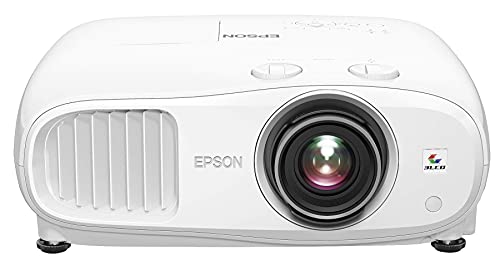
- 3LCD design avoids rainbow effect and color brightness issues
- 3,000 lumens suits brighter classrooms and training rooms
- HDR support and precision lens improve image quality
Best For: Bright classrooms that need strong color and polished picture quality
Install-Friendly Laser Pick
ViewSonic LS740HD Classroom Laser Projector

- 5,500 ANSI lumens for bright classroom viewing
- Laser light source with quick power on/off
- Optical zoom and 4-corner tools ease installation
Best For: Ceiling-mounted classrooms and auditoriums that need bright, flexible setup
Flagship Smart Pick
ONOAYO 4K Smart Projector with 60W Dolby Audio

- Dual 60W Dolby Audio with AI Sound Master
- Built-in Smart TV OS 2.0 with major apps
- AI auto focus, keystone, and screen-fit setup
Best For: multipurpose classrooms needing built-in apps and big sound
Performance Classroom Option
ViewSonic PX749-4K 4000 Lumens Projector

- 4000 ANSI lumens with UHD 4K resolution
- 1.3x optical zoom and auto keystone tools
- Dual HDMI and USB-C for classroom devices
Best For: bright lecture rooms and fixed classroom installs
Smart Portable Choice
ONOAYO 4K Portable Projector with Built-In Apps

- Built-in apps including Netflix and Prime Video
- Auto focus, keystone, and screen-fit in 3 seconds
- Dual 50W Dolby Audio with eARC support
Best For: mobile classrooms and shared spaces with quick setup
Premium Bright Classroom Laser
ViewSonic LS901-4K 5500 Lumens 4K Laser Projector

- 5,500 ANSI lumens for bright rooms
- 4K UHD with HDR/HLG support
- 1.7x zoom, keystone, and 360° projection
Best For: Large classrooms and lecture spaces needing a bright, flexible 4K setup
Easy-Setup Portable Pick
HAPPRUN 2000 ANSI 4K Decoding Projector

- Auto focus and 6D auto-keystone
- 2000 ANSI brightness with 4K decoding
- WiFi 6, Bluetooth 5.2, and built-in speaker
Best For: Portable classroom setups that need quick automatic alignment
Smart Streaming Compact Choice

- Built-in apps for easy streaming
- Auto focus, keystone, and screen alignment
- 4K support with HDR10 and WiFi 6
Best For: Compact classrooms and teaching spaces that value streaming convenience
Smart Classroom Pick – Google TV Projector with Rotatable Stand
For buyers comparing 4k projectors for classrooms, this model focuses on convenience and fast setup. Built-in Google TV, AI voice control, auto focus, and auto keystone make it easier to get lessons on screen quickly, while the 360° rotatable stand helps adapt to different classroom or small meeting room layouts.
Best For: Teachers and office presenters who want built-in streaming, flexible placement, and quick image setup.
Pros:
- Built-in Google TV with pre-loaded apps reduces the need for an external streaming stick.
- AI Auto Focus and Auto Keystone help produce a sharp, rectangular image fast.
- 360° rotatable, detachable stand adds flexibility for shelves, tables, and angled setups.
- Supports 4K decoding and includes HDMI, USB, Bluetooth, and Wi-Fi connectivity.
Cons:
- Native resolution is 1080p, so it is not a native 4K panel.
- Brightness is listed as 28,000 lm in the notes, but the real-world classroom fit will still depend on room lighting.
- Best suited to smaller classroom and office-style spaces rather than large fixed installs.
This is a practical choice if you want the simplest possible classroom projector experience with streaming built in. Its strength is usability, not just specs on paper.
Premium Color Choice – Epson Home Cinema 3800 4K PRO-UHD
If you want a more serious option among 4k projectors for classrooms, the Epson Home Cinema 3800 stands out for brightness, color handling, and smooth image processing. Its 3-chip 3LCD design avoids the rainbow effect, and the 3,000-lumen output makes it a strong fit for presentations in brighter rooms.
Best For: Classrooms, training rooms, and shared spaces where color accuracy and brightness matter.
Pros:
- 3-chip 3LCD design displays 100% of the RGB color signal with no rainbow effect.
- 3,000 lumens of color and white brightness support brighter room use.
- 4K PRO-UHD processing, HDR support, and precision glass lens aim for sharp image quality.
- Lens shift and precision focus help with flexible installation and alignment.
Cons:
- It is a home cinema projector, so it may be more than some classrooms need.
- No built-in smart TV platform is listed.
- Audio is basic compared with some all-in-one smart projector options.
For classroom buyers who care most about image quality and brightness, this Epson is the most polished option here. It is especially appealing if you plan to use it often and want a more installation-friendly projector.
Bright All-in-One Pick – Google TV 3000 ANSI Projector
For shoppers looking at 4k projectors for classrooms and multipurpose rooms, this HAPPRUN model combines high brightness with built-in streaming. The 3000 ANSI lumen rating, auto focus, and auto keystone make it easier to use for lessons, while Google TV removes the need for an extra media device.
Best For: Bright rooms, school presentations, and users who want streaming built in.
Pros:
- 3000 ANSI lumens help keep images visible in rooms with ambient light.
- Built-in Google TV provides access to major streaming apps without a separate stick.
- Auto focus and 6D auto keystone simplify setup in different placements.
- Dolby Audio and dual 10W speakers add usable sound out of the box.
Cons:
- Native resolution is 1080p, with 4K support rather than native 4K.
- The projector is still LCD-based, so it is not aimed at fixed high-end classroom installs.
- Large-screen performance will depend on how much ambient light is in the room.
This is a well-rounded option if you want brightness, streaming, and simple setup in one unit. It makes sense for classrooms that need quick deployment and flexible day-to-day use.
Install-Friendly Laser Pick – ViewSonic LS740HD Classroom Laser Projector
Among 4k projectors for classrooms, the ViewSonic LS740HD is the most installation-focused choice here, even though it is a 1080p laser model rather than a 4K projector. Its 5,500 ANSI lumens, optical zoom, keystone tools, and 360-degree projection make it a strong option for classrooms, auditoriums, and other fixed setups.
Best For: Classrooms, auditoriums, and ceiling-mounted installations that need strong brightness and easy alignment.
Pros:
- 5,500 ANSI lumens provide strong brightness for larger or well-lit rooms.
- Laser light source offers long life and quick power on/off behavior.
- Optical zoom, H/V keystone, corner adjustment, and 360-degree projection support flexible setup.
- Designed for classroom and auditorium use with ceiling-mount compatibility.
Cons:
- Native resolution is Full HD 1080p, not 4K.
- No built-in smart streaming platform is listed.
- Best value will depend on whether you need the laser and installation features more than 4K resolution.
If your classroom priority is brightness, reliability, and installation flexibility, this ViewSonic is a strong contender. It trades 4K branding for the kind of practical setup features schools often need most.
Flagship Smart Pick – ONOAYO 4K Smart Projector with 60W Dolby Audio
For classrooms that need a flexible 4k projector, the ONOAYO ONO5Pro 2.0 stands out for its built-in apps, fast smart OS, and strong audio. It is designed to handle streaming, presentations, and mixed media without requiring extra speakers or devices.
Best For: Classrooms that want an all-in-one smart projector with loud built-in sound and quick auto setup.
Pros:
- Dual 60W Dolby Audio with AI Sound Master for louder, clearer sound.
- Built-in Smart TV OS 2.0 with apps like YouTube, Prime Video, and Disney+.
- AI image engine, 4K support, and ambient light sensor for auto brightness adjustment.
- VisionlQ auto calibration handles focus, keystone, screen fit, and obstacle avoidance in about 3 seconds.
Cons:
- Product details emphasize entertainment and smart features more than classroom-specific mounting specs.
- Gaming latency is highlighted, but the notes do not provide classroom presentation latency figures.
Overall, this is a strong pick for rooms where audio matters and teachers want a projector that boots fast and adapts automatically. It looks best suited to multipurpose classrooms that also use streaming content.
Performance Classroom Option – ViewSonic PX749-4K 4000 Lumens Projector
The ViewSonic PX749-4K is a practical 4k projector for classrooms that need bright, detailed images and flexible setup. Its 4000 ANSI lumens, optical zoom, and keystone tools make it easier to adapt to different room sizes and mounting positions.
Best For: Bright classrooms and lecture spaces that need reliable 4K image quality and simple installation.
Pros:
- 4000 ANSI lumens and UHD 4K resolution for bright, detailed projection.
- 1.3x optical zoom plus H/V keystone, auto keystone, and 4-corner adjustment.
- Large projection range up to 300 inches for flexible classroom use.
- Dual HDMI and USB-C inputs support common classroom devices.
Cons:
- Bullets focus heavily on home entertainment and gaming features rather than education-specific tools.
- It is a stationary ceiling-mount style projector, so it is less portable than compact models.
For classrooms that need brightness first, this ViewSonic is the most straightforward option in the group. It trades smart streaming extras for dependable projection quality and installation flexibility.
Smart Portable Choice – ONOAYO 4K Portable Projector with Built-In Apps
If you want a 4k projector for classrooms that can also move between rooms, the ONOAYO ONO3Pro 2.0 leans into portability and smart convenience. It combines built-in apps, automatic adjustment, and 50W Dolby Audio in a compact projector that can handle casual teaching setups.
Best For: Flexible classrooms, shared spaces, and mobile teachers who want built-in streaming and easy setup.
Pros:
- Built-in apps with support for Netflix, YouTube, Prime Video, Apple TV, and Disney+.
- Smart TV OS 2.0 is described as fast, with quick boot and app switching.
- Fully automatic focus, keystone correction, screen-fit, and obstacle avoidance in about 3 seconds.
- Dolby Audio Hi-Fi dual 50W speakers with eARC for stronger built-in sound.
Cons:
- The notes emphasize portable entertainment use more than classroom-specific brightness numbers.
- It is positioned as a portable projector, so it may be less ideal than a fixed-install model for permanent rooms.
This model makes sense when convenience matters more than a rigid classroom install. It is a practical pick for educators who want quick setup, integrated apps, and decent built-in sound.
Premium Bright Classroom Laser – ViewSonic LS901-4K 5500 Lumens 4K Laser Projector
If you want one of the more powerful 4k projectors for classrooms, the ViewSonic LS901-4K is built around brightness, flexible installation, and easy image correction. Its 5,500 ANSI lumens, 4K UHD resolution, 1.7x optical zoom, and H/V keystone support make it a strong fit for larger rooms where clear visibility matters.
Best For: Large classrooms, lecture halls, and shared spaces that need a bright, install-friendly 4K laser projector.
Pros:
- 5,500 ANSI lumens help keep images visible in brighter teaching environments.
- 4K UHD resolution with HDR/HLG support adds detail and contrast for presentations or video.
- 1.7x optical zoom, H/V keystone, 360-degree projection, and 4-corner adjustment support flexible setup.
- Laser light source is rated for 20,000 hours for long-term use.
Cons:
- Designed as a home-theater projector, so it may offer more features than some classrooms need.
- Weighs 10.7 pounds, so it is less portable than compact models.
Overall, this model stands out when classroom brightness and installation flexibility are top priorities. It is a practical choice for educators who want a high-output projector that can adapt to different room layouts.
Easy-Setup Portable Pick – HAPPRUN 2000 ANSI 4K Decoding Projector
For buyers comparing 4k projectors for classrooms, the HAPPRUN 2000 ANSI model is appealing if fast setup and portability matter most. It combines auto focus, 6D auto-keystone, obstacle avoidance, and screen alignment with 2000 ANSI brightness and 4K decoding support, making it easier to get a clean image with less manual adjustment.
Best For: Portable classroom use, hybrid teaching spaces, and quick setups that benefit from automatic image correction.
Pros:
- Auto focus and 6D auto-keystone can produce a rectangular image within seconds of startup.
- 2000 ANSI lumens and 4K decoding provide a brighter, more detailed picture than basic portable projectors.
- WiFi 6, Bluetooth 5.2, and multiple ports make it versatile for phones, PCs, sticks, and consoles.
- Built-in 8W speaker adds convenience for simple classroom or meeting use.
Cons:
- Native resolution is 1080p, so 4K is decoding support rather than true 4K output.
- Auto focus works best when the projector is positioned level and within the stated angle limits.
This is a good fit for educators who need a flexible projector that is easy to move and easy to set up. It is especially useful when convenience and wireless connectivity are more important than maximum brightness.
Smart Streaming Compact Choice – iWIMIUS P65 Smart Projector
The iWIMIUS P65 is a practical option if you want one of the more compact 4k projectors for classrooms with built-in streaming and simple setup tools. It supports 4K content, HDR10, WiFi 6, and built-in apps, while auto focus, auto keystone, obstacle avoidance, and screen alignment help speed up installation in flexible teaching spaces.
Best For: Teachers or presenters who want a compact smart projector with built-in streaming and easy image setup.
Pros:
- Built-in apps for Netflix, Prime Video, YouTube, and more reduce the need for extra devices.
- Auto focus, auto keystone, screen alignment, and obstacle avoidance help simplify setup.
- Supports 4K content, HDR10, WiFi 6, and multiple casting options including AirPlay and Miracast.
- 20W speakers with Dolby Audio and sound balancing provide a stronger built-in audio option.
Cons:
- Native resolution is 1080p, so 4K support is not native 4K output.
- Best suited to rooms where a compact projector and streaming features matter more than maximum brightness.
Overall, this projector makes sense for classrooms that want a compact, modern setup with fewer external accessories. Its biggest strengths are convenience, smart features, and easy content access.
How We Picked the Best 4K Projectors for Classrooms
We prioritized brightness, image clarity, ease of installation, and practical classroom features such as auto keystone, autofocus, and multiple input options. For larger rooms, higher-lumen models matter more than headline 4K support alone.
We also looked for projectors that can run reliably with laptops, streaming devices, and document cameras, since classroom workflows often involve quick switching between sources.
Quick Comparison
When comparing options, focus on the projector’s usable brightness, throw flexibility, and whether it fits your room size. Some 4K Projectors for Classrooms emphasize portability and smart apps, while others are better suited to fixed installations and bigger lecture spaces.
Key Buying Factors for 4K Projectors for Classrooms
Brightness and Room Lighting
In a classroom, brightness is often more important than native resolution. Well-lit rooms typically need a stronger lumen rating so text, charts, and videos remain readable without darkening the space.
Setup Flexibility
Auto focus, keystone correction, optical zoom, and lens adjustments can save time and make ceiling mounting or cart-based setups easier. These features are especially helpful if the projector moves between rooms.
Connectivity and Compatibility
Look for HDMI, wireless screen mirroring, Wi-Fi, and Bluetooth if you plan to connect laptops, Chromebooks, tablets, or speakers. Built-in smart platforms can also reduce the need for extra streaming hardware.
Audio and Classroom Use
Many classrooms still benefit from external speakers, but stronger built-in audio can simplify smaller spaces. If you teach in a larger room, make sure the projector’s sound won’t be the weak link.
Maintenance and Long-Term Value
Laser and LED options often offer lower maintenance and longer usable life, which can matter in schools that want fewer lamp changes and less downtime.
Who Should Buy Which 4K Projectors for Classrooms?
If you need a projector for a large, bright classroom, choose a high-brightness model with solid zoom and installation tools. If your room is smaller or more flexible, a portable smart projector may be the better fit. For multimedia-heavy teaching, prioritize stronger contrast, easy wireless casting, and dependable app support. In short, the best choice depends on room size, ambient light, and how often the projector needs to move between classes.