Finding a capable digital microscope on a $200 budget is easier than ever, but the right model depends on how you plan to use it. Soldering, coin inspection, electronics repair, and portable viewing each favor different combinations of magnification, screen size, lighting, connectivity, and stability.
We selected 10 budget-friendly options ranging from HDMI and LCD microscopes to Wi-Fi and USB handheld models. Use the guide below to narrow the choices by workspace, imaging needs, and the features that matter most in real use.
Best 10 Electronics Microscopes Under 200 Picks for 2026
Best All-Purpose Pick
Andonstar AD246S-M 3-Lens Digital Microscope

- Three lenses for repairs, objects, and slides
- 2160P video with HDMI output
- Adjustable metal boom-arm stand
Best For: Multi-purpose electronics repair and education
Best Compact Value
Elikliv EDM4 4.3-Inch Digital Microscope

- Portable design with rechargeable battery
- 4.3-inch 720P LCD display
- Eight adjustable LED lights
Best For: Beginner inspection, collecting, and STEM activities
Best Soldering Station Setup
Andonstar AD249S-M Plus Digital Microscope

- 10.1-inch monitor with 2160P and HDMI
- Extension base, helping hands, and tool holder
- Three lenses with up to 2040x listed magnification
Best For: Bench-based soldering and organized electronics repair
Best for Coin Collectors
TOMLOV DM9 7-Inch Digital Microscope

- 7-inch LCD for comfortable viewing
- 12MP photos and 1080P video
- Stable metal stand with multi-angle lighting
Best For: Coin inspection, documentation, and hobby electronics
Best USB Imaging Pick
Opti-Tekscope OT-HD Digital Microscope

- 1600x1200 CMOS imaging
- Adjustable aluminum stand
- Windows, Mac, and Linux support
Best For: Computer-based inspection and repair work
Best Wireless Versatility
Cainda 4K WiFi Digital Microscope
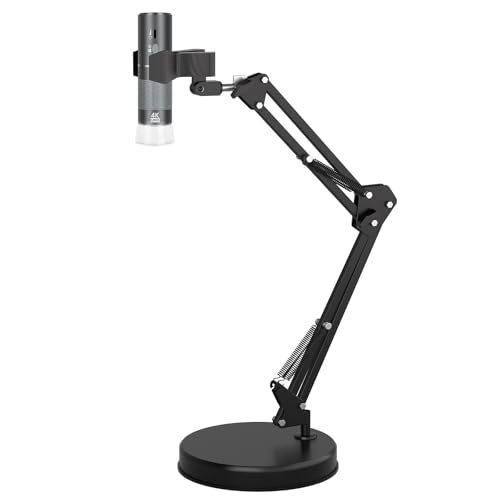
- Wireless phone and tablet viewing
- Up to 4K video support
- Adjustable rotating stand with clamp
Best For: Flexible mobile and computer-based inspection
Best Standalone Screen
PalliPartners 4.3-Inch Digital Microscope

- 4.3-inch HD LCD display
- Rechargeable 4-5-hour battery
- 32GB microSD card included
Best For: Portable inspection and hands-free viewing
Best 4K WiFi Pick
Jiusion 4K Handheld Microscope

- 4K 3840x2160P output
- WiFi and USB connectivity
- Includes stable stand
Best For: Circuit-board inspection, students, and mobile viewing
Best Autofocus Design
ScopeAround MS200 Digital Microscope

- Autofocus operation
- 2.8-inch IPS display
- White and UV LED modes
Best For: Portable electronics, jewelry, and surface inspections
Best Budget Wireless Option
Skybasic WiFi Digital Microscope

- WiFi and USB connectivity
- 1080P smartphone imaging
- Eight adjustable LED lights
Best For: Beginners, electronics hobbies, and educational exploration
Best All-Purpose Pick – Andonstar AD246S-M 3-Lens Digital Microscope
For shoppers comparing electronics microscopes under 200, the Andonstar AD246S-M stands out as a versatile option for soldering, circuit-board repair, coin viewing, and prepared biological slides. Its three interchangeable lenses, 2160P video support, HDMI output, and adjustable boom arm make it suitable for both bench work and educational demonstrations.
Best For: Electronics repairers, hobbyists, educators, and families who want one microscope for multiple observation tasks.
Pros:
- Three lenses cover soldering, general objects, and biological slides.
- 2160P recording, HDMI output, and a 7-inch LCD support comfortable viewing.
- Adjustable metal boom arm accommodates a larger work area.
- Includes a 32GB microSD card, remote, slides, and measurement-software support.
Cons:
- Changing lenses requires removing and installing screws.
- The larger stand takes more bench space than a compact handheld model.
This is the strongest choice when flexibility matters more than portability. The dedicated soldering lens and sturdy stand support electronics work, while the other lenses broaden its usefulness beyond repairs.
Best Compact Value – Elikliv EDM4 4.3-Inch Digital Microscope
The Elikliv EDM4 is a practical entry point for shoppers seeking electronics microscopes under 200 without a large workstation setup. It combines a 4.3-inch display, adjustable LED lighting, a height-adjustable stand, and a rechargeable battery for inspecting circuit boards, coins, jewelry, and other small objects.
Best For: Beginners, coin collectors, students, and hobbyists who need a portable microscope for occasional inspection.
Pros:
- Compact 4.3-inch LCD provides a direct view without requiring a computer.
- Eight adjustable LEDs help illuminate subjects in low light.
- Built-in rechargeable battery provides up to three hours of continuous use.
- Works with Windows and MacBook computers for larger viewing and file storage.
Cons:
- The package does not include a memory card for photos and videos.
- Its 720P display is less detailed than the 2160P models in this roundup.
Choose the EDM4 if portability and simple operation are priorities. Its rechargeable design is convenient for moving between work areas, while the stand adds stability for more precise viewing.
Best Soldering Station Setup – Andonstar AD249S-M Plus Digital Microscope
Among electronics microscopes under 200, the Andonstar AD249S-M Plus is especially compelling for hands-on soldering because it combines a 10.1-inch monitor with a metal stand, extension base, tool holder, helping hands, and soldering mat. Its three lenses also let you switch between electronics repair, general objects, and biological slides.
Best For: Electronics hobbyists who want a dedicated, organized soldering station with microscope-assisted viewing.
Pros:
- Three lenses provide ranges for soldering, general inspection, and slides.
- 2160P capture, HDMI support, remote control, and eight LED intensity levels add flexibility.
- Extension base increases workspace and includes component storage boxes.
- Includes helping hands, tool holder, soldering mat, 32GB card, and slides kit.
Cons:
- The full station has a comparatively large footprint.
- Lens changes require removing and installing screws.
This model is best suited to a permanent or semi-permanent electronics bench. The included accessories reduce the need to assemble a separate soldering setup, while the large screen makes shared viewing easier.
Best for Coin Collectors – TOMLOV DM9 7-Inch Digital Microscope
The TOMLOV DM9 is a strong option for shoppers comparing electronics microscopes under 200 for coins and close-up inspection. Its 7-inch LCD, 12MP camera, 1080P video, height-adjustable metal stand, and 16GB memory card support detailed viewing and documentation of coins, mint marks, solder joints, and small components.
Best For: Coin collectors, hobby electronics users, and anyone who wants a stable microscope for recording inspection findings.
Pros:
- Large 7-inch screen provides a comfortable direct viewing experience.
- Metal base and stand offer stability for close inspection and light soldering.
- 12MP photos, 1080P video, and included 16GB card support documentation.
- Eight built-in LEDs plus two flexible gooseneck lights help manage shadows and glare.
Cons:
- The stand-based design is less portable than a handheld microscope.
- Its feature set is centered on close-up inspection rather than interchangeable lens applications.
The DM9 makes the most sense when comfortable viewing and stable positioning are more important than maximum versatility. It is particularly well matched to coin documentation, while remaining useful for PCB inspection and light soldering.
Best USB Imaging Pick – Opti-Tekscope OT-HD Digital Microscope
For electronics microscopes under 200, the Opti-Tekscope OT-HD is a practical choice when you want computer-based inspection and image capture. Its 1600×1200 CMOS sensor, USB connection, aluminum stand, and adjustable LED lighting suit detail-focused work such as circuit-board inspection, phone repair, coin viewing, and quality control.
Best For: Hobbyists, repair work, inspection tasks, and users who prefer viewing and recording specimens on a Windows, Mac, or Linux computer.
Pros:
- Captures high-definition images at up to 1600×1200 resolution.
- USB plug-and-play compatibility with Windows and Mac, with Linux support noted.
- Solid, adjustable aluminum stand provides stable positioning.
- Eight LED lights and video or still-image capture support detailed inspections.
Cons:
- Designed for computer-connected use rather than standalone viewing.
- Its maximum stated magnification is 200x, lower than some competing digital models.
This model emphasizes dependable desktop imaging over portability. Choose it if a stable stand, computer workflow, and industrial-style construction matter more than a built-in screen.
Best Wireless Versatility – Cainda 4K WiFi Digital Microscope
Among electronics microscopes under 200, this Cainda model stands out for flexible wireless viewing. It can connect to iPhone, Android, tablet, iPad, or computer devices, while its claimed 4K video support, adjustable stand, and broad operating-system compatibility make it adaptable for circuit-board repair, collecting, and general inspection.
Best For: Users who want to inspect objects wirelessly on a phone or tablet, with a stand that can accommodate both close-up and elevated views.
Pros:
- Supports wireless connection to iPhone, Android devices, tablets, and iPads.
- Offers up to 3840×2160 video and 8MP image display according to the supplied specifications.
- Height-adjustable, 360-degree rotating arm includes a weighted base and table clamp.
- Works with Windows, Mac, Linux, Chrome, and several older Windows versions.
Cons:
- The enclosure is plastic rather than metal.
- Wireless use requires installing the required software or app.
- The supplied notes do not specify battery-powered operation, so USB power is required.
The main advantage here is connectivity: you can view, photograph, and record on several device types without relying solely on a computer. Its more elaborate stand also helps when inspecting larger or differently positioned subjects.
Best Standalone Screen – PalliPartners 4.3-Inch Digital Microscope
For shoppers comparing electronics microscopes under 200, the PalliPartners model is convenient when you want a self-contained screen instead of a computer setup. Its 4.3-inch LCD, rechargeable battery, 50x-1000x digital range, adjustable LEDs, and included 32GB microSD card support portable inspection of coins, circuit boards, jewelry, and small objects.
Best For: Portable, hands-free, or family-friendly viewing where an integrated display and onboard photo and video storage are useful.
Pros:
- Includes a 4.3-inch HD LCD screen for standalone viewing.
- Rechargeable battery provides approximately 4-5 hours of operation.
- Includes a 32GB microSD card for saving images and videos.
- Eight adjustable LED lights and a metal bracket support illuminated, hands-free inspection.
Cons:
- It is explicitly not intended for cell or medical purposes.
- The supplied notes describe digital magnification rather than optical magnification.
- Its 2.0MP camera is less focused on high-resolution imaging than some computer-connected alternatives.
This is the most convenient pick for quick viewing away from a desk. The integrated screen, battery, storage card, and bracket make it especially approachable for coin collecting, electronics inspection, and educational exploration.
Best 4K WiFi Pick – Jiusion 4K Handheld Microscope
If you want electronics microscopes under 200 that combine high-resolution imaging with flexible device support, the Jiusion 4K is a strong option. It can connect wirelessly to iPhone, iPad, Android devices, and tablets, or connect by USB to computers. Its included metal stand also makes hands-free inspection easier.
Best For: Electronics hobbyists, students, engineers, and makers inspecting circuit boards, coins, jewelry, insects, and other small objects.
Pros:
- 4K 3840x2160P video and image output when used with compatible devices.
- Wireless phone and tablet support plus wired compatibility with Windows, Mac, Linux, and Chrome OS.
- Eight built-in LED lights with controls for focus and brightness.
- Includes a stable stand and offers a lifetime warranty.
Cons:
- Phone and tablet zoom buttons do not work when connected to computers.
- Its handheld design and plastic enclosure may be less suitable for demanding professional lab work.
The Jiusion stands out for shoppers prioritizing resolution and broad compatibility. Choose it if you want to inspect electronics on a phone or computer and value an included stand for steadier viewing.
Best Autofocus Design – ScopeAround MS200 Digital Microscope
Among electronics microscopes under 200, the ScopeAround MS200 is designed for simple handheld viewing without manual focusing. Its 2.8-inch IPS display, white and ultraviolet LEDs, and lightweight body make it convenient for quick inspections of circuits, coins, jewelry, and other surface details.
Best For: Users who want autofocus, a built-in screen, and specialized white or UV illumination for portable inspection.
Pros:
- Autofocus is intended to provide fast, straightforward image clarity.
- 2.8-inch IPS display supports on-device viewing and can help reduce eyestrain.
- Eight white and eight ultraviolet LEDs provide two illumination modes.
- Lightweight 0.25-pound design and ergonomic handle support portable use.
Cons:
- Maximum magnification is listed as 20x, lower than many digital handheld microscopes.
- No memory card is included.
- Without a memory card, video recording is unavailable and photo storage is limited to approximately 35 images.
The MS200 favors convenience over extreme magnification. Its autofocus and integrated display are useful for quick electronics checks, while the UV mode adds flexibility for spotting residues or other flaws.
Best Budget Wireless Option – Skybasic WiFi Digital Microscope
The Skybasic is a practical choice among electronics microscopes under 200 if you want wireless phone viewing at a modest resolution. It connects to Android and iOS devices through its WiFi hotspot and works with Windows or Mac computers by USB, making it suitable for casual circuit-board inspection and educational exploration.
Best For: Beginners, students, and hobbyists who need a portable microscope for electronics, plants, minerals, insects, and other basic close-up viewing.
Pros:
- Supports wireless use with Android and iOS devices and USB use with Windows and Mac computers.
- Eight adjustable LED lights help illuminate the viewing area.
- One-button photo and video capture is available through the device or app.
- Portable design and 50x-1000x listed magnification suit casual exploration.
Cons:
- Image output is listed as 1080P for smartphones and 720P for computers.
- It is a fixed-focus magnifying device rather than a traditional microscope and is not intended for serious professional biology.
- Wireless setup requires the Max-see app and connection to the microscope’s WiFi hotspot.
The Skybasic offers useful connectivity and simple capture controls in a compact package. It is best viewed as an accessible inspection tool rather than a laboratory microscope, especially for electronics repairs and educational projects.
How We Picked the Best Electronics Microscopes Under 200
We focused on practical value rather than headline magnification alone. The lineup includes models with built-in displays, HDMI output, USB or Wi-Fi connectivity, adjustable stands, integrated lighting, and photo or video capture. These features are especially useful for electronics repair, soldering, inspecting circuit boards, examining coins, and sharing a live view with another screen.
We also considered ease of focusing, workspace stability, portability, and the likelihood that a microscope will be useful beyond occasional close-up viewing. Claimed magnification figures can vary by lens, display size, and digital cropping, so working distance, image clarity, and control layout are often more important than the largest number on the box.
Quick Comparison
| Best for | Look for | Most suitable style |
|---|---|---|
| Soldering and board repair | Stable stand, adjustable LEDs, HDMI or LCD display | Bench-style digital microscope |
| Coins and collectibles | Even lighting, easy focusing, comfortable viewing | LCD coin microscope |
| Phone or PC viewing | Wi-Fi or USB compatibility and app support | Handheld wireless or USB model |
| Detailed image capture | High-resolution sensor, photo and video controls | Camera-based digital microscope |
| Travel and quick inspections | Compact body, internal screen, rechargeable operation | Portable handheld microscope |
Key Buying Factors for Electronics Microscopes Under 200
Display and Connectivity
A built-in LCD screen lets you work without a computer or phone, while HDMI output can provide a larger, more comfortable view. USB models are often economical for PC use, but check software compatibility. Wi-Fi microscopes offer flexibility with phones and tablets, although app quality and connection stability can vary.
Stand and Working Distance
For soldering, choose a rigid stand with enough room beneath the lens for a soldering iron, tweezers, and components. A handheld microscope can reveal defects quickly, but it is harder to keep steady during detailed repair work. A longer working distance is generally more useful than extreme digital zoom.
Lighting and Image Control
Adjustable LED illumination helps prevent glare on metal, circuit-board coatings, and coins. Look for brightness control and, when available, supplemental or side lighting. Autofocus is convenient for quick inspections, while manual focus often gives better control at high magnification.
Resolution and Capture Features
Higher stated resolution does not guarantee a sharper image, especially when digital zoom is involved. Prioritize a clear sensor, smooth focusing, and useful photo or video controls. If documentation matters, confirm the intended file format and connection method before buying.
Who Should Buy Which Electronics Microscopes Under 200?
Choose a bench-style HDMI or LCD model if you regularly solder, repair electronics, or need a hands-free view. These are typically the easiest options for extended work.
Choose a coin-focused LCD microscope if your main priority is viewing coins, stamps, jewelry, or small household objects. A simple screen and consistent lighting can be more valuable than maximum advertised zoom.
Choose a USB or Wi-Fi handheld model if portability and phone or computer viewing matter most. They suit quick inspections, classroom demonstrations, fieldwork, and documenting surface details, but they may be less comfortable for precision soldering.
Before purchasing, verify the included stand, power source, screen or adapter requirements, and device compatibility. Those practical details often determine whether a budget microscope feels genuinely useful in daily work.