Choosing a desk for two children—or one child using dual monitors—requires more than finding the longest tabletop. Screen spacing, cable management, storage, and room size all affect comfort and everyday usability.
This roundup compares 10 practical options, from compact study desks and adjustable standing models to extra-long shared gaming desks with shelves, drawers, lighting, and power features.
Best 10 Children Desks for Dual Monitors Picks for 2026
Best for Shared Study Spaces
SEDETA 94.5-inch Two-Person Desk

- Extra-wide surface for two users
- Monitor stand supports up to four monitors
- Eight drawers, shelves, and built-in charging
Best For: Siblings or shared dual-monitor study spaces
Best Compact Safety-Focused Pick
47.3-inch White Desk with LEDs

- Monitor stand adjusts 12–16 cm
- Anti-tip brackets improve stability
- Drawers, side pocket, and 41 LED modes
Best For: Compact bedrooms and teen study areas
Best for Younger Siblings
Kids' Double Study Desk and Chair Set

- 82.7-inch shared surface for two children
- Includes two chairs and five fabric bins
- Low profile suits crafts and early study
Best For: Playrooms, reading, crafts, and younger siblings
Best Dual-Monitor Workstation

- Monitor shelf is wide enough for dual monitors
- Four outlets plus USB and USB-C charging
- Metal frame with RGB lighting
Best For: Teen gaming, homework, and computer setups
Best Extra-Long Desk

- 86.6-inch surface for two users or multiple monitors
- Reinforced engineered-wood construction
- Scratch-resistant farmhouse-style finish
Best For: Shared homework areas and spacious dual-monitor setups
Best Feature-Packed Corner Desk

- Reversible L-shaped layout with long monitor shelf
- Three AC outlets and two USB ports
- Drawers, CPU shelf, hooks, and customizable LEDs
Best For: Teens needing a connected corner study or gaming station
Best Compact Kids Desk

- Compact footprint for bedrooms and small spaces
- Monitor stand and headphone hook included
- Metal frame with X-shaped stability brace
Best For: Children’s small-room study and single-monitor setups
Best Adjustable Workstation

- Electric sit-stand adjustment with three presets
- Included arm supports two compatible monitors
- Child lock and integrated cable management
Best For: Older children or teens needing an adjustable dual-monitor workstation
Best Shared Desk
LITTLE TREE 78-Inch Double Desk

- 78.74-inch surface for two users
- Eight open shelves for supplies and gear
- Monitor stand helps free desktop space
Best For: Siblings or shared study spaces with ample room
Best Compact Teen Desk
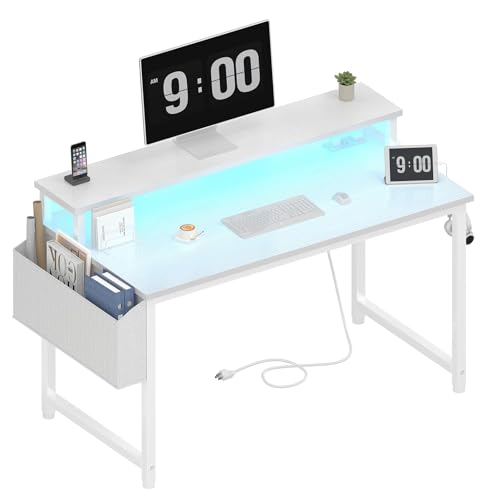
- Monitor stand designed for two monitors or laptops
- Two outlets and two USB charging ports
- RGB lighting with storage bag and hooks
Best For: Small bedrooms or study areas needing built-in charging
Best for Shared Study Spaces – SEDETA 94.5-inch Two-Person Desk
For families looking for children desks for dual monitors, the SEDETA 94.5-inch desk offers an unusually wide shared workspace. Its long surface, monitor stand, drawers, shelves, and built-in charging ports make it suitable for two children or two users working side by side.
Best For: Siblings, classmates, or families needing a large shared study and computer workstation.
Pros:
- 94.5-inch desktop provides generous room for two users and multiple monitors.
- Monitor stand can raise up to four monitors for a more comfortable viewing position.
- Includes eight fabric drawers, two shelves, a printer stand, three AC outlets, and two USB ports.
- RGB lighting offers multiple colors, modes, music synchronization, and timer functionality.
Cons:
- At 19.7 inches deep, the desktop is relatively shallow for larger setups.
- The 76-pound, 94.5-inch design requires substantial room and careful assembly planning.
This is the strongest choice when shared space and storage matter more than compact dimensions. It can accommodate a dual-monitor arrangement comfortably, though its size may be excessive for a single child’s room.
Best Compact Safety-Focused Pick – 47.3-inch White Desk with LEDs
Among children desks for dual monitors, this 47.3-inch model is a compact option for a bedroom, classroom, or study area. It combines a monitor stand, two drawers, a side pocket, LED lighting, and anti-tip brackets in a space-conscious design.
Best For: Older children or teens who need a compact computer and study desk with built-in organization.
Pros:
- Adjustable-height monitor stand raises screens 12–16 cm and holds up to 33 pounds.
- Anti-tip brackets, anti-slip feet, and a steel frame add stability for homes with children or pets.
- Two drawers and a side pocket provide convenient storage for school supplies.
- Includes 41 LED lighting modes and labeled hardware for easier assembly.
Cons:
- The 19.5-inch depth and 47.3-inch width may limit larger dual-monitor setups.
- The listed maximum weight recommendation is 15 kg, so heavier equipment should be avoided.
This desk makes the most sense when floor space and stability are priorities. Its monitor stand may support a dual-monitor arrangement, but users should verify the combined monitor size and weight before setup.
Best for Younger Siblings – Kids' Double Study Desk and Chair Set
This double study set is designed primarily for young children rather than computer-heavy setups. For families comparing children desks for dual monitors, its 82.7-inch length offers shared room, but the 20.59-inch height and child-sized chairs make it better suited to drawing, reading, crafts, and early study.
Best For: Two younger children sharing a playroom or activity space.
Pros:
- Long 82.7-inch design gives two children a comfortable shared work area.
- Includes two wooden chairs designed for children.
- Built-in shelves, a book rack, and five removable fabric bins support organization.
- Water-resistant tabletop is easy to wipe clean after crafts or spills.
Cons:
- At 20.59 inches high, it is not designed for standard computer monitors or older children.
- It does not include a monitor stand, cable management, or charging ports.
- The shallow 15.67-inch depth limits computer equipment placement.
This is a practical shared kids’ activity table, not a conventional dual-monitor computer desk. Choose it for supervised creative work and early learning rather than monitor-based homework or gaming.
Best Dual-Monitor Workstation – 55-inch LED Gaming Desk
For shoppers seeking children desks for dual monitors, this 55-inch gaming desk offers a useful balance of footprint and computer-focused features. Its raised monitor shelf is described as wide enough for dual monitors, while the charging station helps keep devices powered without extra extension cords.
Best For: Teens who need a dedicated dual-monitor gaming, study, or homework workstation.
Pros:
- 54-by-19.7-inch desktop is designed to accommodate dual monitors.
- Raised monitor stand helps place screens at a more comfortable viewing level.
- Four AC outlets, two USB ports, and one USB-C port provide convenient charging.
- RGB lighting offers 12 preset modes and more than 60,000 app-controlled colors.
Cons:
- The monitor shelf is the primary storage feature, with no drawers or enclosed storage.
- At 19.7 inches deep, the desk may feel tight with large monitors and accessories.
This is the most directly suited option for a teen’s dual-monitor computer setup. Its compact footprint, monitor shelf, power outlets, and sturdy metal frame make it more computer-ready than the child-focused alternatives.
Best Extra-Long Desk – 86.6-Inch Dual Workstation
For children desks for dual monitors, this extra-long workstation offers abundant room for two monitors, laptops, and study or creative supplies. Its 86.6-inch surface is designed for two users or a spacious single-user setup, making it useful when a standard desk feels cramped.
Best For: Shared homework areas, dual-monitor setups, and large home-office or studio spaces.
Pros:
- 86.6-inch-wide surface supports two users and multiple monitors.
- Reinforced engineered-wood construction is designed for stable daily use.
- Scratch-resistant finish and farmhouse-inspired light-brown look.
Cons:
- The 86.6-inch width requires substantial floor space.
- At 90 pounds, it may be difficult to move or reposition.
This is the strongest choice when workspace capacity matters most. Measure the room carefully, but the generous desktop can make it easier to organize a dual-monitor children’s study or gaming area.
Best Feature-Packed Corner Desk – Korfile 66-Inch L-Shaped Desk
Among children desks for dual monitors, this reversible L-shaped model stands out for combining a long monitor shelf, storage, outlets, and LED lighting. The corner-friendly layout gives students room for screens, accessories, and school materials without relying on a separate power strip.
Best For: Older children or teens who need a corner workstation for studying, gaming, and dual-screen organization.
Pros:
- Reversible L-shaped design helps optimize corner space.
- Built-in station includes three AC outlets and two USB ports.
- Two fabric drawers, a CPU shelf, headphone hooks, and monitor riser add organization.
- LED lighting offers 20 colors, 22 scenes, and five brightness settings.
Cons:
- The 42.5-inch depth and L-shaped footprint need careful room planning.
- The listed 36.5-inch height may not suit younger children without an appropriate chair.
This desk is a practical choice for a tech-heavy study space where storage and connectivity are as important as monitor room. Its adjustable layout and built-in features add flexibility, though sizing should be checked against the child and available corner.
Best Compact Kids Desk – Pamray 47-Inch Study Desk
For smaller rooms, this compact option is a practical pick among children desks for dual monitors, although its included stand is specified to support one monitor. The 47.2-inch-wide surface, monitor stand, and headphone hook create a tidy setup for schoolwork, writing, or a single-screen computer area.
Best For: Children’s bedrooms, dormitories, and small study spaces where compact dimensions matter.
Pros:
- Compact 47.2-by-18.9-inch footprint suits tight rooms.
- Monitor stand raises the screen and frees some desktop space.
- Metal frame, X-shaped back brace, and 150-pound recommended capacity support everyday use.
- Headphone hook and included assembly tools and instructions improve convenience.
Cons:
- The supplied notes specify support for up to one monitor, so dual-monitor users should verify fit.
- Its narrow 18.9-inch depth limits room for large accessories.
This is the most space-conscious choice in the group and works well for a child’s basic computer or study setup. If dual monitors are essential, confirm the monitor arrangement and available surface before buying.
Best Adjustable Workstation – SIAGO Electric Standing Desk
For children desks for dual monitors, the SIAGO combines a 48-by-24-inch desktop with an included adjustable monitor arm and electric sit-stand control. Its programmable heights, child lock, and cable-management features make it a flexible choice for a study, gaming, or home-office setup.
Best For: Older children or teens who need an adjustable workstation for dual monitors, studying, or gaming.
Pros:
- Electric height adjustment from 27.95 to 45.67 inches with three memory presets.
- Included monitor arm supports compatible 15- to 32-inch monitors up to 19.8 pounds.
- Spacious desktop, cable routing, hooks, and a child-lock feature.
- Steel frame supports up to 200 pounds and has been tested through 50,000 lift cycles.
Cons:
- Its 48-inch width may be more desk than a younger child needs.
- Assembly involves two packages and monitor-arm installation.
- The electric mechanism adds complexity compared with a basic desk.
The SIAGO is the most adjustable option here, especially when changing between sitting and standing matters. Verify monitor compatibility and allow room for the 24-inch depth before buying.
Best Shared Desk – LITTLE TREE 78-Inch Double Desk
When children desks for dual monitors need to serve two users, the LITTLE TREE provides a 78.74-inch-wide shared surface with a monitor stand and extensive open shelving. Its generous leg clearance also leaves room for larger chairs, equipment, or a standing desk converter.
Best For: Siblings, shared study spaces, or households that want room for two monitors and two work areas.
Pros:
- Wide 78.74-inch surface accommodates two monitors, gear, or collaborative projects.
- Eight open shelves provide substantial storage on both sides.
- Tiered monitor platform is designed to improve screen alignment and free desktop space.
- Metal frame and scratch-, wear-, and water-resistant engineered-wood top.
Cons:
- The 78-inch width requires a large room or dedicated wall.
- It is a fixed-height desk rather than an adjustable standing desk.
- Open shelving may require organizers to keep children’s supplies tidy.
This is the strongest choice for a shared workstation rather than a compact individual desk. Measure the room carefully and consider whether the open shelf layout suits your storage habits.
Best Compact Teen Desk – Lufeiya LED Computer Desk
For smaller rooms, the Lufeiya is a compact option among children desks for dual monitors, measuring 39.4 inches wide and including a monitor stand intended for two monitors or laptops. Built-in outlets, USB ports, LED lighting, a storage bag, and headphone hooks add convenience for studying and gaming.
Best For: Teens or children with limited space who need dual-monitor support plus charging and accessory storage.
Pros:
- Monitor stand is designed to hold two monitors or laptops.
- Built-in power strip includes two outlets and two USB charging ports.
- RGB lighting offers seven colors, four dynamic modes, and 16 static types.
- Scratch-resistant, anti-collision, and waterproof desktop with removable hooks and storage bag.
Cons:
- The 39.4-inch width and 19.7-inch depth provide less work surface than the larger desks.
- It has a fixed 33.4-inch height.
- The supplied notes do not specify monitor-arm weight or VESA limits.
The Lufeiya makes the most sense when space and built-in charging are priorities. Confirm that your two monitors fit the stand and that the fixed height works for the intended user.
How We Picked the Best Children Desks for Dual Monitors
We focused on the features that matter most in real homes: usable desktop width, monitor support, storage, power access, construction style, and space efficiency. The selection includes desks for solo use, shared study areas, gaming setups, and small bedrooms. Because children grow quickly, we also considered adjustability, legroom, and whether the design can support changing school and computer needs.
Product claims such as dimensions, outlets, lighting, drawers, shelves, and monitor stands should be verified on the current retailer listing before purchase, since configurations can vary.
Quick Comparison
| Desk type | Best suited for | What to prioritize |
|---|---|---|
| Extra-long double desk | Two children or a wide dual-monitor setup | Depth, center legroom, and cable routing |
| Compact desk | Small bedrooms and homework stations | Monitor riser, footprint, and storage |
| L-shaped desk | Corner setups and gaming gear | Orientation, usable corner space, and outlets |
| Standing desk | Adjustable-height work areas | Height range, stability, and motor safety |
Key Buying Factors for Children’s Desks for Dual Monitors
Width and Depth
Two monitors need enough horizontal room to sit side by side without pushing keyboards or notebooks to the edge. For shared use, an extra-long desk is usually more comfortable than a compact model. Depth matters just as much: a shallow tabletop may leave too little viewing distance once a monitor stand, keyboard, and school supplies are added.
Monitor Placement and Stability
Built-in monitor stands can free up tabletop space, but check their width, weight capacity, and height. A dual-monitor arm may be preferable when the desk is sturdy enough to support a clamp. Keep screens centered and at a comfortable eye level, and avoid placing heavy equipment where it can make the desktop unstable.
Storage, Power, and Cable Management
Drawers, fabric bins, shelves, and side racks help keep books and accessories off the main work surface. Integrated outlets and USB ports are convenient, but they should not replace safe cable routing or a properly rated surge protector. Look for openings that keep charging cables away from foot traffic.
Fit, Safety, and Durability
Measure the room, doorway, chair clearance, and wall outlets before ordering. Rounded edges, stable legs, strong hardware, and a finish that is easy to clean are especially useful for children. For younger users, anchor tall shelving when recommended and keep heavy items on lower shelves.
Who Should Buy Which Children Desks for Dual Monitors?
Choose an extra-long double desk for siblings, tutoring, or a child who needs two monitors plus ample writing space. Choose a compact 40- to 48-inch desk for a smaller bedroom or a single-monitor homework station. Choose an L-shaped model when a corner layout can separate gaming, schoolwork, and accessories. Choose a standing desk when adjustable height and posture flexibility matter most. Finally, prioritize shelves, drawers, or bins if clutter is the main problem, and prioritize outlets or LED features only after confirming that the core desk dimensions and stability fit the child’s setup.