The best compact laptop cooling pads help manage heat without taking over your desk or adding unnecessary bulk to your laptop bag. The right model can also improve typing comfort by raising your screen and keyboard to a more usable angle.
We compared these 10 options across size compatibility, fan design, adjustability, portability, noise, and useful extras so you can choose a cooler that matches your laptop and daily setup.
Best 10 Compact Laptop Cooling Pads Picks for 2026
Best Balanced Cooling
TECKNET Triple-Fan Laptop Cooling Pad

- Three quiet 1200 RPM fans
- Two height settings and dual USB ports
- Fits 12- to 17-inch laptops
Best For: Versatile everyday cooling with added connectivity
Best Lightweight Pick
havit HV-F2056 Slim Cooling Pad

- Slim design weighs about 697 grams
- Three quiet fans and a metal-mesh surface
- Two height settings plus an extra USB port
Best For: Portable cooling for 15.6- to 17-inch laptops
Best Adjustable Design

- Five selectable quiet fans
- Six adjustable height settings
- Dual USB hub and front laptop stoppers
Best For: Flexible desk-based cooling and ergonomic positioning
Best for Gaming Laptops
llano V12 Ultra Turbo Cooling Pad

- 2800 RPM turbo fan with smart software modes
- Dedicated 36W adapter and memory-foam airflow seal
- Fits 15.6- to 19-inch gaming laptops
Best For: High-performance gaming laptops and demanding workloads
Most Portable
Hagibis Magnetic Laptop Stand Cooler
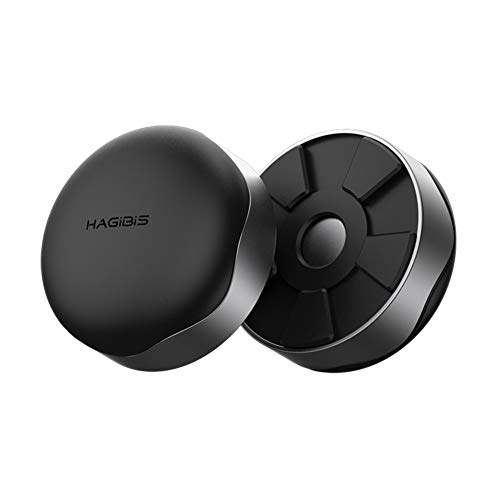
- Two-piece design weighs about 1.76 ounces
- Magnetic attachment with silicone grip surfaces
- Passive elevation improves bottom airflow
Best For: Travelers and minimalist desk setups
Best for Lap Use
Targus 17-Inch Dual-Fan Chill Mat

- Dual USB-A-powered fans
- Soft neoprene lap cushion
- Open mesh top and ergonomic tilt
Best For: Comfortable laptop use on a lap
Best Adjustable Stand
ICE COOREL Aluminum Laptop Cooler

- One adjustable 160mm fan
- Seven height settings
- Two USB 2.0 ports and aluminum surface
Best For: Adjustable desk setups for 12- to 15.6-inch laptops
Best Compact Cooling Pad for Everyday Work

- Two-fan metal-mesh cooling
- Five adjustable height settings
- Phone holder and two USB ports
Best For: Everyday work with laptops up to 15.6 inches
Best Multi-Fan Compact Cooling Pad

- Six adjustable-speed 70 mm fans
- Five height settings with nonslip baffles
- Supports laptops up to 17 inches
Best For: Users prioritizing multi-fan airflow and larger laptop compatibility
Best Adjustable Compact Cooling Pad for Large Laptops

- Six fans with adjustable speed controls
- Seven height settings and phone holder
- Supports laptops up to 17.3 inches
Best For: Flexible cooling and positioning for medium to large notebooks
Best Balanced Cooling – TECKNET Triple-Fan Laptop Cooling Pad
For shoppers comparing compact laptop cooling pads, the TECKNET offers a practical balance of portability, airflow, and everyday usability. Its three USB-powered fans, two height settings, and broad 12- to 17-inch compatibility make it suitable for work, browsing, and extended sessions.
Best For: Users who want a versatile cooling pad with adjustable comfort and an extra USB port.
Pros:
- Three 1200 RPM fans with a whisper-quiet design.
- Two adjustable height settings and rubber grips help improve comfort and stability.
- Dual USB ports provide power plus connectivity for another device.
- Compatible with laptops from 12 to 17 inches.
Cons:
- Uses a USB-A to USB-A cable, so USB-C devices may require an adapter.
- At 1.4 pounds, it is not the lightest option listed.
The TECKNET is a well-rounded choice when you need cooling, basic ergonomics, and useful connectivity without moving to a larger performance-focused stand.
Best Lightweight Pick – havit HV-F2056 Slim Cooling Pad
The havit HV-F2056 is a straightforward option among compact laptop cooling pads, combining a slim profile with three quiet fans and a metal-mesh surface. It is designed for 15.6- to 17-inch laptops and doubles as a simple ergonomic stand.
Best For: People who prioritize a lightweight, portable cooler for larger laptops.
Pros:
- Slim, portable design weighs about 697 grams.
- Three ultra-quiet USB-powered fans support a quieter workspace.
- Two height settings can improve viewing and typing comfort.
- Extra USB port and power switch add convenience.
Cons:
- Compatibility is focused on 15.6- to 17-inch laptops rather than smaller models.
- The included USB-to-USB cable may require an adapter for Type-C devices.
Choose the havit when portability and quiet operation matter more than extensive adjustability or high-powered cooling controls.
Best Adjustable Design – Kootek Five-Fan Cooling Stand
The Kootek stands out among compact laptop cooling pads with five selectable fans and six height settings. Its larger footprint suits 12- to 17-inch laptops, while the front stoppers and metal-mesh surface help keep a laptop secure during work, gaming, or media use.
Best For: Users who want maximum height adjustment and flexible fan control.
Pros:
- Five quiet fans can be configured for one, four, or all five fans.
- Six adjustable height settings provide more positioning flexibility.
- Built-in dual USB hub supports additional peripherals.
- Front stoppers help prevent compatible laptops from slipping.
Cons:
- At 1.16 kg, it is heavier than the havit option.
- Its 11.81-inch width makes it less compact than slimmer models.
- Type-C devices may need a Type-C-to-USB adapter.
The Kootek is a strong fit for buyers who value adjustability and customizable airflow, but its size and weight make it better suited to a fixed desk than frequent travel.
Best for Gaming Laptops – llano V12 Ultra Turbo Cooling Pad
The llano V12 Ultra takes a different approach to compact laptop cooling pads, using a 5.5-inch turbo fan, memory-foam sealing, software controls, and a dedicated 36W power adapter. It is built for larger 15.6- to 19-inch gaming laptops and includes adjustable stands, RGB lighting, and a USB 3.0 hub.
Best For: Owners of large, high-performance gaming laptops who want powerful, externally powered cooling.
Pros:
- 5.5-inch turbo fan reaches up to 2800 RPM.
- Smart software offers low, medium, and high modes, with manual control available.
- Dedicated 36W adapter supplies power without draining the laptop.
- Includes a removable dust filter, three height settings, and a three-port USB 3.0 hub.
Cons:
- At 4 pounds and 2.7 inches high, it is less portable than slim cooling pads.
- Designed for 15.6- to 19-inch laptops, limiting smaller-device compatibility.
- Requires a wall adapter rather than laptop USB power alone.
The llano is the performance-oriented choice here: less compact in practice, but better suited to demanding gaming setups that can accommodate its larger, externally powered design.
Most Portable – Hagibis Magnetic Laptop Stand Cooler
For shoppers seeking compact laptop cooling pads without carrying a full-size fan mat, the Hagibis stand uses elevation to improve airflow beneath a laptop. Its magnetic, two-piece design is lightweight and easy to pack.
Best For: Travelers and minimalist desk users who want portable elevation and passive heat dissipation.
Pros:
- Two stands weigh about 1.76 ounces, making them easy to carry.
- Magnetic Nd-Fe-B design attaches readily and securely.
- Silicone surfaces help prevent scratches and slipping.
- Raises the laptop for a more comfortable typing angle.
Cons:
- Uses passive elevation rather than powered fans.
- Its small stand format may provide less lap support than a cooling mat.
The Hagibis is a particularly compact option for improving bottom airflow and ergonomics without adding much bulk. It suits users who prioritize portability over active cooling.
Best for Lap Use – Targus 17-Inch Dual-Fan Chill Mat
The Targus Chill Mat is one of the more practical compact laptop cooling pads for lap use, combining dual USB-powered fans with a cushioned neoprene base. Its open mesh surface helps move heat away while you work.
Best For: Users who work with laptops on their laps and want active cooling plus a softer, more comfortable base.
Pros:
- Dual fans provide active heat dispersion.
- Soft neoprene underside cushions the mat on a lap.
- Open mesh top encourages airflow.
- Ergonomic tilt supports more comfortable typing.
Cons:
- Its 15-by-11.75-inch footprint is less compact than miniature stands.
- Fans require a USB-A connection.
- At 2 pounds, it is heavier than the other listed options.
With dual fans and lap-friendly cushioning, the Targus is a sensible choice for comfort-focused cooling. It is better suited to regular lap work than ultra-light travel.
Best Adjustable Stand – ICE COOREL Aluminum Laptop Cooler
The ICE COOREL combines active cooling, an aluminum surface, and seven height settings in a relatively slim stand. Among compact laptop cooling pads, it stands out for adding workspace flexibility and two USB ports.
Best For: Desk users who want adjustable positioning, active airflow, and convenient USB expansion for 12- to 15.6-inch laptops.
Pros:
- Large 160mm fan offers adjustable 1000–1400 RPM cooling.
- Seven height settings support different viewing and typing positions.
- Aluminum surface helps draw heat away from the laptop.
- Two USB 2.0 ports add connectivity.
Cons:
- Designed for laptops from 12 to 15.6 inches, limiting larger-device compatibility.
- At about 1.35 pounds, it is less portable than a simple stand.
- Its raised design may be less convenient for lap use.
The ICE COOREL is a well-rounded cooling stand when adjustability matters as much as airflow. Its fan, aluminum top, and USB ports make it especially useful for a structured desk setup.
Best Compact Cooling Pad for Everyday Work – KeiBn S039
For shoppers comparing compact laptop cooling pads, the KeiBn S039 combines two fans with a metal mesh surface in a portable design for laptops up to 15.6 inches. Its adjustable stand and extra USB connectivity make it useful for home or office work.
Best For: Users who want a compact cooler with basic stand adjustment, phone storage, and USB expansion.
Pros:
- Two fans and metal mesh support airflow and heat dissipation.
- Five height settings and nonslip baffles help create a more comfortable, stable setup.
- Includes a hideable phone holder, blue activity indicator, and two USB 2.0 ports.
Cons:
- Compatibility is listed for laptops up to 15.6 inches, so it may not suit larger notebooks.
- It uses air cooling rather than a more specialized cooling system.
At 0.8 kg and about 1.18 inches high, this is a practical option when portability and desk functionality matter more than maximum fan count.
Best Multi-Fan Compact Cooling Pad – ICE COOREL Six-Fan Cooler
The ICE COOREL is a strong choice among compact laptop cooling pads for users who want six fans and adjustable cooling. Its metal mesh platform, height settings, and two USB ports provide both airflow support and everyday workstation flexibility.
Best For: Laptop users seeking six-fan cooling and support for notebooks up to 17 inches.
Pros:
- Six 70 mm fans operate at adjustable speeds from 2400 to 2600 RPM.
- Metal mesh helps draw heat away while providing a firm, wear-resistant surface.
- Five height settings, two USB 2.0 ports, and a supplied USB cable add practical convenience.
Cons:
- At 1.03 kg and 16.5 inches long, it is less portable than smaller cooling pads.
- The product is listed for laptops up to 17 inches, but its larger footprint may not suit every compact desk.
Choose this model when broad laptop compatibility and multiple fans are priorities, while keeping in mind its larger size and weight.
Best Adjustable Compact Cooling Pad for Large Laptops – LIANGSTAR 6-Fan Cooler
The LIANGSTAR cooler stands out among compact laptop cooling pads for its six fans, seven height positions, and adjustable wind speed. It also supports notebooks from 12 to 17.3 inches, making it a versatile choice for gaming laptops and larger work machines.
Best For: Users who want highly adjustable cooling for laptops ranging from 12 to 17.3 inches.
Pros:
- Six quiet fans can run together or in separate groups, with two controls for fan speed.
- Seven height settings, a phone holder, and a large non-slip baffle support flexible positioning.
- Two USB ports and a large metal mesh surface improve connectivity and airflow functionality.
Cons:
- Its 1.8-pound weight may be less convenient for frequent travel.
- The 12-month warranty is shorter than the lifetime warranty listed for the KeiBn model.
With broad size compatibility and more control over fan operation and viewing angle, the LIANGSTAR is a well-rounded option for users who value adjustability.
How We Picked the Best Compact Laptop Cooling Pads
We focused on practical features that matter in everyday use rather than fan counts alone. The selection includes slim USB-powered pads, adjustable laptop stands, gaming-oriented coolers, quiet multi-fan designs, and compact solutions for smaller workstations. We considered supported laptop sizes, airflow configuration, height adjustment, stability, portability, USB connectivity, and whether each design suits desk or lap use.
Fan quantity can be helpful, but placement and the laptop’s ventilation layout are equally important. A well-positioned two-fan pad may outperform a larger unit whose airflow does not reach your laptop’s intake vents.
Quick Comparison
- Most portable: Look for slim, lightweight designs such as the TECKNET, Havit, or Hagibis options.
- Best for adjustability: Models with multiple height settings, including Kootek, ICE COOREL, KeiBn, and LIANGSTAR designs, make it easier to improve viewing angles.
- Best for gaming laptops: Consider higher-airflow options such as the llano V12 Ultra or multi-fan ICE COOREL and LIANGSTAR pads.
- Best for lap use: The Targus Lap Chill Mat uses a soft neoprene surface and is designed with comfort and heat protection in mind.
- Best for smaller laptops: Check compact models that support 10- or 12-inch computers rather than choosing a cooler designed mainly for 17-inch systems.
Key Buying Factors for Compact Laptop Cooling Pads
Size and Laptop Fit
Confirm both the cooler’s stated laptop range and its usable platform dimensions. A pad should support your computer securely without leaving the rear edge or intake vents poorly positioned.
Airflow and Fan Control
More fans do not automatically mean better cooling. Look for adjustable speed, smart software control, or a fan layout that aligns with your laptop’s underside vents. Variable control is especially useful when you want lower noise during browsing and stronger airflow during gaming.
Height Adjustment and Stability
Multiple height settings can reduce neck and wrist strain, but the stand should remain stable at the angle you use. Check for nonslip feet, a front retaining lip, and enough surface area for your laptop’s weight.
Noise, Power, and Connectivity
Most laptop coolers draw power through USB, so check whether the design includes USB passthrough if you need to preserve a port. Quiet operation matters in offices, libraries, and meetings, while louder high-airflow models may be acceptable for gaming.
Portability and Materials
Choose a slim plastic or lightweight model for frequent travel. Aluminum stands can feel sturdier and dissipate heat well, but they may add weight. Foldable designs are easier to store in a laptop sleeve or backpack.
Who Should Buy Which Compact Laptop Cooling Pads?
Choose a slim portable cooler if you work in multiple locations or need a simple way to improve airflow without carrying a bulky accessory. Choose an adjustable stand-style cooler if posture and screen height are as important as temperature control.
Choose a multi-fan gaming cooler if your laptop runs demanding games or creative software and has large underside intake vents. Choose a lap-focused mat if you regularly use your computer on a couch or bed, where soft surfaces can block airflow. Before buying, match the pad to your laptop’s size, port layout, vent placement, and preferred noise level.