High-speed network switches make it easier to connect multi-gigabit computers, NAS devices, access points, and gaming systems without slowing down your wired network.
We compare 10 unmanaged and managed options, including 2.5GbE, 10GbE, RJ45, and SFP+ models, so you can choose the right balance of speed, ports, control, and value.
Best 10 High Speed Network Switches Picks for 2026
Best 10G Port Capacity
NICGIGA 8-Port 10G Ethernet Switch

- Eight multi-gig RJ45 ports
- 160Gbps switching capacity
- Desktop or 19-inch rack mounting
Best For: Expanding a 10G NAS, workstation, or Wi-Fi 7 network
Best for Managed Networks

- Managed eight-port design
- Aluminum case
- 48Gbps listed data transfer rate
Best For: Users seeking a configurable MikroTik network switch
Best Silent Multi-Gig Switch

- Eight 2.5Gbps RJ45 ports
- Fanless silent operation
- 40Gbps switching capacity
Best For: Quiet gaming, home-office, and NAS networks
Best Mixed-Speed Uplink Design
GiGaPlus 10-Port 2.5G/10G Switch
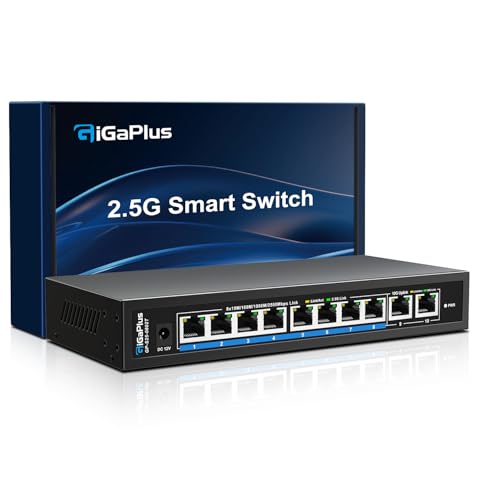
- Eight 2.5G ports plus two 10G ports
- 80Gbps switching capacity
- Fanless metal enclosure
Best For: Networks combining 2.5G clients with 10G NAS or server links
Best All-Around 2.5Gb Pick

- Eight 2.5Gbps RJ45 ports
- Plug-and-play unmanaged setup
- Fanless metal design for desktop or wall mounting
Best For: Multi-gig home and small-office networks
Best for NAS Expansion
UGREEN 6-Port 2.5Gb/10Gb SFP+ Switch

- Five 2.5Gb RJ45 ports and one 10Gb SFP+ port
- Selectable standard, LAG, and VLAN modes
- Supports 12K jumbo frames for large transfers
Best For: NAS users and small networks needing a 10Gb backbone
Best All-Around Multi-Gig Upgrade
TP-Link TL-SG108S-M2 8-Port 2.5G Switch

- Eight 2.5Gbps RJ45 ports
- Up to 40Gbps switching capacity
- Fanless and plug-and-play
Best For: Homes, small offices, NAS setups, and LAN parties
Best Compact 5-Port Pick
BrosTrend 5-Port 2.5G Unmanaged Switch

- Five 2.5Gbps RJ45 ports
- Up to 25Gbps switching capacity
- Silent fanless plug-and-play design
Best For: Gaming stations, small offices, and home entertainment
Best for 10G Uplinks
NUBASA 8-Port 2.5G Switch with SFP+
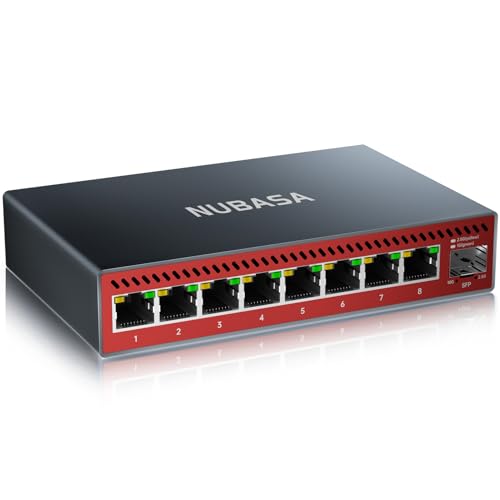
- Eight 2.5Gbps RJ45 ports
- 10Gbps SFP+ uplink
- Fanless aluminum enclosure
Best For: NAS, servers, workstations, and 10GbE backbones
Best 10G Port Capacity – NICGIGA 8-Port 10G Ethernet Switch
For homes or small workspaces building around 10G NAS devices, PCs, Wi-Fi 7 routers, or high-resolution media, this NICGIGA model is one of the more straightforward high speed network switches to consider. Its eight RJ45 ports support several link speeds, so it can connect newer multi-gig equipment alongside older Ethernet hardware without manual configuration.
Best For: Users who need eight flexible 10G-capable copper ports and may want either desktop or 19-inch rack installation.
Pros:
- Eight RJ45 ports support 10G, 5G, 2.5G, 1G, and 100M connections.
- 160Gbps switching capacity supports multiple connected devices.
- Plug-and-play setup includes auto-negotiation and automatic MDI/MDIX.
- Metal case, 4KV lightning protection, and included rack ears add installation flexibility.
Cons:
- It is an unmanaged switch, so advanced traffic controls and configuration features are not provided.
- The built-in fan may be less suitable than a fanless design for exceptionally quiet rooms.
This is a strong choice when the priority is maximum 10G copper-port availability with minimal setup. The one-year warranty and lifetime technical support add reassurance for a small high-speed network.
Best for Managed Networks – MikroTik CRS310-8G+2S+IN
The MikroTik CRS310-8G+2S+IN is the managed option in this selection of high speed network switches. Its aluminum case and eight-port design suit users who want a more configurable network platform than a basic plug-and-play switch, although the supplied specifications do not detail its specific management features or port speeds beyond the listed 48Gbps data transfer rate.
Best For: Network users who specifically want a managed MikroTik switch with eight ports and an aluminum enclosure.
Pros:
- Managed switch design offers a more advanced starting point than unmanaged alternatives.
- Eight ports provide connectivity for desktop and other Ethernet devices.
- Aluminum case offers a durable enclosure in a compact, 1kg design.
Cons:
- The supplied notes do not specify individual port speeds or detailed management capabilities.
- It may require more network knowledge to configure than an unmanaged plug-and-play model.
Choose this MikroTik when manageability matters more than the simplest possible installation. Before buying, verify that its port configuration and supported features match your intended high-speed network layout.
Best Silent Multi-Gig Switch – BrosTrend 8-Port 2.5Gb Switch
For gaming rooms, home offices, and entertainment setups, this BrosTrend model delivers 2.5Gbps across all eight RJ45 ports without adding fan noise. It is among the more accessible high speed network switches for upgrading several wired devices at once, with a simple connection process and support for desktop or wall mounting.
Best For: Quiet home offices, gaming setups, NAS connections, and multi-device networks that need 2.5Gbps rather than 10Gbps.
Pros:
- Eight ports each support 2.5Gbps, with up to 40Gbps switching capacity.
- Fanless design provides silent operation.
- Plug-and-play setup requires no software installation or configuration.
- Compact enclosure supports desktop or wall mounting.
Cons:
- It does not provide 10G ports for devices that require full 10Gbps links.
- The plastic case may feel less rugged than the metal enclosures on some alternatives.
This is a practical value pick for upgrading a gigabit network to 2.5Gbps while keeping the environment quiet. Its all-RJ45 layout also avoids the need for SFP transceivers and optical-fiber cables.
Best Mixed-Speed Uplink Design – GiGaPlus 10-Port 2.5G/10G Switch
This GiGaPlus switch combines eight 2.5G-capable RJ45 access ports with two 10G RJ45 ports, making it a useful bridge between everyday wired devices and faster NAS, server, or router links. For buyers comparing high speed network switches, the layout provides a practical way to add 10G connectivity without requiring optical SFP hardware.
Best For: Small offices and home networks that need several 2.5G connections plus dedicated 10G links for storage, servers, or uplinks.
Pros:
- Eight ports support 100M, 1G, and 2.5G auto-sensing connections.
- Two 10G RJ45 ports provide higher-speed links for compatible equipment.
- 80Gbps switching capacity supports a mixed-speed network.
- Fanless metal design supports quiet operation, desktop use, and wall mounting.
Cons:
- Only two ports support 10G, so it is less suitable when many devices need 10Gbps connections.
- The switch is unmanaged and does not offer configurable network controls.
The mixed-port arrangement makes this a sensible upgrade for networks transitioning from gigabit to multi-gig speeds. Its fanless design, metal casing, and 4KV lightning protection further suit compact workspaces and small-business installations.
Best All-Around 2.5Gb Pick – UGREEN 8-Port 2.5Gb Switch
For a straightforward upgrade to high speed network switches, the UGREEN 8-port model delivers 2.5Gbps on every port. It is a practical fit for homes or offices connecting NAS devices, gaming PCs, consoles, and Wi-Fi 6 or 6E routers without requiring configuration.
Best For: Multi-gig home and small-office networks needing eight full-speed 2.5Gb ports.
Pros:
- Eight RJ45 ports support 100Mbps, 1Gbps, and 2.5Gbps connections.
- Unmanaged plug-and-play setup requires no software or configuration.
- Metal housing, heatsinks, ventilation, and fanless operation support quiet performance.
- Can sit on a desk or mount to a wall.
Cons:
- All ports top out at 2.5Gbps, with no 10Gbps uplink.
- It is unmanaged, so advanced VLAN or traffic-management features are not included.
This is a strong general-purpose choice when you want consistent 2.5Gbps connectivity across several devices and a simple installation. Its silent, metal design also makes it suitable for living spaces and workstations.
Best for a 10Gb Uplink – NETGEAR GS108MX 8-Port Switch
The NETGEAR GS108MX is a useful option among high speed network switches when one device needs a faster backbone connection. It combines one auto-negotiating 10Gb multi-gig port with seven 1Gb Ethernet ports, making it suitable for linking a high-speed NAS, server, or router to an existing gigabit network.
Best For: Networks that need one 10Gb connection while retaining several standard gigabit ports.
Pros:
- One 10Gbps multi-gig port supports a high-speed uplink.
- Eight-port unmanaged design installs without software or configuration.
- Auto-negotiation works with existing Cat5e or Cat6 Ethernet cables.
- Fanless, energy-efficient metal design supports desktop or wall mounting.
Cons:
- Only one port supports 10Gbps; the remaining ports are 1Gbps.
- It does not offer managed networking features.
The GS108MX makes sense for a mixed-speed setup rather than an all-multi-gig network. Its 10Gb port provides a clear upgrade path for a central device, while the remaining ports keep everyday wired connections simple.
Best for NAS Expansion – UGREEN 6-Port 2.5Gb/10Gb SFP+ Switch
For demanding NAS and backbone connections, this UGREEN model stands out among high speed network switches with five 2.5Gb RJ45 ports and a flexible 10Gb SFP+ port. Its selectable standard, link aggregation, and VLAN modes add useful network options for home labs, small teams, and performance-focused setups.
Best For: NAS users and small networks that need 2.5Gb access plus a 10Gb SFP+ backbone.
Pros:
- Combines five 2.5Gb Ethernet ports with one 10Gb SFP+ port.
- Link aggregation can raise the bandwidth limit to 5Gbps for supported multi-port NAS devices.
- Three selectable modes include standard, link aggregation, and VLAN operation.
- Supports up to 12K jumbo frames and desktop or wall mounting.
Cons:
- The SFP+ module is not included.
- It has only six total ports.
- Advanced modes require selecting the appropriate switch setting for the intended setup.
This is the most feature-oriented option in the group. It is especially compelling when a compatible NAS or router can use the SFP+ connection or link aggregation, though buyers should budget for a separate SFP+ module if needed.
Best All-Around Multi-Gig Upgrade – TP-Link TL-SG108S-M2 8-Port 2.5G Switch
For homes and small offices that need several wired connections, this TP-Link model is a practical choice among high speed network switches. Its eight 2.5Gbps RJ45 ports support automatic 100Mbps, 1Gbps, and 2.5Gbps negotiation, making it easy to add faster networking without replacing existing Cat6 wiring.
Best For: Home offices, LAN parties, workstations, NAS devices, and 2.5G Wi-Fi access points.
Pros:
- Eight 2.5Gbps ports provide up to 40Gbps of switching capacity.
- Auto-negotiation supports 100Mbps, 1Gbps, and 2.5Gbps devices.
- Fanless operation keeps the switch silent.
- Supports desktop or wall mounting and includes a three-year warranty.
Cons:
- It is an unmanaged switch, so advanced network configuration features are not included.
- It has RJ45 ports only, with no SFP or SFP+ uplink.
Choose this switch when you want broad 2.5G connectivity and straightforward installation. Its eight-port layout is more flexible than smaller models, while the fanless design suits quiet workspaces and entertainment areas.
Best Compact 5-Port Pick – BrosTrend 5-Port 2.5G Unmanaged Switch
The BrosTrend 5-port model is a compact option for buyers seeking high speed network switches without paying for unused ports or complex management features. All five RJ45 connections support 2.5Gbps, providing a simple way to connect gaming systems, PCs, NAS devices, TVs, and access points.
Best For: Small desktop setups, gaming stations, home entertainment systems, and compact offices.
Pros:
- Five 2.5Gbps ports deliver up to 25Gbps of switching capacity.
- Plug-and-play setup requires no software installation or configuration.
- Fanless construction provides silent operation.
- Compact desktop or wall-mount design and lifetime protection are included.
Cons:
- Only five ports are available, limiting expansion compared with eight-port models.
- There is no SFP or SFP+ port for fiber or specialized uplink connections.
This is a sensible choice when five wired connections are enough and you want a low-heat, quiet switch. Its all-RJ45 layout keeps installation affordable and uncomplicated, though larger networks may outgrow it sooner.
Best for 10G Uplinks – NUBASA 8-Port 2.5G Switch with SFP+
For setups that need both multiple 2.5G connections and a faster backbone, this NUBASA model stands out among high speed network switches. It combines eight 2.5Gbps RJ45 ports with a 10Gbps SFP+ uplink, making it suitable for connecting high-speed NAS devices, servers, routers, and workstations without relying on a slower uplink.
Best For: NAS-heavy networks, gaming setups, workstations, and users planning a 10GbE backbone.
Pros:
- Eight RJ45 ports support 10Mbps, 100Mbps, 1Gbps, and 2.5Gbps connections.
- 10Gbps SFP+ uplink supports 1G, 2.5G, and 10G optical or copper modules.
- Aluminum casing aids heat dissipation without fans or moving parts.
- Includes a Cat6a cable and wall-mount screws.
Cons:
- SFP+ modules are sold separately unless you choose a bundle option.
- It is unmanaged, so it does not provide advanced configuration controls.
- The 10Gbps uplink cannot be used immediately for every setup without compatible modules or cabling.
This switch is the strongest fit for buyers who want a scalable wired network rather than only basic 2.5G expansion. The SFP+ uplink adds flexibility, while the silent aluminum design suits home offices and media areas.
How We Picked the Best High Speed Network Switches
We selected switches that match common home-lab, gaming, NAS, streaming, and small-office requirements. The lineup includes compact 2.5GbE models, higher-capacity 10GbE switches, and flexible multi-gigabit options with a mix of copper RJ45 and SFP+ connectivity.
We focused on port speed, total port count, switching capacity, ease of setup, cooling, management features, and compatibility with existing Ethernet cabling. Unmanaged switches are prioritized for plug-and-play convenience, while managed models are included for buyers who need VLANs, monitoring, link aggregation, or more detailed network control.
Quick Comparison
- Best for simple upgrades: An unmanaged 2.5GbE switch is usually the easiest way to improve performance beyond standard gigabit Ethernet.
- Best for demanding transfers: An 8-port 10GbE model suits fast NAS backups, workstation-to-workstation transfers, and high-resolution media workflows.
- Best for mixed networks: Multi-gigabit switches with both 1GbE and faster ports can connect older devices without wasting higher-speed ports.
- Best for advanced networks: A managed switch provides greater control than plug-and-play alternatives, but requires more configuration.
Key Buying Factors for High-Speed Network Switches
Port Speed and Layout
Check whether every port supports the advertised speed or whether only selected uplink ports do. A switch with several 2.5GbE ports and one 10GbE uplink may be ideal for connecting multiple clients to a fast router or NAS. If several devices need simultaneous 10Gbps transfers, choose a model with more 10GbE ports.
RJ45 Versus SFP+
RJ45 ports work with familiar Ethernet cables and are generally the simplest choice for homes. SFP+ ports can support fiber or direct-attach cables and are useful for longer links, lower-latency connections, or compatible network equipment. Verify transceiver and cable compatibility before buying.
Managed or Unmanaged
Unmanaged switches require little setup and are best for straightforward expansion. Managed switches can offer VLAN support, traffic monitoring, link aggregation, and configuration controls, making them better suited to home labs and small businesses with more complex networks.
Cooling, Power, and Cabling
Fanless designs are quiet, but sustained high-speed traffic can still produce heat. Look for good ventilation and avoid placing the switch in an enclosed area. Cat5e may support some multi-gigabit connections over shorter runs, while Cat6 or better is a safer choice for reliable 10GbE links.
Who Should Buy Which High Speed Network Switches?
Choose a 2.5GbE unmanaged switch if you want an affordable, quiet upgrade for gaming PCs, Wi-Fi 7 access points, NAS devices, or a small group of workstations.
Choose a 10GbE switch if you regularly move large video files, maintain a high-speed NAS, or need rapid connections between multiple performance-focused devices.
Choose a mixed-speed model if your network includes older gigabit equipment alongside newer multi-gigabit hardware. This gives you room to upgrade without replacing every device at once.
Choose a managed switch if you need segmented networks, centralized administration, or detailed traffic control. For basic connectivity, however, an unmanaged model is simpler and often more cost-effective.