Heavy laptops need more than a basic tray. The right mount should support your device securely while keeping the screen at a comfortable height and leaving valuable desk or vehicle space clear.
We compared 10 laptop mounts for heavy devices across desk arms, VESA-compatible trays, under-desk storage, and mobile work setups to help you choose a stable fit for your laptop and workspace.
Best 10 Laptop Mounts for Heavy Devices Picks for 2026
Flexible Desk Setup
HUANUO Laptop Tray Monitor Arm

- Ventilated 14 x 12-inch laptop tray
- Supports monitors up to 22 pounds
- Clamp or grommet mounting options
Best For: 2-in-1 laptop and monitor desk setups
Rugged Universal Fit

- Spring-loaded fit for roughly 10-17-inch laptops
- Adjustable rubber-grip clamping arms
- High-strength composite with lifetime warranty
Best For: Mobile or vibration-prone laptop mounting
High-Capacity Desk Mount

- Holds laptops up to 22 pounds
- Supports monitors up to 26.4 pounds
- Full-motion arm with ventilated tray
Best For: Large laptops and monitors in space-saving desk setups
Heavy-Duty Vehicle Workstation

- Seat-rail installation without drilling
- Dual USB cooling fans
- Quick-release, full-motion design
Best For: Technicians and contractors working from vehicles
Versatile Desk Pick

- Supports laptops up to 17 inches and up to 19.8 pounds
- Converts between a laptop tray and VESA monitor mount
- Includes full-motion adjustment and cable management
Best For: Flexible laptop-or-monitor desk setups
Heavy-Duty Wall Option

- Holds laptops up to 22 pounds
- Mounts to walls or standard VESA patterns
- Folds away and includes ventilation slots and safety stoppers
Best For: Floating wall-mounted laptop workstations
Large-Monitor Flexibility

- Supports laptops up to 17 inches and monitors up to 34 inches
- Holds up to 19.8 pounds with a ventilated, secured tray
- Offers extended reach and full-motion positioning
Best For: Laptop setups that may switch to larger monitors
Best Under-Desk Storage
VIVO Mount-UDLS1 Laptop Holder
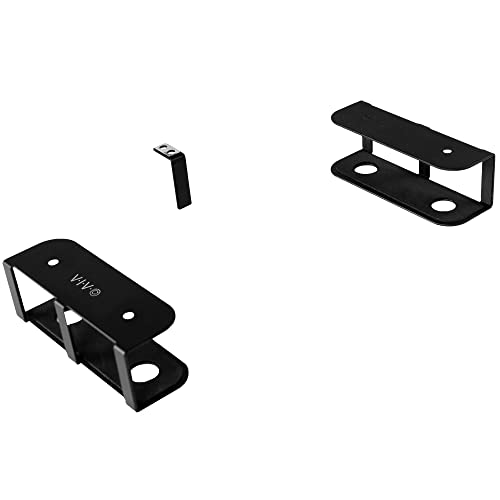
- Supports devices up to 11 pounds
- Custom-spacing three-piece bracket design
- Padded under-desk storage mount
Best For: Clearing desk space with secure under-desk storage
Best VESA Tray Upgrade
Mount-It! Ventilated Laptop Tray

- Fits laptops up to 16.5 inches wide
- Attaches to 75x75 or 100x100 VESA arms
- Ventilated steel tray with adjustable clips
Best For: Adding a laptop to an existing monitor arm
Flexible Desk Setup – HUANUO Laptop Tray Monitor Arm
For laptop mounts for heavy devices in a home or office, the HUANUO combines a ventilated laptop tray with a monitor arm rated for screens up to 22 pounds. Its clamp or grommet installation and broad adjustment range make it useful for reclaiming desk space while positioning a laptop or monitor at a more comfortable height.
Best For: Desk users who want a 2-in-1 laptop and monitor mount with flexible positioning.
Pros:
- Supports laptops on a 14 x 12-inch ventilated tray with a raised retaining lip.
- Fits 13- to 32-inch VESA monitors weighing up to 22 pounds.
- Offers tilt, swivel, rotation, height adjustment, and integrated cable management.
- Includes C-clamp and grommet mounting options for compatible wooden desks.
Cons:
- Mounting hardware is specified for wooden desks only.
- The laptop tray and monitor arm have separate size and weight limitations that require checking before purchase.
This is a practical choice when a heavy laptop needs a ventilated platform and you also want monitor-mount functionality. Confirm desk material, thickness, and device dimensions before installation.
Rugged Universal Fit – RAM MOUNTS Tough-Tray
The RAM MOUNTS Tough-Tray is a sturdy option among laptop mounts for heavy devices, using a high-strength composite tray and adjustable spring-loaded arms. Its rubber-grip side clamps accommodate a range of laptop widths while the ball-and-socket system is designed to isolate shock and vibration.
Best For: Mobile, industrial, or vehicle-mounted laptop setups that need adjustable retention.
Pros:
- Spring-loaded tray accommodates laptops approximately 10 to 17 inches wide.
- Four rubber-grip arms can be repositioned vertically and horizontally to clear ports and drives.
- Perimeter mounting holes support additional devices such as GPS units, PDAs, and phones.
- Includes a lifetime warranty.
Cons:
- This listing describes the tray assembly rather than a complete desk or vehicle mounting base.
- Its fit depends on laptop width, thickness, and proper adjustment of the clamping arms.
Choose the Tough-Tray when secure, adaptable laptop retention matters more than an integrated desk arm. You may need compatible RAM mounting components separately, depending on your installation.
High-Capacity Desk Mount – WALI Laptop Desk Mount
For laptop mounts for heavy devices, the WALI laptop desk mount stands out with support for a laptop up to 22 pounds and a monitor up to 26.4 pounds. The full-motion arm, ventilated detachable tray, and clamp or grommet installation provide a flexible way to lift bulky equipment off the desk.
Best For: Users who want one desk mount for a large laptop, a monitor, or both.
Pros:
- Supports notebooks up to 17 inches and monitors from 17 to 32 inches.
- Offers up to 17.3 inches of height adjustment and 19.3 inches of extension.
- Provides tilt, swivel, and 360-degree rotation for ergonomic positioning.
- Ventilated detachable tray helps promote airflow around the laptop.
Cons:
- Maximum capacities differ between the laptop and monitor positions.
- Desk installation is limited to compatible clamp or grommet setups and specified thickness ranges.
This is one of the more suitable choices for a large notebook and monitor combination, especially where desk space is limited. Check the separate laptop and monitor capacities, VESA pattern, and desk dimensions before buying.
Heavy-Duty Vehicle Workstation – No-Drill Truck Laptop Mount
This no-drill truck laptop mount is designed for demanding mobile work rather than a conventional desk. Its aluminum-and-steel construction, seat-rail installation, dual cooling fans, and adjustable full-motion platform make it a compelling option among laptop mounts for heavy devices used by technicians, contractors, and fleet drivers.
Best For: Vehicle-based professionals who need a removable, adjustable laptop workstation.
Pros:
- Installs to passenger-seat rail bolts without drilling.
- Heavy-duty aluminum and steel construction is intended to remain stable on rough roads.
- Built-in dual USB cooling fans help manage laptop heat.
- Quick-release telescopic pole helps preserve passenger space when removed.
Cons:
- Fit depends on the vehicle’s passenger-seat rail bolt configuration.
- At 12 pounds, the mount itself is relatively substantial for a mobile accessory.
- It is intended for vehicle use, not standard tabletop mounting.
This mount makes the most sense when a laptop must remain usable inside a work vehicle without permanent drilling. Verify seat-rail compatibility and installation clearances before relying on it for field work.
Versatile Desk Pick – MOUNT PRO 2-in-1 Laptop Arm
For shoppers comparing laptop mounts for heavy devices, the MOUNT PRO combines a ventilated laptop tray with a monitor arm and supports up to 19.8 pounds. Its aluminum arm, clamp or grommet installation, and broad adjustability make it a practical choice for a flexible desk setup.
Best For: Users who want one mount for a laptop or VESA monitor, with flexible positioning and desk-space savings.
Pros:
- Supports laptops up to 17 inches and monitors from 13 to 32 inches.
- Holds up to 19.8 pounds and includes anti-slip pads plus Velcro straps.
- Offers tilt, swivel, and 360-degree rotation, with height adjustment up to 16.9 inches.
- Includes cable management and clamp or grommet mounting options.
Cons:
- The tray should not be rotated to a vertical position.
- Its monitor compatibility is limited to 32 inches, narrower than some larger-screen options.
This is a strong all-purpose option when you need substantial capacity without giving up the ability to switch between laptop and monitor use.
Heavy-Duty Wall Option – VIVO Flip-Down Laptop Tray
If you need laptop mounts for heavy devices and want to clear the desk entirely, the VIVO Flip-Down tray supports up to 22 pounds. It mounts directly to a wall or a standard VESA arm, creating a space-saving floating workstation for compatible laptops.
Best For: Wall-mounted workstations and users who prioritize high weight capacity and a fold-up design.
Pros:
- Supports 13- to 17-inch laptops weighing up to 22 pounds.
- Works with wood studs, drywall, concrete, brick, or 75x75mm and 100x100mm VESA patterns.
- Folds up when not in use to preserve workspace.
- Ventilation slots, padding, and safety stoppers help protect and support the laptop.
Cons:
- It is primarily a tray holder rather than a full-motion laptop arm.
- Wall installation requires selecting the appropriate hardware for the surface.
The VIVO stands out for capacity and wall compatibility, especially when a stable, fold-away platform matters more than extensive screen positioning.
Large-Monitor Flexibility – HUANUO 2-in-1 Laptop Mount
Among laptop mounts for heavy devices, the HUANUO offers a useful balance of capacity, reach, and adjustability. Its tray supports notebooks up to 17 inches, while removing the tray allows the arm to hold VESA monitors up to 34 inches and up to 19.8 pounds.
Best For: Users who need a sturdy laptop mount that can also accommodate a larger external monitor.
Pros:
- Supports laptops up to 17 inches and monitors from 13 to 34 inches.
- Supports up to 19.8 pounds and uses a ventilated tray with six anti-slip pads and Velcro straps.
- Provides 45-degree tilt, 90-degree swivel, 360-degree rotation, and up to 18.1 inches of arm extension.
- Includes clamp and grommet mounting options for a range of desk thicknesses.
Cons:
- The counterbalanced arm may rise when the laptop is removed, so removal requires control.
- Its two-year warranty is shorter than the ten-year warranty listed for the MOUNT PRO.
Choose this model when monitor size and arm reach are priorities; its broad compatibility makes it particularly adaptable for changing between laptop and monitor configurations.
Best Under-Desk Storage – VIVO Mount-UDLS1 Laptop Holder
For laptop mounts for heavy devices that prioritize desk space, the VIVO Mount-UDLS1 stores a laptop, tablet, keyboard, or docking station beneath a desk. Its three-piece bracket design supports devices up to 11 pounds and allows custom spacing.
Best For: Under-desk laptop or docking-station storage in offices and compact workspaces.
Pros:
- Supports up to 11 pounds.
- Adjustable three-piece bracket set accommodates different device sizes.
- Anti-skid padding helps prevent scratches and slipping.
- Uses five screws for installation and includes a three-year warranty.
Cons:
- Requires a desktop at least 0.75 inches thick.
- Designed for under-desk storage rather than adjustable, eye-level positioning.
This is a practical choice when clearing the desktop matters more than frequent access or full-motion adjustment. Measure the mounting surface before installation.
Best VESA Tray Upgrade – Mount-It! Ventilated Laptop Tray
Among laptop mounts for heavy devices, this Mount-It! tray is a straightforward way to add laptop support to an existing monitor arm. Its steel, ventilated platform fits laptops up to 16.5 inches wide and uses adjustable clips to help keep the device positioned.
Best For: Users who already have a compatible 75×75 or 100×100 VESA monitor arm.
Pros:
- Fits laptops from 9.5 to 16.5 inches wide.
- Adjustable clips, bottom lips, and traction pads help secure the laptop.
- Ventilation openings allow warm air to escape beneath the device.
- Includes a lifetime warranty and US-based technical support.
Cons:
- Requires an existing monitor arm or stand; one is not included.
- Compatibility depends on a 75×75 or 100×100 VESA pattern.
This tray works best as an add-on for an established monitor-arm setup. Verify the arm’s VESA pattern and available capacity before pairing it with a heavier laptop.
Best Heavy-Duty Full-Motion Arm – UPGRAVITY 17-Inch Laptop Mount
For laptop mounts for heavy devices needing more positioning flexibility, this UPGRAVITY desk mount supports laptops up to 17 inches and up to 17.6 pounds. Its ventilated tray attaches to a full-motion arm with tilt, swivel, rotation, and height adjustment.
Best For: Heavy laptops that need ergonomic positioning and broad adjustment at a desk.
Pros:
- Supports up to 17.6 pounds and laptops up to 17 inches.
- Offers 90-degree tilt, 180-degree swivel, and 360-degree rotation.
- Includes clamp and grommet mounting options.
- Detachable tray can be switched between laptop and monitor use.
Cons:
- Requires desk compatibility with the included clamp or grommet options.
- Its 17.6-pound support limit should not be exceeded.
This is the most versatile option in the group for heavier notebooks and changing viewing angles. Its cable clips and two installation methods also help create a more organized workstation.
How We Picked the Best Laptop Mounts for Heavy Devices
We focused on compatibility, stated weight capacity, construction, adjustability, installation method, and everyday practicality. A mount must support the laptop’s size and weight without relying on vague “universal” claims. We also considered whether each design works with VESA monitor arms, standard desks, vehicle interiors, or under-desk storage needs.
Because mounting hardware varies, we gave particular attention to tray dimensions, clamp or bolt installation, ventilation, retention features, and the range of adjustment available. Capacity ratings should be treated as a starting point: the combined load of the laptop, tray, monitor, and arm must remain within the weakest component’s limit.
Quick Comparison
- Best for a monitor-arm workstation: HUANUO, MOUNT PRO, Mount-It!, or the black 17-inch desk mount, depending on VESA and capacity requirements.
- Best for larger laptops: WALI and HUANUO models that support larger notebooks and higher stated loads.
- Best for vehicle use: The no-drill truck laptop mount, designed for mobile work rather than a fixed desk.
- Best for compact storage: VIVO’s flip-down tray or under-desk laptop storage mount.
- Best for rugged mobile equipment: RAM MOUNTS Tough-Tray, especially where retention and durability matter.
Key Buying Factors for Laptop Mounts for Heavy Devices
Weight Capacity and Load Distribution
Check the laptop’s actual weight, then account for the tray and any monitor attached to the same arm. Choose a mount with meaningful headroom, since an arm at full extension places greater leverage on the desk clamp and joints.
Size, Tray Fit, and Retention
Measure the laptop’s width, depth, thickness, and footprint rather than relying only on screen size. Raised lips, adjustable brackets, straps, or side supports help prevent movement, particularly on articulated arms or in vehicles.
Mounting Standard and Installation
VESA trays commonly use 75x75mm or 100x100mm patterns, but not every monitor arm has the same capacity or hardware. Desk clamps need sufficient edge clearance, while under-desk and vehicle mounts require a solid, suitable mounting surface.
Adjustment and Ventilation
Look for tilt, height, swivel, and rotation controls that match your posture and workflow. A ventilated steel tray or open design can improve airflow, but never block the laptop’s intake or exhaust vents.
Who Should Buy Which Laptop Mounts for Heavy Devices?
Choose a full-motion desk arm if you want the laptop elevated beside or below a monitor and expect to change positions frequently. A fixed or flip-down tray is better when stability, simplicity, and a smaller footprint matter more than maximum adjustment.
For a heavy 17-inch notebook or a laptop-and-monitor combination, prioritize high capacity, a rigid clamp, and short arm extensions. If your laptop travels between locations, a rugged tray with positive retention is preferable. Vehicle users should select a purpose-built mobile mount rather than adapting a lightweight desk accessory. Finally, an under-desk holder is the most practical option when the goal is storage and quick access, not elevated viewing.