The best microscopes with cameras make it easier to inspect fine details, capture images, and share live views on a computer or display. The right choice depends on whether you need a ready-to-use digital unit, a laboratory microscope with imaging, or a camera upgrade for equipment you already own.
We selected 10 options spanning handheld inspection tools, LCD soldering microscopes, compound binocular models, trinocular systems, and dedicated microscope cameras. Use the guide below to match magnification, camera performance, connectivity, and stand stability to your work.
Best 10 Microscopes with Cameras Picks for 2026
Best for Coin Detail

- 12MP photos and 1080P video
- 7-inch LCD with PC viewing
- Stable stand with adjustable lighting
Best For: Coin collecting, crafts, and light electronics inspection
Best Camera Upgrade
Swiftcam 25MP Microscope Camera

- 25MP full-color image capture
- USB 3.0 computer connection
- Adapters for multiple eyetube sizes
Best For: Adding digital imaging to a compatible microscope
Best All-Purpose Bench Setup
Andonstar AD210 Digital Microscope

- 10.1-inch IPS display
- 12MP photos and 1080P video
- Top, side, and bottom lighting
Best For: Coins, soldering, and basic slide observation
Best for Laboratory-Style Viewing

- 40x–5000x stated magnification
- Trinocular design with HD USB camera
- Mechanical stage and specimen kit
Best For: Biology education and laboratory-style slide viewing
Best HDMI Industrial Microscope
NICE-POWER Digital Microscope Camera

- 13MP camera with 1080P HDMI/VGA output
- 150X zoom and up to 1000mm working distance
- Adjustable 56-LED ring light
Best For: Electronics repair and long-working-distance inspection
Best Eyepiece Camera for Measurement
SWIFT EP2M Digital Microscope Camera

- 1080p live view at 30 fps
- Fits 23.2mm eyepieces and many trinocular phototubes
- Software includes measuring and annotation tools
Best For: Teaching, lab reviews, and quality-control documentation
Best Complete Compound Microscope Kit
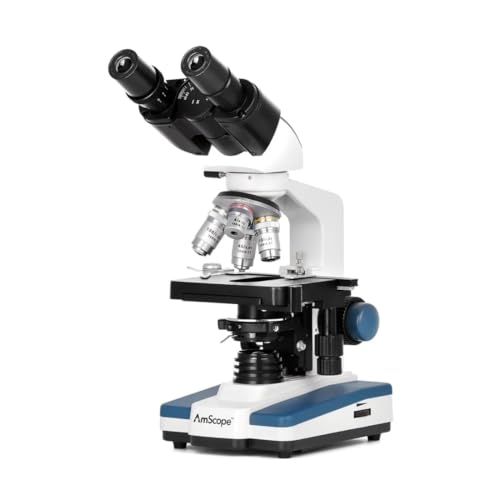
- 40X–2500X compound magnification
- 5MP USB camera with software included
- Binocular viewing and 3D stage
Best For: Students, educators, and compound-microscopy users
Industrial Inspection Pick

- 1080P 60FPS video for inspection work
- HDMI and USB outputs with adapter
- Brightness, color, zoom, freeze, and TF card features
Best For: Industrial quality control and electronics inspection
Best Wireless Handheld
Skybasic 50X-1000X WiFi Microscope

- WiFi for Android and iOS devices
- USB support for Windows and Mac
- Eight LEDs and app-based photo/video capture
Best For: Portable learning and hobby observations
Best Budget USB Kit
Bysameyee 40X-1000X Microscope
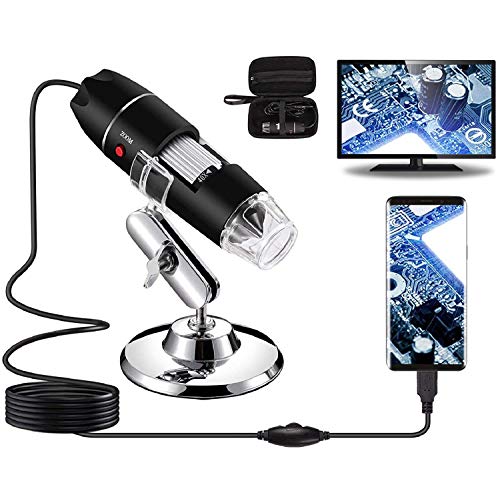
- 40X-1000X range with adjustable eight-LED lighting
- Works with Windows, Mac, Linux, and OTG Android
- Includes stand, ruler, adapter, driver, and case
Best For: USB inspection projects and hobby use
Best for Coin Detail – TOMLOV DM9 Digital Microscope
If you’re comparing microscopes with cameras for coin collecting, close-up inspection, or light electronics work, the TOMLOV DM9 combines a built-in screen, adjustable stand, and image capture in one practical setup. Its 7-inch display provides a comfortable way to examine details without constantly looking through an eyepiece.
Best For: Coin collectors, hobbyists, DIY users, and light soldering or PCB inspection.
Pros:
- 12MP photos and 1080P video capture for documenting coins, components, and other subjects.
- 7-inch LCD screen enables convenient shared viewing and extended observation.
- Stable metal base, adjustable stand, and 16GB card support hands-on inspection and storage.
- Adjustable LEDs and flexible gooseneck lights help illuminate details from different angles.
Cons:
- Its design is geared toward surface inspection rather than traditional biological slide viewing.
- PC viewing is specified for Windows and Mac, so other operating systems may not be supported.
The DM9 is a strong choice when your priority is documenting coins and inspecting larger surface details. The screen, lighting, and steady metal stand make it especially convenient for hobby benches and demonstrations.
Best Camera Upgrade – Swiftcam 25MP Microscope Camera
For shoppers seeking microscopes with cameras but already owning a compatible microscope, the Swiftcam 25MP is a dedicated camera upgrade rather than a complete microscope. It connects to a computer through USB 3.0 and includes adapters for several eyetube sizes.
Best For: Microscope owners who want high-resolution photo and video capture on Windows, Mac, or Linux.
Pros:
- 25MP camera is designed for full-color microscope images and videos.
- USB 3.0 supports fast transfer between the camera and computer.
- Reduction lens helps provide an accurate field of view at the microscope’s magnifications.
- Included adapters support 23.2mm, 30mm, and 30.5mm tube sizes.
Cons:
- This is a camera accessory, so a compatible microscope and computer are required.
- Its maximum listed magnification is 400x, depending on the microscope setup.
- Compatibility should be confirmed before purchase, particularly for nonstandard microscope ports.
The Swiftcam makes the most sense as a documentation and sharing solution for an existing trinocular or eyetube microscope. Its broad adapter selection and cross-platform software add flexibility, but it is not an all-in-one microscope.
Best All-Purpose Bench Setup – Andonstar AD210 Digital Microscope
The Andonstar AD210 is one of the more versatile microscopes with cameras for users who move between coin inspection, soldering, and biological slides. Its large IPS display, adjustable metal stand, multiple lights, and included accessories create a flexible workbench system.
Best For: Electronics repair, coin collecting, demonstrations, and basic biological slide observation.
Pros:
- 10.1-inch IPS screen offers a large viewing area with a 178-degree viewing angle.
- Captures 12MP photos and 1080P video, with a 32GB card included.
- Adjustable working distance from 1cm to 26cm accommodates varied subjects and tasks.
- Top, side, and bottom lighting support coins, soldering, and prepared slides.
Cons:
- Its large stand and accessory set may take more bench space than a compact microscope.
- The listed imaging specifications are lower than the dedicated 25MP Swiftcam camera.
The AD210 is a practical pick for households, classrooms, and repair benches that need one digital microscope for several jobs. Its bottom light stage expands its use beyond surface inspection, while the remote helps reduce camera shake.
Best for Laboratory-Style Viewing – Woehrsh Trinocular Microscope
If you want microscopes with cameras for compound, laboratory-style observation, the Woehrsh trinocular model pairs a broad stated 40x–5000x range with an electronic eyepiece and HD USB camera. Its mechanical stage, achromatic objectives, and extensive specimen kit support more structured biological work.
Best For: Biology learning, school science teaching, pet-hospital inspection, and laboratory-style specimen viewing.
Pros:
- Trinocular configuration supports camera use while retaining binocular eyepiece viewing.
- Includes 195 achromatic objectives and a stated 40x–5000x magnification range.
- Dual mechanical stage, coarse and fine focus, and LED illumination support controlled observation.
- Large laboratory gift pack includes slides, coverslips, specimens, tools, and a phone holder.
Cons:
- This is a corded laboratory-style setup rather than a portable screen-based microscope.
- The supplied notes do not specify the USB camera’s megapixel resolution.
- Its advanced controls and extensive accessories may be more than casual users need.
The Woehrsh is the strongest fit here for users who need compound-microscope functionality and a dedicated camera path. It offers a more traditional laboratory experience than digital coin and soldering microscopes, with the included kit helping users begin slide-based work.
Best HDMI Industrial Microscope – NICE-POWER Digital Microscope Camera
For shoppers comparing microscopes with cameras for electronics work, the NICE-POWER combines a 13MP camera, 1080P HDMI/VGA output, and a long-working-distance zoom lens. Its adjustable stand and ring light make it a practical setup for soldering, inspection, and close observation of small objects.
Best For: Electronics repair, soldering, coin inspection, and other tasks that benefit from a long working distance and live display output.
Pros:
- 13MP camera with 1080P HDMI and VGA output.
- 150X zoom C-mount lens with up to 1000mm working distance.
- Bright, adjustable 56-LED ring light rated up to 60,000 lux.
- Foldable, multi-angle stand and remote control for HDMI mode.
Cons:
- Remote control battery is not included.
- Remote-control operation is limited to HDMI output mode.
- Its industrial design may be more than needed for basic classroom viewing.
The NICE-POWER is a strong choice when workspace clearance, direct monitor connection, and adjustable illumination matter more than a traditional eyepiece experience. Verify that your display supports the intended HDMI or VGA connection before buying.
Best Eyepiece Camera for Measurement – SWIFT EP2M Digital Microscope Camera
Among microscopes with cameras, the SWIFT EP2M is a compact digital eyepiece option for adding live viewing and documentation to a compatible microscope. It delivers 1920×1080 video at 30 fps and includes software for measuring, annotating, and exporting observations.
Best For: Teaching, lab reviews, quality-control inspection, and users who already have a microscope with a 23.2mm eyepiece or compatible trinocular phototube.
Pros:
- 1920×1080 live view at 30 fps.
- Fits 23.2mm eyepieces and most trinocular phototubes.
- S-Viewer software supports calibration, measurements, annotations, and capture.
- Compatible with Windows 7–11 and macOS.
Cons:
- Some microscopes may require a separate adapter.
- It is a camera accessory rather than a complete microscope.
- Not intended for medical use.
The EP2M makes the most sense when you want computer-based viewing and reporting without replacing an existing microscope. Confirm the eyepiece or phototube dimensions and operating-system compatibility before ordering.
Best Complete Compound Microscope Kit – AmScope B120 with 5MP Camera
For buyers seeking microscopes with cameras in an all-in-one format, the AmScope B120 combines binocular viewing with a 5MP USB camera and interactive software. Its 40X–2500X range, LED illumination, and 3D stage suit educational work as well as selected laboratory and clinic applications.
Best For: Students, educators, and users who want a traditional binocular compound microscope with computer image capture.
Pros:
- 40X–2500X magnification range.
- Includes a 5MP USB microscope camera and professional software.
- Binocular design with a 3D stage for hands-on viewing.
- Daylight-balanced LED illumination with a specialized fly-eye lens.
Cons:
- Requires a laptop for the compatible camera setup.
- Uses corded 110V power.
- Its compound-microscope format is less suited to large solid objects or repair work.
The AmScope is the most complete option here for structured specimen viewing and image analysis. Choose it over a standalone camera when you need both binocular observation and high-magnification compound microscopy in one kit.
Industrial Inspection Pick – 37MP 1080P C-Mount Camera
For buyers seeking microscopes with cameras for inspection work, this C-mount model emphasizes real-time viewing, high-definition video, and flexible connections. Its HDMI and USB outputs make it suitable for integrating with monitors and computers in lab or industrial environments.
Best For: Industrial quality control, electronics inspection, material analysis, and documentation.
Pros:
- 1080P at 60FPS supports clear, fluid inspection video.
- HDMI and USB connectivity support monitors, computers, and other setups.
- Offers automatic or manual brightness, RGB adjustment, digital zoom, freeze function, and TF card support for HDMI output.
- Metal construction is designed for consistent use in demanding environments.
Cons:
- The C-mount design may require compatible mounting hardware or an adapter.
- Its industrial feature set may be more than casual users need.
This is the strongest fit of the three for a dedicated inspection station. Choose it when connection flexibility, control options, and durable construction matter more than handheld portability.
Best Wireless Handheld – Skybasic 50X-1000X WiFi Microscope
This Skybasic model is one of the more portable microscopes with cameras, combining WiFi connectivity for Android and iOS devices with USB support for Windows and Mac computers. Its handheld format and adjustable stand make it convenient for quick observations at home, school, or outdoors.
Best For: Students, children, hobbyists, and portable examination of plants, insects, minerals, and small objects.
Pros:
- Connects wirelessly to Android and iOS devices through its WiFi hotspot.
- USB connectivity supports Windows and Mac computers.
- Eight adjustable LEDs help illuminate subjects, with 1920×1080 capture on smartphones.
- One-button or app-based photo and video capture simplifies documentation.
Cons:
- It is a fixed-focus magnifying device rather than a traditional microscope.
- Computer video resolution is listed as 720P, and the device is not intended for serious professional biology.
- WiFi setup requires the Max-see app and may require device camera-setting adjustments.
Its main advantage is convenience: you can view and capture images on a phone without being tied to a computer. It is a practical educational and hobby tool, but buyers needing laboratory-grade observation should look elsewhere.
Best Budget USB Kit – Bysameyee 40X-1000X Microscope
For buyers comparing microscopes with cameras for hands-on projects, this Bysameyee USB model offers broad compatibility, adjustable lighting, and a useful accessory package. It connects to Windows, Mac, Linux, and compatible Android devices, though it does not work with iPhone or iPad.
Best For: Students, makers, collectors, engineers, and hobbyists examining coins, circuit boards, hair, skin, and other small objects.
Pros:
- Advertised 40X-1000X magnification range supports varied close-up observations.
- Eight adjustable LEDs and an inline dimming control help manage illumination.
- Supports image capture and video recording through installed software.
- Includes a metal stand, OTG adapter, ruler, driver, and carrying case.
Cons:
- Not compatible with iPhone or iPad devices.
- Measurement software works only for Windows users.
- Android use requires a phone with OTG functionality.
This is a versatile starter kit when a stable stand and included accessories are priorities. Confirm your device compatibility first, especially if you use iOS, and choose it for practical inspection rather than traditional microscope viewing.
How We Picked These Microscopes with Cameras
We evaluated the selected models by looking at their intended use, optical or advertised magnification range, camera resolution, viewing options, stand design, focusing controls, and compatibility. Because “magnification” is not measured consistently across digital and optical microscopes, we gave greater weight to usable working distance, image control, illumination, and stability than to the largest number printed in a listing.
The selection includes all-in-one digital microscopes for inspection and soldering, compound microscopes for prepared slides, and standalone camera modules for upgrading compatible eyepieces or trinocular ports.
Quick Comparison
| Type | Best For | What to Check |
|---|---|---|
| LCD digital microscope | Soldering, coins, repairs, general inspection | Screen size, working distance, stand rigidity |
| Handheld wireless microscope | Portable viewing and quick inspections | App support, battery life, connection stability |
| Compound microscope with camera | Slides, cells, classroom and laboratory work | Objective quality, illumination, camera software |
| Trinocular microscope | Shared viewing and more advanced imaging | Camera mount, optical path, mechanical stage |
| Standalone microscope camera | Adding imaging to existing equipment | Sensor fit, C-mount or eyepiece size, drivers |
Key Buying Factors for Microscopes with Cameras
Optics, Magnification, and Working Distance
Choose a compound microscope for transparent specimens and prepared slides; its objective lenses provide more meaningful optical magnification. Digital inspection microscopes are usually better for larger three-dimensional objects, circuit boards, coins, and surface defects. High magnification is useful only when the optics, lighting, focus mechanism, and specimen stability can support it.
Camera Resolution and Video Output
Resolution affects captured detail, but sensor quality and software matter too. HDMI output is convenient for a dedicated monitor, while USB is useful for computers and recording. Check whether the camera includes drivers, measurement software, calibration tools, or a reduction lens. A high-resolution camera can still produce poor results if the microscope’s optical path or lighting is weak.
Lighting and Mechanical Stability
Adjustable LED lighting is important for reflective objects and uneven surfaces. Ring lights provide broad illumination, while transmitted light is essential for many slides. A metal stand, fine focus control, and a stable stage help prevent vibration and make high-power viewing more practical.
Compatibility and Ease of Use
For a camera-only purchase, confirm the eyetube diameter, C-mount thread, sensor format, operating-system support, and available adapters. All-in-one units are simpler, but modular systems are easier to upgrade. Also consider screen size, storage, Wi-Fi reliability, and whether the controls are accessible while working.
Who Should Buy Which Microscopes with Cameras?
Choose an LCD digital microscope for electronics repair, coins, crafts, and general surface inspection. Choose a wireless handheld model when portability and quick phone or tablet viewing matter most. Choose a binocular compound microscope for students, hobbyists, and educators examining prepared slides. Choose a trinocular system when multiple people need to view specimens or when you want a more flexible imaging setup. Choose a standalone camera if you already own a compatible microscope and want better documentation, live display, or computer-based measurement.