Raspberry Pi robotics kits can turn coding lessons into hands-on projects students actually want to build. From simple smart cars to advanced robot arms and walking bots, the right kit makes STEM learning more engaging and practical.
Below, we focus on options that balance educational value, build quality, software support, and room to grow as skills improve.
Best 10 Raspberry Pi Robotics Kits for Students Picks for 2026
Sensor-Rich Robot Car
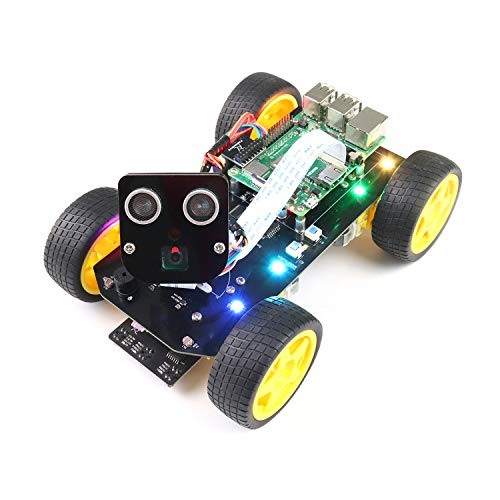
- Face tracking, line tracking, and obstacle avoidance
- Includes camera, ultrasonic sensor, servos, and motors
- Step-by-step guide with complete Python code
Best For: students who want a feature-rich robot car project
IoT Coding Starter Lab
SunFounder Pico W Ultimate Starter Kit

- 450+ components and 117 projects
- 27 video tutorials by Paul McWhorter
- Supports MicroPython, C/C++, and Piper Make
Best For: beginners who want a broad Pico W learning kit
Two-in-One STEM Robot

- Robot car plus robotic arm in one kit
- Camera display, color tracking, and obstacle avoidance
- Web control from phones, tablets, and computers
Best For: students who want a dual-purpose robot build
Comprehensive Maker Library

- 223 items and 128 projects
- 962-page tutorial with schematics and wiring diagrams
- Supports Python, C, Java, Scratch, and Processing
Best For: students who want a large, code-heavy project kit
Beginner-Friendly STEM Car Kit
Adeept Smart Robot Car for Raspberry Pi Pico

- MicroPython-based robotics kit for Raspberry Pi Pico
- Line tracking, obstacle avoidance, IR remote, and app control
- Detailed 180-page tutorials and complete code included
Best For: Students who want a guided, hands-on smart car project
Advanced Walking Robot Kit
Freenove Big Hexapod for Raspberry Pi

- Six-legged robot with camera and ultrasonic sensor
- Wireless control via phone, tablet, or computer
- Step-by-step assembly guide with complete Python code
Best For: Older students ready for a challenging robot build
Feature-Rich Smart Car Kit
LAFVIN 4WD Raspberry Pi Robot Car

- Line tracking, face tracking, and obstacle avoidance
- Camera support plus RGB light and horn control
- Assembly videos and updated online tutorials included
Best For: Students who want a sensor-heavy smart car project
AI Learning Car
SunFounder PiCar-X AI Robot Kit

- Supports Raspberry Pi 5/4/3B+/Zero 2W
- Uses multiple LLMs, OpenCV, and voice tools
- Works with Python and Scratch
Best For: students exploring AI, voice, and vision on Raspberry Pi
Tracked Arm Robot
Adeept RaspTank Metal Smart Car Kit

- Compatible with Raspberry Pi 5/4B/3B/3B+
- Includes a 4-DOF robotic arm
- Covers obstacle avoidance and line tracking
Best For: older students building a tracked robot with a robotic arm
Camera Arm Robot
Adeept PiCar Pro V2 Robotics Kit

- Works with Raspberry Pi 5/4/3/3B+
- Includes 1080P camera and 4-DOF arm
- Comes with 350+ pages of tutorials
Best For: students wanting a guided camera robot with arm projects
Sensor-Rich Robot Car – Freenove 4WD Smart Car Kit
If you want raspberry pi robotics kits for students that go beyond basic blinking LEDs, this Freenove 4WD car gives learners a hands-on path into navigation, tracking, and app control. It pairs a Raspberry Pi with a multi-sensor smart car platform, so students can practice assembly, wiring, and Python-based robotics features in one project.
Best For: Students who want a feature-rich Raspberry Pi robot car with camera and tracking functions.
Pros:
- Includes face tracking, line tracking, light tracing, and obstacle avoidance features.
- Comes with a camera, ultrasonic sensor, servos, motors, and acrylic pan-tilt parts.
- Provides a detailed step-by-step assembly guide and complete Python code.
- Supports wireless control from Android, iPhone, and computers.
Cons:
- Raspberry Pi and battery are not included.
- No paper tutorial; instructions are provided via download link on the box.
- Some older Raspberry Pi models need extra parts.
This is a strong pick for students ready for a more advanced robotics build that combines mechanical assembly with programming and sensor integration. It is best suited to classrooms or home learners who can supply their own Raspberry Pi and battery.
IoT Coding Starter Lab – SunFounder Pico W Ultimate Starter Kit
For raspberry pi robotics kits for students that emphasize coding foundations and IoT, this SunFounder Pico W kit is a broad starter lab rather than a single robot build. It gives beginners a large parts assortment, guided lessons, and project variety so they can learn microcontroller programming at a manageable pace.
Best For: Beginners who want a wide-ranging Pico W kit with guided lessons and many projects.
Pros:
- Includes 450+ items and 117 projects for broad hands-on practice.
- Comes with 27 video tutorials led by Paul McWhorter.
- Supports MicroPython, C/C++, and Piper Make.
- Designed for IoT learning with Wi-Fi and Bluetooth connectivity.
Cons:
- Built around the Raspberry Pi Pico W, not a full robot car platform.
- Not focused on a single robotics mechanism or chassis build.
- Requires learning across many small components rather than one guided robot project.
This kit is a practical choice for students who want a deep intro to electronics, sensors, and coding before moving into more specialized robotics. It is especially useful when the goal is skill-building through many smaller projects.
Two-in-One STEM Robot – 2 in 1 Smart Robotics Arm Kit
This 2-in-1 option stands out among raspberry pi robotics kits for students because it combines a robot car and a grabbing arm in one build. With camera-based display, color tracking, line tracing, and obstacle avoidance, it gives students a practical way to explore multiple robotics functions without needing a separate platform.
Best For: Students who want both a robot car and a robotic arm in one Raspberry Pi project.
Pros:
- Includes a 2-in-1 design with robot car and robotic arm functions.
- Offers HD camera display, color tracking, line tracing, and obstacle avoidance.
- Supports web and remote control from phones, tablets, and computers.
- Comes with tank and off-road tires for varied surfaces.
Cons:
- Raspberry Pi board is not included.
- AA batteries for remote control are not included.
- Arm assembly requires buying the Pi board separately before proceeding.
It is a good fit for students who want a more playful, multi-function robotics build that still teaches coding and control concepts. The extra mechanical variety makes it appealing for STEM projects and gift-giving, as long as the missing parts are planned for in advance.
Comprehensive Maker Library – Freenove Ultimate Starter Kit
For students who want a broad foundation instead of a single robot, this Freenove bundle is one of the more comprehensive raspberry pi robotics kits for students. It focuses on electronics, coding, and project variety with enough parts and documentation to support a long learning path across multiple builds.
Best For: Students and hobbyists who want a large, code-heavy Raspberry Pi project kit.
Pros:
- Includes 223 items and 128 projects for extended practice.
- Provides a 962-page detailed tutorial with schematics and wiring diagrams.
- Supports Python, C, Java, Scratch, and Processing.
- Compatible with many Raspberry Pi models, including Pi 5 and Zero series.
Cons:
- Raspberry Pi is not included.
- No paper tutorial; the guide is available via download link.
- It is a general starter kit, not a dedicated robot chassis or car kit.
This is a strong option if the goal is to build core electronics and programming skills through many different projects. It works best for students who want depth, variety, and a lot of guided material rather than a single robotics build.
Beginner-Friendly STEM Car Kit – Adeept Smart Robot Car for Raspberry Pi Pico
If you’re comparing raspberry pi robotics kits for students, this Adeept smart car is a strong pick for hands-on coding and build practice. It is designed for Raspberry Pi Pico and uses MicroPython, with line tracking, obstacle avoidance, IR remote control, app control, and steering driven by a servo motor for a more realistic car-like structure.
Best For: Students who want a guided robotics project with coding, assembly, and multiple ways to control a smart car.
Pros:
- Includes detailed tutorials and complete code for assembly and programming support.
- Supports line tracking, obstacle avoidance, IR remote control, and app control.
- Uses MicroPython, which makes the code easier to read and modify.
- Servo-based steering adds a more realistic mechanical design.
Cons:
- Raspberry Pi Pico is not included.
- Paper tutorials are not available because the guides are updated frequently.
- IR remote batteries are not included.
This kit fits well in a student robotics path where the goal is to learn by building, testing, and tweaking code. It offers a balanced mix of guidance and functionality, especially for learners ready to move beyond basic toy cars.
Advanced Walking Robot Kit – Freenove Big Hexapod for Raspberry Pi
For students who want a more ambitious build, this is one of the more advanced raspberry pi robotics kits for students. The Freenove hexapod adds six-legged walking mechanics, a rotatable head with camera and ultrasonic sensor, and support for wireless control from phones, tablets, or computers.
Best For: Older students who want a complex robot build with walking motion, sensor interaction, and Python coding.
Pros:
- Six legs with three motors each create a highly mechanical walking robot.
- Includes a camera and ultrasonic distance sensor in the rotatable head.
- Provides step-by-step assembly guidance and complete Python code.
- Supports control from Android, iPhone, Windows, macOS, and Raspberry Pi OS.
Cons:
- Raspberry Pi and battery are not included.
- Assembly is required and the project is more complex than a simple car kit.
- Paper tutorials are not included.
This kit is best suited to students who already have some confidence with robotics or are ready for a bigger challenge. The combination of walking mechanics, sensor features, and cross-platform control makes it a strong showcase project.
Feature-Rich Smart Car Kit – LAFVIN 4WD Raspberry Pi Robot Car
This LAFVIN 4WD kit is a practical option if you want raspberry pi robotics kits for students that go beyond basic motion. It uses a Raspberry Pi as the main controller and adds line tracking, face tracking, obstacle avoidance, RGB light control, horn sound output, and a camera for real-time viewing.
Best For: Students who want a feature-packed smart car project with sensors, camera support, and expanded software practice.
Pros:
- Offers line following, light tracking, and ultrasonic obstacle avoidance modes.
- Includes face recognition and tracking support through the Windows client.
- Multi-platform app control works on Windows, macOS, iOS, and Android.
- Comes with assembly videos, software manuals, and online documentation tutorials.
Cons:
- Raspberry Pi is not included.
- Battery is required and is described as lithium-ion, but the kit details focus on the build rather than a ready-to-run package.
- The feature set may be more than a beginner needs for a first robotics project.
Among student robot car kits, this one stands out for combining sensor-driven movement with camera and face-tracking functions. It should appeal to learners who want room to grow from basic control into more advanced programming and computer-vision features.
AI Learning Car – SunFounder PiCar-X AI Robot Kit
If you’re comparing raspberry pi robotics kits for students, the SunFounder PiCar-X stands out for combining core robot-building with modern AI features. It supports Raspberry Pi 5/4/3B+/3B/Zero 2W and adds camera-based vision, voice interaction, and line-following/obstacle-avoidance functions, making it a strong pick for learners who want both coding practice and hands-on AI exploration.
Best For: Students and educators who want an AI-focused Raspberry Pi robot car with Python and Scratch support.
Pros:
- Works with Openclaw and multiple LLM platforms, including ChatGPT, Gemini, Grok, DeepSeek, Qwen, Doubao, and Ollama.
- Includes OpenCV, MediaPipe, TTS, and STT for voice and vision-based interaction.
- Supports both Python and Scratch, which helps it fit different skill levels.
- Offers line following, obstacle avoidance, and a camera for varied student projects.
Cons:
- Raspberry Pi is not included.
- Assembly is beginner-friendly, but the notes recommend learning with experienced users for best results.
Overall, PiCar-X is best viewed as an AI learning platform first and a robot car second. For students ready to move beyond basic movement projects, it offers a broad set of tools for experimenting with robotics, speech, and computer vision.
Tracked Arm Robot – Adeept RaspTank Metal Smart Car Kit
Among raspberry pi robotics kits for students, the Adeept RaspTank is a good match for learners who want a tracked robot with a mechanical arm and structured tutorials. It is compatible with Raspberry Pi 5/4B/3B/3B+ and includes obstacle avoidance, line tracking, computer vision line tracking, target recognition, and real-time video transmission for a more advanced STEM build.
Best For: Older students who want a tracked Raspberry Pi robot with a 4-DOF arm and guided coding projects.
Pros:
- Tracked aluminum-alloy chassis gives it a tank-style design for student robotics projects.
- Includes a 4-DOF robotic arm for learning industrial automation concepts.
- Offers obstacle avoidance, line tracking, OLED display, and target recognition features.
- Comes with 300+ pages of pro tutorials and over 20 coding projects.
Cons:
- Raspberry Pi is not included.
- Assembly is rated intermediate and recommended for ages 16+.
This kit makes sense for students who already have some coding confidence and want a more complex robot platform. The arm, tracked drive system, and tutorial depth make it useful for longer-term learning rather than a quick first build.
Camera Arm Robot – Adeept PiCar Pro V2 Robotics Kit
If you want raspberry pi robotics kits for students that balance smart-car learning with a robotic arm, the Adeept PiCar Pro V2 is a solid option. It supports Raspberry Pi 5/4/3/3B+, adds a 1080P HD camera, and includes obstacle avoidance, line tracking, remote control, target recognition, and speech recognition for a broad set of beginner-to-intermediate projects.
Best For: Students who want a camera-equipped Raspberry Pi robot car with a 4-DOF arm and guided coding lessons.
Pros:
- Includes a 1080P HD camera for real-time video transmission and vision-based projects.
- Features obstacle avoidance, line tracking, target recognition, and speech recognition.
- Comes with a 4-DOF robotic arm that can pick up small objects up to 50g.
- Includes 350+ pages of tutorials and 29+ coding projects.
Cons:
- Raspberry Pi is not included.
- Assembly is intermediate and recommended for ages 16+.
- The arm is educational use only and limited to small objects.
Compared with simpler robot cars, this one gives students more to experiment with thanks to the camera and arm combination. It is a strong choice for learners who want a project kit that can grow with their coding and robotics skills.
How We Picked the Best Raspberry Pi Robotics Kits for Students
For this roundup of Raspberry Pi Robotics Kits for Students, we prioritized kits that are genuinely useful for learning: clear instructions, strong community or tutorial support, age-appropriate complexity, and features that teach core robotics concepts like motor control, sensors, vision, and Python programming. We also looked for good hardware compatibility, since many student builds depend on a specific Raspberry Pi model or exclude the board entirely.
Quick Comparison
Broadly, these kits fall into a few categories. Smart cars are best for beginners and classroom labs because they are easier to assemble and demonstrate line tracking, obstacle avoidance, and app control. AI- and camera-enabled cars add computer vision and voice or object recognition for more advanced students. Robot arms and hexapods are better for learners who want more mechanical challenge, while starter kits are ideal for building coding confidence before moving into full robotics projects.
Key Buying Factors for Raspberry Pi Robotics Kits for Students
1. Skill Level and Assembly Time
Choose a simpler build for younger students or first-time makers. If the goal is a class project or club activity, a kit with shorter assembly time and clearer documentation will usually deliver a better learning experience.
2. Software and Tutorial Quality
Good tutorials matter as much as the hardware. Look for kits with guided projects, sample code in Python, and support for common learning tools like Scratch or C/C++. Strong documentation reduces frustration and helps students focus on concepts instead of troubleshooting.
3. Sensor and Feature Set
For robotics learning, sensors are where the lessons happen. Line tracking, obstacle avoidance, camera vision, and arm control all teach different skills. Pick a kit that matches the topics you want students to explore rather than the one with the most features on paper.
4. Raspberry Pi Compatibility
Some kits support multiple boards, while others are built for a specific Pi or use a Pico microcontroller. Make sure the kit matches the hardware you already have, especially if you are buying for a classroom or a student who is just getting started.
5. Expansion and Long-Term Use
The best kits leave room to grow. Modular parts, open coding support, and upgrade-friendly designs help students continue learning after the first project is finished.
Who Should Buy Which Raspberry Pi Robotics Kits for Students?
Beginners should look for starter kits or simple smart cars with strong tutorials. Students ready for more challenge may prefer AI cars, tracked robots, or robotic arms that introduce vision and more advanced control logic. For classroom use, the safest choice is usually a kit with broad compatibility, abundant learning material, and a clear path from basic assembly to code customization.
If you want the most educational value from Raspberry Pi Robotics Kits for Students, choose the kit that best matches the student’s current skill level, the Raspberry Pi hardware on hand, and the type of robotics skills you want them to build next.