Robot arm kits for students can turn abstract STEM concepts into hands-on learning, making coding, mechanics, and control systems easier to understand.
Whether you want a beginner build, an app-controlled model, or a more advanced programmable arm, the right kit depends on age, skill level, and classroom goals.
Best 10 Robot Arm Kits for Students Picks for 2026
Arduino Open-Source Pick
miniArm Smart Robot Arm Starter Kit

- Arduino-compatible and open source
- App, knob, and offline action control
- Expansion ports for sensors and modules
Best For: Students who want coding-first learning with expansion options
Mechanical Build Challenge
Thames & Kosmos Bionic Robotic Arm Kit

- No motors or electricity required
- Joystick-and-cable control system
- Step-by-step STEM manual included
Best For: Hands-on mechanical engineering and STEM learning
Record-and-Repeat Choice
Arduino Robot Arm Learning Kit

- Records and repeats up to 170 actions
- Step-by-step tutorials and support included
- Flexible 4-axis arm for beginner practice
Best For: Beginners and teens learning coding and electronics
Remote-Control Block Set

- Large 1468-piece tracked build
- Remote and app controlled after assembly
- Arm and gripper offer active motion
Best For: Kids who want a big remote-controlled STEM build
Advanced Student Pick

- 6DOF arm supports grasping, transport, and custom actions
- PC, app, mouse, and wireless handle control
- Includes tutorials and simple programming software
Best For: Students and courses wanting a fuller robotics learning platform
Beginner STEM Build
Wooden Mechanical Robot Arm Kit

- Teaches circuits and mechanical movement through assembly
- No soldering required and includes all accessories
- Wooden build with tutorial support
Best For: Younger students and first-time STEM builders
Coding-Focused Kit
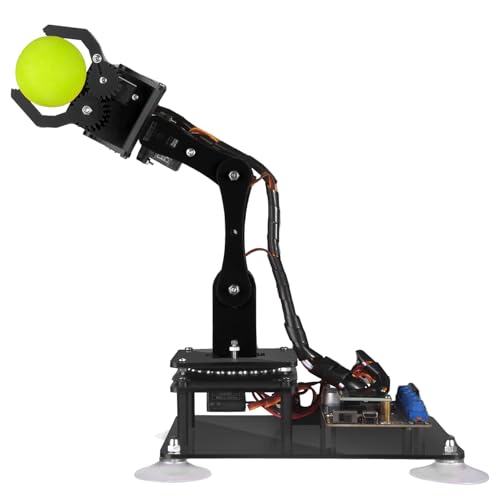
- Arduino IDE compatible with code routines included
- Manual and PC graphical control options
- PDF tutorials and digital assembly guides
Best For: Older students learning programming and robotics
Starter STEM Robot
4-DOF Programming Arm for Kids

- Simple programming for beginner robotics learning
- Durable metal construction for repeated use
- Grabbing motion and sound effects add engagement
Best For: Students ages 8+ starting with an easy robotics kit
Advanced Coding Lab
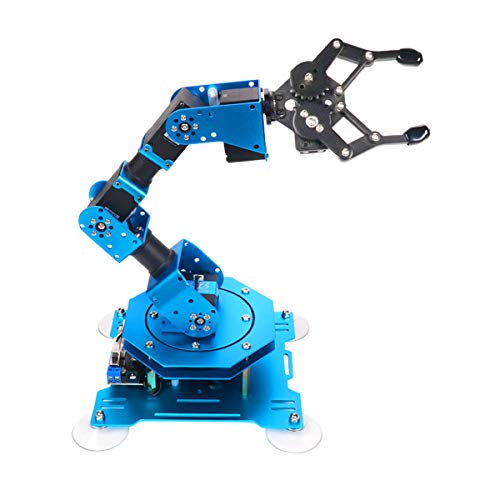
- 6-axis arm with high-precision servo feedback
- Works with PC, app, mouse, and wireless control
- Handles objects up to 500g for broader projects
Best For: Older students and teen coders wanting a more advanced STEM arm
Ready-Built STEM Arm
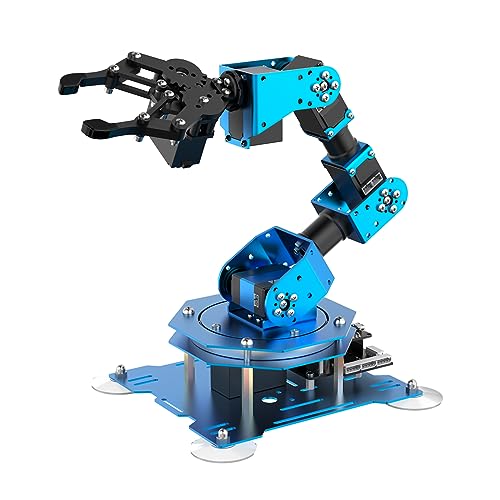
- Preassembled design cuts down setup time
- 6-axis arm supports coding and action editing
- Multiple control methods suit classroom use
Best For: Educators and students who want an assembled coding-ready robot arm
Arduino Open-Source Pick – miniArm Smart Robot Arm Starter Kit
If you’re comparing robot arm kits for students who want both building and coding practice, the miniArm Starter Kit stands out for its Arduino-compatible, open-source design. It gives learners a compact 5DOF arm with app control, knob control, and room for sensor-based expansion, which makes it useful for entry-level experiments and secondary development.
Best For: Students who want an Arduino-based robot arm kit with open-source tutorials and expansion potential.
Pros:
- Compatible with Arduino programming and built on the Atmega328 platform.
- Open-source programs, tutorials, and secondary development examples are available.
- Supports app control plus real-time knob control and offline action editing.
- Includes high-performance hardware with expansion ports for sensors and modules.
Cons:
- Starter kit version does not include the sensor add-ons listed in the standard kit.
- Designed as an educational build, so it is not a plug-and-play toy.
- Age guidance and technical features suggest it is better suited to older learners.
Overall, this is a strong pick if the goal is hands-on programming rather than simple play. It gives students a clear path from assembly to coding, with enough hardware flexibility to keep projects growing over time.
Mechanical Build Challenge – Thames & Kosmos Bionic Robotic Arm Kit
For students who want robot arm kits for students that focus on mechanics rather than electronics, this Thames & Kosmos build is a great fit. It uses nearly 300 pieces, no motors or batteries, and a joystick-and-cable system that teaches how robotic arms move through simple mechanical forces.
Best For: Kids and teens who want a hands-on mechanical engineering build with no power requirements.
Pros:
- No motors or electricity required.
- Joystick controls use nylon cables for intuitive movement.
- Nearly 300-piece assembly offers a substantial STEM build.
- Step-by-step manual includes science and engineering background.
Cons:
- It is a mechanical model, not a programmable robot arm.
- Best suited to ages 10+ with help or 14+ independently.
- Assembly may take patience because of the larger part count.
This kit makes sense if you want a classroom-friendly or home STEM project that explains real robotic arm principles without electronics. It is especially appealing when the main goal is building, experimenting, and understanding movement.
Record-and-Repeat Choice – Arduino Robot Arm Learning Kit
Among robot arm kits for students, this Arduino-based kit is a practical option for beginners, teens, and adults who want to learn electronics and programming. It includes tutorials, support, and a memory function that can record and repeat up to 170 actions, making it useful for early coding and control exercises.
Best For: Beginners and teens who want a compact Arduino robot arm with movement memory features.
Pros:
- Includes hardware and tools with step-by-step build guidance.
- Can record and repeat up to 170 actions.
- Flexible 4-axis design can grab objects in different directions.
- Assembly and programming tutorials are provided with technical support.
Cons:
- Requires two batteries, which are not included.
- Small acrylic build may feel less substantial than larger kits.
- Less advanced than models with built-in sensor expansion.
This is a solid learning kit if your priority is simple robotics practice with repeatable movement routines. Its mix of build guidance, joystick control, and memory functions makes it approachable while still teaching real coding concepts.
Remote-Control Block Set – UNCLE BRICK Tracked Robot Arm
If you want robot arm kits for students that feel more like a build-and-play engineering project, this UNCLE BRICK tracked set offers a large 1468-piece construction with remote and app control. The tracked base, moving arm, and gripper create a more interactive finished model than a static display build.
Best For: Kids ages 8-14 who want a large remote-controlled building block robot arm.
Pros:
- Includes 1468 pieces, 4 M-type motors, a battery box, and remote control.
- Remote and app control add active play after assembly.
- Tracked base can move forward, backward, turn, and U-turn.
- Arm and gripper have practical motion range for hands-on use.
Cons:
- Requires one nonstandard battery.
- Large part count means assembly will take time.
- Geared mechanisms can be sensitive if the gripper is overloaded.
This kit is a good fit when the goal is a more elaborate construction project with strong play value afterward. It leans less toward programming and more toward mechanical building, motion control, and coordination skills.
Advanced Student Pick – LeArm 6DOF Desktop Kit
If you’re comparing robot arm kits for students, this LeArm kit stands out as a hands-on desktop option for learning bionic robotics, basic programming, and motion control. It includes a 6DOF arm with quality digital servos, multiple control methods, and tutorials, making it a practical pick for structured projects and classroom-style exploration.
Best For: Students, university courses, and hobbyists who want a more advanced learning platform with software control and assembly practice.
Pros:
- 6DOF design supports grasping, transportation, and custom actions.
- Offers PC, app, mouse, and wireless handle control.
- Includes easy tutorials and simple programming software.
- Metal bracket structure and high-torque base servos add stability.
Cons:
- More suited to learners ready for a fuller robotics build than absolute beginners.
- Assembly and software use may take more time than simpler kits.
Overall, this is a solid choice if you want robot arm kits for students that combine building, control options, and programming practice in one package. Its feature set is especially useful for learners who want room to grow beyond a basic mechanical project.
Beginner STEM Build – Wooden Mechanical Robot Arm Kit
This is a straightforward option to consider if you want robot arm kits for students that focus on circuits, assembly, and problem-solving. With motors, a PCB microcontroller board, wires, and wooden parts, it offers a first-time robotics project that blends basic electronics with a satisfying build process.
Best For: Kids, tweens, and early STEM learners who want a challenging but approachable mechanical build with no soldering required.
Pros:
- Introduces circuits and mechanical movement through assembly and operation.
- Combines 3D puzzle-style building with electrical engineering concepts.
- No soldering required and includes all accessories for assembly.
- Wooden construction and clear tutorial support a hands-on challenge.
Cons:
- Requires 6 AA batteries, which are not included.
- Less focused on programming than more advanced robotics kits.
For students who learn best by building first and asking technical questions along the way, this kit hits a nice balance between fun and STEM fundamentals. It is especially useful when the goal is to build confidence with mechanical assembly before moving to more advanced coding projects.
Coding-Focused Kit – Adeept 5DOF Arduino Arm Kit
For robot arm kits for students who want to focus on coding, this Adeept 5DOF kit is built around Arduino IDE compatibility and guided learning. It includes detailed PDF manuals, code routines, and both manual and PC-based control, making it a strong fit for learners exploring programming and robotics together.
Best For: Older students, Arduino learners, and makers who want a programming-first robotic arm with tutorial support.
Pros:
- Compatible with Arduino IDE and includes code routines.
- Supports manual knob control and graphical PC software control.
- Comes with digital assembly guides and detailed PDF tutorials.
- Features learning modes like self-learning, drawing, and imitating.
Cons:
- Better suited to learners comfortable with coding and technical setup.
- Paper tutorials are not included in the box.
This kit is a strong match when the priority is programming practice rather than only mechanical assembly. With multiple control methods and guided code examples, it gives students a clear path into more advanced robotics projects.
Starter STEM Robot – 4-DOF Programming Arm for Kids
If you’re comparing robot arm kits for students, this 4-DOF model is a practical entry point for younger builders who want hands-on robotics without jumping straight into a complex platform. It combines simple programming, a durable metal build, and interactive movement features that make early STEM learning feel more like play than homework.
Best For: Students ages 8+ who want an approachable first robot arm kit for basic programming and building.
Pros:
- Simple programming support helps students start learning robotics fundamentals.
- Metal structure adds durability for repeated classroom or home use.
- Multiple movement functions, including grabbing and rise/fall motion, add hands-on interest.
- Includes simulation sound effects for a more engaging build-and-play experience.
Cons:
- 4-DOF design is less advanced than full 6-axis educational arms.
- Best suited to beginners rather than older students wanting deeper coding control.
Overall, this kit makes sense when the goal is a student-friendly introduction to robotics, engineering, and science concepts. It is more about accessible learning and engagement than advanced programming depth.
Advanced Coding Lab – 6DOF xArm1S Desktop Robot
For buyers researching robot arm kits for students, this 6DOF desktop arm is a stronger pick when coding practice and multi-platform control matter. Its high-precision servos, aluminum-alloy structure, and support for PC, app, mouse, and wireless controller use make it a more advanced STEM tool for building programming skills.
Best For: Older students and teen coders who want a more capable robot arm for programming, action editing, and control-method experimentation.
Pros:
- 6-axis design offers more advanced movement and project possibilities.
- High-precision servos provide position, voltage, and temperature feedback.
- Supports PC, app, mouse, and wireless controller control methods.
- Can grasp objects up to 500g, which broadens classroom demo and lab use.
Cons:
- More complex than beginner-friendly robot arm kits.
- Requires DC power supply and is not battery powered.
This is the most feature-rich option in the group for students who want a serious coding and robotics practice platform. It stands out for flexibility, stability, and the ability to edit actions in multiple ways.
Ready-Built STEM Arm – Assembled 6DOF Robot Kit
If you want robot arm kits for students but prefer to skip a complicated build, this assembled 6DOF version is a strong fit. It keeps the same educational focus on programming, grasping, and action editing, while the preassembled format makes it easier to get straight into STEM practice.
Best For: Students or educators who want an assembled robot arm kit for coding practice and classroom demonstrations.
Pros:
- Assembled version saves time and reduces setup difficulty.
- 6-axis design supports more advanced movement and programming exercises.
- High-precision servos add feedback and stable performance.
- Multiple control options, including PC, app, mouse, and PS2 wireless control, add flexibility.
Cons:
- Less hands-on building time than a true DIY kit.
- Still a more advanced tool than an entry-level student robot arm.
For classrooms or learners who want the educational value of a robot arm without the assembly work, this model offers a practical shortcut. Its strength is getting students into coding and control experiments quickly.
How We Picked These Robot Arm Kits for Students
We focused on kits that balance educational value, build experience, and practical control options. The best Robot Arm Kits for Students should teach core STEM skills without overwhelming beginners, while still offering enough depth for older learners to grow into programming, servo control, and motion planning.
We also looked at assembly complexity, durability, compatibility with common learning platforms like Arduino or PC software, and whether the kit supports guided learning through tutorials or app-based control.
Quick Comparison: Which Type Fits Your Student?
If you want a simple introductory build, a mechanical or lower-DOF kit is usually the easiest place to start. If the goal is coding practice, look for Arduino-compatible or programmable arms with repeatable motion. For older students or robotics clubs, 6DOF and full-metal designs offer more realistic movement and broader experimentation.
Key Buying Factors for Robot Arm Kits for Students
Age and Skill Level
Match the kit to the student’s experience. Younger learners often do better with straightforward assembly and visible motion, while teens and advanced beginners may benefit from coding-focused kits that reward experimentation.
Degrees of Freedom
More axes mean more movement options, but also more complexity. A 4DOF or 5DOF kit can be ideal for foundational learning, while 6DOF arms are better for students ready to explore precision control and more advanced robotics concepts.
Programming and Control
Some kits emphasize physical assembly, while others add Arduino IDE support, PC software, handle control, or app connectivity. For robotics education, controllable and programmable kits usually provide the strongest long-term learning value.
Materials, Stability, and Support
Metal frames often feel more robust than lightweight plastic builds, especially for repeated classroom use. Clear instructions, tutorials, and accessible parts support can make the difference between a frustrating project and a successful one.
Who Should Buy Which Robot Arm Kits for Students?
Choose a beginner-friendly or toy-style kit for younger students, first-time builders, or family STEM projects. Choose an Arduino-based arm for students who want to learn coding and electronics. Choose a 6DOF or full-metal robotic arm if you need a more advanced platform for robotics clubs, high school engineering, or deeper experimentation with robot motion.
In short, the best Robot Arm Kits for Students are the ones that match the learner’s age, patience, and goals. A well-chosen kit can build confidence now and create a stronger foundation for future STEM projects.