The best USB-C KVM switches make it easier to share one or two monitors, a keyboard, mouse, storage devices, and other accessories between computers. They are especially useful for desks that combine a laptop with a desktop or work machine.
This roundup compares 10 USB-C KVM switches across dual-monitor support, video resolution, USB speeds, charging, and computer compatibility. Use the guide below to choose the right setup for your desk.
Best 10 USB C Kvm Switches Picks for 2026
Best Dual-Monitor Powerhouse
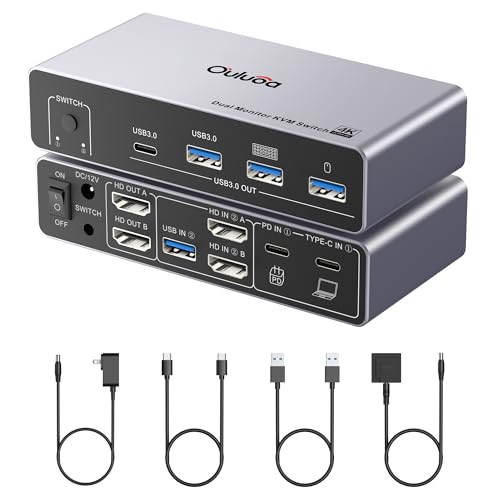
- Dual HDMI monitor support with up to 8K@60Hz from the desktop
- Four shared USB ports, including USB-C
- 100W PD charging, power adapter, remote, and cables included
Best For: Windows desktop-and-laptop workstations
Best Two-Laptop Docking KVM

- Switches between two laptops with dual HDMI 4K@60Hz output
- Four 5Gbps USB 3.0 ports for shared peripherals
- Dual 100W PD inputs; adapter required and not included
Best For: Two-laptop dual-monitor workstations
Best Bi-Directional USB-C Switch

- Supports 2-in-1-out and 1-in-2-out switching
- 8K@60Hz video, 20Gbps data, and 100W PD charging
- Compatible with Windows, macOS, and Linux systems
Best For: Flexible USB-C monitor or dock switching
Best Dual-Laptop Dock
AV Access 2-Monitor USB-C KVM Dock

- Switches two USB-C laptops across two HDMI monitors
- 12-in-1 dock adds USB, Ethernet, SD, and headset ports
- Up to 60W charging per laptop with 2–3 second switching
Best For: Dual-monitor USB-C laptop workstations
Best for Three Computers
Cable Matters 20Gbps USB-C KVM Switch

- Shares one USB-C or Thunderbolt 4 display or dock
- Supports three computers and 140W charging
- Includes RF remote and up to 20Gbps USB4 bandwidth
Best For: Three-computer single-display or dock setups
Best Compact Mixed-Input KVM
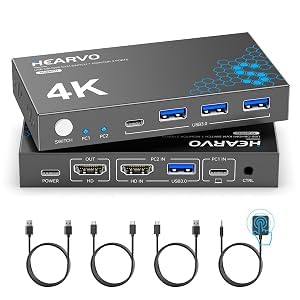
- Connects one HDMI computer and one USB-C computer
- Supports 4K at 60Hz and HDCP 2.2
- Shares four USB peripherals with wired remote control
Best For: One-monitor PC, laptop, or Mac mini setups
Best High-Speed Peripheral Pick
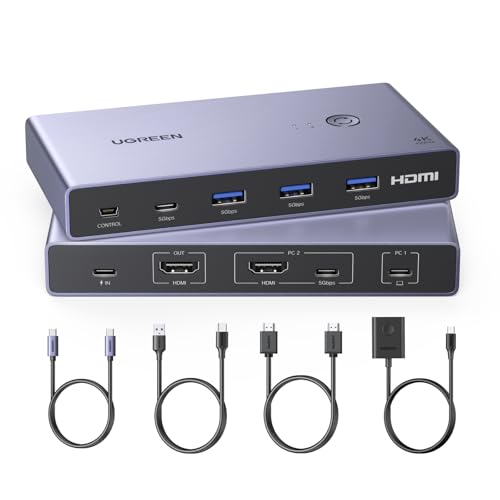
- Four USB 3.0 peripheral ports
- 4K@60Hz with HDR10+ support
- Button and desktop-controller switching
Best For: Mixed laptop-and-desktop setups needing faster USB transfers
Best Simple Charging Pick
100W USB-C KVM for Two Computers

- Two USB-C computers share one HDMI monitor
- 4K@60Hz display support
- Up to 100W PD charging
Best For: Compact workspaces needing straightforward computer switching
Best Dual-Monitor Powerhouse – 8K USB-C KVM Dock
If you need usb c kvm switches for a desktop-and-laptop workstation, this model combines dual-HDMI display support with USB sharing and laptop charging. It supports up to 8K at 60Hz from the desktop, while the laptop connection supports 4K at 60Hz over USB-C.
Best For: Windows users building a dual-monitor desktop-and-laptop setup with shared peripherals.
Pros:
- Supports two HDMI monitors in extended or mirrored mode on compatible systems.
- Includes three USB 3.0 ports and one USB-C port for shared accessories.
- Built-in 100W PD charging and an external power adapter support connected devices.
- Includes a wired remote, required cables, and a 12-month warranty.
Cons:
- Windows is required for MST extended display; macOS operates in SST mode only.
- HDMI cables up to 6.56 feet are recommended for stable signal transmission.
This is the most complete option here for a high-resolution, dual-monitor workstation. Its main limitation is platform-specific display behavior, so check your computer and monitor requirements before buying.
Best High-Speed USB-C Switch – Alxum 20Gbps Computer Switch
This compact USB-C switch is designed for users who want usb c kvm switches without a full multi-port KVM dock. It lets two computers share one USB-C monitor or docking station, with up to 20Gbps data transfer, 8K at 30Hz video, and 140W power pass-through.
Best For: Professionals and gamers sharing one compatible USB-C display or dock between two computers.
Pros:
- Supports up to 20Gbps data transfer and 8K@30Hz or 4K@144Hz display output.
- Provides 140W PD pass-through charging, though a power supply is not included.
- Works with Windows, macOS, and Linux, with simple button-based switching.
- Compact design is convenient for portable work or gaming setups.
Cons:
- All three connected USB-C devices must support DP Alt Mode.
- It does not support Dell docking stations, and dock pigtails must be no longer than 50 cm.
- Thunderbolt connections may support only one display at up to 4K@60Hz.
The Alxum is a focused, fast switch rather than a complete peripheral-sharing dock. It is appealing when your monitor or dock is USB-C compatible, but the detailed connection requirements make compatibility checking essential.
Best Two-Laptop Docking KVM – Dual 4K USB-C Switch
For a two-laptop desk, this USB-C KVM docking switch combines one-click computer switching with dual HDMI monitor support and four shared USB ports. It can deliver dual 4K at 60Hz, while two PD inputs allow both connected laptops to be charged when paired with a suitable 100W adapter.
Best For: Users who alternate between two USB-C laptops and want shared dual monitors and peripherals.
Pros:
- Supports two external HDMI monitors at up to 4K@60Hz.
- Provides four USB 3.0 ports with up to 5Gbps transfer speeds.
- Offers two 100W PD inputs for charging both connected laptops.
- Includes physical-button and wired-remote switching with LED status indicators.
Cons:
- A 100W power adapter is required but not included.
- Laptop USB-C ports must support DP Alt Mode, data, and power transfer.
- macOS does not support extended mode, and the notes specify systems must be 11th generation or newer.
This is a strong fit for a shared two-laptop office setup, especially if both computers support the required USB-C features. Confirm operating-system, processor-generation, and adapter compatibility before choosing it.
Best Bi-Directional USB-C Switch – Unitek 8K Display Switch
The Unitek offers flexible 2-in-1-out or 1-in-2-out switching for a USB-C display, monitor, docking station, or peripheral. Among usb c kvm switches, it stands out for bi-directional operation, 20Gbps transfer speeds, 8K@60Hz support, and 100W charging.
Best For: Users who need flexible USB-C source or destination switching with compatible displays and docks.
Pros:
- Supports both two-source-to-one-output and one-source-to-two-output configurations.
- Handles up to 8K@60Hz video and 4K@144Hz, depending on the connected equipment.
- Provides up to 20Gbps data transfer and 100W PD charging.
- Works with Windows, macOS, and Linux systems when devices support DP Alt Mode.
Cons:
- Requires a power supply for operation.
- It does not support Dell docking stations or docks with pigtails longer than 50 cm.
- Thunderbolt setups have reduced display support, and Mac users are limited to one monitor.
This switch is a versatile choice when your setup does not fit a conventional one-way KVM layout. Its broad capabilities depend heavily on USB-C, dock, and Thunderbolt compatibility, so verify those specifications before purchase.
Best Dual-Laptop Dock – AV Access 2-Monitor USB-C KVM Dock
This AV Access model is a practical choice among usb c kvm switches if you want one dual-monitor workstation for two USB-C laptops. It combines KVM switching with a 12-in-1 docking station, allowing you to share displays, keyboard, mouse, networking, storage, and other peripherals without repeatedly swapping cables.
Best For: Home offices, hybrid workers, and professionals managing two USB-C laptops with dual monitors.
Pros:
- Supports two laptops and two HDMI monitors through one shared setup.
- Combines KVM and docking functions with USB, Ethernet, SD card, headset, and dual HDMI connectivity.
- Offers up to 60W charging per laptop and switching in approximately 2–3 seconds.
- Includes the required USB-C cables, power adapter, and a 12-month warranty.
Cons:
- Mac models support mirrored displays only because of macOS limitations.
- It is not compatible with 5K monitors, FreeSync/G-Sync, or Dell Display Manager.
- Requires USB-C laptops with DP Alt Mode and DP MST for extended dual displays.
This is the most complete workstation solution of the three, especially if you need dual monitors and laptop charging in addition to switching. Check compatibility carefully if you use a Mac or an ultrawide display.
Best for Three Computers – Cable Matters 20Gbps USB-C KVM Switch
The Cable Matters switch stands out among usb c kvm switches for sharing one USB-C or Thunderbolt 4 monitor or dock across three computers. It supports high-speed USB4 connectivity, 140W Power Delivery, and remote switching, making it useful for multi-computer setups that do not need a traditional multi-monitor KVM.
Best For: Users switching one compatible USB-C or Thunderbolt 4 display or dock between three computers.
Pros:
- Connects three computers to one USB-C or Thunderbolt 4 monitor or docking station.
- Supports up to 20Gbps data transfer and video up to 8K at 30Hz on Windows.
- Provides up to 140W Power Delivery to the selected active computer.
- Includes an RF remote control for convenient switching without software.
Cons:
- Only the selected computer receives charging at a time.
- macOS supports one external display, with up to 4K at 60Hz in the listed configuration.
- Requires the included USB4 20Gbps cables; Thunderbolt 3/4/5 cables are specifically not recommended.
This is a specialized, flexible option for three-computer environments, particularly when you already own a compatible USB-C or Thunderbolt dock. Its bandwidth and cable requirements mean it is important to follow the compatibility guidance before purchasing.
Best Compact Mixed-Input KVM – USB 3.0 HDMI and USB-C Switch
This compact model is one of the more straightforward usb c kvm switches for a one-monitor, two-computer desk. It combines HDMI input for one computer with full-function USB-C input for another, while sharing a keyboard, mouse, and other USB peripherals through four USB ports.
Best For: PC-and-laptop or PC-and-Mac mini setups using one 4K HDMI monitor.
Pros:
- Supports mixed HDMI and full-function USB-C computer inputs.
- Delivers up to 4K at 60Hz with HDCP 2.2 support.
- Shares three USB-A devices and one USB-C device at up to 5Gbps.
- Offers both an on-device button and wired remote control.
Cons:
- Designed for one monitor and two computers, so it does not suit dual-monitor workflows.
- The USB-C computer connection must support video and data transmission.
- Power is supplied through the included USB-A to USB-C cable rather than laptop charging.
For a simple one-screen setup, this switch covers the essentials without the extra docking features of the AV Access model. It is especially appealing when one computer uses HDMI and the other uses full-function USB-C.
Best Thunderbolt-Capable Pick – 100W USB-C KVM for Two Laptops
This USB C KVM switch is designed for two compatible laptops sharing one HDMI monitor, keyboard, mouse, and other peripherals. It supports up to 4K at 60Hz and includes up to 100W charging, making it a practical choice for consolidating a dual-laptop workspace.
Best For: Users with Thunderbolt 3/4/5 laptops who want one-monitor switching plus laptop power delivery.
Pros:
- Supports two laptops sharing one HDMI monitor and USB peripherals.
- Up to 4K@60Hz output, with support for lower resolutions.
- Provides up to 100W charging for the active laptop.
- Includes USB-A and USB-C data ports for devices such as printers and storage drives.
Cons:
- Requires compatible Thunderbolt USB-C ports with video and charging support.
- Supports HDMI monitor output only; USB-C data ports do not carry video.
- Requires an external power supply to operate.
This is a strong option among USB C KVM switches when Thunderbolt compatibility is confirmed. Check your laptop ports carefully, and plan for an HDMI monitor and connected power supply.
Best High-Speed Peripheral Pick – UGREEN USB-C and HDMI KVM
The UGREEN USB-C and HDMI KVM switch lets one USB-C laptop and one computer share an HDMI monitor and four USB devices. With 4K@60Hz support, four USB 3.0 ports, and both a button and desktop controller for switching, it suits workstations that frequently move between systems.
Best For: Users who prioritize fast USB 3.0 peripheral access and convenient physical switching between a laptop and desktop.
Pros:
- Shares one HDMI monitor and four USB peripherals between two computers.
- Four USB 3.0 ports support data speeds up to 5Gbps.
- Supports up to 4K@60Hz, HDR10+, HDCP 2.2, and 3D.
- Offers a front-button or desktop-controller switching method.
Cons:
- Does not support automatic or hotkey switching.
- Only supports one HDMI monitor.
- Power adapter and power cable are not included.
Among USB C KVM switches, this model stands out for its USB 3.0 connectivity and included switching accessories. Confirm that the USB-C computer supports full audio and video transmission and that the second computer can use HDMI plus USB data connections.
Best Simple Charging Pick – 100W USB-C KVM for Two Computers
This USB C KVM switch connects two compatible USB-C computers to one HDMI monitor while sharing a keyboard, mouse, and USB devices. Its physical select button, 4K@60Hz output, and up to 100W PD charging provide a straightforward setup for switching between two computers.
Best For: Users seeking a simple two-computer KVM with USB-C connectivity and power delivery.
Pros:
- Connects two USB-C computers to one HDMI monitor.
- Supports up to 4K@60Hz display output.
- Offers up to 100W USB-C PD charging for a connected laptop.
- Shares keyboard, mouse, storage, printer, and other compatible USB devices.
Cons:
- Requires computers with compatible USB-C video output, including Thunderbolt support where applicable.
- Uses one HDMI monitor rather than a multi-monitor arrangement.
- Requires a compatible power adapter for stable charging and operation.
This model keeps the control scheme simple with a physical button and adds useful laptop charging. It is a sensible choice for a compact setup, provided both computers support USB-C video output and the display uses HDMI.
How We Picked the Best USB C Kvm Switches
We focused on the features that most affect everyday switching: the number of computers and monitors supported, USB-C and Thunderbolt compatibility, maximum resolution and refresh rate, USB data speed, power delivery, and the included connection types. We also considered whether each model functions primarily as a KVM switch, a docking station, or a simpler peripheral-sharing switch.
Because USB-C implementations vary, compatibility matters as much as headline specifications. A computer’s USB-C port must support the required video mode, while the monitor, cable, and dock must also support the selected resolution and refresh rate.
Quick Comparison
| Feature | What to look for |
|---|---|
| Monitor support | One or two displays, with HDMI or USB-C video outputs |
| Resolution | 4K at 60Hz for most workstations; 8K support for compatible premium setups |
| USB speed | USB 3.0 for common peripherals; 20Gbps for fast storage and high-bandwidth accessories |
| Charging | 100W or 140W PD can reduce laptop charger clutter, subject to the switch’s actual output |
| Computer inputs | Two laptops, two desktops, or a mixed laptop-and-desktop setup |
Key Buying Factors for USB-C KVM Switches
Monitor Layout and Video Standards
Start with the number of displays you want to share. Single-monitor models are simpler and often more affordable, while dual-monitor USB C Kvm Switches are better for productivity and multitasking. Check whether the switch uses HDMI, USB-C DisplayPort Alt Mode, or both. For 4K at 60Hz, every part of the signal chain must support the required bandwidth.
USB Data and Peripheral Support
Keyboard and mouse use little bandwidth, but external SSDs, webcams, card readers, and printers may benefit from USB 3.0 or faster connectivity. A 20Gbps switch can be useful for high-speed storage, but it does not automatically make every connected device faster.
Power Delivery and Compatibility
Power Delivery is valuable when one USB-C connection can carry display, data, and charging to a laptop. Verify the advertised wattage, whether the charger is included, and how much power remains available after the switch consumes its share. Thunderbolt 4 compatibility can improve flexibility, but it does not guarantee that every display arrangement will work.
Switching Method and Desk Practicality
Look for a physical button, wired remote, or convenient desktop control. Consider cable length, port placement, enclosure size, and whether the unit needs external power. A compact switch is convenient, but a powered docking-style model may be more reliable with multiple monitors and peripherals.
Who Should Buy Which USB C Kvm Switches?
Choose a dual-monitor model if you regularly work across two screens or switch between a laptop and desktop without changing cables. Choose a single-monitor model for a simpler home-office setup or a gaming and work computer sharing one display.
Choose a 20Gbps model if fast external storage is part of your workflow. Choose a charging-focused model if you want one USB-C connection to handle video, peripherals, and laptop power. For basic keyboard, mouse, printer, and monitor sharing, a USB 3.0 switch can provide the necessary functionality at a lower cost.