The URAO KB1016 Kids Tablet review is about more than specs on a page.
It’s a family-focused Android tablet that aims to make screen time safer, easier to manage, and less stressful for parents.
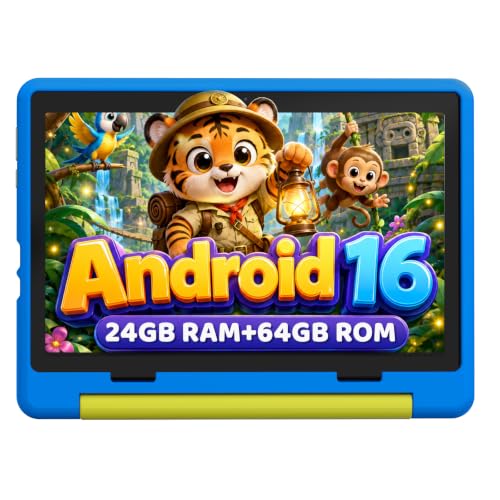
If you’re asking is URAO KB1016 Kids Tablet worth it, the answer depends on whether you want a protected, child-friendly device rather than a general-purpose tablet.
URAO KB1016 Review Summary
The URAO KB1016 Kids Tablet is best suited to parents who want a first tablet for a child ages roughly 3 to 12, with the most natural fit around the younger elementary years.
It combines a 10-inch display, a child-safe software setup, a tough silicone case, and expandable storage in a package designed for learning apps, reading, videos, and basic games.
What stands out immediately is how deliberately it’s built for family use.
The URAO KB1016 Kids Tablet includes pre-installed parental controls, child profile customization, screen-time management, and safer browsing tools, which means you spend less time configuring restrictions and more time actually using the device.
Just as important, it avoids some of the common frustrations of low-end kids tablets.
The display is large enough for readable text and enjoyable video playback, performance should be adequate for everyday kid tasks, and the included case/stand makes the device more practical for travel and home use.
The trade-off is that this is still an HD kids tablet rather than a premium media slate, so buyers expecting a sharper full HD screen or adult-tablet versatility should adjust expectations.
Scorecard
| Category | Score | Why It Matters |
|---|---|---|
| Kid-Friendly Controls | 9.0/10 | Pre-installed parental controls, custom child profiles, screen-time management, and safer browsing options. |
| Display Quality | 8.0/10 | 10-inch IPS HD touchscreen with low blue light and reading mode for learning and video. |
| Performance | 8.0/10 | 2.0 GHz octa-core chip and expanded memory target smoother everyday use than basic kids tablets. |
| Durability | 9.0/10 | Food-grade silicone case and adjustable stand improve drop protection and viewing stability. |
| Battery Life | 8.0/10 | Designed for long standby and several hours of active use, useful for travel and daily routines. |
| Portability | 8.0/10 | Slim body plus protective case makes it easy to carry in a backpack or tote. |
| Learning App Value | 8.0/10 | Google Play access and child-focused setup support education, reading, and entertainment apps. |
Bottom line: the URAO KB1016 Kids Tablet is a smart buy for families that care most about supervision, durability, and simple usability.
It is not the most premium tablet in its class, but it is thoughtfully designed for the actual problems parents face.
Key Features and Specifications of URAO KB1016
The URAO KB1016 Kids Tablet packs a useful set of features for a child-focused device.
Below is the core spec sheet, followed by what those numbers mean in real use.
| Specification | Details |
|---|---|
| Brand / Model | URAO KB1016 |
| Screen Size | 10 inches |
| Display Type | IPS HD touchscreen |
| Resolution | 1280 x 800 |
| Panel Detail | 323 PPI, high-contrast display |
| Operating System | Android 16.0 |
| Processor | 2.0 GHz octa-core |
| Memory | 20GB RAM |
| Storage | 64GB ROM / 64GB storage capacity |
| Expansion | micro SD / TF card slot up to 1TB |
| Battery | Lithium polymer battery |
| Charging | Fast charging |
| Connectivity | WiFi |
| Software Safety | Parental controls, child profiles, screen-time controls, safe browsing |
| Included Accessory | Food-grade silicone case with adjustable bracket/stand |
| Support | Lifetime technical support, free exchange over 30 days |
The most important hardware choice here is the 10-inch IPS HD display.
For a kids tablet, that is a practical size because it is large enough for reading apps, YouTube-style video playback, and educational activities without feeling cramped.
The 1280 x 800 resolution is not as sharp as a premium full HD panel, but it is acceptable for a child’s device, especially when the priority is usability over cinematic detail.
The 2.0 GHz octa-core processor and expanded memory configuration suggest better responsiveness than the absolute cheapest tablets in this category.
Parents should still think of it as a tablet for learning apps, browsing, streaming, and casual games rather than heavy multitasking or advanced gaming.
One practical advantage is Google Play access.
That makes it much easier to install educational apps, reading tools, and family-approved entertainment.
The expandable storage up to 1TB also matters because kids tend to accumulate downloads fast, and a micro SD card can prevent storage complaints later.
Pros and Cons of URAO KB1016
Every kids tablet has trade-offs, and the URAO KB1016 Kids Tablet pros and cons are fairly easy to separate.
Pros
- Strong parental control setup for screen time, child profiles, and safer browsing.
- 10-inch screen is comfortable for reading, cartoons, and educational apps.
- Protective silicone case and stand included, which adds immediate value.
- Expandable storage up to 1TB helps families avoid running out of space.
- Low blue light and reading mode are helpful for eye comfort during longer sessions.
- Google Play support gives access to a broad app library.
- Travel-friendly design with a lightweight, kid-oriented build.
Cons
- HD resolution only, so display sharpness is good but not premium.
- Base storage is modest if you do not add a micro SD card.
- Battery-life claims vary depending on brightness, streaming, and games.
- Not ideal as a family shared tablet if adults want a more versatile all-purpose device.
From a buying perspective, the biggest strengths are protection, usability, and kid-safe controls.
The biggest drawback is that the screen and internal storage are functional rather than luxurious, which is normal at this level but still worth knowing.
Who Should Buy URAO KB1016?
The URAO KB1016 Kids Tablet is a good fit for parents who want a manageable first tablet for a child and do not want to build the experience from scratch.
It is especially suitable for families that value supervision tools, offline durability, and a simple learning-and-entertainment routine.
- Parents buying a first tablet for a younger child.
- Families who want educational app access with built-in controls.
- Kids who mostly read, watch videos, draw, and play simple games.
- Traveling families who need a case, stand, and portable form factor.
It is also a strong option if you prefer not to add a separate case right away.
The included silicone shell and adjustable stand reduce the hassle of piecing together accessories later.
On the other hand, you should probably skip it if your child needs a more advanced screen, if you want a tablet for demanding 3D games, or if you expect it to function like a high-end adult Android tablet.
In those cases, a more general-purpose slate may be a better long-term purchase.
Kids Tablet Performance in Daily Use
In daily use, the URAO KB1016 Kids Tablet appears tuned for the exact tasks most children actually do.
That means loading learning apps, streaming cartoons, browsing approved websites, reading ebooks, and switching between a few simple games.
The claimed 2.0 GHz octa-core processor should be enough to keep those tasks reasonably smooth, especially when paired with the expanded memory configuration.
For parents, the important question is not whether it beats premium tablets on benchmarks.
It’s whether it stays responsive enough that children do not get frustrated.
Based on the specification set, the answer is yes for routine use, but not for power-user workloads.
The 10-inch form factor also matters more than many buyers expect.
Smaller screens can be tiring for reading and awkward for touch targets, while larger tablets can feel bulky in a child’s hands.
This size is a sensible middle ground for ages 6 to 12, and still usable for younger kids with supervision.
If your child uses the tablet heavily for video, the lower resolution is acceptable, though not exceptional.
If your child will mostly use text-heavy learning apps, the combination of a bigger display and reading mode is more valuable than pure pixel density.
Parental Controls and Safety Features
This is where the URAO KB1016 Kids Tablet separates itself from a standard budget Android tablet.
The device is built around pre-installed parental controls, and that can make a big difference when you want a safer setup from day one.
Parents can create and customize child profiles, set screen-time limits, and manage safer browsing options.
That matters because one of the biggest frustrations with generic tablets is that they technically can be restricted, but only after a lot of setup and app juggling.
For a child’s first device, a simple management structure is often better than a feature-rich but confusing one.
The URAO setup seems aimed at reducing friction for adults while keeping the experience age-appropriate for children.
Another benefit is the way the tablet’s software and hardware choices support supervised use.
Low blue light and reading mode help with long sessions, and the Android-based platform with Google Play makes it easier to choose age-appropriate apps rather than relying on a closed ecosystem.
Still, parents should remember that no tablet replaces supervision.
Safety features are helpful, not magical. You will still want to review installed apps, set rules, and adjust content access as your child grows.
Case, Stand, and Drop Protection
The included food-grade silicone protective case is one of the URAO KB1016’s biggest practical advantages.
For kids’ electronics, the case is not just an accessory; it is part of the product’s value.
The material choice suggests a soft-touch, grippy shell that should help absorb minor bumps and make the tablet easier for children to hold.
The adjustable bracket/stand adds another layer of convenience, especially during car rides, kitchen-table learning, or hands-free video viewing.
That said, buyers should keep expectations realistic.
The case improves protection, but it does not make the tablet indestructible.
If a child is especially rough on devices, you still want to treat it as a guarded electronics purchase, not a toy.
Design-wise, this is the right direction.
A kids tablet should ship with a case by default, and URAO gets that part right.
It saves money, reduces accessory hunting, and makes the device ready for day-one use.
Battery Life for Travel and School Days
Battery performance is always one of the most important buying factors in a kids tablet review.
The URAO KB1016 is described as offering up to 3 days of standby and about 6 hours of active use, which is a workable range for family life if your expectations are realistic.
For travel, that’s useful.
A child can use the tablet through part of a road trip, a flight, or a few quiet sessions without constant charging.
The fast-charging support is another plus because it reduces downtime when the battery eventually runs low.
In real-world use, battery life will depend heavily on brightness, WiFi use, streaming, and game choice.
Video playback and brighter screen settings will shorten runtime, while reading mode and simpler apps should stretch it further.
That variability is normal, so buyers should view the claims as practical targets rather than guarantees.
If battery life is your top priority, the URAO KB1016 looks competent rather than class-leading.
If that’s enough for your household, the rest of the package gives it a good balance.
Best Ages and Use Cases
URAO positions the device for children roughly 3 to 12, while the practical sweet spot looks closer to 6 to 12.
That is the age range where a 10-inch tablet, a protective case, and parental controls make the most sense.
For younger kids, the tablet works best when a parent is actively managing content and screen time.
For older children, it can function as a school-adjacent device for reading apps, educational platforms, and entertainment, though it is not a replacement for a full-featured student laptop.
Good use cases include:
- Educational apps and early learning tools
- Reading, ebooks, and story apps
- Streaming kid-friendly video
- Simple games and creativity apps
- Family travel and quiet-time entertainment
If your child is very young, the case and controls are especially useful.
If your child is approaching pre-teen age and wants stronger gaming or display performance, you may want to compare it against more premium options.
Alternatives to Consider
If you are comparing the URAO KB1016 Kids Tablet with other options, a few well-known Amazon-friendly alternatives are worth checking:
- Amazon Fire Kids Tablet — a popular choice for families who want a more established kids ecosystem and simple parental controls.
- Samsung Galaxy Tab A Kids case bundle — a stronger route if you want a more mainstream Android tablet with kid-focused protection.
- Kids learning tablet with full HD display — useful if display sharpness matters more than accessory value.
- Budget Android tablet for children with parental controls — a broader search if you want to compare features and platform options.
Compared with these alternatives, the URAO model’s main advantage is its ready-to-go kids bundle: case, stand, controls, and expandable storage all line up nicely for family use.
URAO KB1016 Review Summary
When you step back and look at the package as a whole, the URAO KB1016 Kids Tablet review points to a well-targeted product rather than a flashy one.
It succeeds because it focuses on the things parents actually care about: protection, simplicity, safe browsing, app access, and enough performance for everyday kid tasks.
The display is good enough, the software controls are genuinely useful, and the included case makes the tablet easier to trust in real family life.
The biggest compromise is the HD-only screen and modest built-in storage, but those are understandable in a children’s tablet if the rest of the experience is well thought out.
Best for: parents wanting a first tablet, kids who need supervised app access, and families who want a durable learning-and-entertainment device.
Not best for: buyers who want a premium display, heavy gaming performance, or a tablet that doubles as an adult work device.
Is URAO KB1016 Worth It?
Yes, the URAO KB1016 Kids Tablet is worth it for the right buyer.
If your priority is a child-friendly Android tablet with strong parental controls, decent everyday performance, and practical drop protection, this is a sensible and well-rounded choice.
What makes it appealing is the balance: it is simple enough for kids, controlled enough for parents, and useful enough for daily learning and entertainment.
The 10-inch IPS display, expandable storage, Google Play access, and protective case all support the kind of tablet experience most families actually want.
However, if you expect sharper visuals, more premium materials, or a tablet that can grow with your child into more demanding use cases, you may want to compare it with a Samsung or Amazon Fire alternative.
For younger kids and budget-conscious families, though, the URAO KB1016 Kids Tablet is an easy recommendation.
Final buying advice: choose the URAO KB1016 if you want a supervised, durable, easy-to-manage kids tablet with solid everyday value.
Skip it only if your child needs higher-end performance or a more versatile family tablet.