Zerfis 14-inch Laptop Screen Extender review buyers are usually chasing one thing: more screen space without adding bulk.
This model aims squarely at that problem.
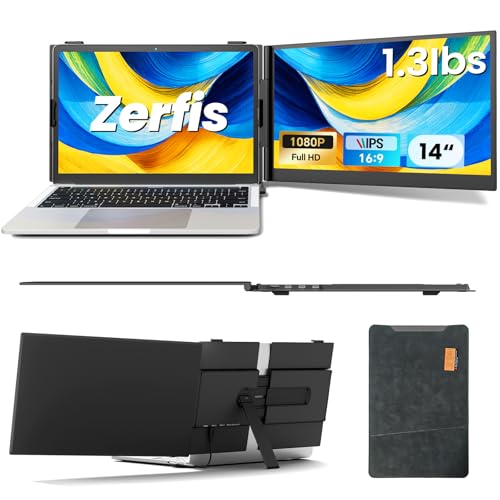
If you work on the move, the Zerfis 14-inch Laptop Screen Extender is built to make a laptop feel much closer to a compact multi-monitor workstation.
Zerfis 14-inch Extender Review Summary
The Zerfis 14-inch Laptop Screen Extender is best for remote workers, students, and frequent travelers who want a lightweight dual- or triple-screen setup. It combines a 14-inch Full HD IPS panel, flexible display modes, and a very portable chassis in a package that is clearly designed for productivity first.
If you have ever wished your laptop could handle email, documents, Slack, spreadsheets, and a browser at the same time without constant tab switching, this is exactly the type of accessory that can improve your workflow.
The biggest appeal is not raw performance; it is how quickly it can expand your usable workspace while still fitting in a bag.
The Zerfis 14-inch Laptop Screen Extender also makes sense for buyers who value a clean, compact desk footprint.
Instead of carrying a separate portable monitor and stand, you get an integrated screen extender with attachment hardware, a protective case, and multiple connection options.
That makes it especially attractive for mobile productivity, client meetings, co-working spaces, and temporary home-office setups.
Scorecard
| Category | Score | Why it matters |
|---|---|---|
| Portability | 9.0/10 | Extremely thin and light for a laptop add-on, making it easy to carry for travel and café work. |
| Display quality | 8.0/10 | 14-inch Full HD, IPS, wide viewing angles, 300 nits brightness, and full sRGB coverage deliver sharp visuals. |
| Multi-screen productivity | 9.0/10 | Extended, mirrored, duplicate, portrait, and landscape modes suit serious multitasking. |
| Compatibility | 8.0/10 | Works with 13-inch to 17-inch laptops plus phones and consoles, but port requirements matter. |
| Setup simplicity | 7.0/10 | Usually plug and play, though some setups need specific USB-C support or a driver. |
| Build and durability | 8.0/10 | Aluminum housing, adjustable stand, anti-slip hooks, and case support everyday durability. |
| Eye comfort | 8.0/10 | Anti-glare and low blue light features help reduce fatigue during long sessions. |
Bottom line: this is a strong buy if you want a truly portable screen extender for work and travel.
It is less ideal if your laptop ports are limited or you want the simplicity of a single self-powered monitor with fewer compatibility questions.
Key Features and Specifications of Zerfis 14-inch Extender
The hardware list is strong for an accessory in this class, and the details explain why the Zerfis 14-inch Laptop Screen Extender stands out in searches for a portable laptop screen extender.
| Spec | Detail |
|---|---|
| Screen size | 14 inches |
| Native resolution | 1920 x 1080 Full HD |
| Panel type | IPS LCD |
| Aspect ratio | 16:9 |
| Brightness | 300 nits |
| Color gamut | 100% sRGB |
| Contrast ratio | 1000:1 |
| Refresh rate | 60 Hz |
| Response time | 2 ms |
| Viewing angle | 180 degrees |
| Weight | 2.2 pounds |
| Thickness | 0.17 inches |
| Dimensions | 10.8" D x 15.7" W x 2.6" H |
| Build | Aerospace-grade aluminum casing |
| Mounting | Reinforced adjustable stand, two anti-slip hooks |
| Rotation | 180° rotating screen |
| Modes | Extended, mirrored, duplicate, portrait, landscape |
| Connectivity | Two full-function USB-C ports; USB-C + HDMI + external power adapter; H5 + HDMI + external power adapter |
| Compatibility | 13-inch to 17-inch laptops, smartphones, gaming consoles |
| Systems | Windows, Mac, Android, Chrome |
| Eye comfort | Anti-glare, low blue light |
| Extras | Premium leather protective case included |
| Warranty | 12-month quality warranty |
- Full HD IPS panel: sharp enough for spreadsheets, documents, browsing, and streaming.
- 300 nits brightness: suitable for indoor use and moderate ambient light.
- 100% sRGB coverage: helps with more accurate color reproduction than basic budget screens.
- 2 ms response time and 60 Hz refresh: not a gaming-first spec sheet, but solid for smooth everyday use.
- Anti-glare and low blue light: useful for long work sessions and reduced eye strain.
- Ultra-thin aluminum design: a major reason this product is appealing to mobile professionals.
For a buyer, the main takeaway is that the Zerfis 14-inch Extender is not trying to be a desktop replacement monitor.
It is trying to be the easiest possible way to add screen real estate to a laptop while keeping the system compact.
Pros and Cons of Zerfis 14-inch Extender
Here is the practical Zerfis 14-inch Laptop Screen Extender pros and cons breakdown that matters before you buy.
| Pros | Cons |
|---|---|
| Very portable for a second-screen accessory | Port compatibility can be a hurdle for some laptops |
| Sharp Full HD IPS display with wide viewing angles | Some setups may require driver installation |
| Flexible display modes for productivity | Glossy finish can reflect light in bright rooms |
| Sturdy aluminum build with stable mounting features | Best experience depends on having the right USB-C or HDMI connections |
| Low blue light and anti-glare for longer sessions | Not as simple as a basic plug-in monitor for every device |
The pros are especially compelling for productivity users. The display quality, build materials, and flexible orientation modes all support the core use case: making laptop work less cramped and more efficient.
The main drawback is equally clear: compatibility is not universal in practice, even if the product supports many devices on paper. If your laptop has limited ports or lacks full-function USB-C, you need to pay close attention to the connection method before assuming a smooth setup.
How the triple-screen setup works
The biggest value proposition of the Zerfis 14-inch Laptop Screen Extender is the ability to create a multi-screen workflow from a laptop.
Depending on your setup, you can run extended mode, mirrored mode, duplicate mode, portrait mode, or landscape mode.
That flexibility matters more than many buyers realize. Extended mode is best when you want each screen to show different apps, like email on one side and documents or a browser on the other.
Mirrored and duplicate modes are useful for demos, training, and client presentations.
Portrait mode is particularly appealing for reading long documents, reviewing code, or tracking chat feeds and social content.
The 180° rotating screen also makes the unit more adaptable in meetings and collaboration settings.
If you work with a teammate, it is easier to angle the display for side-by-side review without rearranging your whole desk.
One smart design choice here is the use of two anti-slip hooks and an adjustable stand.
That gives the extender a more secure feel than bargain accessories that rely on flimsy support.
For a travel accessory, stability is a major buying factor because the screen has to stay aligned even when the laptop is moved slightly.
Port requirements and connection modes
This is the section that decides whether the Zerfis 14-inch Laptop Screen Extender is a perfect fit or a hassle.
The easiest setup is for laptops with two fully functional USB-C ports.
In that case, the connection process should be clean and relatively simple.
If your system supports that path, you get the smoothest experience and the least cable clutter.
There is also a USB-C + HDMI + external power adapter option, which broadens compatibility.
For laptops without fully functional USB-C support, the H5 + HDMI + external power adapter setup is available.
That helps, but it also means some users may need to manage extra cables and may face driver installation depending on the exact device and configuration.
Buying advice: before choosing this screen extender, verify your laptop ports carefully.
A model like this is only as convenient as the connection method your laptop supports.
If your current machine is a MacBook, a Windows ultrabook, or a newer USB-C notebook, you are more likely to have a good experience.
If your laptop has older ports or limited power delivery support, expect a more involved setup.
That is why the product works best for informed buyers who know their port layout and need a portable multi-screen solution more than they need a universal one-size-fits-all monitor.
Middle-of-article note: if you already know your port situation and want to compare the extender on Amazon, this is a good time to check the listing details carefully before buying.
Display quality for work and media
In daily use, the display should feel good for office tasks, browsing, study sessions, and casual entertainment.
The 14-inch Full HD resolution keeps text reasonably crisp, and the IPS panel gives you wide viewing angles that are important when a screen is attached to a laptop and may be shifted around often.
100% sRGB is a welcome detail. It does not make the Zerfis 14-inch Extender a professional color-grading monitor, but it does improve confidence for general content work, light photo editing, and any task where colors should look more consistent than they do on low-end portable screens.
The 300 nits brightness level is practical for indoor environments and many travel settings.
It is not overly bright by premium monitor standards, so very sunny spaces may still challenge visibility, especially given the glossy finish.
That glossy panel can make the image look a little more vivid, but the trade-off is more reflection.
For eye comfort, the anti-glare treatment and low blue light mode are useful.
Buyers who spend long days in spreadsheets or writing documents will appreciate that this extender is designed to reduce fatigue rather than maximize showy specs.
In short, the screen quality is better than basic portable add-ons and well matched to productivity.
Travel use and desk footprint
At 2.2 pounds and only 0.17 inches thick, this extender is built for portability.
Those numbers matter because a second screen can easily become too heavy or bulky to carry regularly, and that is exactly the problem many buyers are trying to avoid.
The included premium leather protective case is another plus for travel.
It suggests Zerfis expects this product to move around often, and that is consistent with the overall design.
The aluminum housing also helps the device feel less fragile than many lightweight plastic alternatives.
For café work, hotel desks, co-working spaces, and temporary home offices, this is the kind of accessory that can be genuinely useful. It expands productivity without demanding a dedicated monitor stand or a large footprint.
At the same time, the footprint is still larger than a single laptop screen alone.
If your workspace is tiny, you should think about whether you really need triple-screen expansion every day.
Some users discover that a portable monitor is enough, while others benefit from the extra utility of a true screen extender.
Who Should Buy Zerfis 14-inch Extender?
This product fits a fairly specific buyer profile, and that is a good thing.
The Zerfis 14-inch Laptop Screen Extender is ideal if you want more workspace without turning your bag into a full desktop kit.
- Remote workers who constantly juggle multiple apps and windows.
- Students who research, write, and attend classes on the same machine.
- Travelers who need a lightweight second screen on the road.
- Professionals in meetings who want a portable presentation or collaboration setup.
- Users with compatible USB-C or HDMI setups who want a faster workflow.
Who should skip it?
If you want the simplest possible monitor experience, or if your laptop ports are uncertain, you may be better served by a standard portable USB-C monitor.
Also skip it if you do most of your work in bright outdoor settings, since the glossy screen and 300-nit brightness are more suited to indoor productivity.
This is a smart purchase for organized multitaskers, not for buyers who want a plug-and-forget display with zero compatibility concerns.
Comparing it with alternatives
When considering a laptop screen extender review, it helps to compare this type of product with familiar alternatives on Amazon.
The closest options are a portable USB-C monitor, a laptop screen extender for Windows and Mac, a 14-inch travel monitor, a dual-screen laptop attachment, or a portable monitor with HDMI and USB-C.
Compared with a basic portable monitor, the Zerfis 14-inch Laptop Screen Extender wins on attachment-style convenience and integrated productivity features. Compared with a standard dual-screen monitor, it is easier to travel with and usually better suited to an on-the-go laptop workflow.
However, a simple portable monitor can be less complicated if you want universal compatibility and minimal setup risk.
If your priority is color-critical work, a higher-end portable display may be a better fit.
If your priority is just having more room for email, browsers, docs, and chat, the Zerfis product is much more workflow-friendly than carrying a separate full monitor.
Is Zerfis 14-inch Extender Worth It?
Yes, for the right buyer, the Zerfis 14-inch Laptop Screen Extender is worth it. It delivers the kind of portable multi-screen upgrade that can genuinely improve day-to-day productivity, especially if you spend time working away from a permanent desk.
The value comes from the balance of portability, display quality, flexible modes, and sturdy design.
The aluminum housing, adjustable stand, anti-slip hooks, and protective case all support a use case that is clearly centered on mobile work.
Add in the IPS Full HD panel, 100% sRGB coverage, and low blue light support, and you get a screen extender that is more capable than many generic add-ons.
The caveat is connection compatibility.
If your laptop supports the recommended connection modes, this can be an excellent productivity purchase. If not, the experience may become more frustrating than convenient.
That is why this is a buyer that rewards careful checking of ports and device support before ordering.
My verdict: the Zerfis 14-inch Laptop Screen Extender is a strong choice for travelers, remote workers, and multitaskers who want a compact, practical second screen. If that sounds like you, it is one of the more compelling portable screen extender options to consider in 2026.