The best gaming mouse with side buttons can put abilities, shortcuts, and macros directly under your thumb, reducing keyboard reach and speeding up complex actions. The right layout depends on how many commands you use, how much customization you want, and whether you prefer wired or wireless play.
We compared ten options across button count, sensor performance, software features, ergonomics, connectivity, and value. This guide highlights which designs suit MMO and MOBA players, competitive gamers, and anyone who wants faster access to desktop shortcuts.
Best 10 Gaming Mouse with Side Buttons Picks for 2026
Most Customizable
Redragon M908 Impact MMO Mouse
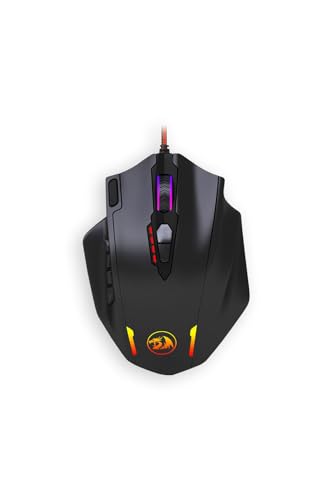
- 12 side buttons and 18 customizable buttons
- DPI adjustment from 100 to 12,400
- Weight-tuning cartridge included
Best For: MMO players needing extensive programmable controls
Best Balanced Layout

- 11 programmable buttons
- Adjustable five-weight system
- HERO sensor tracks up to 25,600 DPI
Best For: Right-handed gamers wanting flexible controls and balance
Most Versatile

- Three swappable side-plate layouts
- Wireless, Bluetooth, and USB-C modes
- Up to 280 hours of Bluetooth battery life
Best For: Players switching among MMO, MOBA, FPS, and productivity
Best Lightweight Pick

- Lightened 89 g design
- Nine-button layout with customizable controls
- LIGHTFORCE hybrid switches
Best For: Right-handed gamers wanting a lighter wired G502-style mouse
Best for Easy Setup
Redragon M901K MMO Gaming Mouse

- 19 programmable buttons with 12 on the side
- Up to 12,400 DPI with adjustable polling rate
- Five profiles and removable weight tuning
Best For: MMO players who want extensive controls and customization
Best Wired Value
UtechSmart Venus Pro MMO Mouse

- 12 programmable side buttons and five profiles
- Up to 16,400 DPI and 1,000Hz polling
- Weighted right-handed design with RGB lighting
Best For: Right-handed MMO players who prefer a customizable wired mouse
Best Wireless Option

- Six side buttons and 12 programmable controls
- 2.4GHz wireless or USB-C wired connectivity
- Up to 67 hours of battery life with RGB off
Best For: MMO and MOBA players who want flexible wireless play
Best MMO Side-Button Mouse
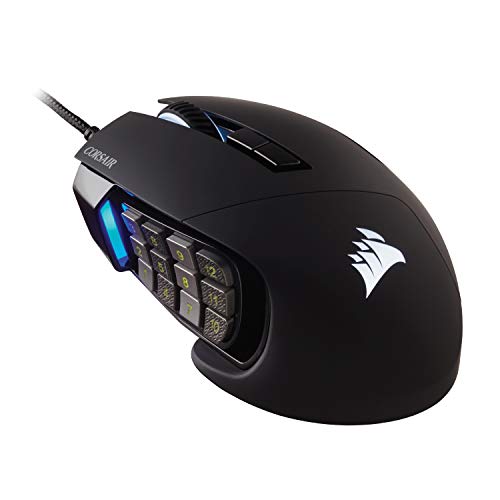
- 17 programmable buttons for macros and hotkeys
- Repositionable 12-button side grid
- 18,000 DPI optical sensor
Best For: MMO and MOBA players needing extensive wired controls
Best Wireless Side-Button Mouse

- 2.4GHz, Bluetooth 5.0, and USB-C modes
- 16 programmable buttons with swappable side plates
- 24,000 DPI sensor and 1,000mAh battery
Best For: Right-handed gamers wanting flexible wireless layouts
Best Budget MMO Side-Button Mouse

- 15 programmable buttons with eight MMO side buttons
- Software-adjustable DPI up to 12,400
- Customizable RGB lighting and ergonomic shape
Best For: PC gamers seeking many wired controls and RGB customization
Most Customizable – Redragon M908 Impact MMO Mouse
If you want a gaming mouse with side buttons for complex keybinds, the Redragon M908 offers an extensive control layout with 12 side buttons and 18 customizable buttons overall. Its programmable DPI settings and adjustable weight system make it especially suited to MMO players who want to tailor both controls and feel.
Best For: MMO players who need many programmable inputs and adjustable weight tuning.
Pros:
- 12 side buttons and 18 customizable buttons provide extensive control options.
- DPI can be adjusted from 100 to 12,400 through the programming software.
- Adjustable polling rates reach up to 1,000 Hz.
- Includes a weight-tuning cartridge system.
Cons:
- Its large button count may take time to learn.
- At 177 g, it is heavier than many lightweight gaming mice.
The M908 is a control-heavy choice rather than a minimalist mouse. It makes the most sense when your games or workflows benefit from numerous remappable inputs.
Best Balanced Layout – Logitech G502 HERO
The Logitech G502 HERO is a practical gaming mouse with side buttons for players who want extra commands without moving to an MMO-style grid. It combines 11 programmable buttons with adjustable weights, a high-resolution HERO sensor, and a dual-mode scroll wheel.
Best For: Right-handed PC and Mac gamers wanting customizable controls and adjustable balance.
Pros:
- 11 programmable buttons support customized game controls.
- HERO sensor offers tracking up to 25,600 DPI without smoothing, filtering, or acceleration.
- Five 3.6 g weights allow personalized balance and feel.
- Scroll wheel supports both precise ratcheting and hyper-fast scrolling.
Cons:
- It is designed for right-handed use.
- The wired design may be less convenient than a wireless mouse.
The G502 HERO suits players who want a familiar, versatile button layout rather than the maximum possible number of side controls. Its adjustable weights also make it easier to fine-tune the handling.
Most Versatile – Razer Naga V3 Pro
The Razer Naga V3 Pro is a gaming mouse with side buttons built for changing genres and control preferences. Its three magnetic side plates provide 12-, 6-, or 2-button layouts, while HyperSpeed Wireless, Bluetooth, and USB-C wired modes cover gaming and everyday use.
Best For: Right-handed players who switch between MMO, MOBA, FPS, and general productivity tasks.
Pros:
- Swappable side plates offer 12-, 6-, or 2-button configurations.
- Supports HyperSpeed Wireless, Bluetooth, and USB-C wired connectivity.
- Focus Pro optical sensor delivers up to 50,000 DPI, 930 IPS, and 90G acceleration.
- Battery life reaches up to 155 hours on HyperSpeed Wireless or 280 hours on Bluetooth.
Cons:
- It is designed for right-handed use.
- Full customization through Razer Synapse is available on Windows, while macOS supports core functions and onboard settings.
- The wireless charging systems are sold separately.
The Naga V3 Pro is the most adaptable option here because its side-button layout can change with the game. It is a strong fit for buyers willing to trade simplicity for broad configuration options.
Best Lightweight Pick – Logitech G502 X Wired
The Logitech G502 X is a gaming mouse with side buttons for users who prefer a familiar right-handed design with a reduced 89 g weight. Its nine-button layout, removable DPI-shift button, HERO 25K sensor, and hybrid LIGHTFORCE switches focus on responsive wired performance.
Best For: Right-handed gamers who want a lighter wired mouse with customizable controls.
Pros:
- Reduced 89 g weight is lighter than the supplied G502 HERO specification.
- LIGHTFORCE hybrid optical-mechanical switches are designed for speed, reliability, and crisp actuation.
- Removable, reversible DPI-shift button supports grip customization.
- Scroll wheel offers ratcheting, free-spin, and tilt controls.
Cons:
- Its nine-button layout provides fewer inputs than MMO-focused alternatives.
- It is wired rather than wireless.
- It is designed for right-handed use.
The G502 X is a streamlined alternative for players who want useful extra buttons without the bulk of a large MMO keypad. Its lighter build and configurable DPI button make it particularly practical for everyday gaming.
Best for Easy Setup – Redragon M901K MMO Gaming Mouse
If you want a gaming mouse with side buttons for complex keybinds, the Redragon M901K offers an extensive control layout with 12 thumb-accessible side buttons and 19 programmable buttons overall. Adjustable DPI, stored profiles, and weight tuning make it adaptable for different games and everyday use.
Best For: MMO players who want maximum button customization and adjustable balance.
Pros:
- 19 programmable buttons, including 12 side buttons
- Adjustable sensitivity from 100 to 12,400 DPI and polling rates up to 1,000Hz
- Five memory profiles, RGB lighting, and eight removable weights
Cons:
- Its large number of buttons may take time to configure
- Right-handed design limits flexibility for left-handed users
The M901K is a strong fit when button density and personalization matter more than simplicity. Its corded USB design keeps the setup straightforward, while the profile and weight options support different play styles.
Best Wired Value – UtechSmart Venus Pro MMO Mouse
The UtechSmart Venus Pro is a practical gaming mouse with side buttons for MMO and macro-heavy gameplay. Its 12 side buttons, five custom profiles, adjustable DPI, and weighted design provide plenty of control without relying on a wireless connection.
Best For: Right-handed MMO players seeking a feature-rich wired mouse with profile switching.
Pros:
- 12 programmable side buttons and 19 buttons overall
- Adjustable sensitivity up to 16,400 DPI with a 1,000Hz polling rate
- Five profiles, RGB lighting, adjustable weights, and a braided six-foot cable
Cons:
- Wired-only connectivity may not suit cable-free setups
- Windows is the listed operating system support
With its high DPI range, textured grip, thumb rest, and included weights, the Venus Pro emphasizes controlled, comfortable play. It is particularly appealing if you prefer a traditional wired setup and want many programmable inputs.
Best Wireless Option – ASUS ROG Spatha X MMO Mouse
The ASUS ROG Spatha X is a gaming mouse with side buttons designed for players who want MMO controls without being tied to a cable. It combines six strategically placed side buttons with dual-mode 2.4GHz wireless and USB-C wired connectivity, plus a charging dock and replaceable switches.
Best For: MMO and MOBA players who want premium wireless flexibility and durable, customizable hardware.
Pros:
- Six side buttons and 12 programmable buttons overall
- Low-latency 2.4GHz wireless and USB-C wired modes
- 19,000 DPI sensor, hot-swappable switches, and up to 67 hours of battery life with RGB off
Cons:
- Large right-handed shape may not suit every grip or hand size
- Wireless operation requires charging
The Spatha X stands out for combining wireless convenience with wired backup and hardware longevity features. Its six side buttons are fewer than the 12-button layouts on the other options, but the design may be easier to manage for players who want targeted MMO controls.
Best MMO Side-Button Mouse – Corsair Scimitar RGB Elite
The Corsair Scimitar RGB Elite is a gaming mouse with side buttons designed for MMO and MOBA players who rely on frequent hotkeys and complex macros. Its 12-button thumb grid can be repositioned to suit your grip, while the 18,000 DPI optical sensor provides fine tracking adjustment.
Best For: MMO and MOBA players who want extensive wired controls and a customizable side-button layout.
Pros:
- 17 fully programmable buttons support macros and frequent actions.
- Key Slider system adjusts the 12 side buttons for a more comfortable reach.
- 18,000 DPI sensor offers precise adjustment in 1 DPI steps.
- 50-million-click Omron switches and a braided cable support extended use.
Cons:
- Wired connectivity may be less convenient than a wireless design.
- Its large number of controls is more specialized than a simple gaming mouse.
The Scimitar RGB Elite is a strong choice when side-button access and macro control matter more than a minimal layout. Its contoured right-hand shape and finger rest add support for longer sessions.
Best Wireless Side-Button Mouse – SM809 Pro Tri-Mode MMO Mouse
The SM809 Pro is a gaming mouse with side buttons for players who want flexible connectivity and a configurable MMO layout. It supports 2.4GHz wireless, Bluetooth 5.0, and USB-C wired use, with magnetic side plates that switch between compact and thumb-grid configurations.
Best For: Right-handed gamers who want wireless flexibility, interchangeable side layouts, and a lightweight shell.
Pros:
- Tri-mode connectivity supports 2.4GHz, Bluetooth 5.0, and USB-C wired play.
- 16 programmable buttons accommodate macros, hotkeys, and shortcuts.
- Four magnetic side plates provide compact or expanded button layouts.
- 24,000 DPI PAW3311 sensor and a 1,000mAh battery suit extended use.
Cons:
- Designed for right-handed use only.
- Its hollow honeycomb shell and extensive controls may not suit users wanting a simple mouse.
The SM809 Pro stands out for adaptability: change the side plates for different games, then use browser-based configuration to save settings to onboard memory. It is also practical across computers and mobile devices thanks to its multiple connection modes.
Best Budget MMO Side-Button Mouse – Redragon M811
The Redragon M811 is a gaming mouse with side buttons that focuses on programmable MMO controls at a straightforward wired price point. It offers 15 editable buttons, including two default controls and an eight-button side group, plus adjustable DPI levels and customizable RGB lighting.
Best For: PC gamers who want many programmable buttons and RGB customization without wireless connectivity.
Pros:
- 15 programmable buttons support game keybinds, media controls, and DPI settings.
- Eight MMO side buttons provide quick access to hotkeys.
- Software supports DPI settings and 16.8-million-color lighting effects.
- Ergonomic shape is designed for extended gaming and work sessions.
Cons:
- Wired USB connectivity offers no wireless option.
- Its listed default DPI levels top out at 6,200, though software supports up to 12,400 DPI.
- Compatible-device support is focused on personal computers.
The M811 is a practical pick for players who want a large number of side controls and software customization. Its wired design keeps the setup simple, while the ergonomic shape and backlighting add comfort and visual flair.
How We Picked the Best Gaming Mouse with Side Buttons
We focused on models with dedicated side controls rather than standard two-button gaming mice. Our comparison considered programmable button count, side-panel layout, sensor resolution, connection type, onboard memory, software support, RGB controls, weight adjustment, and overall versatility. We also accounted for the different grips and hand sizes that affect how comfortable a crowded side panel can feel.
Specification claims such as maximum DPI and button totals are useful starting points, but they do not determine real-world performance alone. Button placement, actuation feel, software reliability, and the ability to disable or remap unwanted controls matter just as much.
Quick Comparison
- Most side-button flexibility: Look for a mouse with a swappable side plate or multiple thumb-button layouts.
- Best for MMO rotations: Models with 12 or more thumb controls provide room for skills, items, and modifiers.
- Best for mixed gaming: A less crowded six- to eight-button layout is easier to use for shooters and everyday tasks.
- Best for desk setups: Wireless or tri-mode connectivity reduces cable clutter, while wired models avoid charging.
- Best for personalization: Remapping software, profiles, onboard memory, and adjustable weight make a bigger difference than RGB alone.
Key Buying Factors for a Gaming Mouse with Side Buttons
Button Layout and Count
More buttons are not automatically better. Twelve-button grids work well for MMO hotbars, but they require thumb accuracy and a short learning period. Fewer, more widely spaced controls may be better for MOBA players, productivity shortcuts, or anyone who frequently switches genres.
Shape, Grip, and Weight
Check the mouse dimensions against your hand size and preferred grip. Palm and relaxed-claw users often prefer a fuller shell, while fingertip users may find a large MMO mouse tiring. Adjustable weights can fine-tune balance, but a lighter fixed-weight design may feel quicker during competitive play.
Sensor and Tracking
High DPI numbers provide flexibility, not necessarily better aim. Prioritize consistent tracking, low lift-off behavior, and a sensor that performs well at your normal sensitivity. Most players need far less than the advertised maximum resolution.
Connectivity and Software
Wired models offer continuous power and typically strong value. Wireless models add freedom but require charging and may cost more. Confirm that the companion software supports profiles, per-button remapping, macros where permitted, and your operating system. Onboard memory is useful when moving between computers.
Who Should Buy Which Gaming Mouse with Side Buttons?
Dedicated MMO players should prioritize a comfortable 12-button side grid, profile support, and dependable remapping software. MOBA players may prefer a moderate button count with easy thumb separation and a shape that supports rapid repositioning.
Competitive FPS players should consider a lighter, simpler mouse with only the side controls they genuinely use. Streamers, creators, and productivity users can benefit from extensive macros, multiple profiles, and wireless or tri-mode connectivity. If you are unsure, choose a model with flexible remapping and a manageable side layout rather than buying the mouse with the highest button count.