Accurate color starts with reliable measurement. Whether you are calibrating a photo-editing display, matching paint, or checking production materials, the right colorimeter can reduce guesswork and improve consistency.
This roundup compares 10 colorimeter color calibration tools across display calibration, portable color matching, brightness range, software workflow, and professional measurement needs.
Best 10 Colorimeter Color Calibration Tools Picks for 2026
Best Portable Matcher
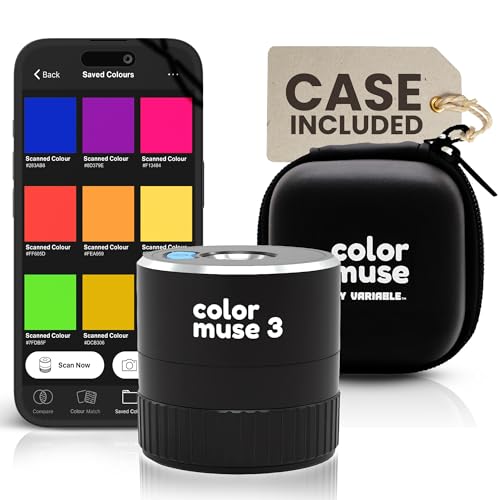
- Scans both surface color and sheen
- Works with paint, textiles, plastics, and print
- Connects to iOS and Android apps
Best For: Portable paint and materials matching
Best Easy Setup

- Three-step setup with roughly 90-second calibration
- Supports Liquid Retina XDR displays
- Optional software upgrades expand capabilities
Best For: Creators who want fast, uncomplicated calibration
Portable Paint Matcher

- Matches scans to 300,000+ brand-name paints
- Outputs RGB, HEX, CMYK, Pantone, RAL, and NCS values
- No calibration required; IPX4 dust and splash resistance
Best For: Paint matching and surface-color identification
Pro Display Calibrator

- Automates color and brightness calibration
- One sensor supports multiple displays
- ReCAL assists with quick repeat calibration
Best For: Multi-display calibration and color consistency
Versatile Surface Color Analysis

- Measures 29 parameters and several color-difference formats
- Matches readings to built-in or custom color cards
- Standalone operation with automatic calibration and app support
Best For: Paint, plastic, textile, packaging, and interior color matching
Professional Display Calibration

- Supports OLED, Mini LED, QD-OLED, and high-brightness displays
- Includes deep calibration, analysis, and 3D LUT export
- Matches multiple monitors and calibrates projectors
Best For: Professional photo, design, video, and multi-display workflows
Simple Photo Workflow

- Guided Easy 1 2 3 calibration process
- Supports up to two monitors with before-and-after checking
- USB-C design with Native or Photo brightness targets
Best For: Photographers and creators seeking simple monitor calibration
Best Overall – Calibrite Display Pro HL
The Calibrite Display Pro HL is a versatile choice among colorimeter color calibration tools for photographers, designers, and creative teams. Its high-luminance sensor supports modern LCD, mini-LED, OLED, Apple XDR, and compatible projector workflows up to 3,000 nits.
Best For: Creative professionals who need flexible monitor profiling, validation, and multi-display matching.
Pros:
- Measures displays up to 3,000 nits, including high-brightness and HDR-capable panels.
- PROFILER software offers Basic and Advanced modes with adjustable white point, luminance, gamma, and contrast.
- Includes Quick Check, profile validation, uniformity, and flare-correction tools.
- Supports multiple monitors, custom patch sets, Mac and Windows, and USB-C or USB-A connections.
Cons:
- The 3,000-nit limit may not suit ultra-bright professional displays.
- Advanced profiling options may be more than casual users need.
With strong display compatibility and useful verification tools, this is a well-rounded option for dependable color consistency across creative workstations.
Best Portable Matcher – Color Muse 3
The Color Muse 3 takes a different approach to colorimeter color calibration tools by scanning physical surfaces rather than calibrating monitors. It measures color and sheen across paint, textiles, plastics, print, coatings, and other materials, then connects to a mobile app for matching and organization.
Best For: Paint, interior, design, and materials professionals who need portable surface color matching.
Pros:
- Measures both color and sheen in one scan using multiple measurement geometries.
- Works with paint, leather, plastics, textiles, printed media, and coatings.
- Pairs wirelessly with iOS and Android through the Color Muse app.
- Includes a USB-C charger, protective case, and extended standby battery life.
Cons:
- It is designed for physical surface matching, not monitor calibration.
- Access to RAL and Pantone libraries requires a subscription.
For on-site matching and finish identification, the Color Muse 3 offers convenient portability and broader surface coverage than display-focused calibrators.
Best for HDR Production – Calibrite Display Plus HL
The Calibrite Display Plus HL is the high-end pick among colorimeter color calibration tools for exceptionally bright screens. Its sensor measures up to 10,000 nits and is built for LCD, mini-LED, OLED, Apple XDR, super-bright displays, and compatible projectors.
Best For: Video editors, colorists, and production teams working with HDR and broadcast-oriented workflows.
Pros:
- Measures ultra-bright displays up to 10,000 nits for HDR calibration.
- Supports Rec.709, BT.1886, and Rec.2020-related workflows.
- PROFILER software provides advanced adjustments, custom patch sets, and shared presets.
- Includes profile validation, uniformity checking, and multi-monitor profiling.
Cons:
- Its extreme luminance capability may be unnecessary for standard monitors.
- Registration within 30 days is required for the stated warranty coverage.
If accurate HDR highlight and shadow decisions are central to your work, the Display Plus HL provides the highest measurement range in this group.
Best Easy Setup – Datacolor SpyderExpress
The Datacolor SpyderExpress is a straightforward choice among colorimeter color calibration tools for creators who want a fast monitor-calibration routine. Its software guides users through three steps and can produce an edit-ready profile in about 90 seconds.
Best For: Photographers, designers, and content creators seeking quick, practical screen calibration.
Pros:
- Designed for simple setup with a three-step software process.
- Calibrates a display in about 90 seconds according to the supplied notes.
- Supports current Liquid Retina XDR displays, including the MacBook M4 mini-LED screen.
- Can save profiles and calibrate up to three connected displays per workstation.
Cons:
- OLED and advanced mini-LED support requires a software upgrade.
- Ambient-light adjustment, multi-display profiling, and DevicePreview are upgrade features.
SpyderExpress is a practical entry point when ease and speed matter most, while optional upgrades provide a path to more advanced workflows.
Portable Paint Matcher – Nix Mini 3 Color Sensor
The Nix Mini 3 is a practical choice among colorimeter color calibration tools for matching physical surfaces and translating colors into digital formats. Scan an object or surface to receive paint matches along with RGB, HEX, and CMYK values.
Best For: DIYers, decorators, and professionals matching paint or capturing surface colors for digital projects.
Pros:
- Matches scans against more than 300,000 brand-name paints.
- Provides RGB, HEX, CMYK, Pantone, RAL, and NCS color information.
- Works with major paint brands and requires no calibration for ongoing scanning.
- Dust and splash resistant with an IPX4 rating.
Cons:
- Paint libraries vary by country or region.
- Performance is better on matte samples, so some surfaces may be less suitable.
The Nix Mini 3 is best when your workflow starts with a real-world surface rather than a computer display. Its broad paint and digital color support makes it versatile for both renovation and color-reference tasks.
Pro Display Calibrator – Datacolor Spyder4Pro
The Datacolor Spyder4Pro is a display-focused option among colorimeter color calibration tools. Its full-spectrum sensor calibrates multiple displays and is designed to improve color accuracy, stability, and consistency over time.
Best For: Users who need to calibrate more than one display and want automated color and brightness adjustment.
Pros:
- Automates display color and brightness calibration.
- A single sensor can calibrate multiple displays.
- Double-shielded color filters are designed for improved accuracy and long-term stability.
- ReCAL helps simplify future recalibration.
Cons:
- This is an older Spyder4Pro model, so compatibility with newer systems is not specified in the supplied information.
- It is intended for display calibration rather than physical paint or surface matching.
The Spyder4Pro suits buyers prioritizing repeatable monitor calibration and multi-display use. Its automated workflow and ReCAL feature make routine maintenance less demanding.
Modern Screen Calibrator – Datacolor Spyder Monitor Calibrator
This Datacolor Spyder is a current screen-focused choice among colorimeter color calibration tools, built for laptop and desktop workflows. It calibrates OLED, mini-LED, and Apple Liquid Retina XDR displays, with a setup designed to establish an accurate viewing and editing baseline in about 90 seconds.
Best For: Photographers, editors, and other users calibrating modern displays across Windows and Mac systems.
Pros:
- Supports OLED, mini-LED, and Apple Liquid Retina XDR displays.
- Offers a fast calibration workflow and an easy preset option.
- Provides customizable settings for more experienced users.
- Uses an ambient light sensor to track room-light changes and support brightness adjustments.
Cons:
- Requires a nonstandard battery.
- DevicePreview is identified as a beta feature.
Choose this Spyder if your work depends on a modern laptop or desktop display and you want both simple presets and deeper control. Ambient-light monitoring and DevicePreview add useful workflow features beyond basic calibration.
Versatile Surface Color Analysis – Portable 45/0 Colorimeter
For paint, plastic, textile, and packaging work, this portable unit is a broad-featured option among colorimeter color calibration tools. It measures numerous color spaces, evaluates color difference, identifies color bias, and can match readings to built-in or custom color cards.
Best For: Interior designers, painters, manufacturers, and users who need handheld surface-color measurement with detailed output.
Pros:
- Measures RGB, Hex, Lab, LCh, HSB, CMYK, XYZ, Yxy, and multiple color-difference formats.
- Can measure color difference on the standalone device and indicate color bias.
- Includes Uncoated, Coated, and RAL K5 electronic color cards, with custom database support.
- Automatic calibration, Bluetooth and USB connectivity, and a rechargeable battery rated for up to 7,000 continuous tests.
Cons:
- Its many parameters and app-based features may be more than casual users need.
- The 4mm aperture is designed for targeted readings rather than broad-area sampling.
- Color-card matching beyond the built-in cards requires moving additional cards to the app.
Choose this model when you need more than a simple color reading. Its 45/0 geometry, 400–700nm range, onboard screen, and extensive measurement formats make it the most flexible surface-focused option in this group.
Professional Display Calibration – SpyderPro Monitor Calibrator
The SpyderPro is a dedicated monitor colorimeter for photographers, designers, and video editors who need reliable screen output. It combines guided calibration with advanced controls for gamma, white point, brightness, display analysis, and multi-monitor matching.
Best For: Professional creative workflows involving modern HDR displays, multiple monitors, projectors, or video color management.
Pros:
- Supports Wide LED, OLED, QD-OLED, Apple Liquid Retina XDR, Mini LED, and displays up to 12,000 nits.
- Offers Standard Calibration in about 90 seconds plus a deeper calibration mode.
- Can calibrate unlimited displays per computer capability and match multi-monitor setups with StudioMatch and SpyderTune.
- Includes projector calibration, display analysis, 3D LUT export, ambient-light reading, and CheckCal verification.
Cons:
- Its professional feature set may be excessive for users who only need basic monitor calibration.
- Advanced capabilities depend on the supplied software and a compatible computer or display workflow.
- It requires a nonstandard battery.
This is the strongest choice here for advanced display management. Its broad backlight compatibility and analysis tools are especially useful when color consistency matters across several screens or production environments.
Simple Photo Workflow – Calibrite Display 123
Calibrite Display 123 is a straightforward monitor colorimeter for creators who want a guided way to improve screen accuracy. Its Easy 1 2 3 software workflow, USB-C connection, and before-and-after comparison keep monitor calibration approachable without an extensive setup process.
Best For: Photographers and creative users who want simple calibration for one or two monitors.
Pros:
- Guided Easy 1 2 3 software workflow is designed for quick, approachable setup.
- Supports calibration of up to two displays for more consistent multi-screen viewing.
- Offers Native or Photo brightness targets and a before-and-after comparison.
- Compact body with an adjustable counterweight and USB-C connection.
Cons:
- Supports only two displays, fewer than the SpyderPro.
- Its simplified workflow provides fewer advanced controls than a professional display-calibration system.
- It is focused on monitors rather than physical-surface color measurement.
For photographers who prefer a low-friction calibration routine, Display 123 is a practical pick. It covers the essential monitor-calibration task and makes the result easy to verify, while remaining compact and simple to operate.
How We Picked These Colorimeter Color Calibration Tools
We selected products for distinct color-measurement jobs rather than treating every colorimeter as interchangeable. The lineup includes monitor calibration devices for LCD, Mini LED, OLED, and high-brightness displays; portable paint and color-matching scanners; and a more technical 45/0 colorimeter for measuring differences across materials.
Our comparison focuses on sensor capability, supported use cases, software or operating workflow, portability, durability, calibration process, and ease of use. Product descriptions and specifications can vary by package or region, so confirm compatibility and included accessories before buying.
Quick Comparison
- Best for modern monitor calibration: Calibrite Display Pro HL and Display Plus HL.
- Best for a straightforward workflow: Calibrite Display 123.
- Best for general display calibration: Datacolor SpyderExpress and Spyder monitor calibrators.
- Best for portable paint matching: COLOR MUSE 3 and Nix Mini 3.
- Best for older calibration setups: Datacolor Spyder4Pro, provided your computer and software support it.
- Best for technical material testing: the portable 45/0 colorimeter with automated calibration and multiple measurement parameters.
Key Buying Factors for Colorimeter Color Calibration Tools
Choose the Right Measurement Category
Monitor colorimeters measure and help correct a display’s output, making them suitable for photography, video, design, and print workflows. Paint scanners and portable color sensors identify or match physical colors instead. A material colorimeter is better suited to repeatable color-difference measurements across products such as paint, plastic, textiles, and packaging.
Check Display and Brightness Support
If you work with HDR, Mini LED, OLED, or very bright screens, look for a sensor designed for those conditions. High-brightness support can matter more than a low price when standard calibration hardware struggles with modern panels. Also verify operating-system, connection, and software requirements.
Consider Workflow and Repeatability
Beginners may prefer guided software and a simple USB-C connection. Professionals should prioritize profile controls, measurement consistency, supported color spaces, and the ability to recalibrate as displays age or lighting changes. For paint matching, a protective case and resistance to dust, debris, or splashes can be valuable in the field.
Understand What the Software Does
A colorimeter measures color; software usually creates a display profile, reports differences, or connects a scan to a color library. Confirm that the software supports your intended applications and that cloud, mobile, or account requirements fit your workflow.
Who Should Buy Which Colorimeter Color Calibration Tools?
Photographers, designers, and editors should choose a dedicated monitor calibrator, with the Calibrite HL models being especially relevant for bright or newer display technologies. Casual users and beginners may prefer a guided option such as the Display 123 or SpyderExpress. Professionals maintaining several displays should compare the advanced software and sensor capabilities of the higher-end calibration models.
DIYers, decorators, and paint retailers should look at the COLOR MUSE 3 or Nix Mini 3 for portable matching. Manufacturers and quality-control users should consider the 45/0 colorimeter when numerical color-difference data and broader material measurement are more important than display profiling.