Campus life often means leaving a laptop briefly in a library, classroom, lab, or shared study space. A compatible locking cable adds a practical layer of protection against opportunistic theft.
These 10 picks cover common Kensington T-Bar, Nano, Wedge, and universal designs, with options for combination access, keyed security, adhesive anchors, and MacBook-specific fit.
Best 10 Laptop Locking Cables for Students Picks for 2026
Best Standard-Slot Combination Lock
Kensington T-Bar Standard Laptop Lock

- Resettable four-digit combination
- 6-foot carbon-steel cable
- Push-button, one-handed engagement
Best For: Laptops with a standard Kensington security slot
Best Adhesive Multi-Device Kit
AboveTEK Laptop and Tablet Security Cable

- Two adhesive anchor sets included
- 6-foot cut-resistant steel cable
- Works with laptops, tablets, and smartphones
Best For: Students securing multiple devices without built-in lock slots
Best for Thin Laptops
Kensington Nano-Slot Combination Laptop Lock

- Slim head for Nano-sized slots
- Resettable four-digit combination
- Pivoting head and rotating anchor
Best For: Thin laptops with compatible Nano security slots
Best Flexible Compatibility
Universal Laptop Cable Lock Kit

- Works with built-in or adhesive slots
- 6.23-foot cut-resistant cable
- Resettable four-digit combination
Best For: Students securing devices with or without lock holes
Best Keyed Kensington Lock

- 6-foot carbon-steel cable
- Pivoting 10mm T-Bar head
- Limited lifetime warranty description
Best For: Students with standard Kensington slots who prefer a keyed lock
Best Universal Combination Lock

- Fits standard, Nano, and wedge slots
- Resettable four-number dial
- Six-foot carbon-steel cable
Best For: Students needing broad slot compatibility without carrying a key
Best Wedge-Slot Student Lock
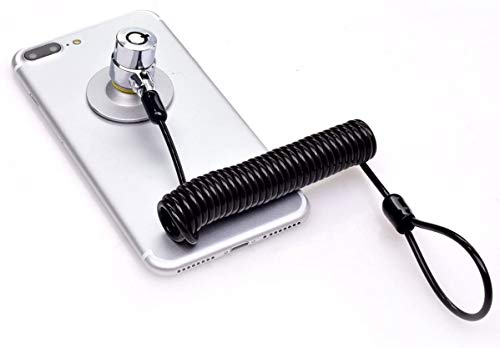
- Designed for 7x3mm wedge slots
- 360-degree rotating lock
- Flexible 6-foot tether
Best For: Students and travelers with compatible wedge-slot laptops
Best Dell-Specific Pick
Kensington N17 Combination Laptop Lock

- Fits Dell and Alienware wedge slots
- Resettable 4-wheel combination lock
- 6-foot cut-resistant carbon steel cable
Best For: Students with compatible Dell or Alienware laptops
Most Versatile Fit
AboveTEK 3-in-1 Universal Cable Lock

- Works with K-Slot, Nano, and wedge slots
- Resettable 4-digit combination
- 360-degree rotating lock head
Best For: Students needing broad laptop compatibility
Best for Recent MacBook Pro Models

- Made for 2021–2024 MacBook Pro 14/16-inch models
- Includes two keys
- 6.56-foot cut-resistant steel cable
Best For: Students with a compatible recent MacBook Pro
Best Standard-Slot Combination Lock – Kensington T-Bar Standard Laptop Lock
For students who need dependable laptop locking cables for students with a standard Kensington security slot, this Kensington model combines a resettable combination lock with a 6-foot carbon-steel cable. Its push-button design is convenient for securing a laptop to a desk, table, or other fixed structure in a dorm, library, classroom, or shared workspace.
Best For: Laptops and other electronics with a standard Kensington security slot, excluding many newer Dell and Alienware devices that use a Noble slot.
Pros:
- Resettable four-wheel combination offers 10,000 possible codes.
- Six-foot carbon-steel cable provides useful reach around desks and tables.
- Push-button engagement supports one-handed attachment.
- Works with various compatible devices, including laptops, monitors, docking stations, and projectors.
Cons:
- Not compatible with Dell or Alienware devices using a Noble lock slot.
- Requires a compatible built-in Kensington security slot.
This is a practical choice when a student’s laptop has the standard slot and they prefer not to carry or lose a key. Check the device’s lock-slot type before ordering, especially for newer Dell models.
Best Adhesive Multi-Device Kit – AboveTEK Laptop and Tablet Security Cable
The AboveTEK is a flexible option for students whose devices may not have built-in lock slots. It includes adhesive anchor plates and a keyed, cut-resistant steel cable, making it suitable for securing laptops, tablets, and smartphones in libraries, cafés, classrooms, retail spaces, or other shared areas.
Best For: Students securing multiple mobile devices, including laptops, tablets, and phones, particularly when an adhesive anchor is more practical than a built-in security slot.
Pros:
- Includes two adhesive sticker and anchor plate sets for multiple devices.
- Industrial-grade 3M adhesive is designed for most flat surfaces.
- Six-foot galvanized steel cable allows movement while the device is secured.
- Keyed design is simple to install and operate.
Cons:
- Adhesive anchors require a suitable flat surface and proper installation.
- Uses keys rather than a resettable combination.
This kit stands out for students who rotate between several devices or own a tablet without a security slot. Its adhesive-based approach adds versatility, but users should ensure the anchor is firmly attached before relying on it in a public setting.
Best for Thin Laptops – Kensington Nano-Slot Combination Laptop Lock
Thin laptops often need a slimmer locking head, and this Kensington model is designed for devices with a Nano-sized security slot. For students using a compatible lightweight notebook in a library, café, dorm, or while traveling, it provides a resettable four-digit combination and a 5-foot carbon-steel cable.
Best For: Thin laptops with Nano-sized security slots that need a low-profile lock head allowing the device to sit flat.
Pros:
- Slim lock head is designed for Nano-sized slots and thin laptops.
- Resettable four-wheel combination provides 10,000 possible codes.
- Pivoting head and rotating anchor can improve access to nearby ports.
- Carbon-steel cable includes an anti-shearing plastic sleeve to help protect surfaces.
Cons:
- Only suitable for laptops with a compatible Nano security slot.
- At 5 feet, the cable is shorter than some six-foot alternatives.
This is a focused choice for students with modern, slim laptops whose chassis may not accommodate a standard T-Bar lock. Confirm the slot size before purchase, since Nano and standard security slots are not interchangeable.
Best Flexible Compatibility – Universal Laptop Cable Lock Kit
This laptop lock kit is designed for students with a mix of devices, including laptops or tablets without built-in security holes. It can use an adhesive lock-slot plate on compatible hard surfaces or connect directly to a built-in slot, while its combination lock avoids the need to carry keys.
Best For: Students who need one locking approach for devices with or without built-in security slots.
Pros:
- Supports devices with built-in slots and devices using the included adhesive plate.
- Six-foot-plus cable provides room to anchor and move the device.
- Four-digit combination offers more than 10,000 possible codes.
- One-key lever push-button and 360-degree rotation support one-handed use.
Cons:
- Adhesive plate installation is required for devices without a built-in slot.
- The adhesive mounting approach may not suit every device surface.
- Product notes do not specify compatibility with particular slot standards.
Its main advantage is versatility: students can use the built-in slot when available or add the supplied adhesive plate when it is not. Verify that the plate’s surface and placement are appropriate before securing valuable electronics.
Best Keyed Kensington Lock – Standard T-Bar Cable
For students whose laptops have a standard Kensington security slot, this keyed option is a straightforward choice among laptop locking cables for students. Its 6-foot carbon-steel cable anchors compatible devices to a desk, table, or other fixed structure.
Best For: Students with standard Kensington slots who prefer a keyed lock and a longer manufacturer warranty.
Pros:
- 6-foot carbon-steel cable with a plastic sheath helps resist cutting attempts.
- Pivoting 10mm T-Bar lock head is designed for standard Kensington security slots.
- Hidden-pin tubular lock and hinged head support easier locking and unlocking.
- Includes an eight-year and limited lifetime warranty description.
Cons:
- Does not work with 2016-and-newer Dell devices using wedge slots.
- Some HP devices and Chromebooks use a Nano Saver slot instead.
- Keyed operation requires keeping track of the key.
This is a solid fit when your laptop’s specifications confirm a standard Kensington slot. Check compatibility before buying, particularly for newer Dell and select HP devices.
Best Universal Combination Lock – 3-in-1 Resettable Cable
This universal combination model stands out among laptop locking cables for students who may use different laptops over time. Interchangeable tips support standard, Nano, and wedge-shaped security slots, while the resettable four-number dial avoids carrying a key.
Best For: Students, shared workspaces, or households needing broad slot compatibility and keyless access.
Pros:
- Includes adapters for standard, Nano, and wedge-shaped laptop slots.
- Resettable four-number combination provides 10,000 possible codes.
- Six-foot carbon-steel cable has a protective plastic sheath.
- Unused lock tips stay attached to the tether, and combination retrieval is available through Kensington’s program.
Cons:
- More components may take additional setup compared with a single-slot lock.
- Combination security depends on keeping the code private.
- Its warranty is five years, shorter than the keyed model’s stated warranty.
The 3-in-1 design is the most flexible choice here for students with changing devices or uncertain slot types. Confirm the included tip fits your laptop before relying on it.
Best Wedge-Slot Student Lock – Rotating 6-Foot Cable
Designed for laptops with a 7x3mm wedge slot, this cable is a practical option among laptop locking cables for students who study in libraries, offices, cafés, or other shared spaces. The 6-foot cable loops around a fixed object, and the rotating lock supports more flexible positioning.
Best For: Students and travelers using compatible wedge-slot laptops in public or shared spaces.
Pros:
- Made for devices with a 7x3mm wedge security slot.
- Six-foot cable provides flexibility around desks, shelves, and other fixed objects.
- 360-degree rotating lock helps accommodate different cable angles.
- Keyed design is intended for quick insertion and locking.
Cons:
- Compatibility is limited to the specified 7x3mm wedge slot unless using the described anchor-plate method.
- The instructions indicate an anchor plate may require 24 hours before use on a laptop without the slot.
- Unlike the Kensington options, the supplied notes do not state a warranty.
This model makes sense when your laptop clearly has the matching wedge slot and you want a simple keyed tether. Verify the slot dimensions before purchase, especially for a device without a standard security opening.
Best Dell-Specific Pick – Kensington N17 Combination Laptop Lock
Kensington N17 Dell Laptop Computer Lock, Combination Security Locking Cable (K68008WW) Black
Check Price On AmazonFor students using Dell or Alienware laptops, this Kensington N17 is a focused choice among laptop locking cables for students. Its wedge-slot compatibility, resettable combination, and six-foot cable make it practical for desks, study areas, and shared spaces.
Best For: Dell and Alienware laptops with a wedge-type security slot.
Pros:
- Designed to fit Dell and Alienware wedge-type lock slots.
- Resettable four-wheel combination offers 10,000 possible codes.
- Push-button engagement supports quick, one-handed attachment.
- Six-foot cut-resistant carbon steel cable anchors to fixed structures.
Cons:
- Compatibility is limited to laptops with the appropriate wedge slot.
- A combination lock requires remembering the selected code.
This is a strong, straightforward option when you have a compatible Dell or Alienware laptop and want key-free access. Verify the slot type before buying.
Most Versatile Fit – AboveTEK 3-in-1 Universal Cable Lock
The AboveTEK 3-in-1 is a flexible option for students comparing laptop locking cables for students across different laptop brands. It supports K-Slot, Nano, and wedge slots, while its resettable combination and rotating head simplify everyday use on campus or while traveling.
Best For: Students who use laptops with different security-slot formats or want one universal cable lock.
Pros:
- Compatible with K-Slot, Nano, and wedge security slots.
- Resettable four-digit combination provides 10,000 possible codes.
- 360-degree rotating ball joint helps with flexible positioning.
- Galvanized steel cable has a vinyl coating and reinforced internal core.
Cons:
- Users must confirm their laptop’s slot type before purchase.
- It includes a 12-month warranty, shorter than some alternatives.
Its broad slot compatibility makes this a practical pick for shared study spaces, campuses, and travel. The universal design is especially useful when securing more than one laptop style.
Best for Recent MacBook Pro Models – AboveTEK Keyed Laptop Lock
Designed specifically for 14- and 16-inch MacBook Pro models from 2021–2024, this AboveTEK lock is a targeted option among laptop locking cables for students. Its keyed system avoids combination codes, and the rotatable head and 6.56-foot cable suit classrooms, cafés, libraries, and shared workspaces.
Best For: Owners of compatible 2021–2024 MacBook Pro 14-inch and 16-inch models.
Pros:
- Designed for MacBook Pro 14-inch and 16-inch models from 2021–2024.
- Keyed lock system includes two keys.
- Rotatable housing and 6.56-foot cable support flexible positioning.
- Silicone contact point helps protect the aluminum finish from scratches.
Cons:
- Compatibility is limited to the specified MacBook Pro models.
- Keys can be misplaced, unlike a resettable combination.
This is a sensible choice for students with a matching MacBook Pro who prefer a key-operated lock. Confirm your model and year before ordering, since the design is not universal.
How We Picked the Best Laptop Locking Cables for Students
We focused on compatibility, cable construction, locking mechanism, installation method, and everyday portability. The selection includes established Kensington models alongside AboveTEK and other alternatives for laptops with less-common security slots or no built-in slot.
Because a cable lock is only useful when it fits securely, we prioritized products that clearly identify their supported slot type. We also considered resettable combinations, included keys, cable length, rotating heads, and adhesive anchors where those features can improve convenience.
Quick Comparison
| Type | Best for | Main advantage |
|---|---|---|
| Combination lock | Students who dislike carrying keys | Keyless access and easy sharing |
| Keyed lock | Consistent personal use | Simple, familiar operation |
| Universal lock | Mixed devices or uncertain slot types | Broader compatibility |
| Adhesive-anchor system | Devices without a security slot | Adds a mounting point |
| Slot-specific lock | Known Nano, Wedge, or T-Bar slots | More precise fit |
Key Buying Factors for Laptop Locking Cables for Students
Check the Security Slot First
Standard Kensington T-Bar slots are common, but newer thin laptops may use Nano or Wedge-shaped slots. Some MacBook models require a compatible adhesive anchor or dedicated adapter. Inspect the laptop’s documentation or port area before ordering; a universal label does not guarantee compatibility with every device.
Choose Keys or a Combination
Combination locks avoid misplaced keys and work well for students who move between classes. Keyed models can be faster for repeated use, but keep a spare key in a safe location. For shared equipment, a resettable combination may be more convenient than managing multiple keys.
Consider Cable Length and Construction
A 6-foot cable generally provides enough reach to wrap around a desk leg or fixed furniture without creating excessive slack. Look for cut-resistant steel cable, a durable lock head, and a rotating connection that makes positioning easier. Remember that a cable deters grab-and-go theft; it is not an absolute guarantee against determined attacks.
Think About Daily Setup
Students who lock a laptop several times a day should favor a compact, easy-to-operate mechanism. If the computer stays in a dorm or shared office, adhesive anchors may provide useful flexibility, but verify the manufacturer’s surface and installation instructions before applying one.
Who Should Buy Which Laptop Locking Cables for Students?
Choose a combination lock if you want keyless convenience for libraries, classrooms, and study halls. Pick a keyed Kensington model when your laptop has a standard T-Bar slot and you prefer straightforward operation. A Nano or Wedge-specific lock is the better choice when your laptop clearly uses that slot type.
Buy a universal 3-in-1 lock if your household or student organization uses several laptops with different security slots. For MacBook users or devices without an integrated slot, consider an adhesive-anchor or model-specific solution, and confirm fit before purchase. Whichever option you select, attach it to a substantial fixed object and never rely on the cable as the only layer of security.