Video editing on a single laptop display can make timelines, preview windows, audio controls, and media bins feel cramped. A portable screen extender adds workspace without requiring a full desktop monitor setup.
These 10 laptop screen extenders combine Full HD panels, USB-C or HDMI connectivity, and travel-friendly designs. Before choosing, confirm your laptop’s ports, supported display outputs, and the extender’s size and mounting range.
Best 10 Laptop Screen Extenders for Video Editing Picks for 2026
Best Modular Design
Wixzet 15.6-inch Detachable Monitor Extender

- Detachable screens with 11+ configurations
- 120% sRGB, HDR, and 300-nit display
- 1.5-pound screens with carrying case
Best For: Editors who regularly change locations or screen layouts
Best Extra Vertical Space
16-inch 1200p Triple Monitor Extender

- Dual 16-inch 1920x1200 IPS displays
- 16:10 format adds vertical workspace
- Two-cable setup with no driver needed
Best For: Editors managing tall timelines, panels, and documents
Best Flexible Triple-Screen Pick
Detachable 15.6-inch FHD Extender
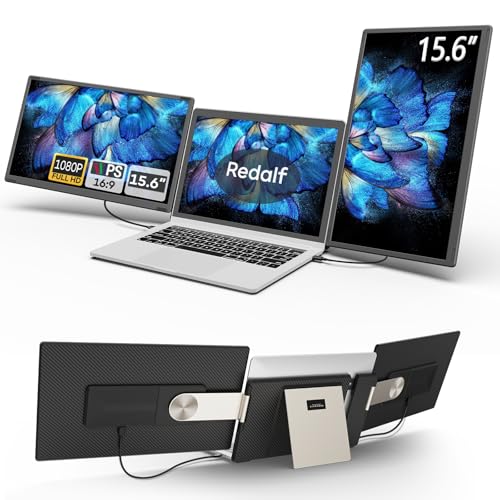
- Rotates horizontally and vertically for multiple layouts
- Detachable 1080p IPS panels for travel or sharing
- Supports USB-C, USB-A, and HDMI connections
Best For: Editors needing a customizable triple-screen workspace
Best Compact Dual-Screen Pick

- Adds a 14-inch 1080p IPS secondary display
- Supports expand, mirror, and second-screen modes
- Matte panel with adjustable stand and protective padding
Best For: Editors wanting a compact, portable second screen
Best for Full-Size FHD Workspaces
15.6-inch Triple Laptop Monitor

- Two 15.6-inch 1080p displays
- Two-cable USB-C setup on compatible laptops
- Includes cables, power adapter, and carry bag
Best For: Editors wanting a larger portable triple-screen workspace
Best for Stable Travel Setups

- Two matte 15.6-inch 1080p IPS panels
- Free-standing, non-slip design
- Two-cable setup on compatible USB-C laptops
Best For: Editors seeking large matte screens and stable placement
Best One-Cable Setup – KYY 15.6-inch Triple Screen Extender
For shoppers comparing laptop screen extenders for video editing, the KYY X90D stands out for its two 15.6-inch 1080p IPS displays and simplified USB-C connection. It can create a triple-screen workspace for timelines, bins, previews, and other editing tools, although drivers must be downloaded before use.
Best For: Editors who want a large, portable triple-screen setup with one-cable USB-C connectivity.
Pros:
- Two 15.6-inch Full HD IPS screens with 178-degree viewing angles.
- One USB-C-to-USB-C cable can connect the extender to a compatible laptop.
- Supports landscape and portrait positioning, with screens rotating up to 360 degrees.
- Includes the necessary cables and power adapter.
Cons:
- Drivers must be downloaded before setup.
- Requires a compatible full-function USB-C or supported Type-A connection.
- Not compatible with PS5, Xbox Series X, and other gaming consoles.
The KYY is a practical choice when portability and a tidy connection matter more than specialized editing features. Its 1080p resolution, matte finish, and 300-nit brightness suit general editing workflows, while the adjustable stand helps with positioning.
Best Modular Design – Wixzet 15.6-inch Detachable Monitor Extender
The Wixzet is a flexible option among laptop screen extenders for video editing, thanks to detachable screens that can work as a triple-screen system, dual monitors, or standalone portable displays. Its 120% sRGB gamut, HDR support, and 300-nit brightness provide useful visual detail for mobile creative workflows.
Best For: Editors who need flexible screen arrangements for travel, meetings, and changing workspaces.
Pros:
- Detachable design offers more than 11 configurations, including standalone use.
- 15.6-inch 1080p IPS screens feature 120% sRGB, HDR, and 300-nit brightness.
- Each screen weighs 1.5 pounds and comes with a carrying case.
- Supports Windows, macOS, ChromeOS, Linux, Android, and DeX.
Cons:
- Two full-featured USB-C ports are needed for a two-USB-C setup.
- HDMI use requires an additional USB-A-to-USB-C power cable.
- The glossy finish may be less suitable for bright environments than a matte screen.
For video editors who value adaptability, the Wixzet’s detachable construction is its main advantage. It is especially useful when a full triple-screen arrangement is not always practical, while the wide color gamut and HDR support add visual appeal for previews and media work.
Best Thin-and-Light Option – KEFEYA 15.6-inch FHD Triple Monitor
The KEFEYA combines two 15.6-inch 1080p IPS displays with a slim 0.16-inch profile, making it a compelling pick among laptop screen extenders for video editing on the go. Its 100% sRGB coverage and independent display controls are useful for organizing editing tools and maintaining a more consistent viewing experience.
Best For: Mobile editors who want a lightweight dual-screen extender with broad device compatibility.
Pros:
- Dual 15.6-inch 1080p IPS screens offer 100% sRGB coverage and 300-nit brightness.
- Ultra-thin 0.16-inch design and approximately 3.9-pound weight support travel use.
- Supports mirror, extended, landscape, and portrait modes with 180-degree rotation.
- Includes multiple USB-C, HDMI-to-USB-C, and power cables.
Cons:
- Mac laptops with M1, M2, or M3 chips require a separate H6 adapter.
- USB-A-to-USB-C cable provides power only.
- Brightness is listed at 280 nits in the product details.
The KEFEYA is well suited to editors who prioritize portability without giving up a three-screen workflow. Its connection options are broad, but Mac users should verify chip compatibility and account for the optional adapter before buying.
Best Extra Vertical Space – 16-inch 1200p Triple Monitor Extender
For video editors who need more room for timelines, panels, and text, this 16-inch extender offers a 1920×1200 resolution and 16:10 aspect ratio. Compared with standard 1080p laptop screen extenders for video editing, the added vertical space can make browsing assets and viewing longer interfaces more comfortable.
Best For: Editors who want larger 16:10 displays and a simple two-cable triple-screen setup.
Pros:
- Dual 16-inch IPS screens provide 1920×1200 resolution and extra vertical workspace.
- 350-nit brightness supports clear viewing for work and entertainment.
- Two USB-C cables can create the setup without driver installation when the laptop has two full-featured USB-C ports.
- Ultra-slim aluminum construction is designed for portability and includes built-in speakers.
Cons:
- The two-cable setup requires two full-featured USB-C ports on the laptop.
- The glossy finish can reflect surrounding light.
- At approximately 4.6 pounds, it is heavier than some slimmer portable options.
This extender is a strong fit for editors who value workspace height over the standard 16:9 format. Its 1200p panels and 350-nit brightness are practical for dense editing interfaces, while the aluminum build supports frequent movement between locations.
Best Flexible Triple-Screen Pick – Detachable 15.6-inch FHD Extender
For editors who need several timelines, bins, and reference windows visible at once, this laptop screen extender for video editing adds two 15.6-inch 1080p IPS displays to compatible 13- to 17.3-inch laptops. Its rotating, detachable design also makes it adaptable for travel or presentations.
Best For: Video editors who want a highly adjustable triple-screen setup with detachable panels and broad device compatibility.
Pros:
- Two 15.6-inch 1080p IPS screens provide expanded workspace for editing applications.
- 235-degree horizontal and 90-degree vertical rotation supports landscape, portrait, and stacked layouts.
- Detachable panels can be used independently; each side weighs 2.1 pounds.
- Supports USB-C, USB-A, and HDMI connections without requiring drivers.
Cons:
- Glossy screens may reflect more light than matte alternatives.
- Mac compatibility excludes standard M1, M2, and M3 chips according to the supplied notes.
- HDMI use requires an additional USB-A-to-USB-C cable for power.
This is the most flexible option here for editors who value screen arrangement and the ability to separate the displays. Check your laptop’s ports and processor compatibility before buying, especially for Mac systems.
Best Travel-Friendly Pick – Clip-Free 15.6-inch Triple Monitor
This laptop screen extender for video editing is designed for mobile workstations, adding two 15.6-inch FHD IPS panels without clamping directly onto the laptop display. Its matte finish, included cables, and slim aluminum housing make it practical for editing away from a permanent desk.
Best For: Traveling editors and creators who want a clip-free, portable triple-monitor setup with a glare-reducing matte display.
Pros:
- Clip-free design avoids pressure on the laptop display and supports more laptop sizes.
- Two 15.6-inch 1920-by-1080 IPS panels offer additional workspace.
- Matte finish and 300 cd/m² brightness help manage glare in bright work environments.
- Includes multiple connection cables, a power adapter, carrying bag, and a 365-day warranty.
Cons:
- At 1.82 kg and 0.86 inches thick, it is heavier than a single portable monitor.
- The listed 63% sRGB gamut may be limiting for color-critical editing.
- M1-M4 MacBooks require obtaining a separate H5 cable from customer service.
Its clip-free mounting and complete accessory bundle make it convenient for editors who regularly move between locations. However, users performing color-sensitive work should account for the listed color gamut before relying on it for final grading.
Best Compact Dual-Screen Pick – 14-inch FHD IPS Extender
For editors who prefer a lighter, more compact setup, this 14-inch laptop screen extender for video editing adds a second FHD IPS display to compatible 13- to 17-inch laptops. Expand, mirror, and second-screen modes support timelines, previews, bins, or video calls without constant window switching.
Best For: Editors who want a compact dual-screen attachment with adjustable positioning, matte viewing, and straightforward USB-C or HDMI connectivity.
Pros:
- 14-inch 1920-by-1080 IPS display adds a practical second workspace.
- Expand, mirror, and second-screen modes accommodate different editing and presentation needs.
- Matte anti-glare coating, 300-nit brightness, and independent brightness controls support longer sessions.
- Adjustable telescopic stand and protective padding help secure the extender to 13- to 17.3-inch laptops.
Cons:
- It provides one additional screen rather than the two added displays offered by the triple-screen models.
- Some laptops require two cables, and compatibility depends on having suitable full-function USB-C or HDMI ports.
- Older Surface and Surface Pro models may need a special cable or additional compatibility assistance.
This is a sensible choice when portability and simplicity matter more than maximum screen area. Its smaller panel and dual-screen design can be easier to carry while still giving video editors a dedicated secondary view.
Best for Full-Size FHD Workspaces – 15.6-inch Triple Laptop Monitor
This 15.6-inch model is a practical choice among laptop screen extenders for video editing when you want a larger triple-screen workspace. Its two 1080p displays, 60Hz refresh rate, and 178-degree viewing angle provide room for a timeline, preview window, and editing tools, while the included carry bag supports mobile setups.
Best For: Editors who prioritize larger screens, triple-screen multitasking, and a portable aluminum design.
Pros:
- Two 15.6-inch 1080p displays provide generous workspace for editing applications.
- Uses two USB-C-to-USB-C cables for compatible laptops and supports extended, mirrored, and portrait modes.
- Includes a power adapter, cables, and leather carry bag; the aluminum shell weighs about 4 pounds.
Cons:
- Full functionality through USB-C requires compatible full-featured ports.
- M1/M2/M3 MacBooks and laptops without full-featured USB-C need an H5-T cable, HDMI, USB-A power, and driver installation.
- Glossy screens may be less suitable for brightly lit editing environments.
Choose this model if screen size matters more than minimizing travel weight. Before buying, verify your laptop’s ports, especially if you use a MacBook or a system without full-featured USB-C.
Best for Stable Travel Setups – 15.6-inch IPS Screen Extender
For laptop screen extenders for video editing, this upgraded 15.6-inch option emphasizes stable placement and a matte IPS viewing surface. The two 1080p panels can help separate editing controls from footage, while the free-standing design avoids hanging directly from the laptop display.
Best For: Video editors who want full-size screens, a free-standing setup, and reduced glare from matte panels.
Pros:
- Two 15.6-inch FHD IPS screens offer 178-degree viewing angles and 60Hz operation.
- Free-standing design with a widened, non-slip stand avoids clamping onto the laptop screen.
- Two USB-C cables provide plug-and-play expansion on laptops with two full-function USB-C ports.
- Includes connection cables, power adapter, quick guide, instructions, and carry case.
Cons:
- At about 3.9 pounds, it is portable but not especially lightweight.
- Laptops without full-function USB-C, including M1–M3 MacBooks, require an H5-T cable, HDMI, USB-A power, and driver installation.
- Compatibility depends on having the appropriate ports for the desired setup.
This is a strong fit when stability and a matte finish are more important than the smallest possible travel footprint. Confirm your laptop’s port configuration before relying on the advertised two-cable setup.
Best for Lightweight Editing on the Go – 14-inch FHD Triple Monitor
This 14-inch model is one of the more travel-oriented laptop screen extenders for video editing. Its two slim 1080p panels, built-in adjustable stand, and roughly 3-pound weight provide extra room for a timeline and preview without the bulk of larger 15.6-inch extenders.
Best For: Mobile editors who value lower weight, flexible viewing angles, and broad operating-system compatibility.
Pros:
- Two 14-inch 1080p IPS screens are housed in a slim design weighing about 3 pounds.
- Built-in aluminum stand adjusts up to 90 degrees and supports 180-degree rotation.
- Supports extended, mirrored, duplicate, portrait, and landscape display modes.
- Includes a blue-light filter, anti-glare technology, and a 178-degree viewing angle.
Cons:
- The 14-inch panels provide less workspace than the 15.6-inch alternatives.
- Laptops without full-featured USB-C and M1/M2/M3 MacBooks require an H5-T cable; additional power or driver setup may be needed.
- The glossy finish may reflect ambient light despite the listed anti-glare technology.
Consider this model when portability and positioning flexibility outweigh maximum screen area. Its compatibility note is important, so check your laptop’s ports and plan for the H5-T cable if required.
How We Picked the Best Laptop Screen Extenders for Video Editing
We focused on portable extenders that can provide useful extra workspace for editing applications, including models with 1080p or higher resolution, IPS-style viewing quality, and designs suited to laptops from roughly 12 to 17.3 inches. We also considered connection flexibility, installation simplicity, portability, screen adjustability, and whether the design supports a dual- or triple-screen workflow.
For editors, specifications matter less in isolation than how reliably the display fits into a working setup. A bright, properly connected 15.6-inch panel may be more useful than a thinner model that requires adapters or cannot maintain a stable signal.
Quick Comparison
| Feature | What to look for | Why it matters |
|---|---|---|
| Screen size | 14 to 16 inches | Balances timeline space with travel portability |
| Resolution | 1080p minimum; 1200p can add vertical room | Keeps interface text and controls reasonably sharp |
| Panel type | IPS or IPS-style | Provides more consistent viewing angles |
| Connections | USB-C and/or HDMI | Improves compatibility across laptops |
| Configuration | Detachable, dual, or triple display | Determines workspace and carrying convenience |
Key Buying Factors for Laptop Screen Extenders for Video Editing
Compatibility and Cabling
Check whether your laptop’s USB-C port supports video output. Some USB-C ports provide only charging or data, so an HDMI connection or additional adapter may be necessary. Also confirm whether the package includes the required cables and whether your operating system supports the intended extended-display mode.
Resolution, Size, and Viewing Quality
1080p is generally adequate for editing panels, bins, scopes, and browser windows. A 1200p display offers extra vertical space, which can help when working with tall timelines or stacked controls. IPS-style panels are preferable when the screen will be viewed from an angle, though they should not be treated as a replacement for a color-calibrated reference monitor.
Mounting and Adjustability
Verify the supported laptop width and screen thickness. Detachable designs can be easier to position, while attached extenders may create a cleaner travel setup. Rotation ranges, kickstands, hinges, and weight distribution affect stability when the laptop is placed on a small desk or used away from home.
Power, Heat, and Portability
Additional displays can draw meaningful power, especially when brightness is high. Consider your laptop’s battery capacity and whether the extender needs one or more cables. Thin construction helps with travel, but a sturdier frame may be worth the added weight for frequent editing sessions.
Who Should Buy Which Laptop Screen Extenders for Video Editing?
- Frequent travelers: Choose a slim 14- or 15.6-inch model with straightforward USB-C connectivity and a compact carrying profile.
- Editors needing maximum workspace: Consider a triple-monitor extender, provided your laptop can drive the additional displays and supply adequate power.
- Mixed-device users: Favor models offering both USB-C and HDMI, since they are more adaptable across laptops and workstations.
- Small-desk users: Look for detachable screens, adjustable hinges, or a kickstand that lets you position displays independently.
- Color-critical professionals: Use an extender for panels and productivity, but keep final color decisions on a calibrated primary monitor.