Schools often need to distribute lessons, presentations, performances, archived materials, and software across physical media. The right optical disc duplicator can make that work faster and more consistent than copying discs one at a time on classroom computers.
This roundup compares 10 standalone duplicator towers, including CD/DVD, M-Disc, and Blu-ray-capable models. We focus on target capacity, supported formats, ease of use, and practical fit for school media rooms, libraries, IT departments, and administrative offices.
Best 10 Optical Disc Duplicators for Schools Picks for 2026
Best Standalone M-Disc Pick

- Standalone operation without a PC
- Supports M-Disc DVD recording
- Up to 24x DVD and 52x CD-R writing
Best For: School archival and routine disc-copying tasks
Best Expandable Storage Option
BestDuplicator 1-to-7 DVD Tower

- Produces up to seven copies
- Optional HDD storage support
- Burner can work as an external optical drive
Best For: Higher-volume duplication with expandable storage
Best High-Capacity Standalone Pick

- Seven target drives for larger batches
- Standalone operation
- Supports M-Disc and compatible DVD Video protection
Best For: High-volume school disc production and archiving
Best Supported-Format Package
BestDuplicator 1-to-5 DVD Tower

- Supports common CD and DVD formats
- Includes Nero burner software
- Three-year labor warranty
Best For: Mixed-format duplication with added support coverage
Best Standalone DVD/CD Tower
Vinpower Digital 1-to-1 DVD/CD Duplicator

- Standalone operation requires no PC
- Writes DVD up to 24x and CD-R up to 52x
- Supports common CD formats and M-Disc DVD
Best For: Single-copy school media and archival projects
Best Multi-Format Blu-ray Tower
PlexCopier 1-to-5 Blu-ray Duplicator
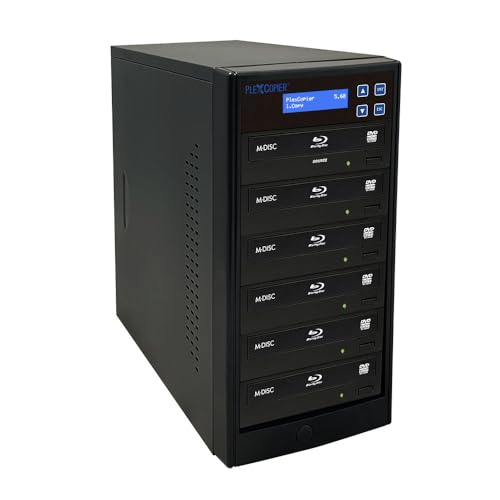
- Copies up to five discs at once
- Supports Blu-ray, BDXL, M-Disc, CD, and DVD
- Lists write speeds up to 52x for supported media
Best For: Schools producing multiple Blu-ray or DVD copies
Best Easy-Start 1-to-1 Tower

- Automatically starts after detecting discs
- Standalone CD/DVD copying needs no PC
- Supports DVD up to 24x and CD-R up to 52x
Best For: Small school offices needing simple CD/DVD copying
Blu-ray Classroom Production Hub
1-to-3 Blu-ray Disc Duplicator

- Duplicates Blu-ray, DVD, and CD media
- Standalone operation requires no PC
- Supports up to three simultaneous target copies
Best For: Schools distributing Blu-ray, DVD, and CD projects
Multi-Copy Archive Tower

- Makes up to three CD/DVD copies at once
- Supports archival M-Disc DVD media
- Standalone design needs no PC
Best For: Schools duplicating and archiving CD/DVD materials
Compact Archive Station

- Duplicates one CD/DVD copy per cycle
- Supports M-Disc archival DVD media
- Includes lifetime technical support
Best For: Schools with occasional CD/DVD duplication needs
Best Standalone M-Disc Pick – 1-to-5 DVD Duplicator Tower
For schools seeking optical disc duplicators for schools that can operate without a computer, this 1-to-5 PlexCopier tower offers a straightforward way to produce several CD or DVD copies from one master. It supports up to 24x DVD writing, 52x CD-R writing, and M-Disc DVD recording.
Best For: Schools and departments needing standalone duplication and archival M-Disc support.
Pros:
- Operates without a PC.
- Supports up to five target copies.
- Records to M-Disc DVD media.
- Can create copy-protected DVD Video copies using compatible OptoDisc MID media.
Cons:
- Does not copy encrypted discs.
- At 17 pounds, it requires a dedicated placement area.
- Its listed interface is Serial ATA.
This is a practical choice when staff want a dedicated tower rather than a computer-based workflow. Its M-Disc compatibility adds an option for long-term archival projects, while the copy-protection feature is limited to the supported media and DVD Video use case.
Best Expandable Storage Option – BestDuplicator 1-to-7 DVD Tower
This BestDuplicator tower is designed for higher-volume school workflows, making up to seven copies from one master. A hard drive can be added for storage and transfer performance, and one burner can function as an external optical drive when connected to a computer.
Best For: Schools that need up to seven simultaneous targets and may benefit from expandable internal storage.
Pros:
- Supports up to seven target copies.
- Optional built-in HDD storage is available.
- One burner can be used as an external optical drive through the external interface.
- Includes a one-year parts-and-labor warranty.
Cons:
- The supplied notes do not specify M-Disc support.
- The tower is rack-mount form factor, which may require suitable installation space.
- Its listed write speed is up to 24x for optical storage.
The main appeal here is flexibility: schools can use the unit for multi-disc production while adding storage as needs grow. Consider it when a seven-target capacity and computer-connected burner matter more than archival-media features.
Best High-Capacity Standalone Pick – 1-to-7 M-Disc DVD Tower
For schools comparing optical disc duplicators for schools by output capacity, this 1-to-7 PlexCopier tower offers seven target drives and standalone operation. It supports up to 24x DVD writing, 52x CD-R writing, M-Disc DVD media, and compatible DVD Video copy protection.
Best For: Schools producing larger batches of instructional, event, or archival discs without relying on a PC.
Pros:
- Copies to up to seven target discs at once.
- Runs as a standalone duplicator.
- Supports M-Disc DVD recording.
- Offers copy-protected DVD Video creation with compatible OptoDisc MID media.
Cons:
- Will not copy encrypted discs.
- Its 22-pound weight makes it less portable.
- The tower needs more physical space than smaller duplication solutions.
This model is a strong fit for departments that regularly need more copies per cycle. It combines the seven-target layout with archival-media support, but buyers should plan for its larger footprint and the stated limits on encrypted-disc copying.
Best Supported-Format Package – BestDuplicator 1-to-5 DVD Tower
This BestDuplicator 1-to-5 tower is a versatile option for schools needing support across common CD and DVD formats. It automatically recognizes the source disc format and includes Nero Multimedia Suite 10 Essentials software, along with a three-year labor and one-year parts warranty.
Best For: Schools that want broad blank-media compatibility, included burner software, and extended service coverage.
Pros:
- Supports DVD+/-R, DVD+/-RW, DVD+/-R Dual Layer, CD-R, and CD-RW media.
- Automatically recognizes the source disc format.
- Includes Nero Multimedia Suite 10 Essentials.
- Provides three-year labor and one-year parts warranty coverage.
Cons:
- Supports up to five target copies, fewer than the seven-target models.
- The supplied notes do not list M-Disc support.
- At 26 pounds, it is relatively heavy for a tower.
This model prioritizes format flexibility and support rather than the highest target count. It may suit schools with mixed CD/DVD media needs, especially where included software and longer labor coverage add value to the purchase.
Best Standalone DVD/CD Tower – Vinpower Digital 1-to-1 DVD/CD Duplicator
Vinpower Digital Standard 1 to 1 Target 24x DVD CD Disc Duplicator Tower SATA Optical Drives - Black
Check Price On AmazonFor schools seeking optical disc duplicators for schools that do not require a computer at every workstation, this Vinpower Digital tower offers standalone 1-to-1 copying. It supports up to 24x DVD and 52x CD-R writing, recognizes common CD formats, and can record archival M-Disc DVDs.
Best For: Schools needing a straightforward standalone duplicator for DVD, CD, and selected archival media projects.
Pros:
- Operates without a PC.
- Supports up to 24x DVD and 52x CD-R write speeds.
- Recognizes common CD formats, including CD-TEXT, ISRC, and over-burned CDs.
- Supports M-Disc DVD media and includes free copy-protection capabilities for compatible OptoDisc MID media.
Cons:
- Copies only one disc at a time.
- Will not copy encrypted, copy-protected discs.
- At 14 pounds, it is less convenient to move between classrooms.
Its standalone design and broad CD-format support make it practical for school libraries, media departments, and administrative offices. The 1-to-1 workflow is best when simplicity matters more than producing several copies simultaneously.
Best Multi-Format Blu-ray Tower – PlexCopier 1-to-5 Blu-ray Duplicator
PlexCopier 1 to 5 Blu-ray BD BDXL M-Disc CD DVD Duplicator Copier Tower with FREE Copy Protection
Check Price On AmazonSchools comparing optical disc duplicators for schools may prefer this PlexCopier tower when Blu-ray compatibility and higher-volume copying are priorities. Its 1-to-5 design is built for making multiple copies, while support for Blu-ray, BDXL, M-Disc, CD, and DVD media adds format flexibility.
Best For: Schools that regularly distribute several Blu-ray, DVD, or CD copies from one source disc.
Pros:
- Can duplicate up to five discs from one master.
- Supports Blu-ray, BDXL, M-Disc, CD, and DVD formats.
- Offers listed media speeds of 16x, 24x, and 52x.
- Works with Windows and macOS systems when compatible optical drives are used.
Cons:
- The supplied details do not specify standalone operation, so setup may depend on compatible PCs or optical drives.
- At 17 pounds, it is relatively heavy for frequent classroom transport.
- The listed optical read speed is 8x.
This is the strongest fit in the group for schools with recurring batch-copying needs and Blu-ray media requirements. Its five-disc capacity can reduce waiting time compared with a 1-to-1 tower, provided the school has compatible equipment for operation.
Best Easy-Start 1-to-1 Tower – AutoDupe CD/DVD Duplicator
PlexCopier AutoDupe Easy to USE STANDALONE 24X 1 to 1 CD DVD Burner Writer Drive Duplicator Tower
Check Price On AmazonFor schools wanting optical disc duplicators for schools with a minimal learning curve, the AutoDupe tower emphasizes automatic operation. Once a master and blank disc are detected, it starts the duplication process without requiring button programming, while supporting up to 24x DVD and 52x CD-R writing.
Best For: Small school offices, libraries, and departments that value simple 1-to-1 CD/DVD duplication.
Pros:
- Standalone operation does not require a PC.
- Automatically begins copying after detecting the master and blank disc.
- Supports up to 24x DVD and 52x CD-R write speeds.
- Can record to archival M-Disc DVD media.
Cons:
- Copies one disc at a time.
- Does not copy encrypted discs.
- It is designed for CD/DVD media rather than Blu-ray.
The AutoDupe workflow is especially approachable for staff who use a duplicator only occasionally. Its compact 9-pound tower and automatic start feature make it a practical choice for small offices and shared school spaces.
Blu-ray Classroom Production Hub – 1-to-3 Blu-ray Disc Duplicator
PlexCopier 1 to 3 Blu-ray BD BDXL M-Disc CD DVD Duplicator Copier Tower with Free Copy Protection
Check Price On AmazonFor schools seeking optical disc duplicators for schools that can handle more than standard DVDs, this standalone tower supports Blu-ray, DVD, and CD duplication. It can produce up to three copies at a time without requiring a computer, making it useful for distributing larger video or data projects.
Best For: Schools creating multiple Blu-ray, DVD, or CD copies from a master disc.
Pros:
- Copies Blu-ray, DVD, and CD media.
- Operates independently without a PC.
- Supports up to 16x BD-R, 24x DVD, and 52x CD-R write speeds, depending on media.
- Can create copy-protected DVD video copies with compatible OptoDisc MID media.
Cons:
- Does not copy encrypted discs.
- Its Blu-ray-focused capability may be unnecessary for schools working only with CDs and DVDs.
This is the most versatile option here for schools with Blu-ray requirements. Its three-target configuration can shorten duplication runs, while standalone operation keeps the workflow simple.
Multi-Copy Archive Tower – 1-to-3 CD/DVD Duplicator
PlexCopier 24X 1 to 3 CD DVD M-Disc Supported Duplicator Copier Tower with Free Copy Protection
Check Price On AmazonThis 1-to-3 tower is a practical choice among optical disc duplicators for schools that primarily use CDs and DVDs. It works without a PC, supports M-Disc DVD media for long-term archiving, and can create up to three copies from one source at a time.
Best For: Schools archiving data on M-Disc or distributing multiple CD and DVD copies.
Pros:
- Duplicates up to three CD or DVD targets simultaneously.
- Supports M-Disc DVD media for archival recording.
- Standalone operation avoids dependence on a computer.
- Offers up to 24x DVD and 52x CD-R write speeds, depending on media.
Cons:
- Does not support Blu-ray duplication.
- Cannot copy encrypted discs.
Schools that need routine CD/DVD distribution and archival storage get a focused, higher-throughput solution here. The three-target design is more efficient than one-at-a-time duplication for classroom, administrative, or event materials.
Compact Archive Station – 1-to-1 CD/DVD Duplicator
PlexCopier 24X 1 to 1 CD DVD M-Disc Supported Duplicator Copier Tower with Free Copy Protection
Check Price On AmazonFor schools needing optical disc duplicators for schools without the volume demands of a multi-target tower, this 1-to-1 model offers a simpler workflow. It supports CD, DVD, and M-Disc DVD recording, operates without a PC, and includes lifetime technical support plus a one-year parts-and-labor warranty.
Best For: Schools with occasional CD/DVD duplication needs and a preference for support coverage.
Pros:
- Standalone operation requires no PC.
- Supports M-Disc DVD recording for archival projects.
- Offers up to 24x DVD and 52x CD-R write speeds, depending on media.
- Includes lifetime technical support and a one-year parts-and-labor warranty.
Cons:
- Creates only one target copy per duplication cycle.
- Does not support Blu-ray.
- Cannot copy encrypted discs.
This model favors straightforward operation and support over high-volume output. It suits smaller schools or departments that duplicate discs periodically and value the included long-term technical assistance.
How We Picked the Best Optical Disc Duplicators for Schools
We evaluated these Optical Disc Duplicators for Schools by looking at the number of target drives, supported disc formats, rated writing speed, standalone operation, and suitability for repeated institutional use. Models range from simple 1-to-1 systems for occasional jobs to larger towers that can create several copies simultaneously.
We also considered whether a unit supports DVD, CD, M-Disc, Blu-ray, or BDXL media. Copy-protection software, bundled utilities, and included burner hardware can affect the workflow, so those features should be weighed against the school’s actual media requirements rather than treated as automatic advantages.
Quick Comparison
| Best For | Recommended Configuration | What to Look For |
|---|---|---|
| Occasional classroom or office jobs | 1-to-1 | Simple controls, broad CD/DVD support, compact footprint |
| Library and department distribution | 1-to-3 or 1-to-5 | Balanced throughput, M-Disc support, dependable SATA drives |
| Large school-wide batches | 1-to-7 | Higher simultaneous output and adequate workspace ventilation |
| Video, archival, or media programs | Blu-ray or BDXL-capable | Format compatibility, compatible source media, and higher storage capacity |
Key Buying Factors for Optical Disc Duplicators for Schools
Target Capacity and Throughput
The number of target drives determines how many discs can be copied in one cycle. A 1-to-1 duplicator is economical for small batches, while a 1-to-5 or 1-to-7 tower is more efficient for graduation videos, training materials, or district-wide distribution.
Media Compatibility
Confirm that the duplicator supports the media your school actually uses. DVD and CD support covers many everyday projects, while Blu-ray and BDXL are useful for high-definition video and larger archives. M-Disc support may appeal to schools creating long-term records, but compatible archival media is still required.
Ease of Operation
Standalone towers should allow staff to copy discs without connecting a computer. Clear menus, straightforward duplication controls, and status indicators reduce training time and help prevent mistakes. If copy-protection or authoring software is included, verify that its licensing and workflow fit your environment.
Space, Noise, and Maintenance
Multi-drive towers need a stable, ventilated location and may generate noticeable fan and drive noise. Plan for accessible power, media storage, and routine cleaning. Schools with limited demand may save money and space with a smaller configuration.
Who Should Buy Which Optical Disc Duplicators for Schools?
Choose a 1-to-1 model for teachers, small offices, or departments making only a few copies at a time. A 1-to-3 or 1-to-5 unit is a practical middle ground for libraries, media centers, and recurring departmental distribution. Schools producing large batches should consider a 1-to-7 tower to reduce operator time.
For video production, archival projects, or large files, select a Blu-ray-capable model and confirm that the source and target media are compatible. For ordinary instructional DVDs and CDs, a DVD-focused duplicator is usually simpler and more cost-effective. Before ordering, estimate monthly copy volume, identify required formats, and reserve workspace near the staff who will operate the system.