A USB hub with Ethernet can add wired internet and much-needed ports to laptops, tablets, and compact desktops without requiring a full docking station. The best models balance network speed, port selection, power delivery, display support, and portability.
This roundup compares 10 options ranging from simple USB-to-Gigabit Ethernet adapters with extra USB ports to full USB-C hubs with HDMI, card readers, and high-wattage charging. Use the guide below to narrow the choices based on your devices and workspace.
Best 10 USB Hub with Ethernet Picks for 2026
Best All-Around Pick
ABLEWE 4-in-1 USB Hub with Ethernet
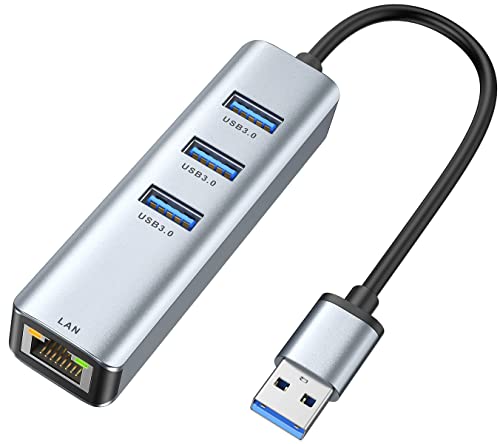
- Gigabit Ethernet and three USB 3.0 ports
- Up to 5Gbps USB data transfer
- Compact aluminum housing with 24-month warranty
Best For: Everyday laptop networking and USB-A expansion
Best for High-Power Peripherals
UGREEN 5-in-1 USB Hub with Ethernet
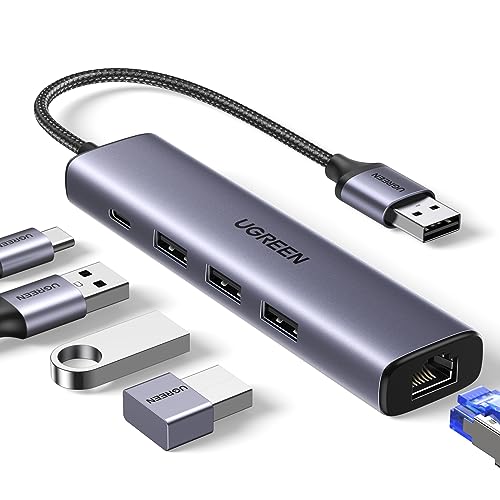
- Gigabit Ethernet plus three USB 3.0 ports
- USB-C input supports high-power peripherals
- Plug-and-play on several current operating systems
Best For: Hard drives and other power-hungry USB accessories
Best Port Variety
ABFCRTTW 7-in-1 USB-C Hub with Ethernet

- Four USB-A and two USB-C data ports
- Gigabit Ethernet with up to 5Gbps USB transfer
- 30cm cable and optional peripheral power
Best For: USB-C laptops needing mixed USB-A and USB-C expansion
Best Compact Option
TP-Link UE330 USB 3.0 Hub with Ethernet

- Gigabit Ethernet and three USB 3.0 ports
- Compact, lightweight design for travel
- 24-month warranty with 24/7 support
Best For: Portable wired networking and basic USB expansion
Best Value USB-C Ethernet Hub

- Gigabit Ethernet and 4K@30Hz HDMI
- Three USB-A 3.0 ports with 5Gbps transfers
- Up to 85W pass-through charging
Best For: USB-C laptop users wanting essential wired connectivity and expansion
Best Full-Featured USB-C Hub

- Ethernet, HDMI, SD, and microSD card readers
- 10Gbps USB data transfer
- Up to 4K@60Hz HDMI with DP 1.4
Best For: Professionals and creators needing broad USB-C connectivity
Best Long-Cable USB Ethernet Hub
FORIDA 8-Port USB Ethernet Hub
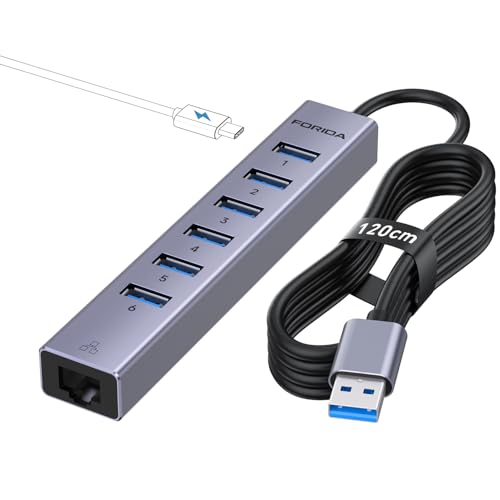
- Six USB 3.0 ports plus Gigabit Ethernet
- 3.9-foot cable for flexible placement
- USB-C 5V/3A charging port
Best For: USB-A desktops and workstations with many peripherals
Best Value
UtechSmart 6-in-1 USB-C Ethernet Hub

- Gigabit Ethernet and three 5Gbps USB 3.0 ports
- 4K HDMI at 30Hz with up to 100W Power Delivery
- Compatible with major desktop and mobile operating systems
Best For: Affordable everyday connectivity for USB-C laptops and handhelds
Best for MacBook Expansion

- Nine ports with Gigabit Ethernet, HDMI, SD, and TF readers
- 4K HDMI output at 60Hz
- Up to 10Gbps USB data and 85W laptop charging
Best For: MacBook users building a versatile desk or media-workflow setup
Best for Card Readers

- Built-in SD and TF card readers with up to 1TB support
- Adds 4K HDMI, USB ports, Ethernet, and 100W charging
- Compatible with Windows, macOS, iPadOS, ChromeOS, iOS, and Android
Best For: Photographers and mobile users who regularly access memory cards
Best All-Around Pick – ABLEWE 4-in-1 USB Hub with Ethernet
If you need a practical usb hub with ethernet, the ABLEWE combines a Gigabit RJ45 port with three USB 3.0 ports. It supports simultaneous use, plug-and-play operation on listed systems, and up to 5Gbps USB data transfer.
Best For: Laptop users who want wired networking plus several USB-A connections in one compact hub.
Pros:
- Gigabit Ethernet supports 10/100/1000Mbps speeds.
- Three USB 3.0 ports can connect peripherals simultaneously.
- Compact aluminum design and a 24-month warranty.
Cons:
- Compatibility and driver-free operation vary by operating system.
- Provides USB-A expansion rather than USB-C data ports.
With its balanced port selection and broad listed compatibility, the ABLEWE is a versatile choice for everyday wired networking and peripheral expansion.
Best for High-Power Peripherals – UGREEN 5-in-1 USB Hub with Ethernet
The UGREEN is a flexible usb hub with ethernet featuring Gigabit networking, three USB 3.0 ports, and a dedicated USB-C power input. That extra power connection is designed to support high-power peripherals such as hard drives.
Best For: Users who need wired internet and multiple USB accessories, especially peripherals that may benefit from additional power.
Pros:
- Gigabit Ethernet supports network speeds up to 1000Mbps.
- Three USB 3.0 ports provide up to 5Gbps data transfer.
- USB-C power input helps stabilize high-power peripherals.
- Plug-and-play on Windows 11/10/8.1, macOS, and Chrome OS.
Cons:
- The USB-C power port cannot charge the host laptop.
- Drivers are required on some older Windows versions and Linux.
Its dedicated peripheral power input gives the UGREEN an advantage for demanding USB setups, while the compact aluminum body remains easy to carry.
Best Port Variety – ABFCRTTW 7-in-1 USB-C Hub with Ethernet
For newer laptops, this usb hub with ethernet expands one USB-C connection into Gigabit Ethernet, four USB-A data ports, and two USB-C data ports. Its six data ports support up to 5Gbps, while the included 1-foot cable offers flexible desk placement.
Best For: USB-C laptop users who need the widest mix of USB-A and USB-C data connections.
Pros:
- Six data ports include four USB-A and two USB-C connections.
- Gigabit Ethernet supports 10/100/1000Mbps networking.
- Up to 5Gbps data transfer across the USB 3.0 hub.
- Optional 5V/3A power can help stabilize USB connections.
Cons:
- USB-C ports do not support video or PD charging.
- Power cable and adapter are not included.
This model stands out for port flexibility, but it is best suited to data expansion rather than display output or laptop charging.
Best Compact Option – TP-Link UE330 USB 3.0 Hub with Ethernet
The TP-Link UE330 is a compact usb hub with ethernet that adds a Gigabit RJ45 port and three USB 3.0 ports to a compatible computer. Its lightweight design and broad listed operating-system support make it convenient for travel or daily laptop use.
Best For: Travelers and laptop owners who want a straightforward wired network adapter with three USB ports.
Pros:
- Gigabit Ethernet provides a stable wired connection.
- Three USB 3.0 ports offer data transfer up to 10 times faster than USB 2.0.
- Backward compatible with USB 2.0 and USB 1.1 devices.
- Includes a 24-month warranty and 24/7 technical support.
Cons:
- It uses a USB-A connection rather than USB-C.
- Only three USB expansion ports are provided.
The UE330 is a dependable, travel-friendly choice when you need essential Ethernet and USB expansion without a larger multiport dock.
Best Value USB-C Ethernet Hub – UGREEN Revodok 6-in-1
If you need a practical USB hub with ethernet for a USB-C laptop, the UGREEN Revodok combines wired networking, display output, charging, and three USB-A ports in one compact adapter. Its Gigabit Ethernet port supports up to 1000Mbps, while the HDMI port delivers up to 4K at 30Hz.
Best For: USB-C laptop users who want essential expansion, reliable wired internet, and pass-through charging without a larger docking station.
Pros:
- Gigabit Ethernet supports up to 1000Mbps for a stable wired connection.
- Includes 4K@30Hz HDMI for presentations, meetings, and entertainment.
- Three USB-A 3.0 ports support data transfer speeds up to 5Gbps.
- Supports up to 85W laptop charging through 100W USB-C PD input.
Cons:
- HDMI is limited to 4K at 30Hz and does not support HDR or 3D.
- The USB-C port is for charging only, not data or video.
UGREEN’s six-port layout covers the most common laptop expansion needs in a straightforward, portable design. It is a strong fit when Ethernet, USB-A accessories, HDMI, and charging matter more than card readers or higher-refresh-rate video.
Best Full-Featured USB-C Hub – Anker 555 8-in-1 Ethernet Hub
The Anker 555 is a feature-rich USB hub with ethernet for compatible USB-C, USB4, and Thunderbolt computers. Along with Ethernet and HDMI, it adds SD and microSD card readers, fast USB data ports, and up to 85W of pass-through charging.
Best For: Content creators, professionals, and laptop users who need wired networking alongside card readers, fast file transfers, and external display support.
Pros:
- Includes Ethernet, HDMI, SD, and microSD card readers in an eight-in-one design.
- USB-C and USB-A data ports support transfer speeds up to 10Gbps.
- Supports up to 4K@60Hz HDMI with a DP 1.4 laptop.
- Provides up to 85W pass-through charging when paired with suitable 100W equipment.
Cons:
- Not compatible with Linux according to the supplied specifications.
- HDMI output drops to 4K@30Hz with DP 1.2 laptops.
- The USB-C port supports data transfer but not video output.
With eight ports and 10Gbps data performance, the Anker 555 offers the broadest connectivity here. Check your laptop’s DP version and operating system before buying, especially if you need 4K at 60Hz or use Linux.
Best Long-Cable USB Ethernet Hub – FORIDA 8-Port USB Ethernet Hub
The FORIDA is a useful USB hub with ethernet for desktops and laptops that need several additional USB connections. It turns one USB-A port into six USB 3.0 ports, a USB-C 5V charging port, and Gigabit Ethernet, with a 3.9-foot cable for more flexible placement.
Best For: Users who need many USB-A accessory ports, a longer connection cable, and wired networking from a USB-A computer.
Pros:
- Provides six USB 3.0 ports, a USB-C charging port, and Gigabit Ethernet.
- USB 3.0 ports support data speeds up to 5Gbps and remain backward compatible.
- The 3.9-foot cable makes it easier to position the hub away from the computer.
- Compatible with Windows, macOS, Linux, Chrome OS, and Unix systems.
Cons:
- Uses a USB-A host connection rather than USB-C.
- The USB-C port is described as a 5V/3A charging port, not a general data port.
- It does not include HDMI or other video output.
FORIDA’s main advantage is capacity: six USB-A data ports and a long cable make it convenient for a fixed workstation or desktop setup. Choose it when peripheral count and placement flexibility matter more than video output or USB-C laptop docking.
Best Value – UtechSmart 6-in-1 USB-C Ethernet Hub
If you need a practical USB hub with Ethernet for everyday laptop connectivity, the UtechSmart 6-in-1 combines Gigabit networking, HDMI, USB-A ports, and USB-C charging in a compact aluminum design. It supports up to 4K at 30Hz and up to 100W Power Delivery.
Best For: Users who want an affordable all-in-one hub for work, streaming, peripherals, and compatible USB-C devices such as MacBooks, Chromebooks, Dell laptops, and Steam Deck.
Pros:
- Gigabit Ethernet supports fast, reliable wired networking.
- Three USB 3.0 ports provide data transfer speeds up to 5Gbps.
- Includes 4K HDMI output and up to 100W Power Delivery.
- Plug-and-play compatibility across Windows, macOS, ChromeOS, Linux, and SteamOS.
Cons:
- HDMI output is limited to 4K at 30Hz.
- The USB-C charging port is for Power Delivery rather than data transfer.
This is a strong value pick when core connectivity matters more than extra card readers or higher-refresh-rate video. Its Gigabit Ethernet port and broad compatibility make it a versatile desktop or travel companion.
Best for MacBook Expansion – UGREEN Revodok Pro 9-in-1 Hub
The UGREEN Revodok Pro is a feature-rich USB hub with Ethernet for compatible MacBook users who need wired networking, high-resolution display output, storage-card access, and fast peripheral connections from one USB-C port. It includes 4K at 60Hz HDMI and supports up to 1000Mbps Ethernet.
Best For: MacBook Air, MacBook Pro, MacBook Neo, and Steam Deck users who need a broad selection of ports for displays, networking, storage cards, and accessories.
Pros:
- Offers nine ports, including Gigabit Ethernet, HDMI, USB-A, USB-C, SD, and TF readers.
- 4K HDMI at 60Hz is well suited to smooth presentations and video playback.
- USB data ports support transfer speeds up to 10Gbps.
- Provides up to 85W pass-through charging from its 100W PD input.
Cons:
- The USB-C port is charging-only and does not support data or video output.
- The supplied compatibility details emphasize macOS devices and Mac OS 14 Sonoma.
Choose this model if you want the most complete port selection in the group and value 4K60 output. It is especially appealing for MacBook setups that regularly use wired internet, memory cards, and multiple USB accessories.
Best for Card Readers – Luonanava 8-in-1 USB-C Hub
The Luonanava 8-in-1 is a convenient USB hub with Ethernet that adds HDMI, USB ports, SD/TF card readers, and USB-C charging to compatible devices. Its aluminum housing and plug-and-play design make it useful for basic productivity, photo access, and peripheral expansion.
Best For: Laptop, tablet, and phone users who need built-in SD and TF card access along with wired networking and 4K HDMI mirroring or extended display support.
Pros:
- Combines RJ45 Ethernet, 4K HDMI, SD/TF readers, and four USB connections.
- Supports up to 100W Power Delivery for compatible USB-C devices.
- USB 3.0 reaches up to 5Gbps, while card readers support cards up to 1TB.
- Works with Windows, macOS, iPadOS, ChromeOS, iOS, and Android devices.
Cons:
- Ethernet is limited to speeds up to 100Mbps.
- HDMI output supports 4K at 30Hz rather than 60Hz.
- The PD port does not support data transfer.
This hub makes sense for users who prioritize card-reader convenience and broad device compatibility. Its slower Ethernet and 30Hz HDMI output are trade-offs, but the port mix covers common mobile-workstation needs at a modest size.
How We Picked the Best USB Hub with Ethernet
We focused on hubs that combine wired Ethernet with useful expansion rather than single-purpose network adapters. The selection includes USB-A and USB-C models, with options offering Gigabit Ethernet, USB 3.0 ports, HDMI output, SD or TF card readers, power delivery, and different cable designs. We also considered compatibility with common Windows, macOS, ChromeOS, and USB-C laptop setups, while treating advertised speeds and features as dependent on the host device, operating system, cables, and network equipment.
Because needs vary, the right choice is not necessarily the hub with the most ports. A compact model may be better for travel, while a powered or higher-port-count hub can make more sense at a desk.
Quick Comparison
- Basic wired networking: Choose a USB 3.0-to-Ethernet hub with a few USB-A ports.
- USB-C laptop expansion: Look for a USB-C hub with Gigabit Ethernet and enough USB-A or USB-C ports.
- External display setups: Select a model with HDMI and confirm the supported resolution and refresh rate.
- Photographers and creators: Prioritize hubs with SD and TF card readers, fast USB ports, and reliable power delivery.
- Desk docking: A 7-in-1, 8-in-1, or 9-in-1 hub can consolidate networking, displays, storage, and charging.
Key Buying Factors for a USB Hub with Ethernet
Host Connector and Compatibility
Check whether your computer has USB-A, USB-C, or Thunderbolt ports. USB-C does not guarantee display output or charging support; those features depend on the host port’s specifications. Also verify operating-system compatibility if you use a work-managed computer or an older device.
Ethernet Speed
Gigabit Ethernet is the most versatile choice for home broadband, office networks, large downloads, and stable video calls. A 10/100 adapter may work for basic browsing but can limit faster internet plans and local file transfers. Real-world performance also depends on your router, switch, network cable, and internet service.
Port Layout and Power
Count the ports you will use simultaneously. USB 3.0 is preferable for external drives and other high-throughput accessories, while USB 2.0 can be sufficient for keyboards and mice. If you plan to connect several bus-powered devices, choose a hub with USB-C power delivery or a dedicated power input. Confirm the maximum charging wattage and remember that the hub itself consumes some power.
Video and Card-Reader Support
For monitor use, verify HDMI resolution and refresh-rate claims for your specific computer. Card readers are valuable for cameras and media workflows, but their speeds vary. A long or detachable cable can improve placement, while a compact integrated design is easier to carry.
Who Should Buy Which USB Hub with Ethernet?
Students and mobile workers should choose a compact USB-C or USB-A hub with Gigabit Ethernet and a few USB ports. Home-office users will benefit from HDMI, multiple USB 3.0 ports, and power delivery for a single-cable setup. Creators should prioritize card readers, fast storage connectivity, display support, and dependable external power. Desktop users may prefer a 9-in-1 or similarly expanded hub when they need networking, monitors, storage, and accessories connected at once.
Before buying, compare the hub’s connector with your device, confirm the required video and charging features, and leave some capacity for future accessories. That approach helps ensure your new USB Hub with Ethernet improves connectivity instead of becoming another adapter to replace.