The ZUMWALT P7 15.
6-inch laptop screen extender is built for people who want more workspace without carrying a full monitor setup.
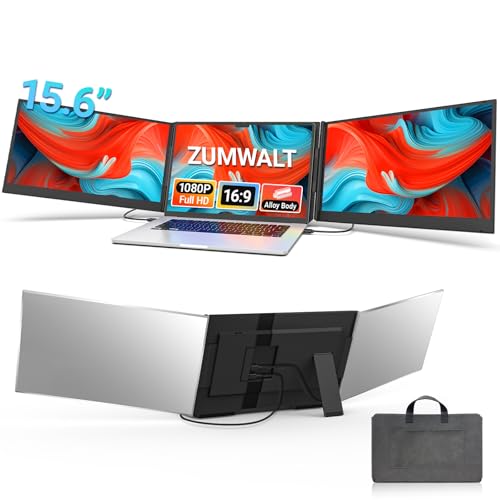
ZUMWALT P7 Extender Review Summary
If you regularly juggle spreadsheets, browser tabs, messaging apps, coding windows, or presentation materials, the ZUMWALT P7 15.6-inch laptop screen extender is exactly the kind of accessory that can change how a laptop feels to use.
It adds two 15.6-inch external displays to create a true triple-screen workflow, which is especially appealing for remote workers, students, traders, coders, and frequent travelers who need a bigger visual canvas than a single laptop display can provide.
What makes the ZUMWALT P7 stand out is the combination of portable design, FHD 1080p panels, and a setup that aims to stay close to plug-and-play on supported devices.
It is not the lightest way to expand your workspace, and it does require checking your laptop’s port support before buying, but for the right user it delivers a meaningful productivity boost in a compact, travel-ready package.
Scorecard
| Category | Score | Takeaway |
|---|---|---|
| Display expansion | 9.0/10 | Turns a single laptop into a triple-screen workspace, making it a strong fit for multitasking, tab-heavy work, and side-by-side app use. |
| Image quality | 8.0/10 | Uses two 15.6-inch FHD 1080p panels with 280 nits brightness and a 178° viewing angle for sharp, readable visuals. |
| Portability | 8.0/10 | The ultra-slim aluminum shell and included carry bag make it practical for travel, though the full setup still adds noticeable bulk compared with a laptop alone. |
| Setup simplicity | 7.0/10 | Supports plug-and-play use with minimal cabling when the laptop is compatible, but some devices need extra cabling or driver setup. |
| Compatibility | 7.0/10 | Works with 13 to 17.3-inch laptops and mainstream systems like Mac, Windows, Chrome, and Switch, but certain Mac models and non-full-function USB-C laptops need added accessories. |
| Build quality | 8.0/10 | The aluminum alloy shell suggests a more premium and durable feel than plastic-bodied screen extenders, while also helping keep weight manageable. |
| Versatility | 8.0/10 | Supports extend, mirror, and portrait modes, making it useful for work, presentations, and coding rather than only general office use. |
Bottom line: the ZUMWALT P7 is a strong choice if you want a portable dual-screen add-on that meaningfully improves productivity, but you should verify your laptop’s USB-C capabilities first.
Key Features and Specifications of ZUMWALT P7 Extender
The ZUMWALT P7 15.6-inch laptop screen extender is designed around practical productivity rather than flashy gimmicks.
Its key advantage is simple: it gives your laptop two extra displays, creating an on-the-go workstation that can handle multiple windows at once.
- Two 15.6-inch portable displays for a triple-screen laptop setup
- FHD 1080p resolution for clear text and usable detail
- 280 nits brightness for indoor productivity and travel use
- 178° wide viewing angle for more flexible viewing positions
- 16:9 aspect ratio that suits standard office and media workflows
- Glossy screen surface for a punchier look, with the usual tradeoff of more reflections
- Ultra-slim aluminum alloy shell for a more premium feel than many plastic alternatives
- About 4 lbs / 1.8 kg total weight
- Compatible with 13-inch to 17.3-inch laptops
- Supports Mac, Windows, Chrome, and Switch
- Extend, mirror, and portrait modes for work, presentations, and coding
- Plug-and-play operation on supported devices with no driver required
- USB-C to USB-C connection for devices with full-function USB-C ports
- H5-T connection path for some laptops, including certain M1/M2/M3 MacBooks
- Alternative H5-T + HDMI + USB-A setup with external power for broader compatibility
- Includes cables, power adapter, and carrying bag
Those specs matter because screen extenders live or die on three things: panel quality, connection flexibility, and how much friction they add to your daily routine.
The P7 is trying to be a real mobile workstation accessory, not just a novelty display attachment.
For buyers comparing the ZUMWALT P7 15.6-inch laptop screen extender review against simpler portable monitors, the biggest distinction is that this is built for multi-screen expansion from the start.
That matters if your work depends on keeping reference material, communication tools, and active tasks visible at the same time.
How the triple-screen setup changes productivity
The biggest reason to consider the ZUMWALT P7 is not the panels themselves, but the workflow shift they create.
A single laptop screen forces constant tab switching, app stacking, and window resizing.
With the ZUMWALT P7 15.6-inch laptop screen extender, you can dedicate one screen to your main task, another to reference material, and a third to communication or monitoring tools.
That separation is valuable in real use.
For example, a spreadsheet user can keep data entry in the center, source files on one side, and email or Slack on the other.
A coder can keep the editor open in the middle, documentation on one display, and output logs or testing tools on the other.
A student can watch lecture notes, research, and a writing draft simultaneously without constantly minimizing windows.
This is where the P7 earns its value: it reduces friction.
Instead of working harder to manage windows, you work faster because everything has a place.
The triple-screen arrangement also helps in presentation mode.
If you are meeting with clients or teaching a class, mirror mode can display the same content across screens, while portrait mode can be useful when you need to scan long code files or vertical documents.
Device compatibility and cable requirements
Compatibility is one of the most important buying factors for any laptop screen extender, and the ZUMWALT P7 makes this both a strength and a caution point.
It supports laptops from 13 inches up to 17.3 inches and works with Mac, Windows, Chrome, and Switch.
That wide support makes it appealing, but the connection method still depends on your laptop’s port capabilities.
On supported devices, the experience is straightforward: two USB-C to USB-C cables can handle the displays with minimal setup.
That is the ideal scenario because it keeps the desk cleaner and the setup easier to live with.
However, not every laptop has a full-featured USB-C port.
If your machine lacks the needed function, the P7 may require an H5-T cable or an H5-T + HDMI + USB-A setup with external power.
In that configuration, driver installation is required.
That does not make it a bad product, but it does mean the buyer needs to do a little homework before ordering.
Important compatibility note: some M1, M2, and M3 MacBooks need the additional H5-T cable path.
If you own one of those systems, confirm your exact model and port support before assuming plug-and-play will work out of the box.
That is the main tradeoff with the ZUMWALT P7 15.6-inch laptop screen extender pros and cons discussion: it is broadly compatible, but the best experience depends on the right ports.
Display quality and viewing experience
For a portable screen extender, display quality is about usability more than cinematic wow factor.
The ZUMWALT P7 uses two 15.6-inch FHD 1080p panels, and that resolution is a sensible match for productivity work.
Text is clear, browser content is readable, and windows feel appropriately spacious without requiring the scaling compromises common on smaller panels.
The advertised 280 nits brightness is adequate for indoor use, coffee shops, hotel rooms, classrooms, and office environments.
It is not a high-brightness outdoor display, so users who plan to work in very bright sunlight should temper expectations.
The 178° viewing angle is useful for sharing content or shifting your body position without immediately losing image clarity.
The glossy finish is a mixed bag.
On the positive side, glossy screens often look more vivid and punchy.
On the downside, they can reflect windows and overhead lighting more easily than matte panels.
If you work in reflective spaces, that is one of the clearest drawbacks to consider.
Buyer takeaway: the display package is well-suited to business work, writing, coding, and general productivity, but this is not the best choice for glare-prone environments or color-critical creative work.
Travel portability and carry case
The ZUMWALT P7 is clearly designed for mobile professionals who move between locations.
The aluminum alloy shell gives it a sturdier, more premium feel than many cheaper portable extenders, and the included leather carry bag adds practical value for commuting or travel.
At around 4 lbs / 1.8 kg, it is still a substantial add-on.
This is not something you toss into a bag as casually as a tablet or a simple headset.
But within the screen extender category, the weight is reasonable for what you get: two full-size displays plus the supporting frame and electronics.
The lack of a top baffle or clip is a thoughtful design choice.
It should make removal and installation easier, which matters when you need to pack up quickly or move from a desk setup to a meeting room.
The downside is that very loose or frequently shifting setups can feel less anchored than clip-heavy designs, so buyers who want the most rigid attachment may prefer a different style.
For road warriors and hybrid workers, the P7 hits a good balance between expanded workspace and travel practicality.
Pros and Cons of ZUMWALT P7 Extender
If you are evaluating the ZUMWALT P7 15.6-inch laptop screen extender, the pros and cons are fairly clear.
| Pros | Cons |
|---|---|
| Creates a true triple-screen workspace for major productivity gains | Not every laptop will get the easy plug-and-play experience |
| Two 15.6-inch FHD 1080p displays are practical for work and coding | Glossy screens can show reflections in bright rooms |
| Aluminum alloy shell feels more premium than many plastic rivals | Still adds notable bulk compared with a laptop alone |
| Includes a carry bag, cables, and power adapter | Some Mac models need an extra cable path and driver setup |
| Supports extend, mirror, and portrait modes | Not ideal for users who only need one extra screen |
The strongest advantage is obvious: serious screen expansion in a portable format.
The main drawback is equally obvious: you need to make sure your laptop is compatible before you commit.
Best use cases for work, school, and coding
The ZUMWALT P7 makes the most sense for people whose workflow benefits from keeping multiple applications visible at once.
- Remote work: keep video calls, notes, and task windows separated
- School and research: run readings, assignments, and note-taking apps side by side
- Coding and development: use portrait mode for code, logs, or documentation
- Finance and operations: track dashboards, spreadsheets, and communication tools at the same time
- Presentations: mirror mode can support demos and client-facing content
It is less compelling for buyers who use a laptop casually, mostly stream media, or only need one additional display occasionally.
In those cases, a single portable monitor is often simpler and cheaper to live with.
If you want to compare options before deciding, the most common alternatives are portable monitors and other screen extender systems.
Search terms like Arzopa portable monitor, Kuvon portable monitor, and lapdock products are worth checking if you want a different balance of portability, price, and setup simplicity.
If your priority is a laptop-mounted multi-display setup specifically, the ZUMWALT P7 15.6-inch laptop screen extender remains the more direct fit.
Who Should Buy ZUMWALT P7 Extender?
The ZUMWALT P7 Extender is a smart buy for users who already know they work better with more screen real estate.
If you are a multitasker, coder, analyst, student, consultant, or frequent traveler, this accessory can make a real difference in daily efficiency.
You should buy it if:
- You want a portable triple-screen setup for productivity
- You regularly switch between multiple apps and tabs
- You travel but still want a desk-like workflow
- You need a flexible setup for extend, mirror, or portrait use
- You have a compatible laptop with full-function USB-C or are comfortable using the alternate cable path
You should probably skip it if:
- You only need occasional extra screen space
- Your laptop ports are limited and you do not want to troubleshoot adapters
- You work in bright, reflective environments and prefer matte panels
- You want the lightest possible mobile setup
In other words, this is not a casual accessory.
It is a productivity tool for users who will actually use the extra space every day.
Design and usability considerations
The design language of the ZUMWALT P7 favors clean mobility over flashy styling.
The aluminum shell is the right choice for a device that will be opened, closed, carried, and reattached often.
The included carry bag reinforces the idea that this is meant to move with you, not stay parked on a desk permanently.
From a usability standpoint, the absence of a top baffle or clip should speed up installation.
That is useful if you frequently swap locations, though some buyers may prefer a more rigid mounting solution.
The control experience is also practical because the unit supports different display modes without locking you into one narrow workflow.
Design verdict: the P7 feels intentionally engineered for real-world commuting and multi-location work, not just for desktop display expansion.
Is ZUMWALT P7 Extender Worth It?
So, is ZUMWALT P7 15.6-inch laptop screen extender worth it?
For the right buyer, yes.
It is one of the more compelling portable productivity accessories if you want to turn a laptop into a serious multi-screen workstation without moving to a full monitor-and-dock setup.
The strengths are easy to appreciate: two 15.6-inch FHD displays, travel-friendly construction, useful viewing angles, and real workflow benefits for multitasking.
The drawbacks are also easy to understand: you must verify compatibility, the glossy screens can reflect light, and some setups require extra cabling or driver installation.
If you want a desktop-like workflow in a portable format, the ZUMWALT P7 15.6-inch laptop screen extender is a strong candidate.
If you want the simplest possible add-on or you are unsure about your laptop’s USB-C support, a single portable monitor may be the safer choice.
Final verdict: buy the ZUMWALT P7 if you will use the triple-screen layout regularly and value productivity more than minimalism.
Skip it only if your laptop compatibility is uncertain or if you prefer a lighter, less complex setup.