ECOPAD THTH-K12C 10.
1 Inch Tablet review buyers want to know if this budget Android tablet is actually useful day to day.
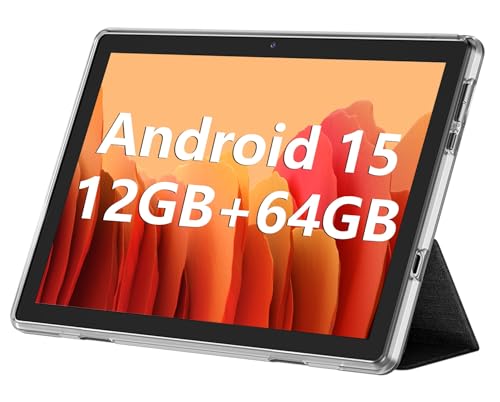
ECOPAD THTH-K12C Review Summary
If you want a simple, low-fuss tablet for everyday use, the ECOPAD THTH-K12C 10.1 Inch Tablet is built around practicality rather than premium specs.
It fits best for shoppers who care more about usable storage, an included protective case, Android 15 compatibility, and easy setup than about flagship-level speed or a high-resolution display.
Quick Scorecard
| Category | Score | What It Means |
|---|---|---|
| Display quality | 7/10 | Good enough for movies, reading, and browsing, but clearly entry-level. |
| Performance | 6/10 | Fine for casual tasks, not ideal for demanding gaming or heavy multitasking. |
| Storage and expandability | 8/10 | 64GB plus microSD support up to 1TB is a strong budget-tablet advantage. |
| Battery life | 7/10 | The 6000mAh battery should handle normal daily use well. |
| Camera and video calling | 6/10 | Serviceable for calls and quick snapshots, but not a standout camera tablet. |
| Software and compatibility | 7/10 | Android 15, GMS certification, dual-band WiFi, and Bluetooth 5.0 make it practical. |
| Value extras | 8/10 | The silicone case with stand function and 1-year warranty improve the out-of-box value. |
Overall, this is a budget-friendly Android tablet for everyday tasks, not a premium device for power users.
If your buying decision is based on screen sharpness, processing speed, or advanced camera quality, you should look higher up the market.
But if you want a dependable, easy-to-use tablet for the basics, the ECOPAD THTH-K12C makes a sensible case for itself.
Key Features and Specifications of ECOPAD THTH-K12C
Here’s a clear look at the hardware and feature set that define the ECOPAD THTH-K12C 10.1 Inch Tablet:
| Specification | Detail |
|---|---|
| Brand | ECOPAD |
| Model Name | THTH-K12C |
| Model Number | TH-KK12C |
| Model Year | 2025 |
| Generation | 1st Generation |
| Display | 10.1-inch IPS touchscreen |
| Resolution | 1280 x 800 pixels |
| Processor | RK3562 quad-core |
| RAM | 12GB listed (4GB + 8GB configuration) |
| Internal Storage | 64GB |
| Expandable Storage | microSD support up to 1TB |
| Operating System | Android 15 |
| Certification | GMS certified |
| Battery | 6000mAh lithium polymer |
| Wireless | Dual-band WiFi |
| Bluetooth | Bluetooth 5.0 |
| Front Camera | 2MP |
| Rear Camera | 8MP |
| Included Accessories | Silicone protective case with foldable stand |
| Warranty | 1 year |
| Primary Uses | Video playback, reading, video calls, light gaming, multitasking |
The most important part of that spec sheet is the balance between Android 15 compatibility and expandable storage.
The tablet is not chasing benchmark glory; instead, it tries to offer a useful daily experience with enough flexibility to store apps, downloads, books, and offline media.
The inclusion of a silicone protective case is also meaningful.
Many budget tablets feel unfinished out of the box, but the ECOPAD THTH-K12C arrives with a case that doubles as a stand, which immediately makes it more convenient for streaming and hands-free use.
Display and media experience
The 10.1-inch IPS panel is one of the tablet’s most important selling points, but expectations should stay realistic.
A 1280 x 800 resolution is acceptable for this size and price class, yet it is still a basic HD panel rather than a sharp, high-density screen.
For streaming video, casual browsing, or reading ebooks, the display should be perfectly usable.
Colors and viewing angles should benefit from the IPS design, which is a sensible choice for a tablet intended for shared family use and media consumption.
That said, buyers who are sensitive to text crispness may notice the limitations when reading small font or viewing detailed images.
This is why the ECOPAD THTH-K12C 10.1 Inch Tablet review has to be honest about the screen: it is good for everyday comfort, not visual wow factor.
If your main use case is watching shows, browsing the web, and using social apps, the display should satisfy.
If you want a sharper panel for serious media work or long reading sessions, a higher-resolution tablet is the better move.
Performance for everyday use
The RK3562 quad-core processor places this tablet squarely in the entry-level category.
In practical terms, that means the ECOPAD THTH-K12C 10.1 Inch Tablet should handle common tasks such as streaming, light app switching, video calls, email, and note-taking without major trouble.
It is not built to feel fast in the way a premium tablet does, but it aims to feel functional.
The listed 12GB RAM configuration is interesting because the device is presented as 4GB + 8GB, which suggests a combination of physical memory and memory expansion support.
Regardless of how the software manages that total, the buyer should view this as a tablet that is optimized for basic multitasking rather than heavy productivity.
For light gaming, it should be fine with casual titles and less demanding apps.
For graphics-heavy games, split-screen work, or many browser tabs at once, the limits of the processor will show up quickly.
That is a normal tradeoff in this price tier, but it matters when deciding whether ECOPAD THTH-K12C 10.1 Inch Tablet is worth it for your needs.
If you want a tablet mainly for video playback, reading, and occasional work tasks, the performance profile makes sense.
If you expect laptop-like responsiveness, this is not the right pick.
Check the ECOPAD THTH-K12C on Amazon
Storage expansion and file handling
This is one area where the ECOPAD THTH-K12C stands out more than many budget tablets.
It includes 64GB of internal storage, which is modest, but the real advantage is support for microSD expansion up to 1TB.
For buyers who store offline videos, ebooks, school files, or downloaded apps, that flexibility is genuinely useful.
The practical buying lesson is simple: the tablet becomes much more attractive when paired with a memory card.
Without one, 64GB can feel tight after the operating system and a handful of apps are installed.
With expansion, the tablet becomes far better suited to family media use, travel storage, and kid-friendly content libraries.
That is one reason the tablet has strong value appeal.
Many similarly priced tablets offer limited storage and give you fewer ways to grow later.
Here, the expansion ceiling is a real buyer-friendly advantage, especially for anyone who dislikes constantly clearing space.
For a budget tablet, this is one of the clearest wins in the ECOPAD THTH-K12C 10.1 Inch Tablet pros and cons discussion.
The con is that the card is not included, so buyers need to budget for that separately if they want the best experience.
Battery life in daily use
The 6000mAh lithium polymer battery is well matched to the tablet’s modest hardware.
With a lower-resolution screen and a processor aimed at everyday use, the battery should be adequate for streaming, browsing, and reading without constant charging.
In practical buyer terms, this means the tablet is suited to casual full-day use with moderate habits, such as a few hours of video, some reading, and web browsing across the day.
Heavy gaming, bright-screen use, and constant connectivity will naturally reduce endurance, but the battery size is still a reasonable fit for this category.
For families, students, and home users, the battery should be enough to make the tablet convenient rather than frustrating.
It is not a defining premium feature, but it supports the product’s overall identity as a practical, everyday Android tablet.
Case, stand, and included accessories
One of the most underrated parts of the bundle is the included silicone protective case with foldable stand function.
That matters because the case does three jobs at once: it protects the tablet, improves grip, and makes hands-free viewing easier.
This is a smart design choice for a budget tablet.
It reduces the need for an immediate accessory purchase and helps the device feel more complete right away.
If you plan to watch movies, join video calls, or use the tablet on a desk or kitchen counter, the stand function is not just nice to have; it is a real convenience feature.
The minimalist black design also keeps the tablet visually simple.
It won’t turn heads like a premium metal-bodied device, but it does suggest a product that is trying to be sensible rather than flashy.
That fits the overall purpose of the ECOPAD THTH-K12C 10.1 Inch Tablet review well: this is about usefulness first.
Software, connectivity, and usability
Android 15 is a strong software inclusion for a budget model because it gives the tablet a current software foundation and broad app compatibility.
The GMS certification is especially important for buyers who want reliable access to common Google apps and services, since that can make setup and everyday app use smoother.
Connectivity is also solid for the category.
Dual-band WiFi helps with better flexibility at home or in office environments, while Bluetooth 5.0 makes it easier to use wireless headphones, speakers, keyboards, and other accessories.
That combination matters more than people often realize, because it affects how flexible the tablet feels over time.
For a buyer comparing budget tablets, software support and wireless compatibility are often just as important as hardware specs.
In that sense, the ECOPAD THTH-K12C makes sensible choices that support its everyday-use mission.
ECOPAD THTH-K12C pros and cons
Here is the clearest breakdown of the ECOPAD THTH-K12C 10.1 Inch Tablet pros and cons from a buyer’s perspective:
- Pros: Expandable storage up to 1TB gives you room to grow.
- Pros: Android 15 and GMS certification improve app compatibility.
- Pros: The included silicone case with stand adds immediate value.
- Pros: Dual-band WiFi and Bluetooth 5.0 improve everyday usability.
- Pros: The 6000mAh battery is well sized for casual daily use.
- Cons: 1280 x 800 resolution is only basic for a 10.1-inch screen.
- Cons: The RK3562 processor is fine for basics but not for demanding users.
- Cons: Camera hardware is modest and unlikely to impress.
- Cons: Internal storage is limited unless you add a memory card.
The main takeaway is straightforward: the strengths are convenience, storage flexibility, and practical software support, while the weaknesses are exactly where you would expect in an entry-level tablet.
Who Should Buy ECOPAD THTH-K12C?
The ECOPAD THTH-K12C 10.1 Inch Tablet is a good fit for buyers who need a general-purpose Android tablet for streaming, reading, video calls, schoolwork, or light app use.
It is especially appealing for families, students, and casual home users who want an affordable device that feels ready to use immediately.
This tablet is also a smart choice for anyone who values expandable storage and included accessories.
If you want a tablet that can hold offline media, ebooks, and kid-friendly content without constantly running out of space, this model has a real advantage.
Who should buy it: casual users, students, families, and shoppers who want a budget Android tablet with simple setup and practical extras.
Who should skip it: gamers, creators, power users, and anyone who wants a crisp high-resolution display or fast multitasking performance.
Display, storage, and alternatives to consider
When deciding between this tablet and alternatives, the biggest question is what you value most.
If you want a smoother and more premium-feeling tablet, a Samsung Galaxy Tab A series device is worth comparing.
If you want a budget-friendly rival with broad availability, a Lenovo Tab M series tablet may offer a different balance of display quality and brand familiarity.
Another common alternative is an Amazon Fire HD tablet, especially for users already invested in Amazon services.
Fire tablets can be compelling for media and family use, but they come with a different software experience that not every buyer wants.
If your priority is a higher-resolution screen or faster performance, you may also want to search for budget Android 10-inch tablet with higher-resolution display or Android 15 tablets with more storage or faster processors.
Those options will usually cost more, but they may be better long-term buys if screen quality and speed matter most.
Against those alternatives, the ECOPAD’s biggest selling point is not raw power.
It is the combination of practical storage expansion, included case, and simple everyday usability.
Is ECOPAD THTH-K12C Worth It?
So, is ECOPAD THTH-K12C 10.1 Inch Tablet worth it?
For the right buyer, yes.
It delivers a useful mix of Android 15, GMS support, expandable storage, and a bundled case, which makes it a sensible value option for casual use.
The key is understanding what you are paying for.
You are not buying a performance tablet, and you should not expect premium screen sharpness or strong camera quality.
What you are getting is a functional, easy-to-live-with Android tablet that covers the basics well and adds a few thoughtful extras.
If your goal is streaming, reading, video calls, light browsing, and simple everyday tasks, the ECOPAD THTH-K12C is a strong budget pick.
If you want speed, display quality, or gaming muscle, keep shopping.
But for practical buyers, this is a solid buy with clear value-focused strengths.
Bottom line: choose the ECOPAD THTH-K12C 10.1 Inch Tablet if you want a budget-friendly tablet that is easy to set up, easy to use, and better equipped for storage and casual use than many alternatives in its class.