Screen-free coding toys for kids make early programming feel playful, tactile, and easy to understand. Instead of staring at a tablet, children learn sequencing, problem-solving, and logic through robots, activity cards, and hands-on challenges.
If you want a toy that supports STEM skills without adding more screen time, this roundup highlights the best options for beginners, preschoolers, and early elementary kids.
Best 10 Screen Free Coding Toys for Kids Picks for 2026
Starter Maze Coding
Code & Go Robot Mouse Activity Set
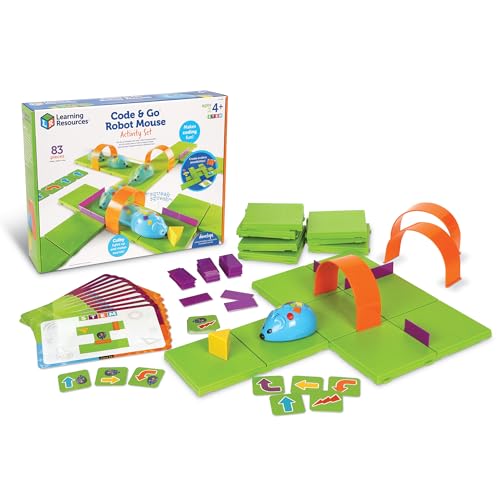
- Hands-on maze coding with simple buttons
- Includes maze grids, walls, tunnels, and cards
- Good fit for ages 4+ and classroom centers
Best For: Young beginners who need a simple screen-free introduction to coding
Build and Code Pet
My Robotic Pet Coding Chameleon

- Unplugged coding with color cards and sensors
- Three play modes add variety to play
- Assembly kit with a 48-page learning guide
Best For: Older kids who want a screen-free robot build with more interactive features
Fantasy Coding Adventure
Coding Critters MagiCoders Blazer the Dragon

- Uses a magic wand and spell book for coding
- Story challenges teach sequencing and problem solving
- Made for beginners ages 4+
Best For: Young kids who learn best through fantasy-themed, guided coding play
Preschool Coding Robot
Apitor Robot Panda Activity Set

- 100% screen-free coding with physical buttons
- Ready to play with cards, map, and guide
- Adds obstacle sensing and loop commands
Best For: Ages 4-6 getting a first hands-on introduction to coding
Screen-Free Jungle Starter

- Teaches sequencing, counting, and early computational thinking
- Uses a 12-page activity book with jungle missions
- Includes 16 path tiles plus a motorized coding pet
Best For: Preschool and early elementary beginners
Talk-and-Play Starter Robot
TaleBot Pro Screen-Free Coding Robot

- Uses command buttons with voice feedback and an interactive map
- Teaches commands, sequences, and loops through play
- Adds storytelling and recording for creative learning
Best For: Ages 3-5 who enjoy tactile, story-based learning
Classic No-Screen Robot

- Ready to code right out of the box
- Uses a remote programmer for screen-free play
- Builds critical thinking, logic, and problem solving
Best For: Elementary beginners who want an easy first robot
Code-First Starter
Learning Resources Code & Go Robot Mouse
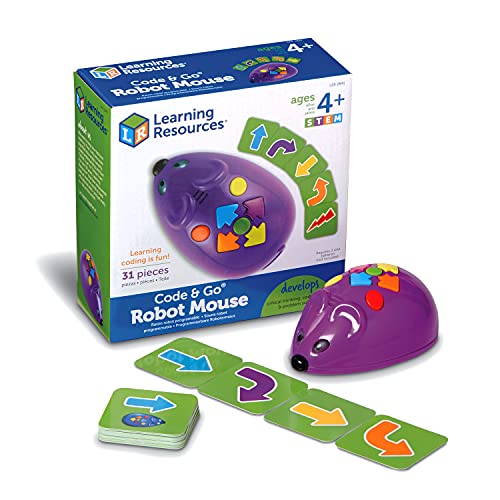
- Screen-free button coding with no app needed
- 30 double-sided coding cards for planning and debugging
- Ages 4+ with light, sound, and two speeds
Best For: young beginners learning sequencing and early programming
Story Play Coding
Learning Resources Coding Critters Ranger & Zip
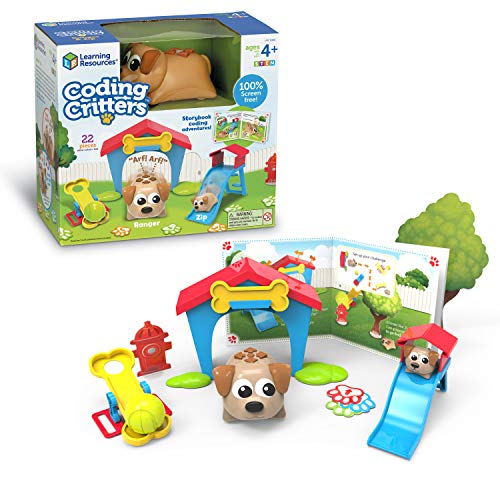
- Screen-free storybook coding adventure
- Play mode includes fetch, hide and seek, and pet care
- 22-piece set for creating your own challenges
Best For: kids who enjoy story-driven STEM play and pretend pets
Robot Skills Builder
Learning Resources Botley the Coding Robot

- Screen-free programming with no tablet or smartphone
- 80-step coding, loops, and obstacle detection
- Includes remote programmer, coding cards, and tiles
Best For: kids 5+ who want a grow-with-me coding robot
Starter Maze Coding – Code & Go Robot Mouse Activity Set
For families looking for screen free coding toys for kids, this robot mouse set makes early programming feel like a game. Kids use simple buttons and matching coding cards to practice sequencing, problem-solving, and directional thinking while guiding Colby through maze challenges.
Best For: Younger beginners ages 4+ who learn best through hands-on maze play and simple coding steps.
Pros:
- Teaches early coding basics with hands-on sequencing and coding cards
- Designed for ages 4+ and built to support confident trial-and-error learning
- Includes maze grids, walls, tunnels, cards, and activity guide for repeat play
- Works well for classroom STEM centers, small groups, or home use
Cons:
- Requires 3 AAA batteries, which are not included
- Focuses on very early coding concepts rather than advanced programming
This is a straightforward entry-level coding toy that keeps the learning physical and approachable. If you want a maze-based STEM toy that reinforces logic and sequencing without any screen time, it is a strong fit.
Build and Code Pet – My Robotic Pet Coding Chameleon
This is one of the more ambitious screen free coding toys for kids who want building, coding, and pretend play in one kit. The coding chameleon uses physical colored action cards plus sensors and LEDs, so kids can program movements and reactions without needing a screen or software.
Best For: Kids ages 8+ who enjoy construction projects, robotic pets, and sensor-based play.
Pros:
- Uses color sensor, infrared sensor, and RGB LEDs for unplugged coding
- Offers three play modes: Coding Mode, Wild Mode, and Pet Mode
- Includes a 48-page manual with assembly and learning guidance
- Large 15-inch model adds a more interactive robotics experience
Cons:
- Assembly is recommended with adult help for younger kids
- Requires 4 AAA batteries, which are not included
This kit stands out if you want a screen-free project that feels more like a real robot build. It is best suited to kids ready for a more detailed STEM activity with coding, sensors, and imaginative play.
Fantasy Coding Adventure – Coding Critters MagiCoders Blazer the Dragon
For families shopping for screen free coding toys for kids, Blazer the Dragon blends storytelling with simple programming in a way that feels playful and approachable. Kids use a magic wand and spell book to guide Blazer through sequencing challenges while he lights up, dances, and chases his ball.
Best For: Beginners ages 4+ who like fantasy themes and guided coding play.
Pros:
- Screen-free play uses a magic wand and spell book instead of devices
- Story-based challenges make sequencing and problem solving feel like a quest
- Includes Blazer and themed accessories for home, classroom, or homeschool play
- Designed for early learners with simple controls and guided activities
Cons:
- Battery powered, so ongoing battery use will be part of ownership
- Best suited to introductory coding rather than advanced STEM work
This set is a strong pick if you want coding practice wrapped in a fantasy adventure. The guided format makes it easy for young kids to start exploring logic and sequencing right away.
Preschool Coding Robot – Apitor Robot Panda Activity Set
If you want screen free coding toys for kids that are especially easy to start, this Robot Panda set keeps the experience simple and hands-on. Kids use physical buttons, coding cards, and activity cards to program movements, lights, and sounds while building early logic and sequencing skills.
Best For: Preschoolers and early elementary kids ages 4-6 who are just starting with coding concepts.
Pros:
- No phone or tablet needed; coding is done with physical buttons
- Includes 36 coding cards, 12 activity cards, a forest map, guide card, and user guide
- Ready to play right out of the box for quick first coding challenges
- Supports obstacle sensing and loop command play for added experimentation
Cons:
- Requires 3 AA batteries, which are not included
- Best suited to very young learners rather than older kids seeking more complexity
This is a practical starter robot for families who want a structured first coding toy without screens. Its mix of cards, sensing, and simple commands makes it easy to keep kids engaged while they learn foundational STEM skills.
Screen-Free Jungle Starter – Dart the Chameleon Coding Pet
If you want screen free coding toys for kids that feel playful and easy to understand, Dart the Chameleon is a strong beginner pick. This set uses black-line paths, storybook missions, and hands-on tile arranging to introduce sequencing, counting, and early computational thinking without a tablet or phone.
Best For: Preschoolers and early elementary kids who learn best through story-based, hands-on coding play.
Pros:
- Screen-free coding practice using path tiles and a motorized coding pet
- 12-page color activity book adds jungle-themed missions and goal-based mazes
- Includes 16 path tiles, activity book, and instructions for guided play
- Designed as an age-appropriate first step into coding concepts
Cons:
- Focused on very early coding concepts rather than advanced programming
- Requires black-line path setup for each activity
- Battery-powered play adds a small ongoing battery requirement
Dart stands out as a classroom-friendly, story-driven option that keeps the coding experience simple and tactile. It is a good fit if you want a gentle introduction that blends learning with imaginative play.
Talk-and-Play Starter Robot – TaleBot Pro Screen-Free Coding Robot
TaleBot Pro is a practical choice if you are comparing screen free coding toys for kids ages 3-5 and want something interactive but still simple. It uses command buttons, an interactive map, and voice feedback to teach early programming ideas like commands, sequences, and loops while also supporting storytelling and creative play.
Best For: Toddlers and preschoolers who need a screen-free robot with voice feedback and storytelling features.
Pros:
- Screen-free play with command buttons for walk, draw, sing, dance, speak, and record
- Teaches early coding concepts including commands, sequences, and loops
- Interactive map and voice feedback make the learning experience more guided
- Includes a challenge booklet with 14 missions and supports Lego block compatibility
Cons:
- Best suited to younger children rather than older kids seeking more complex coding
- Requires some setup with map, markers, and challenge materials
- Learning is centered on basic concepts, not text-based programming
Overall, TaleBot Pro is a strong starter robot for families who want an engaging mix of coding, creativity, and storytelling. Its tactile controls and mission-based play make it especially approachable for early learners.
Classic No-Screen Robot – Botley 2.0 Coding Robot
Botley 2.0 is a straightforward option for families who want screen free coding toys for kids without extra app setup. It is ready to code out of the box, uses a remote programmer for completely screen-free play, and focuses on early STEM skills like critical thinking, problem solving, logic, and engineering.
Best For: Elementary-aged beginners who want an easy, no-screen introduction to coding and STEM skills.
Pros:
- Completely screen-free with no phone or tablet required
- Ready to use out of the box with a remote programmer
- Supports critical thinking, problem solving, logic, and STEM learning
- Includes cards, remote, and robot for active coding play
Cons:
- Requires AAA batteries and a screwdriver for setup
- More of a beginner STEM toy than an advanced coding system
- Designed for indoor play only
Botley 2.0 is the most classic coding-robot style pick in this group, especially if convenience matters. It is a sensible choice for kids who should start with basic command-based play before moving on to more complex robotics.
Code-First Starter – Learning Resources Code & Go Robot Mouse
If you want screen free coding toys for kids that teach the basics through hands-on play, this Code & Go Robot Mouse is a simple place to start. Kids use button commands and coding cards to plan routes, then test and debug their ideas as they move the mouse through obstacles.
Best For: Ages 4+ beginners who need an easy, screen-free introduction to sequencing and early programming.
Pros:
- Screen-free coding with simple button commands, no app or tablet required.
- Includes 30 double-sided coding cards for planning, testing, and debugging paths.
- Built for ages 4+ with light, sound, two speeds, and an activity guide.
- Can be used on its own with household obstacles or expanded with a separate activity set.
Cons:
- Batteries are not included.
- Single-robot setup may be less engaging for kids who want a more open-ended pet-style experience.
Overall, this is a practical early coding toy for young learners who need concrete, step-by-step play. It focuses on sequencing and problem-solving in a format that feels approachable for first-time coders.
Story Play Coding – Learning Resources Coding Critters Ranger & Zip
For screen free coding toys for kids that mix story play with beginner programming, Coding Critters Ranger & Zip offers a playful pet theme. The set includes a screen-free storybook coding adventure, plus play-mode activities like fetch and hide and seek for hands-on practice.
Best For: Kids ages 4+ who learn best through character-driven play and simple coding challenges.
Pros:
- Screen-free storybook coding adventure helps introduce early coding skills.
- Play mode adds fetch, hide and seek, and other pet-style activities.
- 22-piece set supports making your own coding challenges.
- Includes real-pet style interaction like feeding and caring in play mode.
Cons:
- The product notes do not list advanced programming features.
- Smaller set size may be better for shorter, guided play sessions.
This is a strong pick if you want coding to feel like imaginative pet play instead of a purely mechanical activity. It keeps the focus on early STEM skills while giving kids a more story-based reason to keep experimenting.
Robot Skills Builder – Learning Resources Botley the Coding Robot
If you’re comparing screen free coding toys for kids and want something with more room to grow, Botley the Coding Robot adds extra challenge options. It introduces programming fundamentals without tablets or smartphones and includes obstacle-detection play, coding cards, and tiles for building different courses.
Best For: Ages 5+ kids ready for a more flexible coding robot with expanding challenge levels.
Pros:
- Fully screen-free and designed to teach programming fundamentals.
- 80-step programming capabilities plus loops and obstacle detection.
- Includes a remote programmer, detachable robot arms, coding cards, and double-sided tiles.
- Ready to use out of the box for immediate play, aside from batteries.
Cons:
- Batteries are not included.
- Some families may prefer a more story-based toy over a robot-focused setup.
Botley stands out as the most feature-rich option here for kids who want to keep pushing beyond the basics. It combines early coding practice with enough accessories and challenge options to stay interesting as skills improve.
How We Picked the Best Screen Free Coding Toys for Kids
We focused on Screen Free Coding Toys for Kids that are age-appropriate, easy to set up, and genuinely teach coding concepts like direction, sequencing, debugging, and cause-and-effect. We also favored toys with clear progression, durable construction, and enough replay value to keep kids engaged beyond the first few sessions.
Quick Comparison
For the youngest children, simple robots and guided activity sets are usually the best fit. Preschoolers tend to do well with chunky, highly visual toys, while ages 5 to 8+ can handle more advanced challenges, longer sequences, and feature-rich robots. If you want the easiest entry point, choose a toy with a small number of steps and clear feedback. If you want more long-term use, look for models that add puzzles, missions, or expansion activities.
Key Buying Factors for Screen Free Coding Toys for Kids
Age and Skill Level
Match the toy to the child’s developmental stage. Ages 3 to 5 benefit from simple commands and guided play, while older kids can handle more complex problem-solving and multi-step logic.
How Coding Is Taught
The best toys teach coding concepts through motion, buttons, cards, or physical paths. Look for toys that introduce sequencing and debugging in a way kids can see immediately.
Replay Value
Choose toys with multiple challenge levels, accessories, or open-ended play. This helps Screen Free Coding Toys for Kids stay useful as confidence grows.
Durability and Setup
Since these toys are often handled by younger children, sturdy parts and straightforward setup matter. A toy should be easy for parents to get started with and easy for kids to repeat independently.
Who Should Buy Which Screen Free Coding Toys for Kids?
Pick a beginner-friendly robot mouse or preschool coding pet if you want a simple first coding toy. Choose a more advanced robot kit if your child already enjoys puzzles and wants a bigger challenge. For siblings or mixed ages, look for a set with broad age appeal and multiple play modes so more than one child can use it successfully.
Overall, the best Screen Free Coding Toys for Kids are the ones that make learning feel like play while building real early STEM skills. Focus on clarity, durability, and age fit, and you’ll get a toy that teaches more than just one afternoon of fun.